-
-
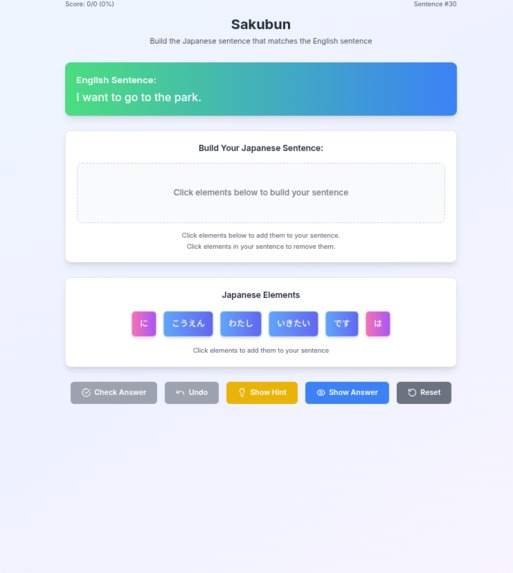
Sakubun is an interactive web application designed to help beginner Japanese learners master sentence construction.
Inspiration
As a Japanese speaker deeply passionate about supporting Japanese language learners, I constantly faced a common frustration: understanding English sentences but struggling to construct natural-sounding Japanese sentences. I particularly observed that English-speaking learners often grapple with the unique aspects of Japanese, such as its flexible word order and intricate particle usage, which frequently trip up beginners. Existing translation tools merely provide the answer, offering little insight into why a sentence is structured a certain way.
I firmly believe that creating numerous Japanese sentences is an excellent way to become accustomed to its word order and the nuanced use of particles. Recognizing this, and seeing a significant gap in interactive, practical tools that help learners build sentences intuitively rather than just memorizing vocabulary or grammar rules in isolation, I was inspired. This led me to conceive Sakubun – an app specifically designed to bridge this gap, focusing on dedicated practice in Japanese sentence construction, making it accessible and engaging for beginners.
What it does
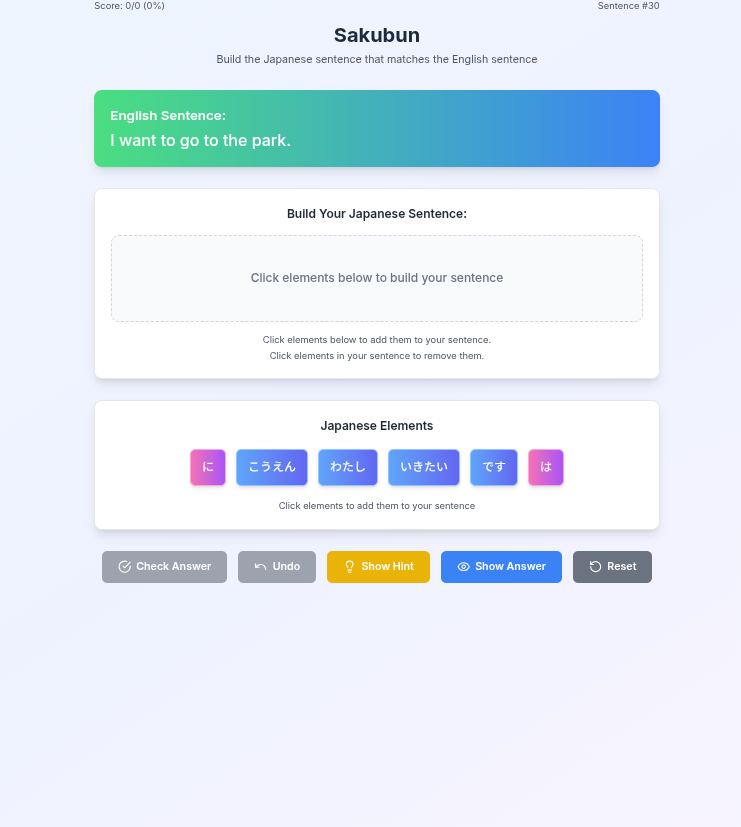
Sakubun is an interactive web application designed to help beginner Japanese learners master sentence construction. Users are presented with an English sentence and a set of Japanese word blocks. The core task is simple yet effective: drag and drop (or click) these Japanese word blocks into the correct order to form a grammatically correct and natural-sounding Japanese translation.
Key features include:
Designed for Beginners (Hiragana/Katakana Focus): Recognizing the challenges beginners face with complex Kanji, Sakubun intentionally uses only Hiragana and Katakana for all Japanese word blocks and interface elements. This approach significantly reduces the initial cognitive load, allowing learners to focus purely on word order and grammatical structure without being overwhelmed by unfamiliar characters.
Intuitive Interface: A clean, user-friendly design that guides learners through the process.
Interactive Word Blocks: Users actively engage by arranging words, reinforcing understanding.
Instant Feedback: Immediately confirms correct answers, providing a sense of accomplishment.
Helpful Support Features: "Show Hint" to guide learners when they're stuck, "Show Answer" for quick reference, and "Undo" to correct mistakes without frustration.
Focus on Natural Japanese: Emphasizes correct word order and particle usage crucial for natural conversation and writing.
How I built it
As a no-code/low-code builder, I embarked on this project with limited technical knowledge and relied almost entirely on AI to bring Sakubun to life. My journey began by leveraging large language models as a powerful co-creator:
Ideation & Requirements Definition (Gemini): I first consulted Gemini to brainstorm ideas for a Japanese learning application. Gemini helped me define the core functionalities and detailed requirements for the app, laying the foundational blueprint.
Sentence Database Generation (Gemini): To optimize token usage and efficiently manage content, I tasked Gemini with generating the entire database of English-Japanese sentence pairs and their corresponding word blocks. This crucial step provided the raw material for the app's interactive exercises.
Core Application Development (Bolt): With the requirements defined and the sentence database prepared, I then handed over the reins to Bolt (the primary AI development tool). By providing Bolt with the detailed requirements and the generated sentence database, Bolt was able to construct the application's core logic and user interface.
Iterative Refinement (Bolt): Upon receiving the initial prototype, I rigorously tested the application, identifying bugs and areas for improvement in user experience. I then communicated these findings directly back to Bolt, which iteratively implemented the necessary corrections and enhancements.
This process of close collaboration with AI tools, particularly Bolt for development and Gemini for conceptualization and data generation, allowed me to build a fully functional and polished application despite my non-technical background. It truly demonstrates the power of AI as an accessible development partner.
Challenges I ran into
Despite my enthusiasm, I encountered several challenges during development:
Sentence Curation and Naturalness for Beginners: Crafting English-Japanese sentence pairs that accurately reflect natural Japanese usage, especially regarding particles and subtle nuances, was challenging. Furthermore, ensuring these sentences were appropriate for beginners, specifically by intentionally avoiding Kanji and strictly using only Hiragana and Katakana, added another layer of complexity. This careful selection and validation process, particularly in curating over 50 unique questions, was more time-consuming than anticipated.
User Interface Interaction Method: Initially, I aimed for a drag-and-drop interface for arranging word blocks. However, after user testing and considering the beginner audience, I realized that drag-and-drop could be cumbersome on various devices. I decided to pivot to a simpler click-based interaction method, which significantly improved usability and responsiveness across different screen sizes.
Demo Video Production: Although not directly part of the application's core development, creating the accompanying demo video presented its own set of challenges. As an individual with limited prior experience in video editing, learning the intricacies of video production, including ensuring smooth playback and resolving unexpected rendering errors (such as issues with hardware acceleration settings in the editing software), required significant effort and iterative troubleshooting.
Accomplishments that I'm proud of
I am particularly proud of several key accomplishments:
Intuitive User Experience: I successfully created an app that makes complex Japanese grammar feel approachable and fun for beginners, a direct result of my focus on intuitive design.
Seamless Interactive Learning: The interactive word block system truly engages users, making the learning process active rather than passive.
Overcoming Technical Hurdles: I successfully navigated various technical challenges, from backend data handling to robust frontend interactions, demonstrating my problem-solving capabilities.
Completing a Functional Prototype: Within the limited hackathon timeframe, I built a fully functional prototype that demonstrates the core value proposition of Sakubun.
What I learned
This project provided invaluable learning experiences:
Deepened Understanding of Japanese Grammar: The process of curating and validating sentence pairs significantly deepened my own understanding of nuances in Japanese grammar and natural language.
Mastering AI-Powered Development (Bolt Utilization): As a no-code/low-code builder, a significant learning was mastering the effective utilization of Bolt. I learned how to articulate requirements precisely to AI, iteratively refine its outputs, and leverage it as a powerful development partner, ultimately building a functional web application with minimal traditional coding knowledge.
Importance of User-Centric Design: Constant consideration for the beginner learner's perspective guided my design decisions, reinforcing the importance of user empathy in development.
Effective Problem Solving Under Pressure: The hackathon environment pushed me to quickly identify and solve technical challenges, fostering strong problem-solving and debugging skills.
Practical Video Editing Skills: Through the process of creating the demo video, I gained hands-on experience with video editing software and learned crucial skills in visual storytelling, audio balancing, and troubleshooting rendering issues, transforming raw footage into a polished presentation.
What's next for Sakubun
Sakubun is currently a strong prototype, and I envision a future with expanded features:
Increased Sentence Database: Continuously expand the library of English-Japanese sentence pairs across various grammar points and vocabulary levels.
Grammar Explanations: Integrate concise, on-demand grammar explanations for each sentence or specific grammatical points (e.g., when a "Hint" is used).
Personalized Learning Paths: Implement user accounts to track progress, suggest new lessons, and adapt difficulty based on performance.
Diverse Question Formats: Explore other interactive exercises like listening comprehension or direct translation input.
Community Features: Allow users to submit their own sentence challenges or share progress.
Bunus challenge
Deploy Challenge, Custom Domain Challenge
Built With
- bolt.new

Log in or sign up for Devpost to join the conversation.