Actra
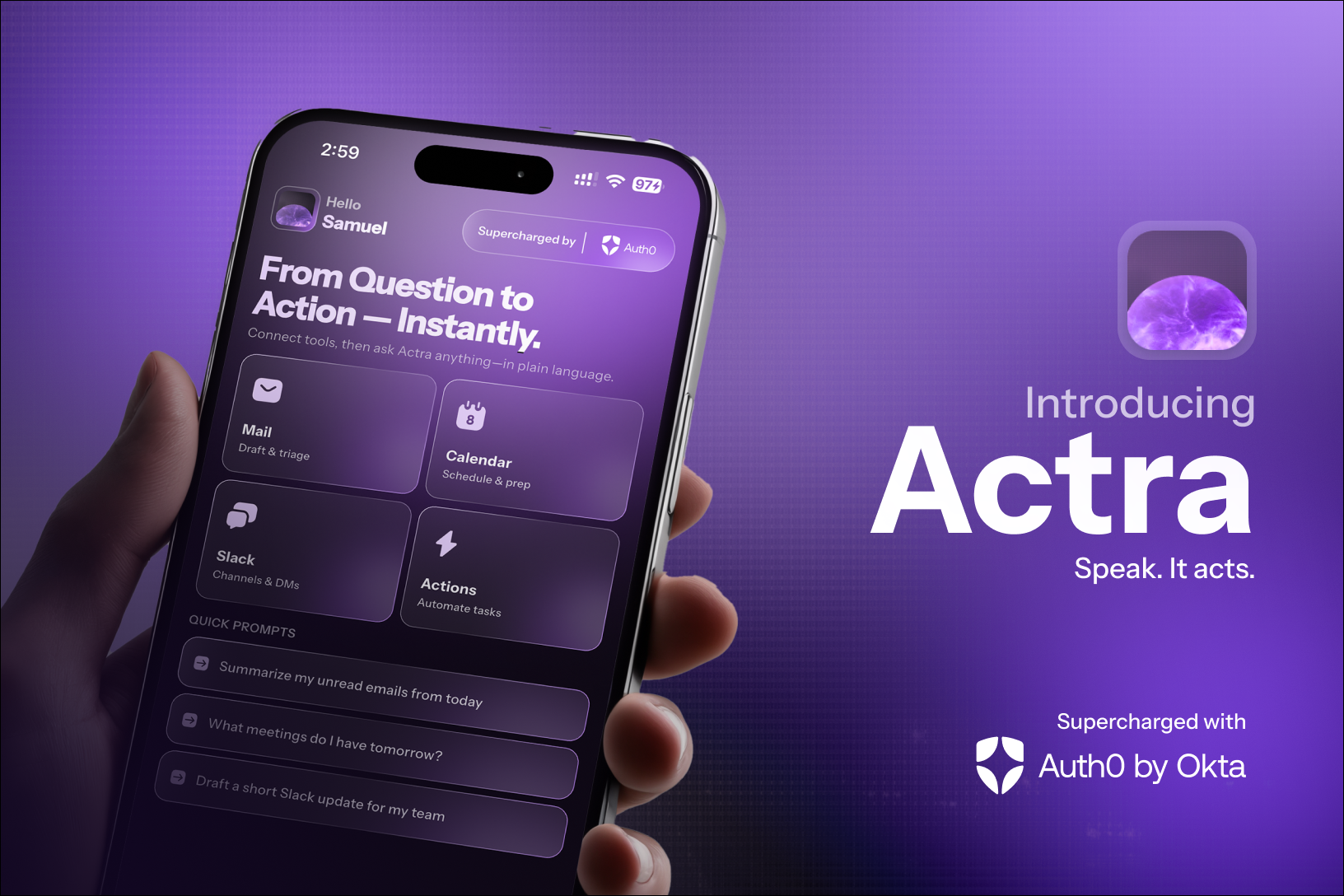
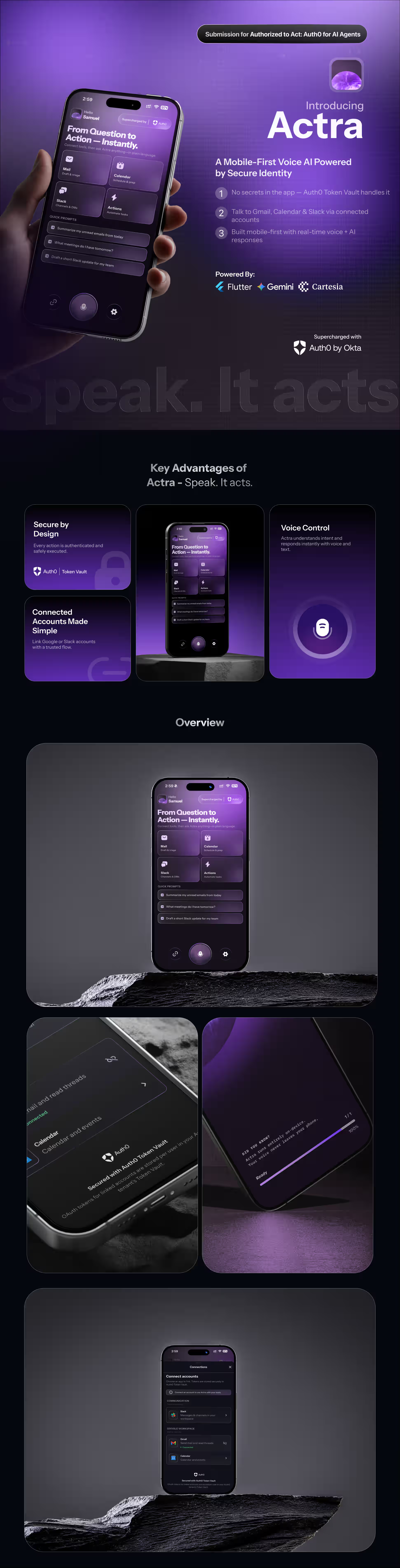
Voice-first AI assistant that uses Auth0 login, Connected Accounts, and Token Vault access-token exchange so the agent can call Gmail, Google Calendar, and Slack on your behalf—without ever putting provider secrets in the mobile app.

Built By:
👨💻 Samuel Philip
MSCS Student building AI-driven mobile & full-stack systems
🔗 Portfolio: https://www.heysam.dev/
🔗 LinkedIn: https://www.linkedin.com/in/samuel-philip-v/
🧠 Inspiration
Modern “agent” demos often fake integrations or ship static API keys. We wanted a hackathon-quality story that matches how real products should work: the user delegates capability, identity infrastructure stores OAuth tokens, and the server exchanges and uses them—never the client holding Google or Slack secrets.
Actra is built around Auth0’s documented split: sign in (OIDC to your Custom API) is separate from connecting accounts (My Account API → browser → Token Vault). That “aha” moment is when the backend successfully exchanges an Auth0 API JWT for a federated Google token and reads real inbox context—proving the assistant can act as the authenticated user, not as a shared service account.
🔍 What It Does
Actra is a Flutter client plus a Python backend. You speak (on-device speech-to-text via Whisper); the app sends transcripts over a WebSocket. The backend:
- Analyzes intent with Google Gemini (model configurable, default
gemini-2.0-flash): which tools are needed (google_gmail,google_calendar,slack) and extracted entities. - Checks linked providers for the user (cached in Redis per session). If Gemini says Gmail/Calendar/Slack are required but the session does not yet list those providers as connected, the server emits
connections_requiredwith a human-readable reason and the missing provider ids. The Flutter UI opens a connection sheet; the user completes Auth0 Connected Accounts in the browser. - After the user links an account, the client sends
account_connected; the server records the provider and resumes the pending user message automatically (resume_after_connections). - When providers are satisfied, the backend uses Token Vault (see below) to obtain short-lived Google or Slack access tokens, then calls Gmail, Google Calendar, or Slack APIs to build context snippets (inbox summaries, upcoming events, workspace context).
- Gemini drafts the full reply from that context; text streams to the client while Cartesia TTS streams PCM audio in parallel (
AgentStreamEvent+TtsAudioChunkEvent). - For send email, the pipeline can emit a
draft_readyevent with structured fields; after the user confirms (or edits) in the UI,action_confirmedtriggers a server-side send via Gmail using a Token Vault–obtained token again.
Agent memory: Redis holds a short-term conversation buffer; Chroma + sentence-transformers embeddings provide retrieval-augmented context for drafting. PostgreSQL stores users (upserted from JWT claims on session_auth) and optional long-term memory rows. FastAPI exposes /health, /memory/save, /memory/search, and connected-account helpers when JWT verification is enabled.
🔐 How Auth0 Token Vault Powers Actra
This is the core of the hackathon submission: provider tokens live in Auth0 Token Vault; the mobile app never sees Google or Slack client secrets.
Login vs. Connected Accounts (two distinct steps)
Login (Native application)
Flutter uses flutter_appauth with scopesopenid,profile,email,offline_access, and (by default)audience= your Custom API identifier (e.g.https://actra-api). The app stores access, refresh, and id_token in flutter_secure_storage. Native apps are public clients—the Auth0 Dashboard does not offer the Token Vault grant on this application; that is expected.Connected Accounts (My Account API)
When the user must link Google or Slack, the app obtains a My Account API access token (audiencehttps://<AUTH0_DOMAIN>/me/)—preferably by refresh-token exchange with Multi-Resource Refresh Token (MRRT) policies, or by a PKCE fallback (…/my-account-callback). With that token,ConnectedAccountsServicecalls:POST …/me/v1/connected-accounts/connect→ open browser withconnect_uri+ticket- user completes OAuth in the provider UI
POST …/me/v1/connected-accounts/completewithconnect_code
Federated tokens are stored in Token Vault for that user/connection.
Server-side access-token exchange (not refresh-token exchange)
The backend uses a confidential Custom API Client created under APIs → your API → Add Application, with Token Vault grant enabled. It calls Auth0’s /oauth/token with:
- Grant:
urn:auth0:params:oauth:grant-type:token-exchange:federated-connection-access-token - subject_token: the user’s Auth0 access token (JWT for your API audience)—sent from the client only over the authenticated WebSocket in
session_auth - subject_token_type:
urn:ietf:params:oauth:token-type:access_token - requested_token_type:
http://auth0.com/oauth/token-type/federated-connection-access-token - connection:
AUTH0_GOOGLE_CONNECTION_NAME(e.g.google-oauth2) orAUTH0_SLACK_CONNECTION_NAME(e.g.sign-in-with-slack), matching your Auth0 social connection names
TokenVaultService caches exchanged federated access tokens in Redis (TTL derived from expires_in) to avoid hammering Auth0. Exchange failures are mapped to actionable WebSocket errors (e.g. TOKEN_VAULT_NOT_CONFIGURED, FEDERATED_TOKEN_NOT_IN_VAULT) with user-facing messages when Auth0 returns known hints.
Consent and “step-up” behavior
- Consent for tools is explicit: the model may request providers the user has not linked; the UI then drives Connected Accounts with scoped connect payloads (
ConnectedAccountsPermissionsaligns Gmail, Calendar, and Slack scope lists with Auth0 connection configuration). - Step-up for My Account: if refresh-token exchange to audience
https://<domain>/me/fails (invalid_target), the app falls back to PKCE for My Account—an extra browser step rather than silent background exchange—so the user clearly consents to account linking.
There is no async OAuth inside the Token Vault exchange itself; the exchange is synchronous server-to-Auth0. The async part is the user completing Connected Accounts in the browser when connections_required fires.
🏗️ Architecture
┌─────────────────────────────────────────────────────────────────────────────┐
│  Flutter (GetX)                                                              │
│  • Auth0 OIDC (flutter_appauth) + secure storage                             │
│  • My Account + Connected Accounts (Dio → Auth0 /me/v1/...)                  │
│  • WebSocket client → transcript, session_auth, account_connected, actions   │
│  • STT: flutter_whisper_kit │ TTS playback: flutter_soloud (PCM)            │
└───────────────────────────────────┬─────────────────────────────────────────┘
                                    │  ws://…:8765 (dev: standalone WS + Uvicorn)
                                    │  wss + /ws on FastAPI when ENVIRONMENT=production
                                    ▼
┌─────────────────────────────────────────────────────────────────────────────┐
│  Python backend (asyncio, websockets, uvicorn, FastAPI)                      │
│  • session_auth → Auth0JwtService (JWKS, RS256, audience)                  │
│  • SessionManager (Redis): verified sub, Auth0 access token, providers,    │
│    pending tasks for connections_required resume                              │
│  • TranscriptHandler: Gemini intent → TokenVaultService → Gmail/Calendar/   │
│    Slack APIs → Gemini draft → parallel Cartesia TTS + stream chunks        │
│  • ActionHandler: confirm → Token Vault → Gmail send                        │
│  • MemoryService: Redis short-term + Chroma vectors + optional Postgres     │
└───────────────┬─────────────────────────────┬───────────────────────────────┘
                │                             │
                ▼                             ▼
         Redis, Postgres, Chroma      Auth0 /oauth/token (federated exchange)
         on disk / Docker volumes              │
                                               ▼
                                    Google APIs, Slack Web API
External services: Auth0 (OIDC, My Account, Token Vault, /oauth/token), Google (Gmail, Calendar), Slack, Google Gemini, Cartesia.
⚙️ Tech Stack
| Layer | Technologies |
|---|---|
| Mobile | Flutter (Dart ^3.10), GetX, flutter_appauth, flutter_secure_storage, web_socket_channel, dio, app_links, wolt_modal_sheet, flutter_whisper_kit, flutter_soloud, audioplayers, permission_handler, … |
| Backend | Python 3.12, websockets, uvicorn, FastAPI, asyncpg, Redis, PyJWT + JWKS, httpx, structlog, pydantic-settings |
| AI / voice | Google Gen AI SDK (google-genai), Cartesia (sonic-3, WebSockets) |
| Memory | Redis, ChromaDB, sentence-transformers, NumPy |
| Data | PostgreSQL 16 |
| Identity | Auth0 (Native app, Custom API, Custom API client + Token Vault grant, My Account API, Connected Accounts) |
| Ops | Docker Compose, Dockerfile |
🚀 Installation & Setup
Prerequisites
- Docker and Docker Compose (recommended for Postgres, Redis, Chroma, backend), or local Postgres + Redis + Python 3.12
- Flutter SDK compatible with Dart ^3.10 (see
pubspec.yaml) - Xcode (iOS) / Android SDK as needed for mobile targets
- Accounts and keys: Auth0 tenant with Token Vault–capable configuration, Google AI (
GEMINI_API_KEY), Cartesia (CARTESIA_API_KEY) - <!-- TODO: confirm --> Public git remote URL for clone step if publishing this readme
1. Clone the Repository
git clone https://github.com/ineffablesam/actra
cd actra
2. Environment Variables
Backend — copy actra-backend/.env.example to actra-backend/.env and set:
| Variable | Description |
|---|---|
WS_HOST, WS_PORT |
WebSocket bind (default 0.0.0.0:8765) |
HTTP_HOST, HTTP_PORT |
FastAPI (0.0.0.0:8000) |
REDIS_URL |
e.g. redis://redis:6379/0 in Docker; redis://localhost:6379/0 locally |
DATABASE_URL |
asyncpg DSN, e.g. postgresql://actra:actra@postgres:5432/actra in Docker |
REQUIRE_AUTH0_JWT |
true (recommended): require verified JWT on session_auth |
AUTH0_DOMAIN |
Your Auth0 tenant domain |
AUTH0_AUDIENCE |
Custom API identifier (e.g. https://actra-api) |
AUTH0_TOKEN_EXCHANGE_CLIENT_ID |
Confidential client linked to that API (Token Vault grant) |
AUTH0_TOKEN_EXCHANGE_CLIENT_SECRET |
Same client’s secret (server only) |
AUTH0_GOOGLE_CONNECTION_NAME |
Social connection name (default google-oauth2) |
AUTH0_SLACK_CONNECTION_NAME |
Slack connection slug (default sign-in-with-slack) |
GEMINI_API_KEY, GEMINI_MODEL |
Gemini access and model id |
CARTESIA_API_KEY, CARTESIA_VOICE_ID, CARTESIA_MODEL_ID, CARTESIA_SAMPLE_RATE |
TTS |
MEMORY_CHROMA_PATH, optional HF_TOKEN |
Chroma persistence; optional Hugging Face token for embedding model download |
Flutter — pass at build/run time with --dart-define (see lib/core/env.dart):
| Define | Purpose |
|---|---|
WS_URL |
WebSocket URL (e.g. ws://127.0.0.1:8765 or LAN IP for devices) |
MEMORY_API_BASE_URL |
http://…:8000 for memory HTTP API |
AUTH0_DOMAIN, AUTH0_CLIENT_ID, AUTH0_AUDIENCE |
Must match Auth0 Native app + API |
AUTH0_SCHEME |
Custom URL scheme (default com.actra.app) — callbacks {scheme}://login-callback, {scheme}://my-account-callback, {scheme}://connected-accounts-callback |
AUTH0_REQUEST_AUDIENCE |
true/false — set false only for local dev quirks (coordinate with backend audience) |
AUTH0_GOOGLE_CONNECTION_NAME, AUTH0_SLACK_CONNECTION_NAME |
Must match Auth0 connection names |
BACKEND_TRUST_USER_ID_HEADER |
Dev-only path when REQUIRE_AUTH0_JWT=false |
3. Install Dependencies
Backend (Docker — recommended)
cd actra-backend
cp .env.example .env
# Edit .env with your secrets
docker compose up --build
Backend (local Python)
cd actra-backend
python3 -m venv .venv && source .venv/bin/activate
pip install -r requirements.txt
# Load .env (e.g. export or direnv)
PYTHONPATH=. python -m src.main
Flutter
cd actra   # repo root containing pubspec.yaml
flutter pub get
4. Auth0 Configuration
High-level checklist (details match actra-backend/README.md):
- Custom API with identifier =
AUTH0_AUDIENCE(e.g.https://actra-api). - Native application for Flutter: allowed callbacks include
{AUTH0_SCHEME}://login-callback,{AUTH0_SCHEME}://my-account-callback,{AUTH0_SCHEME}://connected-accounts-callback; enable refresh tokens /offline_accessas needed; authorize this app for the Custom API and enable My Account API under Application Access with Connected Accounts scopes (create/read/delete:me:connected_accounts). - Custom API Client (confidential) under APIs → your API → Add Application: enable Token Vault grant; set
AUTH0_TOKEN_EXCHANGE_CLIENT_ID/SECRETin backend.envonly. - Google social connection: Gmail/Calendar scopes as used in
ConnectedAccountsPermissions; enable Connected Accounts / store federated tokens for Token Vault per Auth0 docs. - Slack connection: match
AUTH0_SLACK_CONNECTION_NAME; Token Vault + Connected Accounts; Native app enabled on the connection. - Tenant: ensure Token Vault is available and MFA policies do not block development flows if Auth0 docs warn about it.
5. Run the Project
Backend (Compose) — publishes 8765 (WebSocket) and 8000 (HTTP). Optional: docker compose --profile dev up adds Redis Commander on 8081.
Flutter (example for simulator/desktop pointing at local backend):
flutter run \
  --dart-define=WS_URL=ws://127.0.0.1:8765 \
  --dart-define=MEMORY_API_BASE_URL=http://127.0.0.1:8000 \
  --dart-define=AUTH0_CLIENT_ID=<your-native-client-id> \
  --dart-define=AUTH0_DOMAIN=<your-tenant>.us.auth0.com \
  --dart-define=AUTH0_AUDIENCE=https://actra-api
Android emulator: use 10.0.2.2 instead of 127.0.0.1 for host services.
Production WebSocket on FastAPI: set ENVIRONMENT=production so /ws is mounted on the FastAPI app; in development the repo runs a standalone WebSocket server on WS_PORT alongside Uvicorn.
🎮 Usage
- Launch the app and complete Get Started / Auth0 sign-in on the splash flow.
- Open the chat; the WebSocket connects and sends
session_authwith your Auth0 access and refresh tokens (backend verifies JWTsuband optional email upsert). - Speak a request (e.g. “What’s on my calendar tomorrow?”, “Summarize my last emails from X”, or a Slack-related question). The app sends
transcript_received. - If the model needs Gmail, Calendar, or Slack and you have not linked that provider in this session, you’ll see a
connections_requiredmessage and the UI prompts you to connect—browser opens for Auth0 Connected Accounts; return via the custom scheme callback. - After linking, send
account_connected(handled by the app); the server retries the same user request automatically. - Read the streaming answer and hear TTS. For email send flows, review the draft, edit if needed, then confirm to let the server send via Gmail.
🔒 Security Model
- JWT verification:
Auth0JwtServicevalidates RS256 tokens against Auth0 JWKS, issuer, and (when set) audience (AUTH0_AUDIENCE). WithREQUIRE_AUTH0_JWT=true, every agent event requires a priorsession_authwhose tokensubmatches the session’s verified user. - No provider secrets in the client: Google and Slack API calls use tokens obtained only on the server via Token Vault exchange; the Flutter app stores Auth0 tokens, not provider OAuth client secrets.
- Scoped connections: Connect flows request explicit OAuth scopes per provider (
ConnectedAccountsPermissions). - Session boundaries: Logout clears Redis session state, invalidates cached provider flags for the user, clears Token Vault cache entries for that user, and unregisters the WebSocket session.
- HTTP API: With
REQUIRE_AUTH0_JWT=true, memory and “me” routes require a valid Bearer token; with JWT off (dev only),X-User-Idis documented as an insecure escape hatch.
🧩 Challenges We Ran Into
- Native vs. confidential clients: Token Vault grant cannot live on the public mobile app; we had to wire a Custom API Client and access-token exchange end-to-end, with clear env separation (
AUTH0_TOKEN_EXCHANGE_*vsAUTH0_CLIENT_ID). - My Account token acquisition: Refresh-token exchange to audience
https://<domain>/me/often needs MRRT policies; until configured,invalid_targetforces the PKCE fallback—extra callback URLs and user-visible browser steps. - Dashboard alignment: Connection slugs, Token Vault on the connection, and enabling the Native app on each social connection must match exactly—otherwise
/me/v1/connected-accounts/connectreturns 404 or exchange returns Token Vault is not enabled for the provided connection. - Parallel streaming: Running Gemini text chunking and Cartesia TTS concurrently while keeping the mic/TTS audio path stable required careful error handling in the transcript pipeline.
✅ Accomplishments We're Proud Of
- A faithful Auth0 story: login, Connected Accounts, and federated access-token exchange are all reflected in real code paths—not a slide deck.
connections_required→ resume gives a smooth UX: users connect when needed, and the pending utterance replays without manual copy-paste.- Operational clarity: structured logging, Redis caching for exchanged tokens, and explicit WebSocket error codes for Token Vault misconfiguration.
- Polished voice loop: on-device STT, streamed agent text, streamed TTS, and optional Gmail draft → confirm → send.
📚 What We Learned
- Token Vault turns “agent with tools” into an identity problem: the winning pattern is Auth0 session + vault + server-side exchange, not embedding API keys in the app.
- Audience management is subtle: one audience for the API used on the WebSocket, another for My Account (
/me/), and federated tokens addressed by connection name in the exchange body. - Product copy matters for voice + linking: users need to understand why Safari opened and what “Connected Accounts” achieves for the assistant.
Blog Post
Building Actra was less about “adding AI” and more about solving a real product problem:
How do you safely let an AI act on behalf of a user?
Most demos take shortcuts—hardcoded API keys, shared service accounts, or mocked integrations. We wanted to build something closer to how a real production system would work.
The Core Idea
Instead of giving the AI direct access to Gmail, Calendar, or Slack, we leaned into Auth0’s Token Vault architecture:
- The user logs in via Auth0 (standard OIDC flow)
- The user connects accounts (Google / Slack) via Auth0’s Connected Accounts
- Auth0 securely stores provider tokens in the Token Vault
- Our backend exchanges tokens on-demand and calls APIs on behalf of the user
The mobile app never sees Google or Slack secrets.
That’s the key difference.
What Made It Interesting
The real “aha” moment came when:
- A user asked: “What’s on my calendar tomorrow?”
- The system detected it needed Google Calendar
- Prompted the user to connect their account
- Then automatically resumed the original request
- And responded with real calendar data
That flow—intent → missing capability → connect → resume—made the assistant feel genuinely intelligent.
Challenges We Faced
- Understanding the difference between Auth0 login vs Connected Accounts
- Handling Token Vault exchange errors and mapping them to real UX
- Managing multiple audiences (
/apivs/me) - Streaming text + voice in parallel without breaking the experience
A lot of time went into things users never see—but definitely feel.
What We Learned
- AI agents are fundamentally an identity + permissions problem
- Good UX is about when to ask for access, not just how
- “Smart” systems feel better when they recover automatically, not when users retry manually
What’s Next
We’d love to expand Actra into:
- More integrations (Notion, Drive, GitHub)
- Smarter long-term memory
- Fully autonomous workflows (with user approval layers)
If you’re building AI agents, our biggest takeaway is simple:
Don’t start with the model. Start with who the agent is allowed to be.

Log in or sign up for Devpost to join the conversation.