-
-
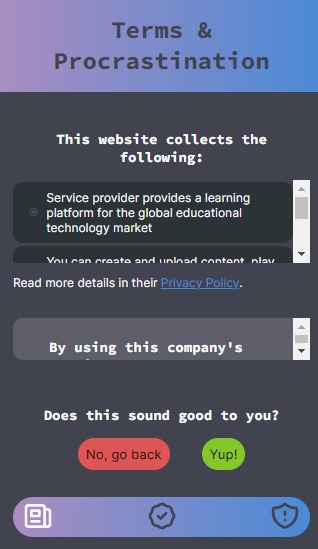
The Privacy Policy and Terms and Conditions summaries
-
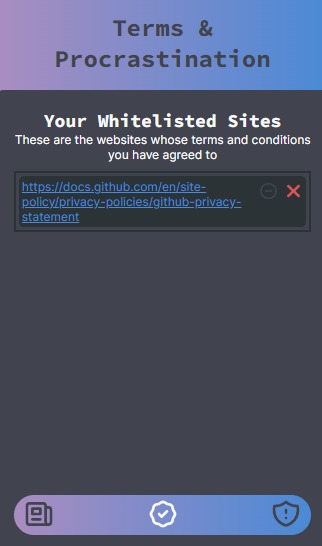
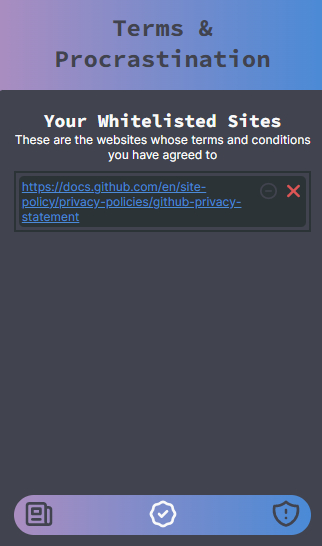
The whitelisted sites page
-
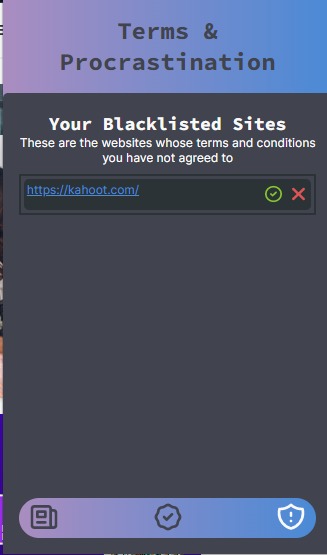
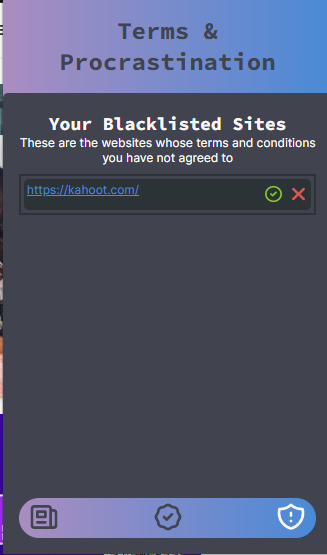
The blacklisted sites page
Inspiration
We've always been taught "Time is of the essence" and told to use our time wisely because wasting it can land us up in some trouble. In our efforts to save time we tend to overlook the process and want to jump to the results; however, we forget to think about how our rush can cost us a lot, including our data privacy. Companies oftentimes tend to take advantage of our rush (or let's face it, procrastination), knowing that we can't find the time to read their overly wrong and boring terms of conditions and make policies to use your data in ways profitable for them. This is where Terms And Procrastination (TAP) comes in! We read and summarize the privacy policy and terms and conditions of a site that saves your data so that you can stay safe while saving your time! TAP was inspired by this phenomenon of saving time and our right to our privacy which is violated more often than you think. The internet is a wonderful place of resources that can help many and we aim to make it safe for everyone.
What it does
TAP is a Chrome extension that allows you to view a summary of the terms and conditions and the privacy policy of the webpage you are currently visiting. We also keep a list of already allowed and blacklisted websites by the user for their viewing which reminds them why they may or may not have agreed with their data policies in the first place. Our text summarizer creates a significantly shorter (yet containing important information with keywords and quantitative figures) for a quick read for our user. The extension also provides key bullet points for the user which highlights the categories of the data and data type of the user a website might be accessing.
How we built it
Over on our front-end side, our main goal was a good user interface. Keeping that in mind we created a simplistic design for our extension. We used React to create a Chrome extension that pops-up on the browser and generates a summary of the website's terms and conditions or privacy policy. For linking all our pages to one another, we used routing so users can easily navigate through the pages as necessary. Our elements were coded in JavaScript files while we used CSS for styling our different components. The front-end is also in charge of web parsing which allows us to gather HREF links (HTML tags) from the policy and use its text to create our final summary for the website. We were able to create concise summaries using a highly accurate transformer in PyTorch. We finetuned the distilbart-cnn-12-6 model (from HuggingFace) by training it on over 400 examples from our custom dataset. We made our custom dataset using the TOS;DR API, by collecting all Terms of Service and Privacy Policy documents and their corresponding summary points, compiling these into a CSV file, and creating a PyTorch dataset out of these that we could use to finetune the HuggingFace model. For the model, we tokenized the dataset (from the CSV file) using the tokenizer from distilbart-cnn-12-6, achieved a final loss of just 0.16 on the test dataset, and then saved the model locally to be run by the API. After running this model on the privacy policy and terms and conditions from the page the extension was running on, we got a summary of these pages and could then send this back to the extension (on the frontend). We were able to access the privacy policies and terms and conditions by using the BeautifulSoup library to store the text content from the URLs returned by the frontend. Used PyMongo to achieve data persistence and store user specific data such as blacklisted and whitelisted websites based on their terms and privacy policy in MongoDB.
Challenges we ran into
While we have worked with React before, this was our first time using react to make a chrome extension. On that end, some of the challenges we ran into were making a pop-up extension which we achieved by creating our React App and changing pop-up restrictions (and updating our source files) to create the base of our chrome extension. On the backend, we ran into quite a few issues with fine tuning the model with our custom dataset. These were mainly with tokenizing the dataset, feeding the tokenized data into our model correctly, and making sure that we had created all the functions that the trainer depended on. We ran into some challenges with prediction as well, especially making sure that we decoded the tokenized info the model returned and that the data we fed to the frontend was in the format expected. With creating the custom dataset, there were some challenges with cleaning the data to be readable by the model (mainly removing HTML tags) and ensuring that the multiline strings returned by the API could be converted to the single line needed in the CSV.
Accomplishments that we're proud of
For our front-end team, this was the first time we created a chrome extension, and while that came with its own challenges we were proud to make the pop-up stand with proper routing that connected all the pages with each other. Moreover the extension has a few aspects that at first we didn't know how to achieve such as storing user database and web parsing but we did thorough research to accomplish the interface for our extension and we're incredibly proud! This was the first time we worked with transformers in PyTorch. With machine learning, there's often many errors that occur due to the fickle nature of ML libraries, especially with feeding correct dataset to models for training. Though it took hours of work, we were able to get it working and as first time transformer users, we are very proud. We were able to successfully create our own customer dataset from scratch: import the TOS;DR CSV, convert it a torch dataset, tokenize it and train the distilbart-cnn on it We were able to effectively analyze the effect of hyper parameters such as the number of epochs and learning rate on the accuracy of the model We were able to efficiently handle the PyTorch models, store them properly and use them across different files. We were able to achieve data persistence with MongoDB by successfully creating the relevant APIs and passing data between the flask backend and react frontend
What we learned
When it comes to user interface we did a lot of research on React for routing pages and creating a chrome extension. Moreover, one of the more time consuming things for us to learn about was web parsing on the frontend to gather the HTML links which contain data for our summarizer to summarize off of. We learned a great amount about how transformers work, especially with how sequence to sequence transformers can be created for text generation to better understand input-output correlations compared to similar models with LSTM RNNs.
What's next for Terms and Procrastination
We think TAP is a great tool for web users and believe that it is unique and valuable for others to use. We hope to expand some of our functionalities (which we couldn't achieve just yet due to time constraints) and publish the extension for users to experience. Our trained summarizer displayed accurate summaries along with key points that the user must learn of prior to agreeing to give their private data to another site. Prior to publishing we would want to further enhance our interface to enhance user experience.
Built With
- beautiful-soup
- chrome
- cognitive-neural-networks
- css
- css3
- hugging-face
- javascript
- mongodb
- pymongo
- python
- pytorch
- react
- tos-dr





Log in or sign up for Devpost to join the conversation.