Inspiration
Many college students, including myself, use Google Calendar to track everything, from classes to extracurriculars to hangouts with friends and study time. I've watched people around me, and myself, turn Google Calendar into something that creates anxiety rather than relieves it. Every hour blocked, every event the same visual weight, and every week looking like a grid to survive rather than a life to live. GCal is technically flawless. It shows you everything. But opening it on a hard Wednesday morning and seeing wall-to-wall blocks doesn't make you feel organized. It makes you feel like there's no room to breathe.
The theme "Designing Beyond Efficiency" gave me a direct question to answer: what would a calendar look like if it stopped optimizing your time and started understanding it? What if it knew the difference between a midterm and a friend hangout, and treated them accordingly? What if it got better at knowing you the longer you used it?
What it does
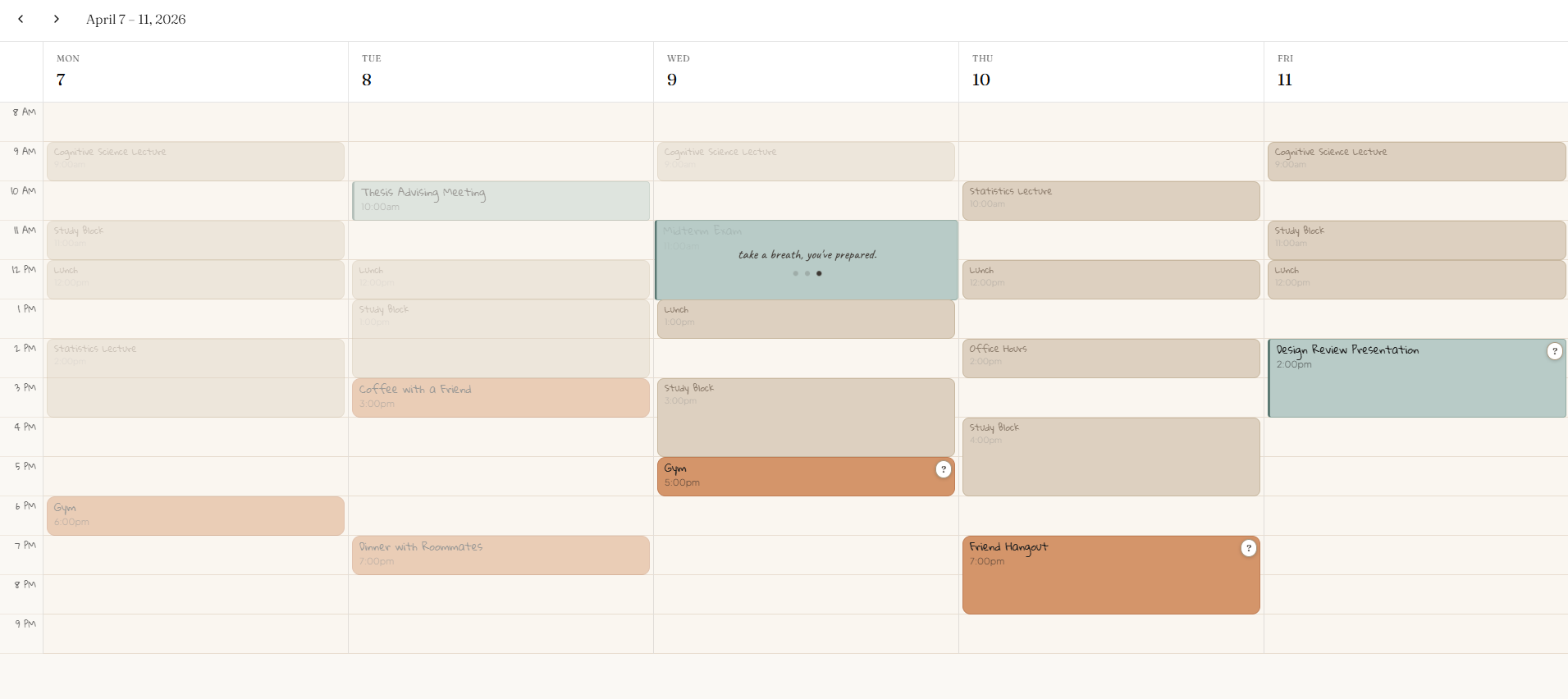
TempoCal is a reimagination of Google Calendar built around emotional intelligence and adaptation over time. It learns what your week means to you, what brings you energy, what weighs on you, what you keep showing up for and reflects that understanding back through the interface. It starts with two onboarding questions: what does a good week feel like, and what tends to weigh on you. From there it watches. By week three it's making early inferences about your schedule by warming the color of events you keep and flagging ones whose language maps to stress. By week eight it knows your week. Joy events appear in a warm brown color. Pressure events appear in cool sage. Recurring events, like lectures, lunch, and study blocks, recede quietly into the background as it has become part of your routine. Past events breathe rather than disappear, pulsing slowly at low opacity as a quiet record of what you've already gotten through. Free time holds warmth rather than the empty white space.
When you open the calendar on a heavy morning, a gentle overlay surfaces what matters. Hovering over a pressure event offers a moment of pause rather than more information. The calendar notices what you're anxious about and responds to it.
How we built it
TempoCal was built entirely with Figma Make. All design decisions, the idea, the screens and the visual design was thought of by me. I used Claude to help with creating the prompts that would best utilize my Make credits to get what I want.
Challenges we ran into
The hardest design problem was making adaptation feel earned rather than assumed. It's easy to show a "before and after", but the hard part is making the in-between legible. I spent significant time on the week three state, which needed to feel genuinely uncertain and where the system making guesses it isn't confident about yet, showing its reasoning rather than just presenting a finished result. Getting that middle state right was what made the full arc convincing.
The other challenge was interaction legibility. The hover states, the breathing past events, and the warm free time are all subtle by design, which means they're easy to miss without context. Balancing subtlety with clarity, making sure the interactions felt discovered rather than instructed, took a lot of iteration.
What's next for TempoCal
The logical next step is real behavioral tracking by connecting TempoCal to actual Google Calendar data so the learning is genuine rather than prototyped. The ML logic can be utilized by personalized joy signals learned from onboarding and confirmed through behavioral patterns, universal pressure detection from keyword matching, and adaptation that emerges from what you actually do rather than what you say you'll do.
Built With
- figma
- figma-make

Log in or sign up for Devpost to join the conversation.