
Inspiration
Are you a doomscroller? If you are, you're probably not bad at time: you're bad at stopping. Most people who are chronically late aren't disorganized, they're too absorbed, and are unable to detatch themselves from the feed. This problem exacerbated for those with a tight schedule -- miss one meeting and you damage your reputtaion; open Instagram in the morning and miss half a day of class; open YouTube before bed and destroy your sleep schedule.
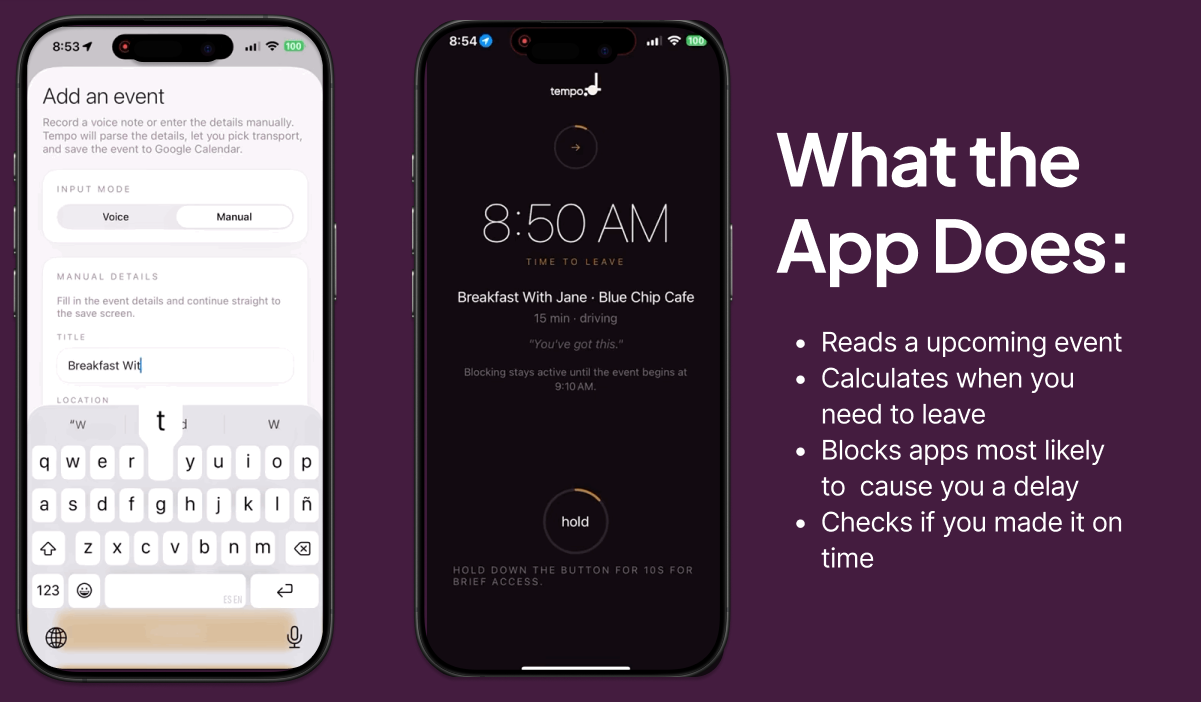
Tempo can help. Tempo is a schedule enforcer, it watches your calendar, calculates exactly when you need to leave, notifies you to leave, and introduces a lockout screen if you continue doomscrolling. When you need to leave, it generates a barrier between you and your feed, remoing the willpower required to pull yourself away.
What it does
Tempo links itself to your Google Calendar, and automatically pulls event schedules as well as their locational information. With this information, it calculates the departure time according to real-time road conditions. A progress bar spawns 20 minutes before departure, informing you of the journey, an telling you to get ready. This is the warning. If you ignore the warning and continue doomscrolling, a soft lockout screen will spawn, placing a physical barrier between you and your feed.
How we built it
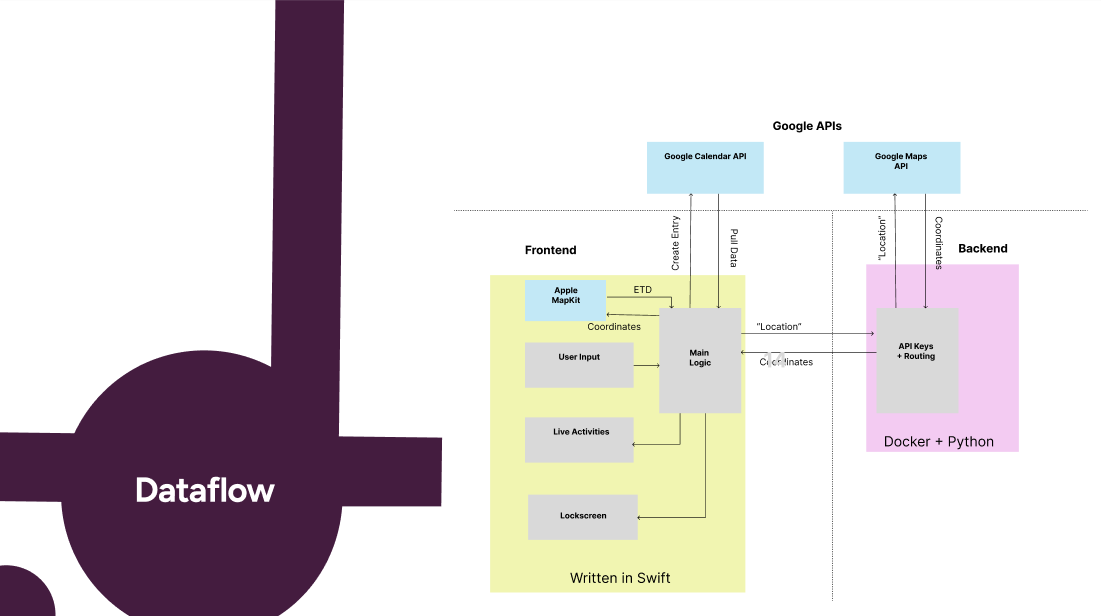
Frontend written in Swift, to interface with Apple Live activities and lockout screen Uses a docker + Python/FAST API backend; backend is very light, and only meant to store API keys A postgres database to keep track of user registration Apple MapKit API (local) for travel time estimation Google Calendar API for calendar integration Google Maps Geocoding API
Challenges we ran into
Deciding to build an app came with an unexpected challenge: only one person on our team had access to a Mac. Since the features we were most excited about, like family controls and home screen widget, are best supported through SwiftUI, this limited how we could develop and test our ideas.
To prevent merge conflicts, we had to carefully divide the work into various non-connected pieces such that the backend, the UI/UX choices, the core of the frontend, etc. It pushed us to to invest in the earlier parts of the design cycle, and saved much headache later.
Accomplishments that we're proud of
We have developed a working Swift app. As none of us had exeriences developing IOS applications, it was a new experience for all of us.
Our application has significant real world applicability, and many of friends have expressed a need for it. Our team is sad at the current state of the youths, and do hope that some methods will exist for them to escape the loop of addiction. We're proud to have contributed something to this cause.
We're also proud of our focus and persistence in this hackathon :)
What we learned
We learned a lot about the importance of a good PRD. The features that we thought through the most thoroughly and completely tended to face fewer issues during team collaboration & prototyping. On the other hand, features that we hadn't considered very much in advance were prone to error loops, merge conflicts and overall confusion. We found that it's better to err on the over-communication end rather than the under-communication when it comes to creating good specifications, and to repeat our perceived notions of what features were/should do out loud multiple times amongst ourselves to reduce confusion later on. We also learned that coding for Apple is really hard when you don't have a MacBook!
What's next for Tempo
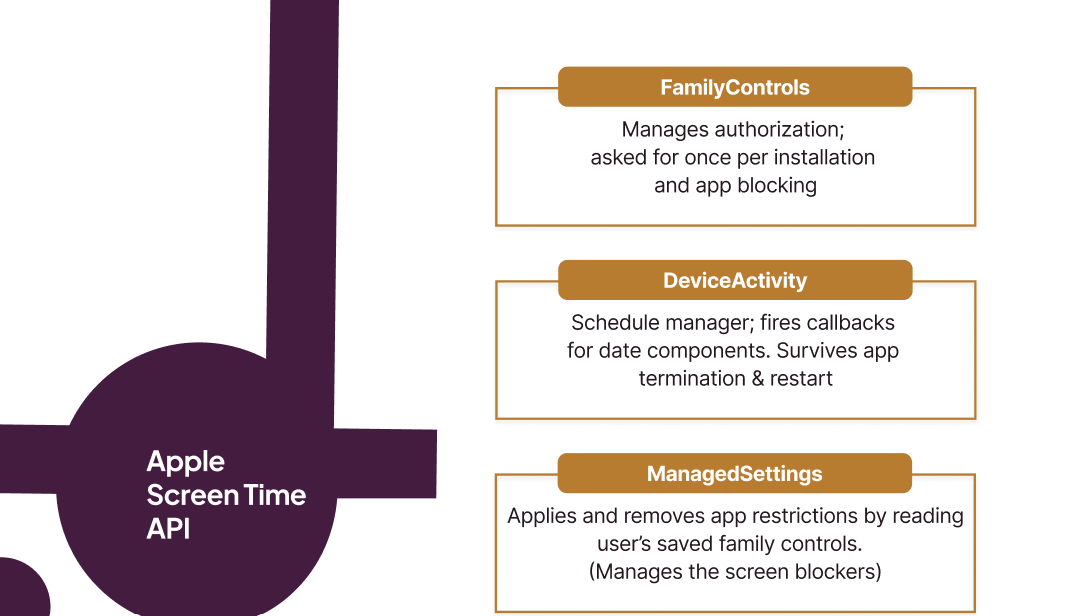
The simulated blocking model we shipped is the foundation for a full Screen Time integration that restricts apps at the OS level — not just within Tempo, but across the entire device. The architecture is already in place. The entitlements are configured. Full activation is the next deliberate step. Beyond that: a Live Activity tracker that counts down to departure on the lock screen and Dynamic Island, flipping to a count-up late state once leave time passes. Direct scheduling from existing calendar events without needing to draft a new one. And eventually, a lightweight pattern model that learns which routes run long, which days need more buffer, and adjusts quietly — so over time, Tempo gets more accurate without asking you to configure anything new.
Built With
- deviceactivity
- familycontrols
- geminiapi
- google-maps
- googlecalendarapi
- managedsettings
- mapkit
- swift


Log in or sign up for Devpost to join the conversation.