-
-
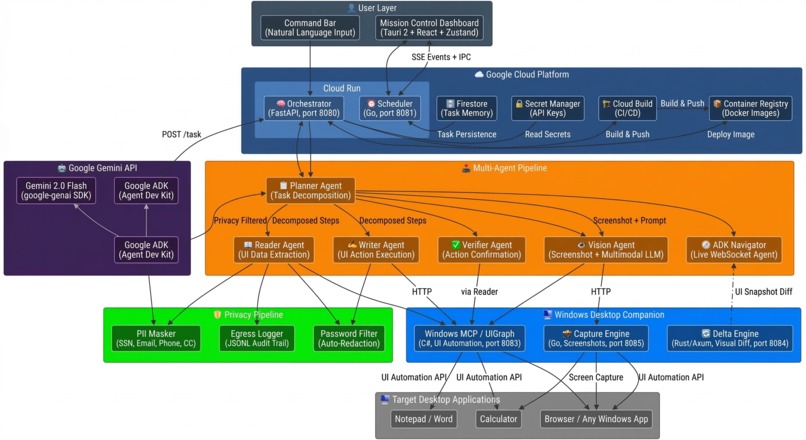
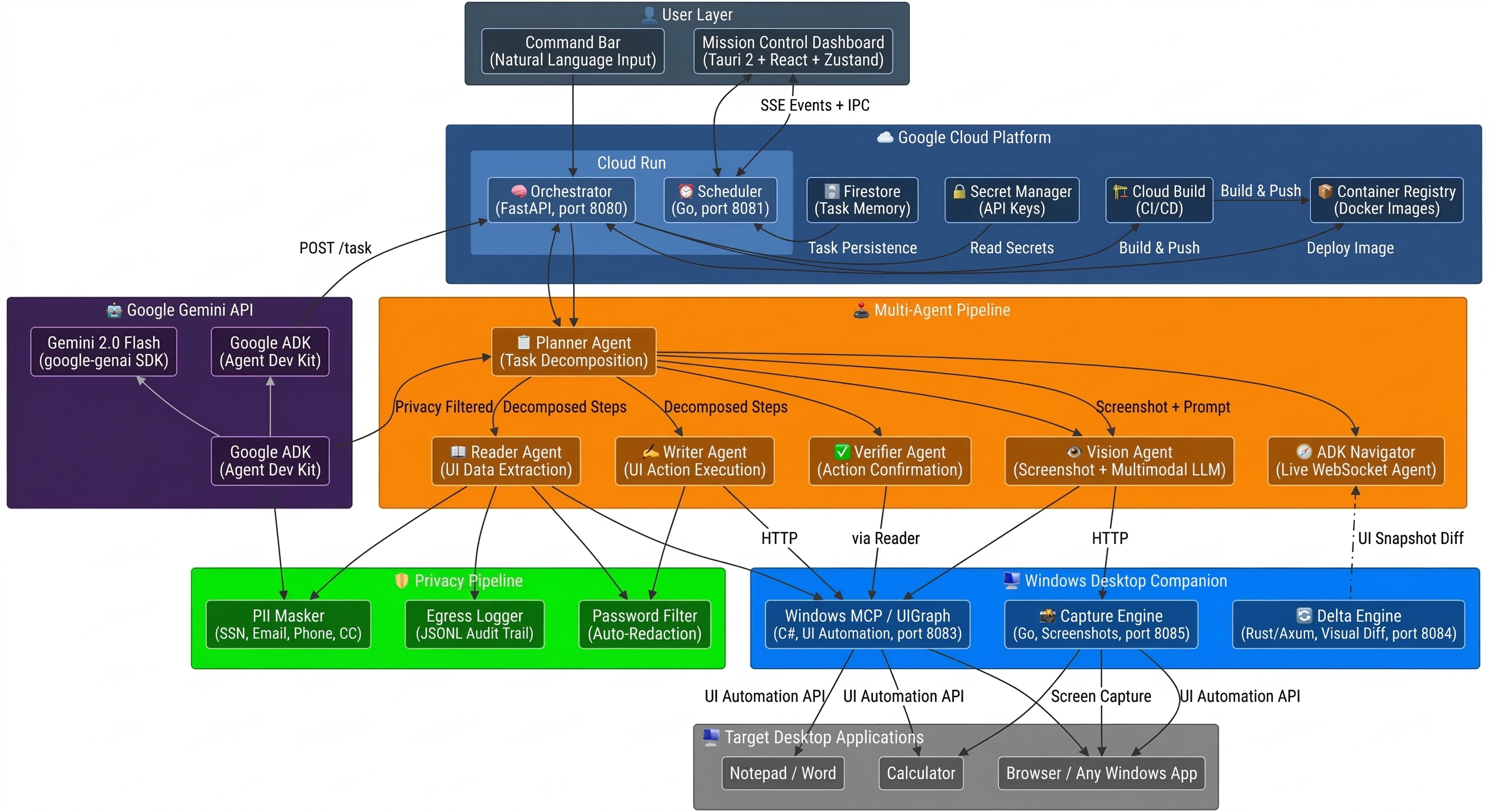
Architecture Diagram
-
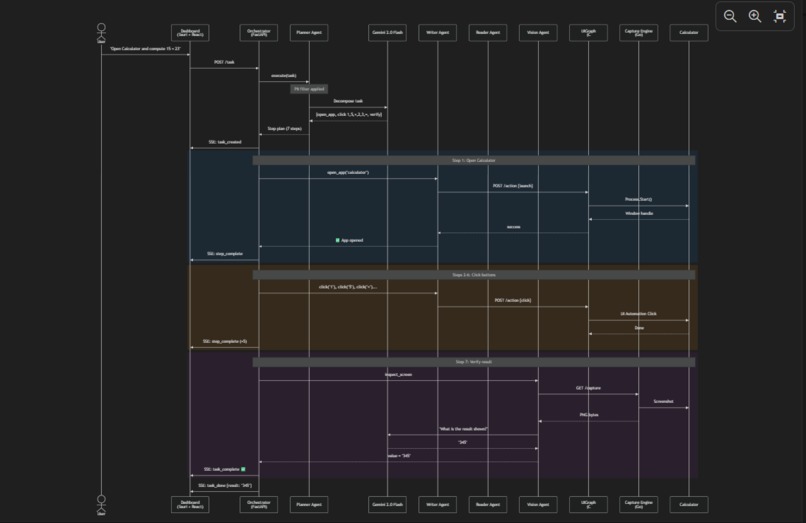
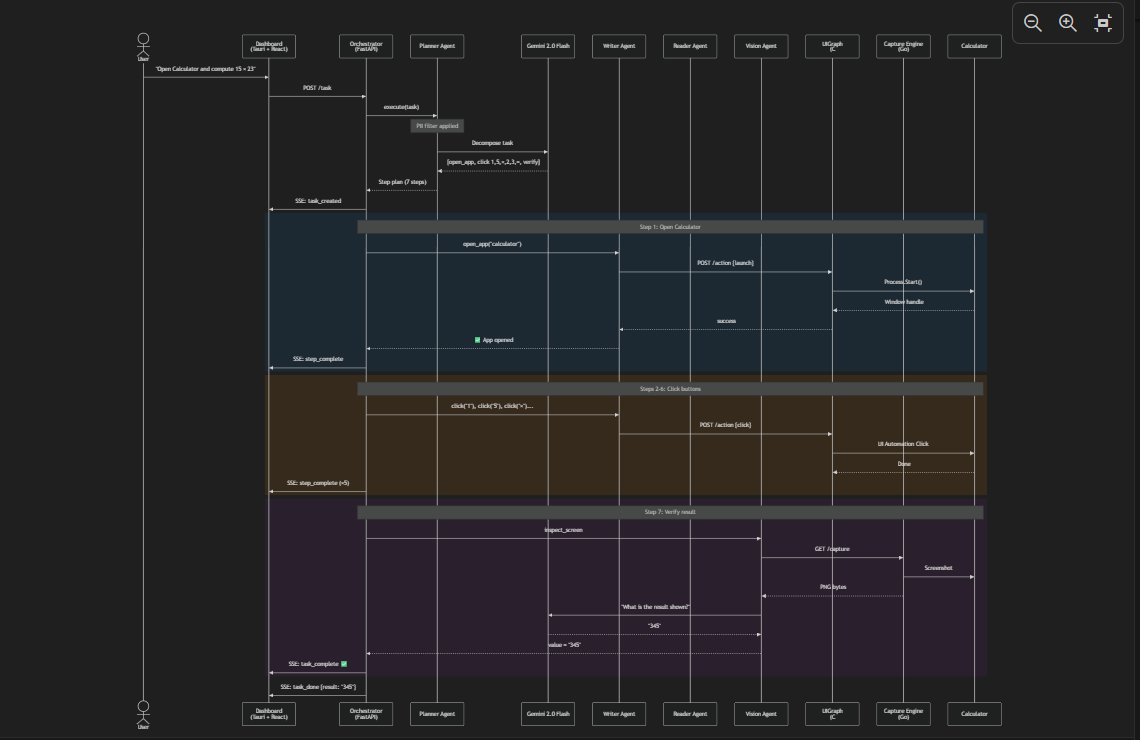
Demo Flow Sequence Diagram
-
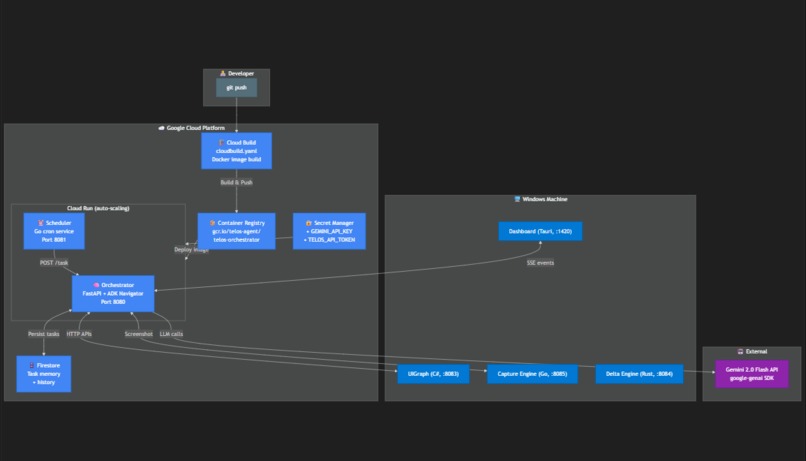
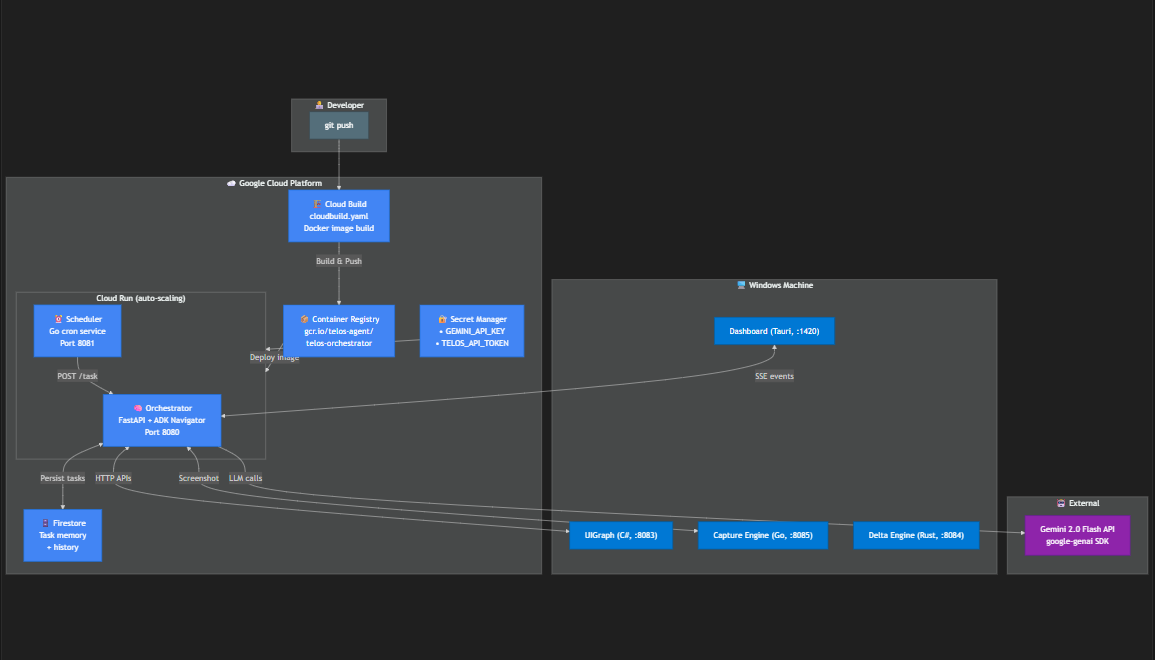
Google Cloud Deployment Architecture
-
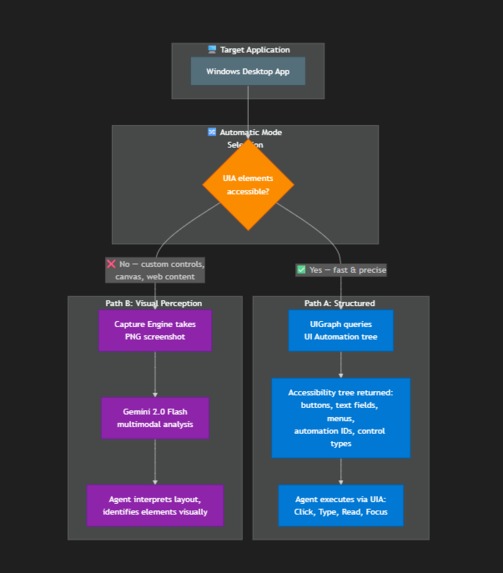
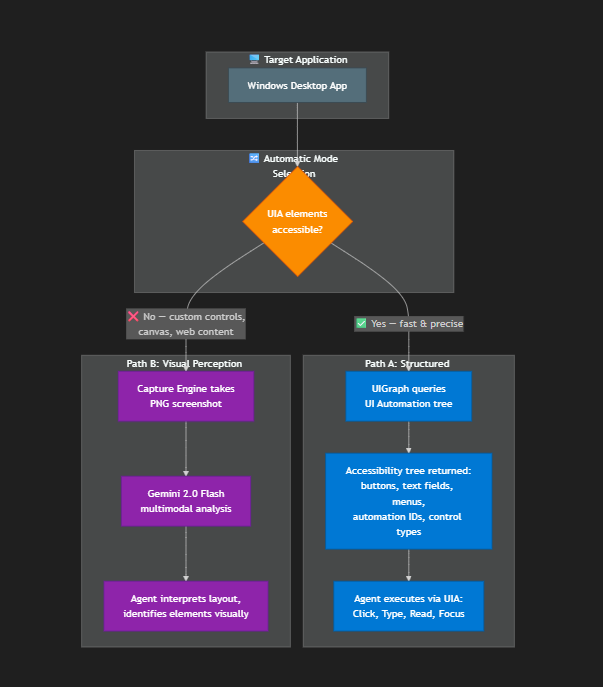
Dual Perception System
-
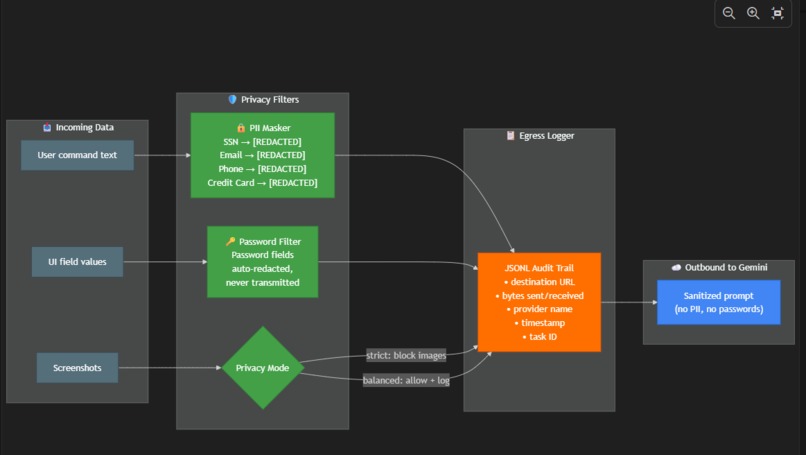
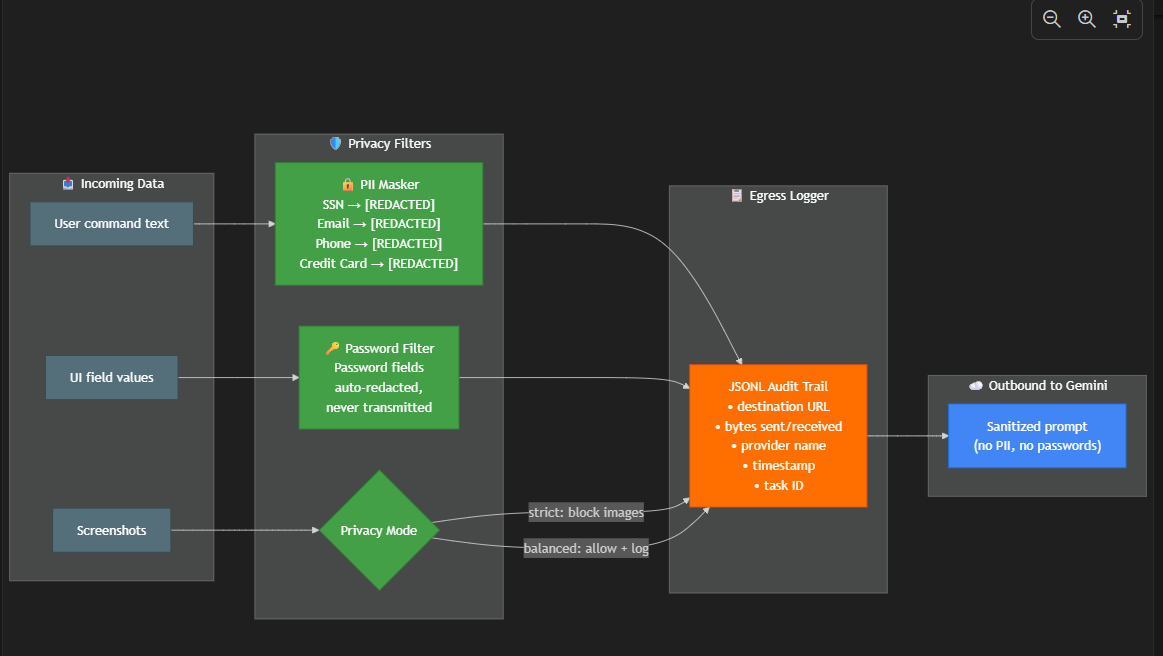
Privacy-First Pipeline
-
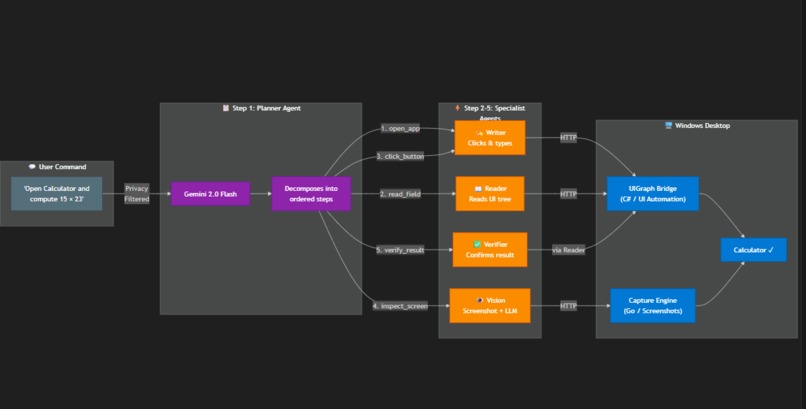
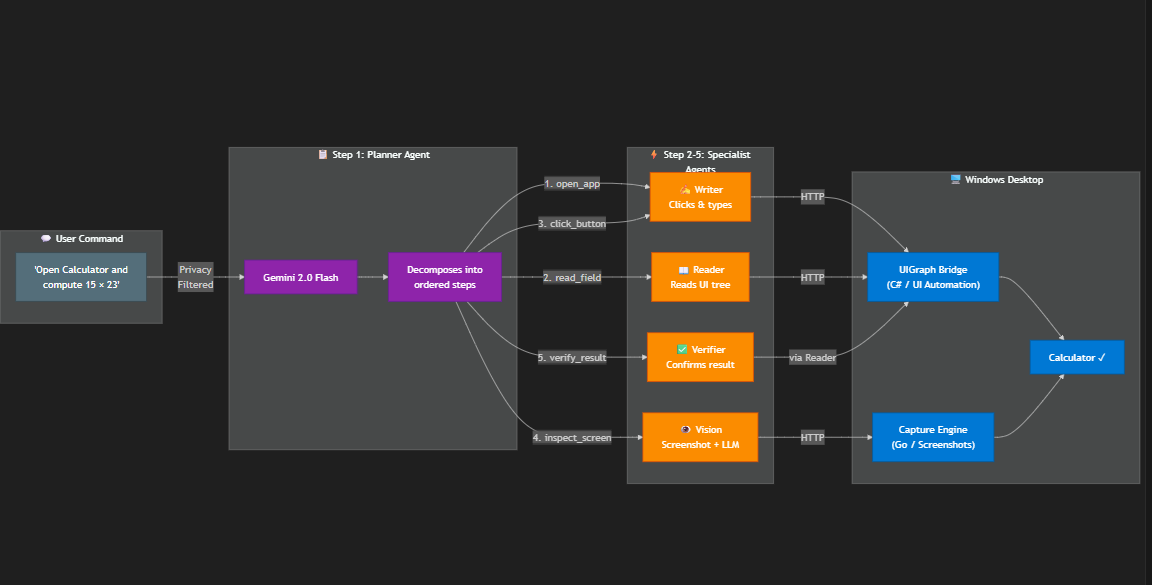
Multi-Agent Pipeline
TELOS — Gemini-Powered UI Navigator for Windows
One-line pitch
TELOS is a multi-agent desktop automation system that uses Gemini 2.0 Flash with dual perception (UI Automation + multimodal vision) to understand, control, and verify actions across any Windows application — all from natural language commands.
What it does
TELOS turns natural language into real Windows desktop actions. Instead of scripting mouse clicks or recording macros, users describe what they want in plain English, and TELOS decomposes the task, reads the screen, executes actions, and verifies the result — all powered by Gemini 2.0 Flash.
Example command: "Open Notepad, type a meeting summary, save it as notes.txt"
The system then:
- Plans — The Planner Agent sends the task to Gemini, which decomposes it into ordered steps (open app, focus field, type text, click Save, enter filename)
- Reads — The Reader Agent queries the Windows UI Automation tree to understand what's currently on screen
- Acts — The Writer Agent executes UI actions (clicks, keystrokes, value entry) through the UIGraph bridge
- Sees — When UIA can't reach an element, the Vision Agent captures a screenshot and sends it to Gemini multimodal to interpret the visual layout
- Verifies — The Verifier Agent re-reads the target field to confirm the action succeeded
- Streams — Every step is broadcast via Server-Sent Events to a real-time Mission Control dashboard
Category: UI Navigator — TELOS observes the Windows desktop display through dual perception, interprets visual elements with and without DOM/API access, and performs actions based on user intent.
How we built it
Multi-Agent Pipeline (5 Specialized Agents + ADK Navigator)
| Agent | Role | Key Tech |
|---|---|---|
| Planner | Decomposes natural language tasks into step sequences | Gemini 2.0 Flash via google-genai SDK |
| Reader | Extracts data from Windows app UI trees | Windows UI Automation (C#) |
| Writer | Executes clicks, keystrokes, value writes with 3x retry | UIGraph bridge |
| Verifier | Confirms actions succeeded by re-reading target fields | Delegates to Reader |
| Vision | Screenshot capture + multimodal LLM interpretation | Go capture engine + Gemini vision |
| ADK Navigator | WebSocket-based live interaction mode | Google ADK (Agent Development Kit) |
Dual Perception System (What Makes TELOS Different)
- Structured perception via Windows UI Automation — reads the accessibility tree, understands control types, extracts values, identifies interactive elements
- Visual perception via Gemini multimodal — when UIA can't reach an element (custom controls, canvas apps, games), TELOS captures a screenshot and asks Gemini 2.0 Flash to interpret the visual layout and determine the next action
- The system chooses the right perception mode automatically based on what's available
Privacy-First Architecture
Every piece of data is filtered before leaving the machine:
- PII Masking: SSN, email, phone, credit card patterns detected and replaced with
[REDACTED] - Password Redaction: Password fields are never read or transmitted
- Egress Logging: Every outbound API call recorded (destination, bytes, provider) in JSONL audit trail
- Configurable Modes:
strict(blocks all image egress) vsbalanced(allows with logging)
Polyglot Microservice Architecture
| Service | Language | Purpose |
|---|---|---|
| Orchestrator | Python/FastAPI | Central brain, agent coordination, API gateway |
| Scheduler | Go | Cron-based job scheduling with SQLite |
| Capture Engine | Go | Screenshot service (PNG capture) |
| Delta Engine | Rust/Axum | UI snapshot diffing (visual change detection) |
| Windows MCP | C# | Windows UI Automation bridge |
| Dashboard | Tauri 2 + React + Zustand | Real-time Mission Control UI |
Google Cloud services used
| Service | Purpose | Evidence |
|---|---|---|
| Cloud Run | Hosts orchestrator + scheduler containers | deploy/Dockerfile.cloudrun, live at telos-orchestrator-777032186668.us-central1.run.app |
| Cloud Build | Automated Docker image builds from source | cloudbuild.yaml |
| Secret Manager | Secure storage for Gemini API keys and API tokens | --set-secrets in deploy script |
| Firestore | Cloud-backed task memory and history | services/orchestrator/memory/firestore_store.py |
| Container Registry | Docker image storage | gcr.io/telos-agent/telos-orchestrator |
| Gemini API | LLM inference (text + multimodal vision) | services/orchestrator/providers/gemini_provider.py |
Automated Cloud Deployment: The entire deployment is scripted via deploy/deploy-gcloud.sh — a single script that enables APIs, creates secrets, builds the container, and deploys to Cloud Run. This qualifies as Infrastructure-as-Code for the bonus points.
What we learned
Dual perception is essential — UI Automation alone can't handle every app. Custom controls, WPF renderers, and web content inside desktop apps all need visual fallback. Combining structured UIA with Gemini multimodal vision creates a much more robust agent.
Privacy can't be an afterthought — Desktop agents see everything: passwords, financial data, personal documents. Building PII masking and egress logging into the core pipeline from day one was the right call.
Agent decomposition beats monolithic prompting — Instead of one giant prompt, specialized agents (plan, read, write, verify, see) each do one thing well. The planner orchestrates, and each specialist has clear inputs/outputs.
Google ADK simplifies agent wiring — The ADK Runner + InMemorySessionService pattern made it straightforward to build the WebSocket-based live navigator. The framework handles session management and tool dispatching cleanly.
Cloud Run + Firestore is a natural fit — The orchestrator is stateless (memory in Firestore), so Cloud Run's scale-to-zero model works perfectly for both development and production.
Challenges we ran into
- Windows UI Automation inconsistency — Different apps expose their UI trees differently. Some controls lack automation IDs, others have deeply nested hierarchies. The fallback to Gemini vision was critical.
- Privacy vs. functionality tradeoff — Blocking all image egress breaks the Vision Agent. The configurable privacy modes let users choose their comfort level.
- Cross-service coordination — With 5+ microservices in different languages, health checking and error propagation needed careful design. The A2A event bus solved the real-time coordination problem.
Demo flow
- Show the Windows companion services and Gemini orchestrator running
- Send a natural language command: "Open Calculator and compute 15 times 23"
- Watch the agent plan steps, capture the screen, launch Calculator, click the UI, and verify the result
- Send a follow-up: "Open Notepad and type the answer"
- Show the Vision Agent fallback when UIA can't access certain elements
- Show Cloud Run deployment URL and Firestore cloud state as Google Cloud evidence
Built with
- Gemini 2.0 Flash (google-genai SDK)
- Google ADK (Agent Development Kit)
- Google Cloud Run
- Google Cloud Build
- Google Cloud Firestore
- Google Secret Manager
- FastAPI + Python 3.12
- Tauri 2 + React + Zustand
- Go (Capture Engine + Scheduler)
- Rust/Axum (Delta Engine)
- C# .NET (Windows UI Automation)

Log in or sign up for Devpost to join the conversation.