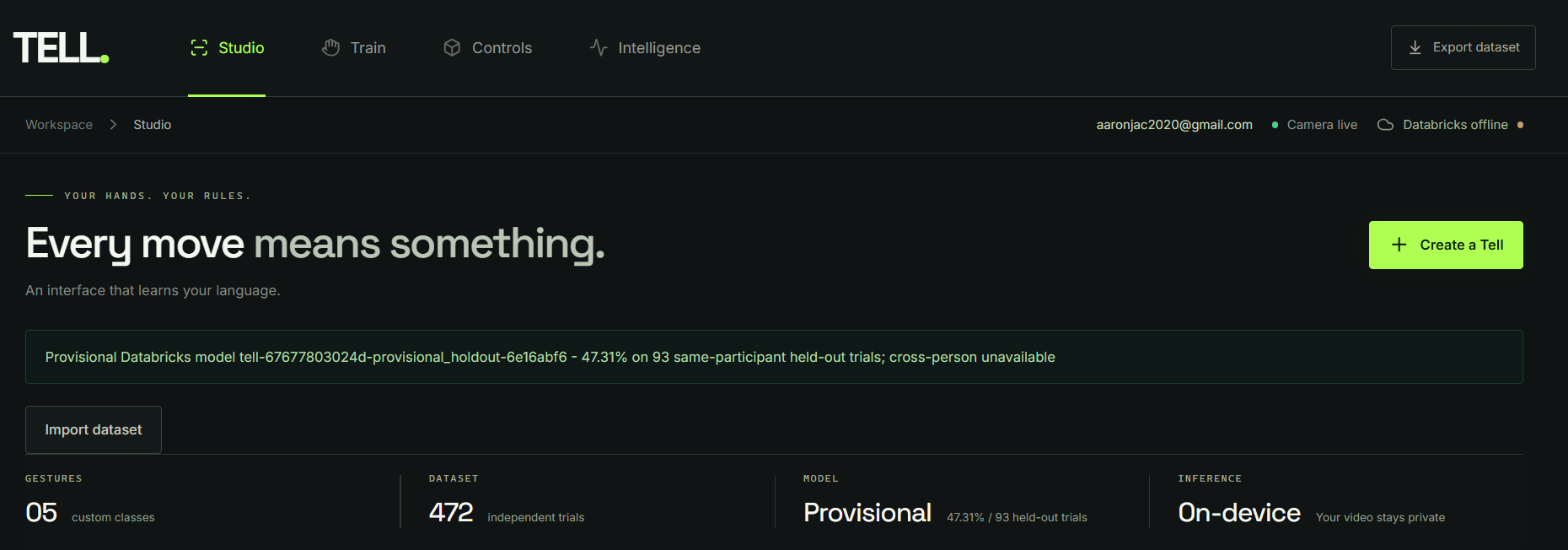
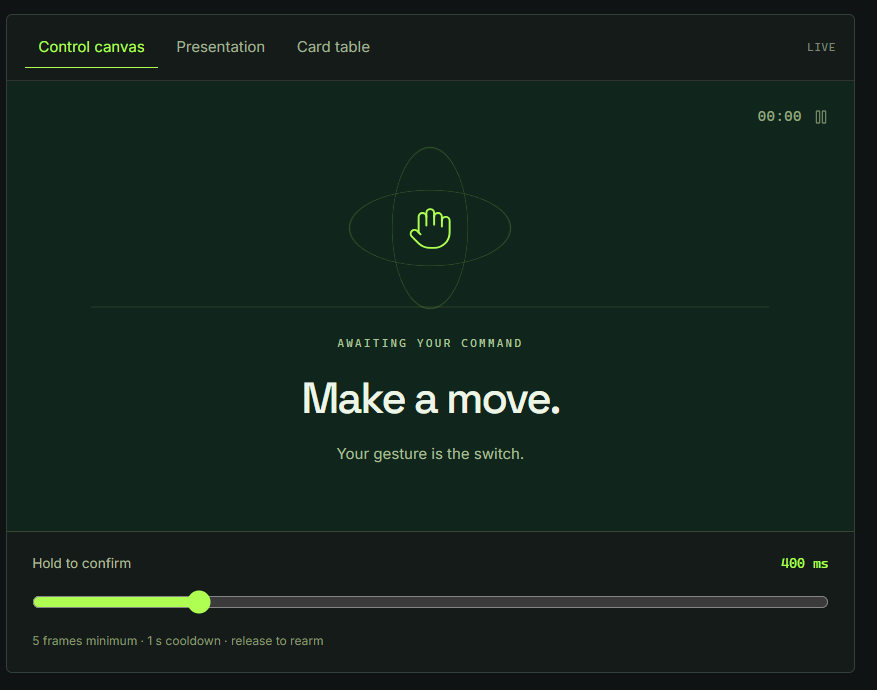
TELL. — Teach Technology Your Language
Train your own hand gestures. Turn them into real commands. Make technology respond to you.
Inspiration
Most technology expects people to adapt to it. We learn keyboard shortcuts, navigate complicated interfaces, and interact with devices using predefined controls.
But what if technology could learn how we want to communicate instead?
Hand gestures are one of the most natural forms of human expression, yet most gesture-recognition systems are limited to predefined movements. We wanted to build something different: an application where anyone could create their own gestures, teach an AI model to recognize them, and use those gestures to control real functionality. That was the dataset we cultivated using a couple willing volunteers who sat making hand signs, training our models.
That idea became TELL.
Rather than forcing users to memorize a fixed gesture vocabulary, TELL. gives them the ability to define their own.
Our goal was to make machine learning feel less like an invisible algorithm and more like something users could teach, experiment with, and experience firsthand.
What it does
TELL. is a customizable, webcam-powered gesture-learning application that transforms user-defined hand movements into functional commands.
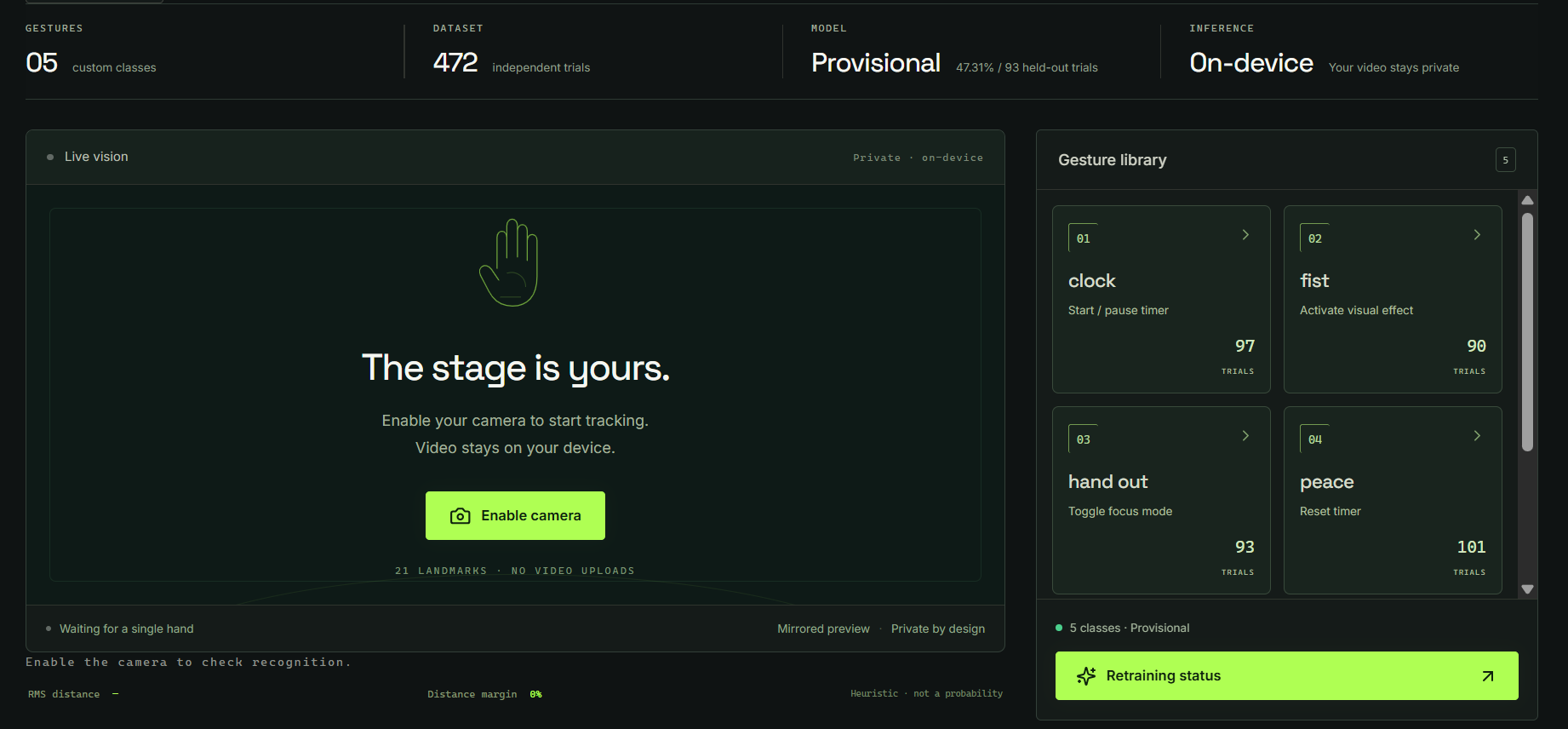
Using a webcam, users can record their own gestures, train a recognition model, and assign each gesture to an action within the application.
The experience centers on four steps:
- Create. Define a custom gesture and give it a name.
- Record. Demonstrate the gesture to the webcam while MediaPipe captures hand landmarks.
- Train. Use the collected recordings to teach a recognition model to distinguish gestures.
- Activate. Assign the gesture to an application command and trigger that command through movement.
Personalized gesture recognition
Unlike systems that recognize only predefined gestures, TELL. allows users to create their own gesture vocabulary.
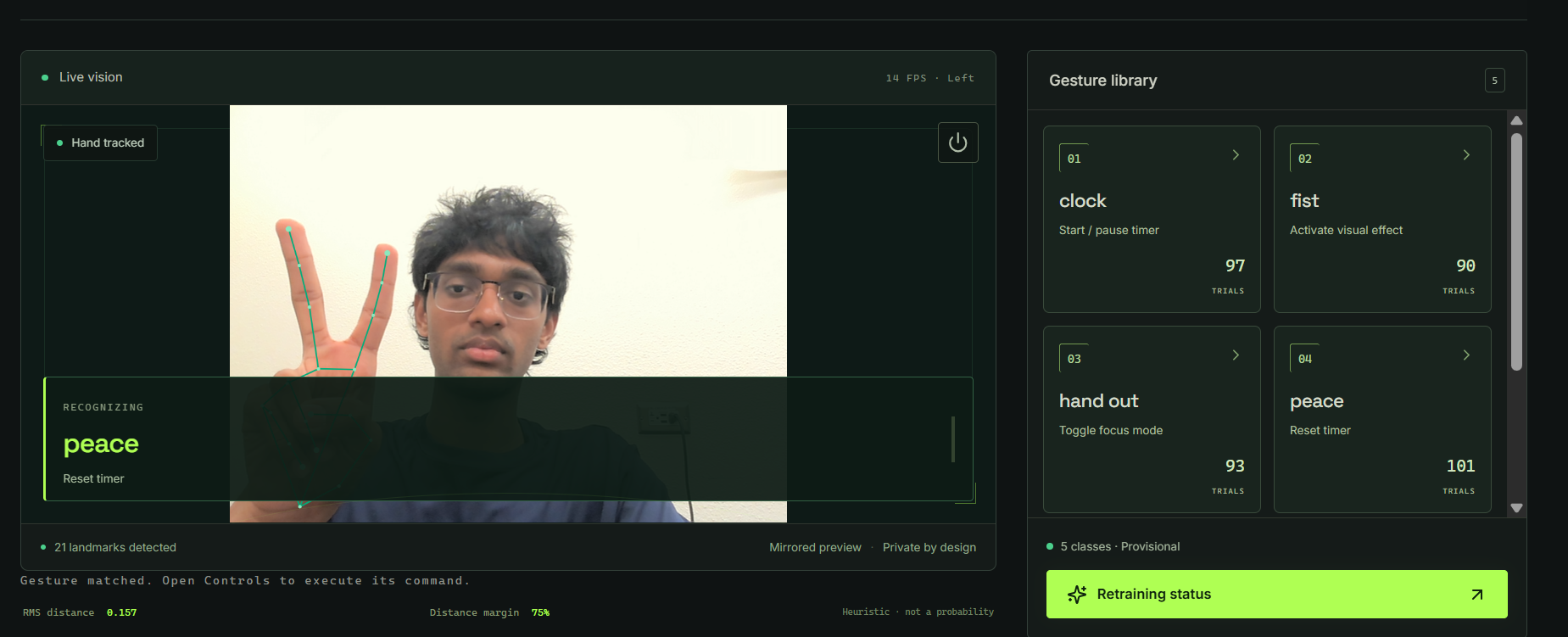
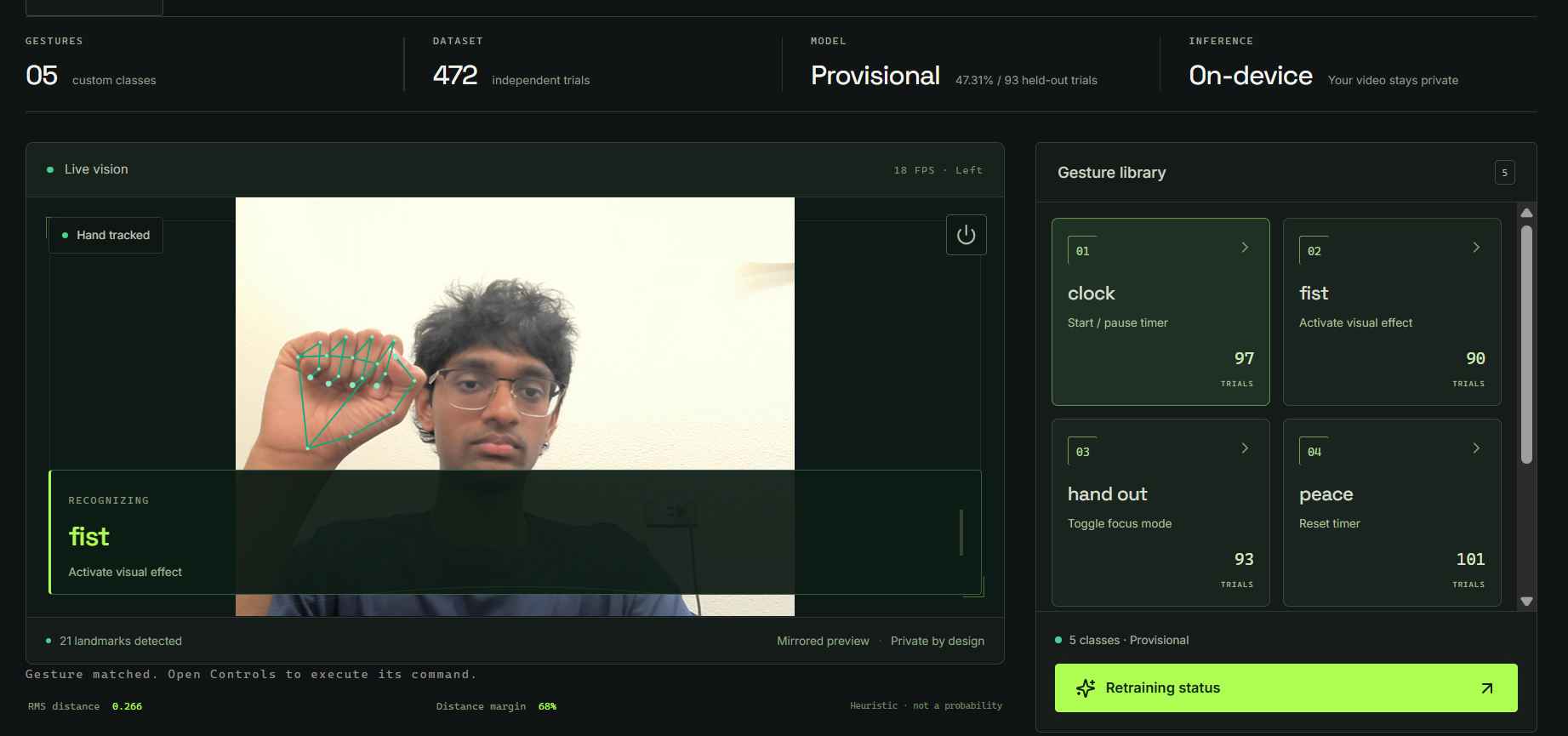
A user could associate a closed fist with one command, a peace sign with another, and a completely original hand pose with something else.
The gesture's meaning comes from the user, not from a fixed dictionary.
Real-time hand tracking
TELL. uses Google's MediaPipe Hand Landmarker to track 21 landmarks on a hand.
Instead of relying on raw camera images as the model's primary input, the application represents hand positions as structured landmark coordinates.
These coordinates provide the foundation for training and real-time recognition.
Gesture-to-command mapping
Recognizing a gesture is only half the experience.
TELL. connects recognition to an application command system, allowing users to assign actions to gestures and change those assignments without redefining the gestures themselves.
Examples of implemented command types include timer controls, focus-related actions, visual effects, and application navigation.
A real machine-learning pipeline
To move beyond a browser-only prototype, we developed a Databricks pipeline for ingesting original gesture recordings, transforming landmark features, training recognition models, evaluating their performance, and exporting models for browser integration.
This allows the application to connect user-generated gesture data to an explicit, versioned machine-learning workflow.
How we built it
Frontend — React, TypeScript, and MediaPipe
We built TELL. as a web application using React, TypeScript, and Vite.
The browser handles webcam capture and real-time hand tracking through MediaPipe.
For each detected hand, MediaPipe produces 21 landmarks containing three-dimensional coordinates.
These coordinates become structured observations associated with a gesture, recording trial, and capture metadata.
The interface supports gesture creation, recording, workspace management, and assigning gestures to application commands.
Used Cursor for coding and then Grok Agents to automate our integrations and help teach us how to use Databricks.
Data pipeline — Databricks
We integrated Databricks to provide a dedicated machine-learning workflow.
The pipeline is organized into four notebooks:
1. Bronze ingestion
Original gesture observations are imported from JSONL into the data pipeline.
Each observation retains information about its gesture, recording trial, hand landmarks, and capture metadata.
2. Silver feature engineering
Raw landmark observations are validated and transformed into model-ready numerical features.
The exported model uses a 63-dimensional representation: 21 hand landmarks with x, y, and z coordinates.
The normalization process uses the wrist as the origin and scales coordinates using a palm-landmark RMS measurement.
3. Gold training and evaluation
The transformed observations are used to train a gesture classifier.
The training workflow includes evaluation reporting and model versioning.
We also distinguish between independent recording trials and individual frames, since frames from the same recording should not be treated as independent evidence of generalization.
4. Model export
The trained model is exported into browser-readable artifacts:
model.json— model parameters and associated information.manifest.json— model metadata and compatibility information.
These artifacts allow the React application to use a Databricks-trained model without requiring a remote inference request for every webcam frame.
Model integration
We implemented a frontend adapter that loads and validates exported model artifacts.
The integration includes:
- Model checksum verification.
- Landmark normalization consistent with training.
- Gesture prediction and command dispatch.
- Dataset compatibility checks.
- Model version tracking.
- Fallback behavior when a model cannot be activated.
- Automated tests covering model loading, predictions, and application behavior.
An important design decision was to preserve the relationship between a model and the exact gesture dataset used to train it.
If the user's dataset changes, the existing model is not silently treated as compatible. A new training and export cycle is required.
Infrastructure — Render and Vultr
The frontend is hosted using Render.
We also provisioned an Ubuntu 24.04 server on Vultr and established SSH access as part of moving backend infrastructure to a dedicated cloud instance.
The remaining infrastructure work includes deploying the backend services, securing access, configuring HTTPS, and validating communication between the frontend and backend.
Testing
Our initial model integration was reported to pass:
- 41 frontend tests
- 48 backend tests
- Numerical prediction parity checks across the original 59 recorded observations.
- TypeScript compilation and production frontend build checks.
These results verify important aspects of the implementation, but they are not equivalent to measured recognition accuracy on previously unseen users.
Challenges we ran into
1. Training on too little data
Our first dataset contained only 10 independent recording trials and 59 landmark observations across five gestures.
That was sufficient to demonstrate the full Databricks pipeline, but insufficient for reliable held-out evaluation.
The initial model was therefore explicitly labeled provisional, with no validated accuracy reported.
We addressed this by collecting a substantially larger set of real gesture recordings.
Our expanded dataset contains 472 accepted recording trials and 3,024 landmark observations across five gestures.
The next step is to retrain and evaluate using that expanded dataset.
2. Making training and inference agree
A machine-learning model is only useful when the features supplied during inference match the features used during training.
Our original frontend normalization method differed from the normalization expected by the Databricks model.
To resolve this, we implemented a dedicated model adapter that reproduces the training normalization in the browser.
This prevents differences in feature preparation from silently affecting predictions.
3. Keeping models compatible with changing gestures
Because users can define and modify gestures, a previously trained model may no longer match the current workspace.
We introduced dataset binding and compatibility validation so that the application can identify when a model was trained on a different gesture collection.
This makes the relationship between training data and deployed models explicit.
4. Separating model quality from code correctness
Passing automated tests does not guarantee that gestures will be recognized accurately under real webcam conditions.
We treated these as separate questions:
- Does the software correctly load and execute the model?
- Does the model recognize new gesture demonstrations reliably?
The first has substantial automated test coverage. The second requires further held-out evaluation and live testing.
5. Connecting multiple cloud services meaningfully
We wanted cloud integrations to serve actual architectural purposes rather than simply appearing in the technology stack.
Databricks handles the data and model lifecycle. Render hosts the frontend. Vultr is intended to provide backend infrastructure.
Keeping those responsibilities distinct has been an important part of the architecture.
Accomplishments that we're proud of
Built a customizable gesture-command experience
TELL. allows users to define gestures and connect them to working application functionality rather than simply displaying gesture labels.
Developed an end-to-end Databricks training pipeline
We successfully completed the first full cycle of data ingestion, feature transformation, model training, and model export.
Integrated a trained model into the application code
The frontend integration supports model validation, numerical feature compatibility, and command mapping while preserving the existing gesture workspace.
Collected an original gesture dataset
Instead of relying entirely on a preexisting gesture dataset, we recorded our own hand landmark observations.
The expanded dataset represents a major improvement over our initial training collection.
Designed for model traceability
Model versions, integrity checks, and dataset compatibility information help make it clear which recordings produced a given model.
What we learned
More frames do not necessarily mean more independent training examples. Recording-trial boundaries matter when evaluating how well a model generalizes.
Feature consistency is essential. Even a correctly trained model can behave differently if browser inference uses another normalization method.
Personalization creates new engineering challenges. Allowing users to modify their gesture vocabulary means the application must track which models remain compatible with which datasets.
Working software and validated machine learning are different achievements. Both need to be tested, and neither should be used as a substitute for the other.
Cloud integrations are most valuable when each has a clear purpose. Separating training, frontend hosting, and backend infrastructure helped us define a more maintainable architecture.
What's next
Our immediate focus is completing the expanded-data training and production integration.
- Retrain on the expanded dataset. Convert the latest gesture export into the Databricks ingestion format and run the Bronze, Silver, Gold, and model-export notebooks again.
- Measure recognition performance. Evaluate on held-out recording trials, inspect per-gesture results, and report the actual metrics rather than assuming an accuracy level.
- Update the application model. Replace the provisional model artifacts and regenerate their dataset compatibility binding.
- Validate the real-time experience. Test gesture recognition, unknown-gesture handling, and command execution using the webcam.
- Complete deployment. Merge the tested changes, update the Render application, and finish the Vultr backend deployment.
- Expand generalization testing. Collect recordings from additional users, lighting conditions, and hand positions to understand how well the model performs outside its original recording environment.
Ultimately, we want TELL. to make gesture-based interaction more personal, flexible, and approachable.
Technology already understands clicks, taps, and keystrokes. We want to teach it something new: your gestures.
Built With
- computer
- cursor
- databricks
- grok
- html5
- javascript
- learning
- machine
- mediapipe
- python
- react
- render
- typescript
- vision
- vite
- vultr


