Inspiration
Writing a change is getting faster. Understanding how it interacts with everyone else's work still takes time.
A branch can look reasonable on its own and break a user-facing behavior when combined with another change. When that happens, the useful information is often spread across a failed test, a pipeline log, a source file and a conversation with an agent.
We built Telar to keep those pieces together: what we wanted to ship, what failed, why it might have failed, and whether a fix actually changed the result.
What it does
Telar tests branches together, explains what breaks, and verifies fixes before you merge.
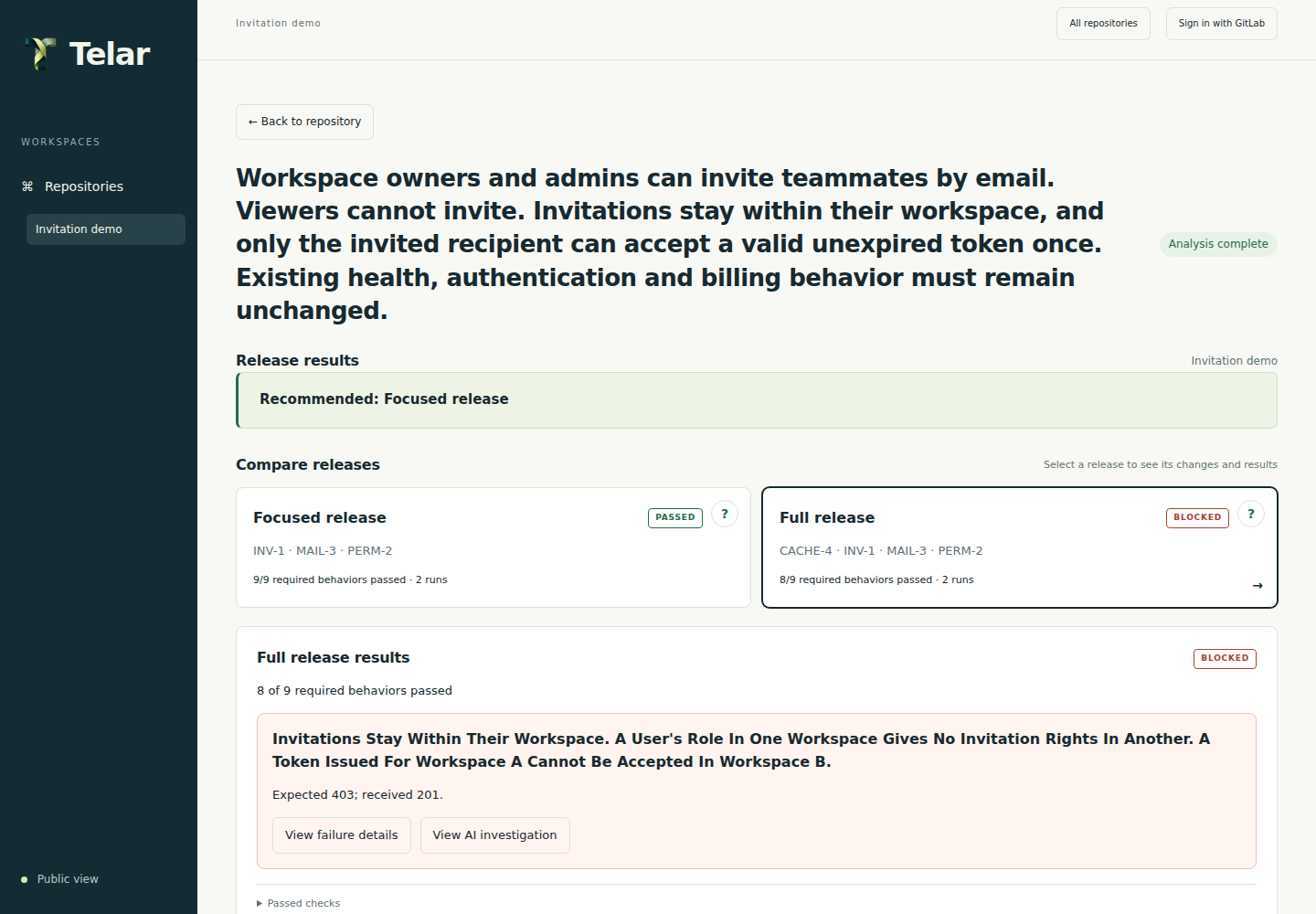
You start with an outcome in plain language. GitLab Duo proposes requirements and tests based on that goal and the selected source. You review them before Telar runs the analysis. The dashboard compares the tested combinations and shows which behaviors passed or failed, with links to the exact commits and source.
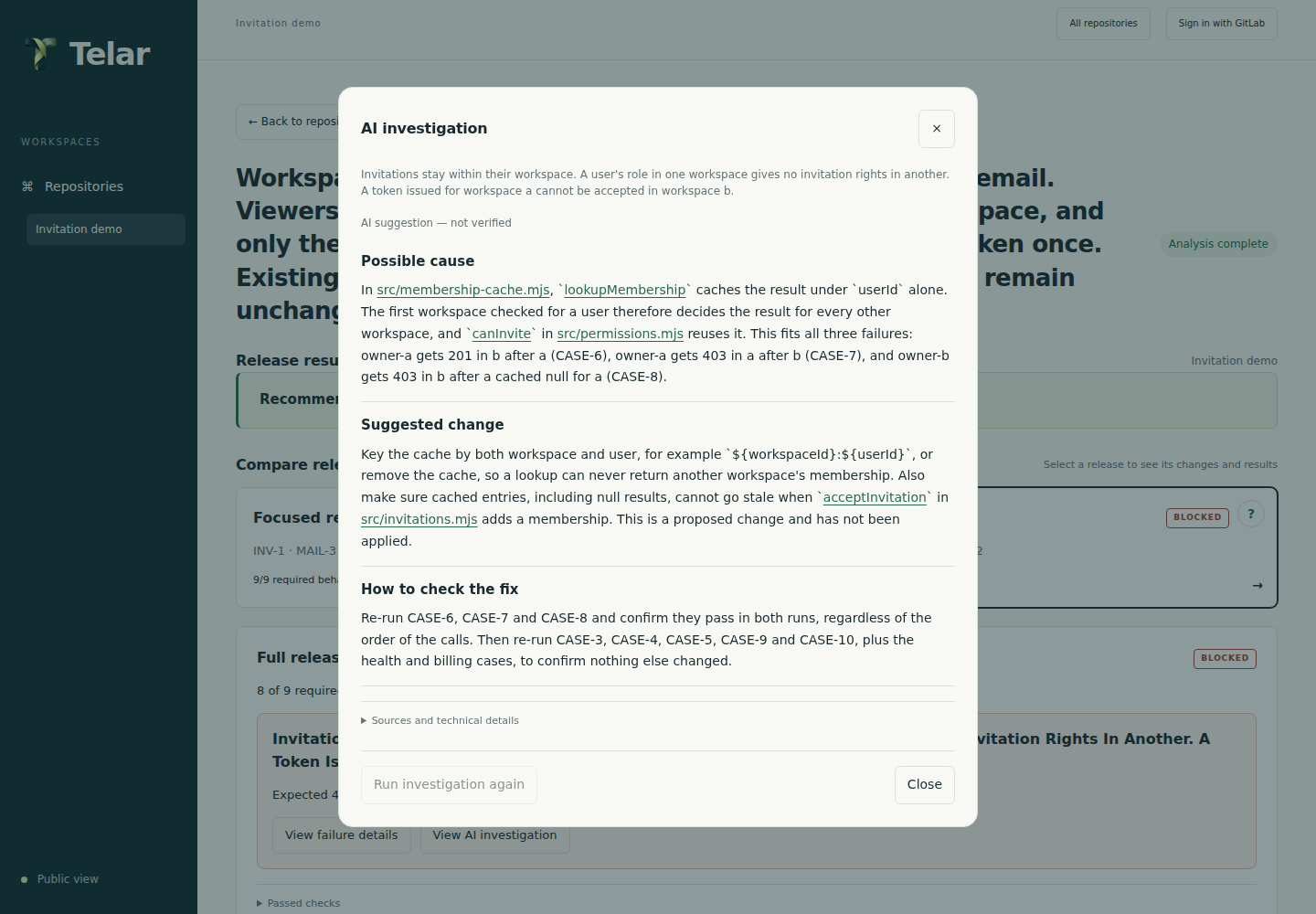
In the invitation example, one combination passes. Adding a membership cache breaks workspace isolation: a user can perform an action in a workspace where they should have no permission. Duo investigates the recorded failure and points to a cache that does not distinguish between workspaces.
For a failed CI pipeline, a configured policy can allow Telar to request a source fix from Duo, open a separate repair merge request and check that commit's CI results. The developer reviews the outcome. Telar does not merge or deploy the repair.
Try the public analysis or inspect the recorded CI repair. Both are available without signing in.
How we built it
We built Telar with TypeScript, Node.js and a browser dashboard. GitLab Duo Agent Platform custom flows clarify goals, propose tests and investigate failures using the supplied source and results.
Telar records the exact source revisions, runs the reviewed checks and keeps the results tied to those revisions. GitLab CI/CD runs hosted repository checks and provides the jobs, logs and test reports used to verify repairs. Scoped CLI and MCP tools let coding agents use the same analysis workflow as the dashboard.
The frontend runs on Vercel, with a Render service coordinating accounts and workflows. GitLab sign-in gives each user a separate workspace and uses their own repository permissions and Duo access.
Source code and setup instructions · GitLab CI/CD history
Challenges we ran into
The hardest question was what should count as a verified fix. A passing pipeline on a different commit is not enough, and neither is a convincing explanation. We had to preserve the original failure, keep the checks unchanged and compare the relevant results.
We also had to limit what an automated repair could change. The supervised policy restricts the branch and source files; tests and CI configuration are protected. If the proposed repair falls outside those limits, the workflow stops for review.
Another challenge was keeping the local demo and connected repositories consistent. We moved them onto one shared workflow so a feature available in the example would also be available in a connected project.
Accomplishments that we're proud of
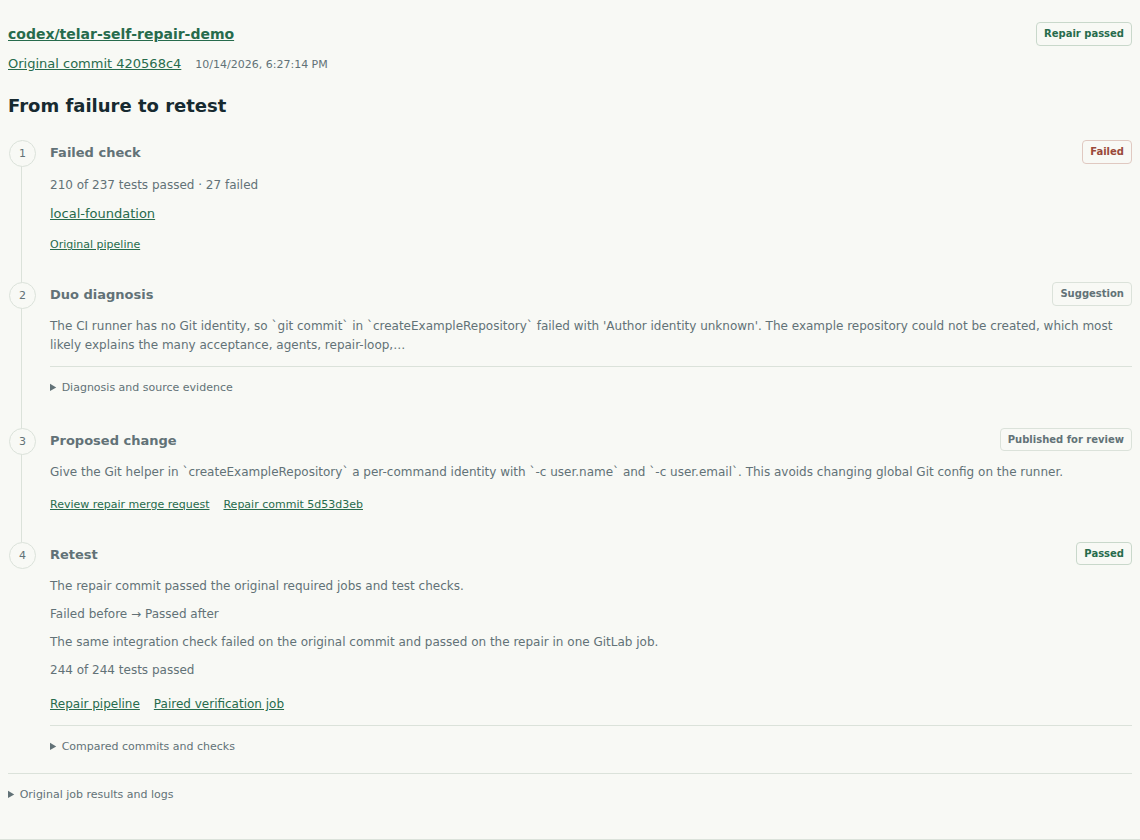
We used Telar on its own failed pipeline. Duo traced the failure to missing Git identity configuration in a source helper and proposed a fix. Telar published a separate repair merge request, whose pipeline passed 244 tests without changing the original tests or pipeline configuration.
We then ran the same unchanged integration check on the original and repaired commits in one GitLab job. It failed before the fix and passed after. That focused comparison is recorded separately from the full pipeline result.
The demonstration defects are deliberately seeded. The tests, native Duo session, repair merge request and GitLab job results are available to inspect.
Repair merge request · Before-and-after verification job
What we learned
The goal matters because existing tests do not necessarily cover the behavior a change is meant to deliver. Our invitation example keeps its existing regression checks green while failing a workspace-isolation requirement.
We also learned to keep explanations separate from evidence. Duo can suggest where to look and what to change. An unchanged test, run against both versions, gives the developer a way to check that suggestion.
What's next for Telar
Our next step is support for more application types. Branch comparison currently supports trusted, dependency-free Node HTTP applications; connecting a GitLab project does not make every stack compatible with that runner.
We also want simpler Duo setup, broader before-and-after verification for CI repairs, and clearer ways for coding agents to hand a failed analysis back to the agent responsible for the change. The aim is to keep the path from failure to checked repair easy to follow as more people and agents contribute.
Built With
- docker
- gitlab-api
- gitlab-ci/cd
- gitlab-duo-agent-platform
- javascript
- model-context-protocol-(mcp)
- node.js
- typescript
- vercel

Log in or sign up for Devpost to join the conversation.