Inspiration
AI assistants are starting to shop for people, and PayPal is making merchants "agent-ready" so an assistant can find products and hand the buyer to a trusted checkout. But that path starts from an online catalog. The bakery, food truck or market stall down the street has a chalkboard, not a catalog, so AI shoppers simply can't buy from it. We wanted to give those shops an on-ramp: one photo, a couple of minutes of review, and they're selling through AI with PayPal checkout.
What it does
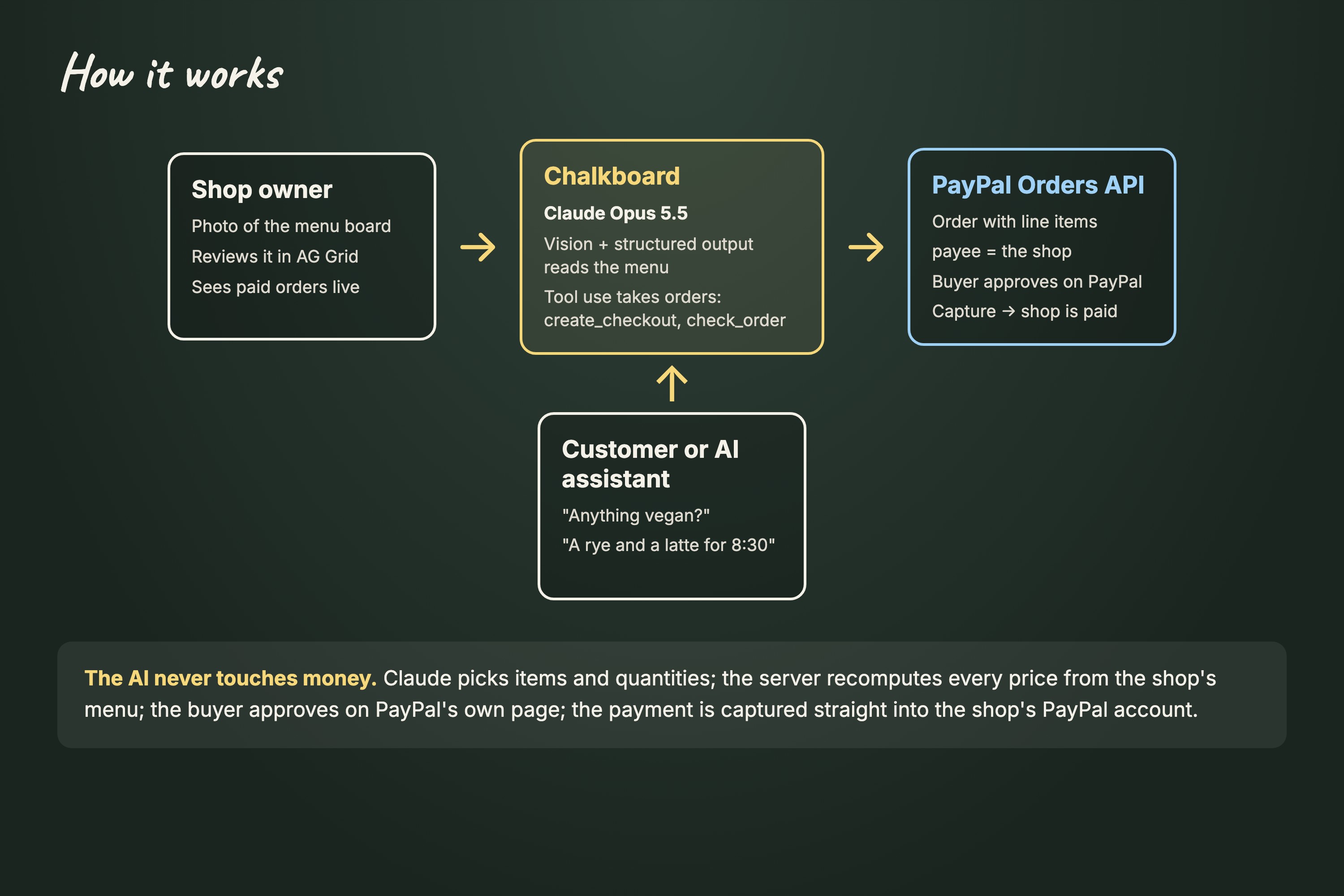
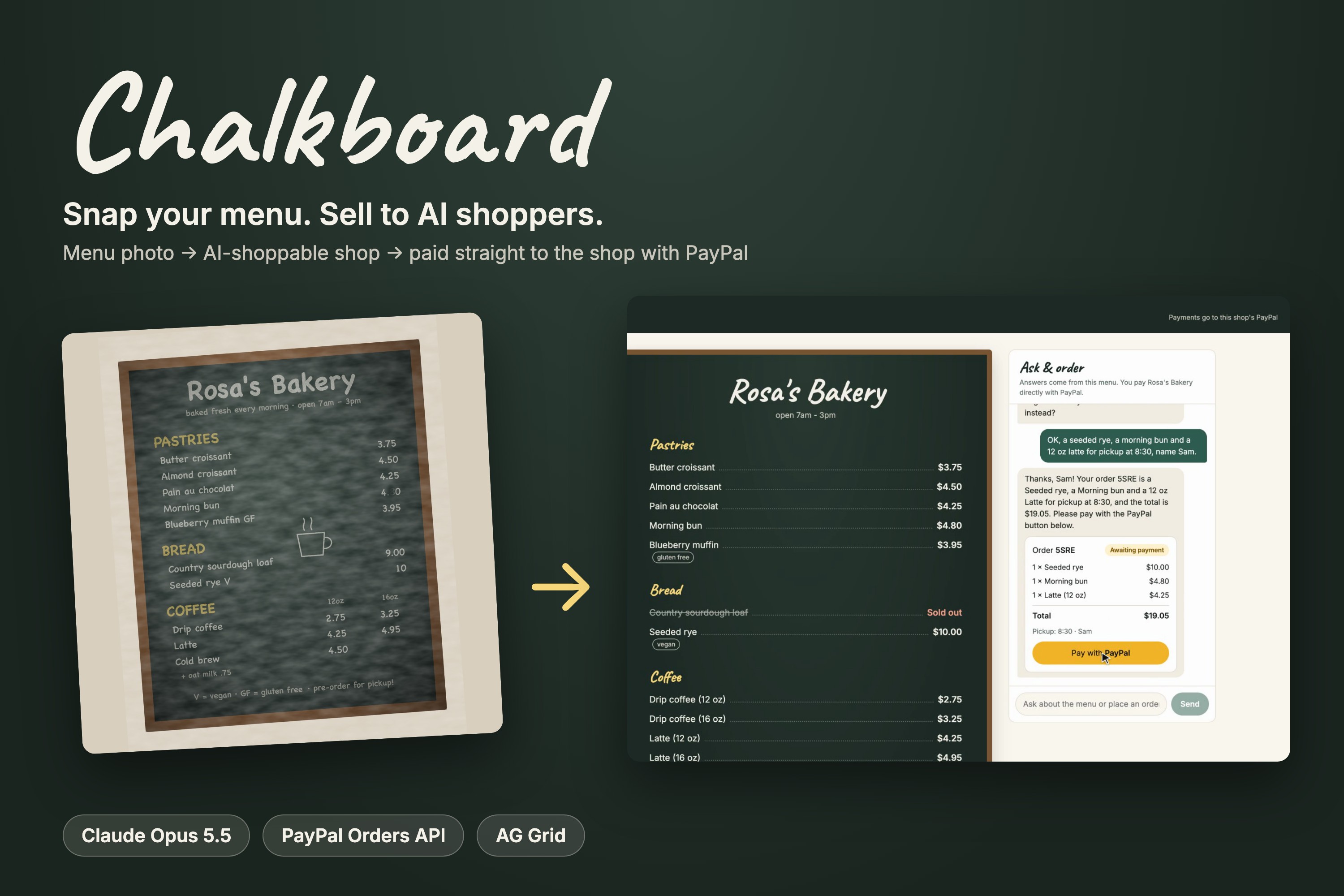
Chalkboard turns a photo of a menu board into a shop that people and AI assistants can order from, with every payment going straight to the shop's own PayPal account.
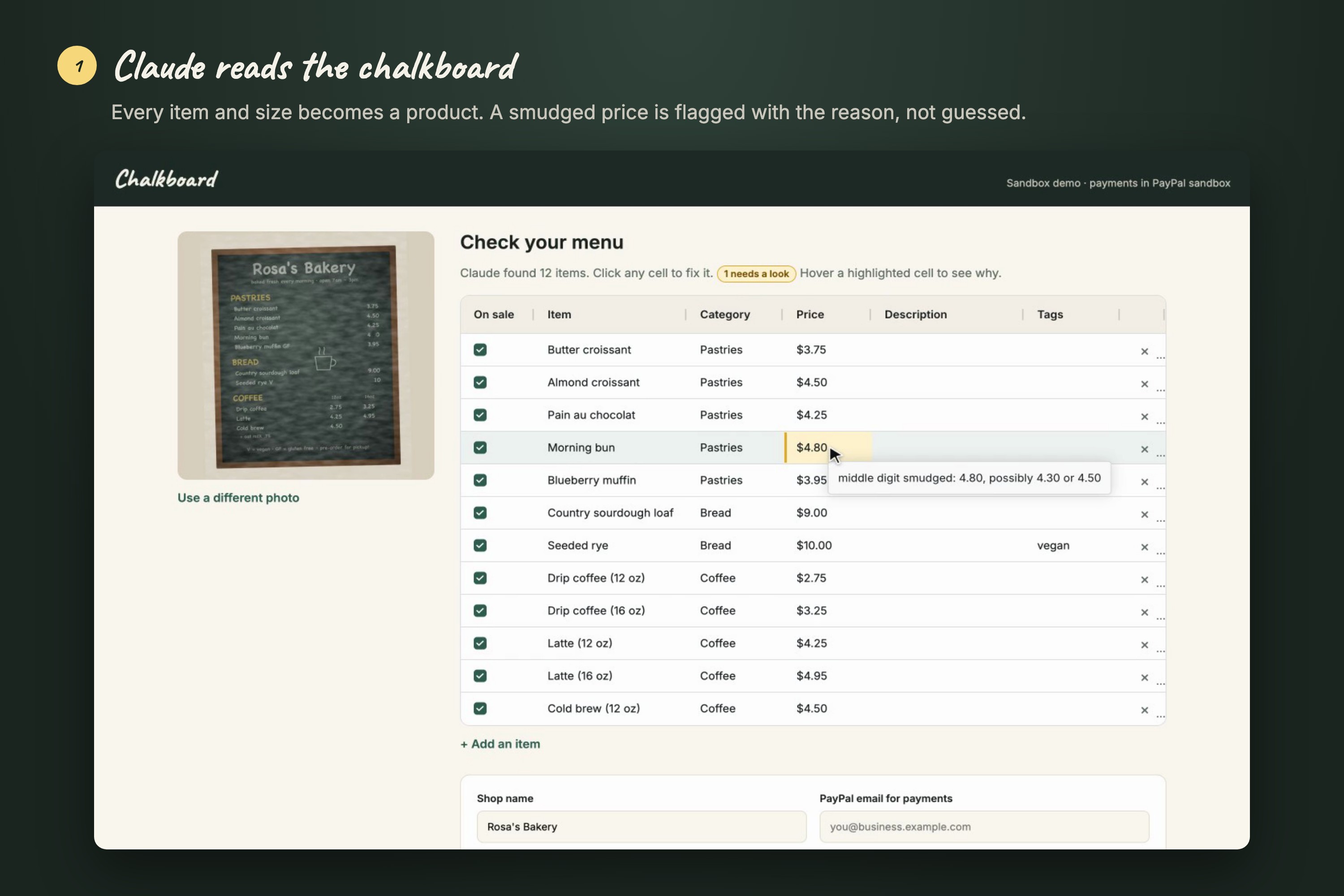
- Photo to catalog. The owner snaps their menu. Claude reads it into structured items with prices, categories and dietary tags, one item per size. Anything it isn't sure about, like a smudged price, is flagged with the reason ("price smudged: 4.80 or 4.30").
- Review in a grid. The draft opens in an editable AG Grid table. Flagged cells are highlighted, and editing a cell confirms it.
- Publish. The owner adds the PayPal email that should get paid and gets a public shop page plus a private dashboard.
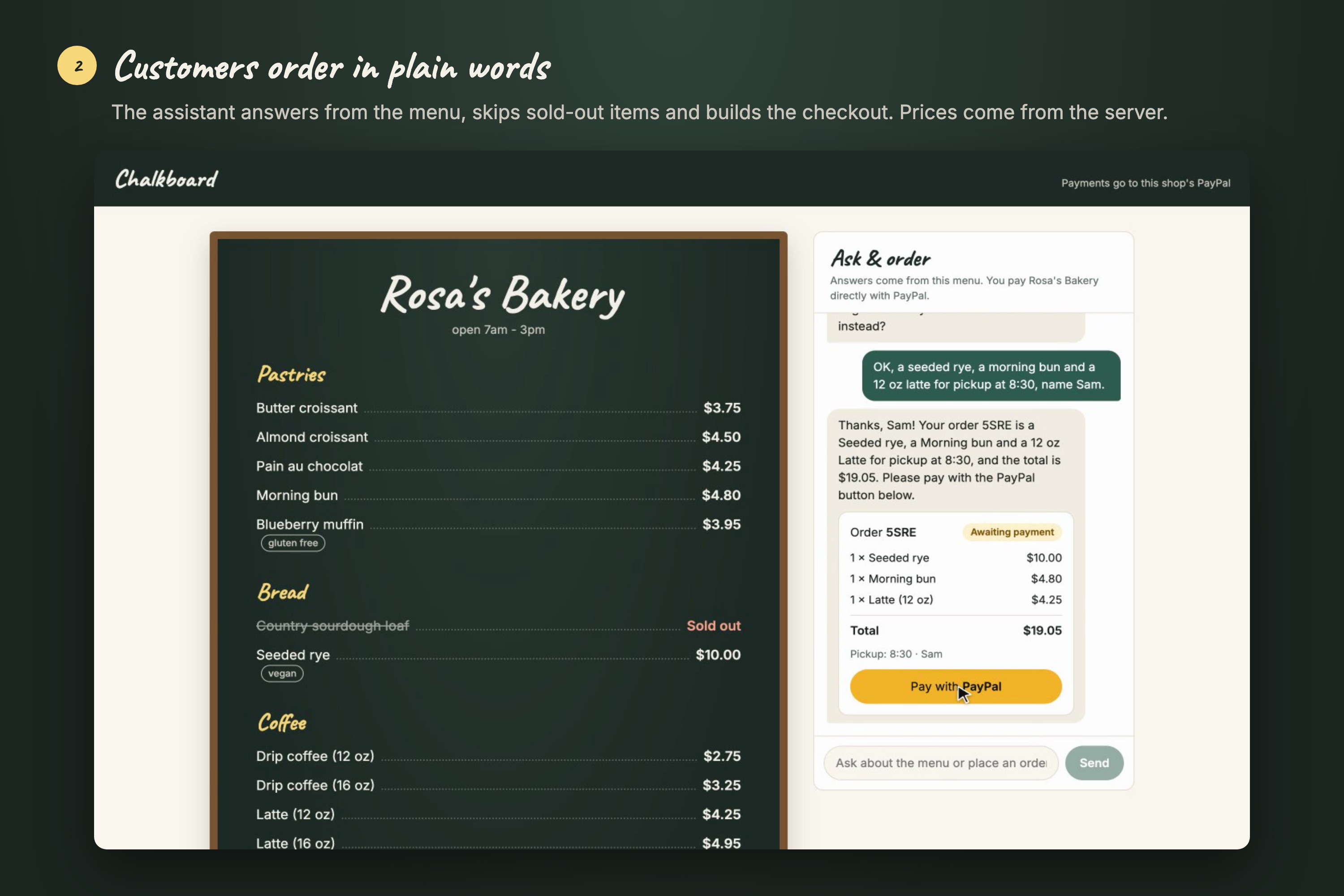
- Order with AI. Customers, or their AI assistants, chat with the shop's assistant: "anything vegan?", "a seeded rye and a 12 oz latte for 8:30". It answers only from the menu, turns down sold-out items with an alternative, and builds a PayPal checkout.
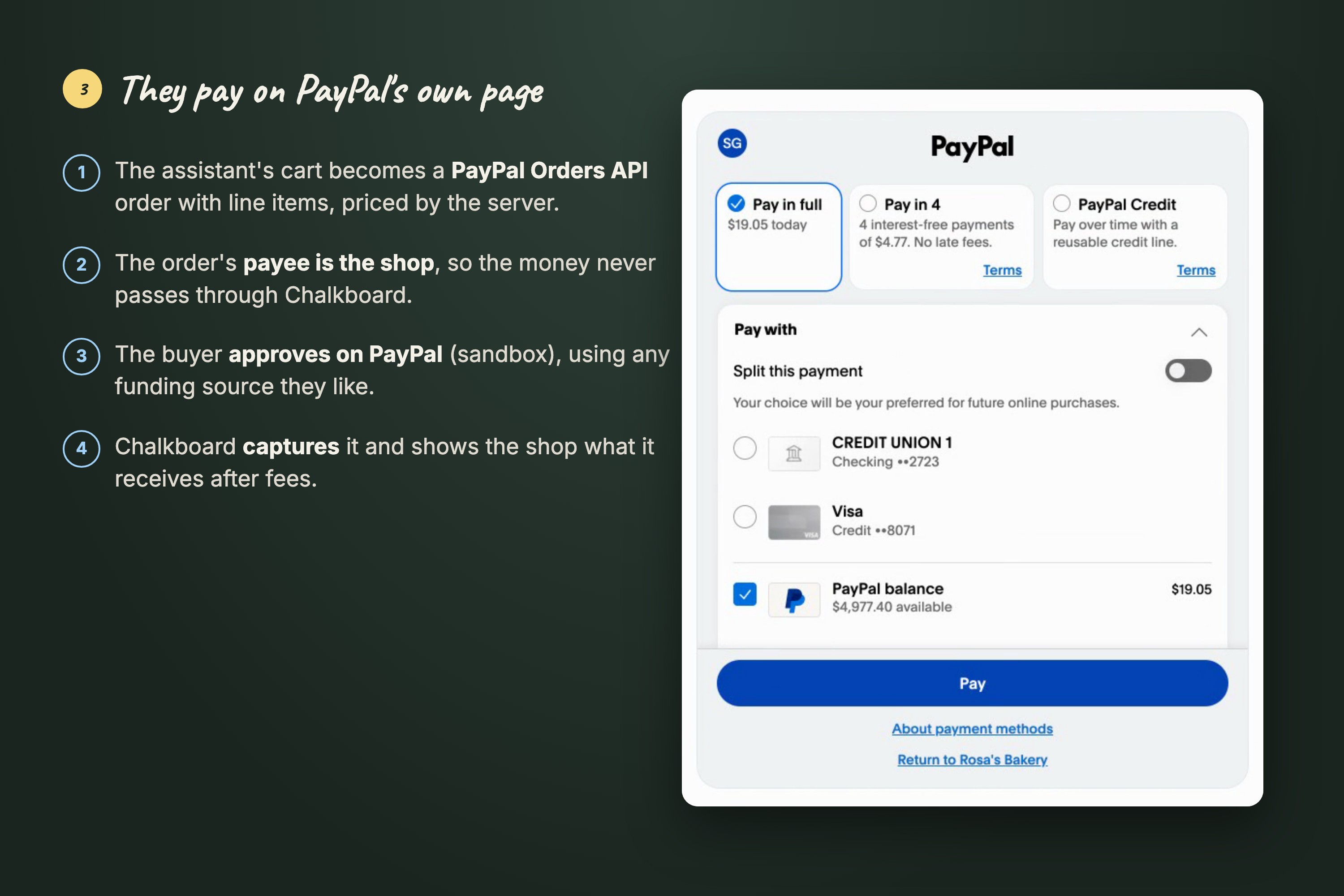
- Pay the shop directly. The buyer approves on PayPal's own page, and the payment is captured into the shop's account, not ours.
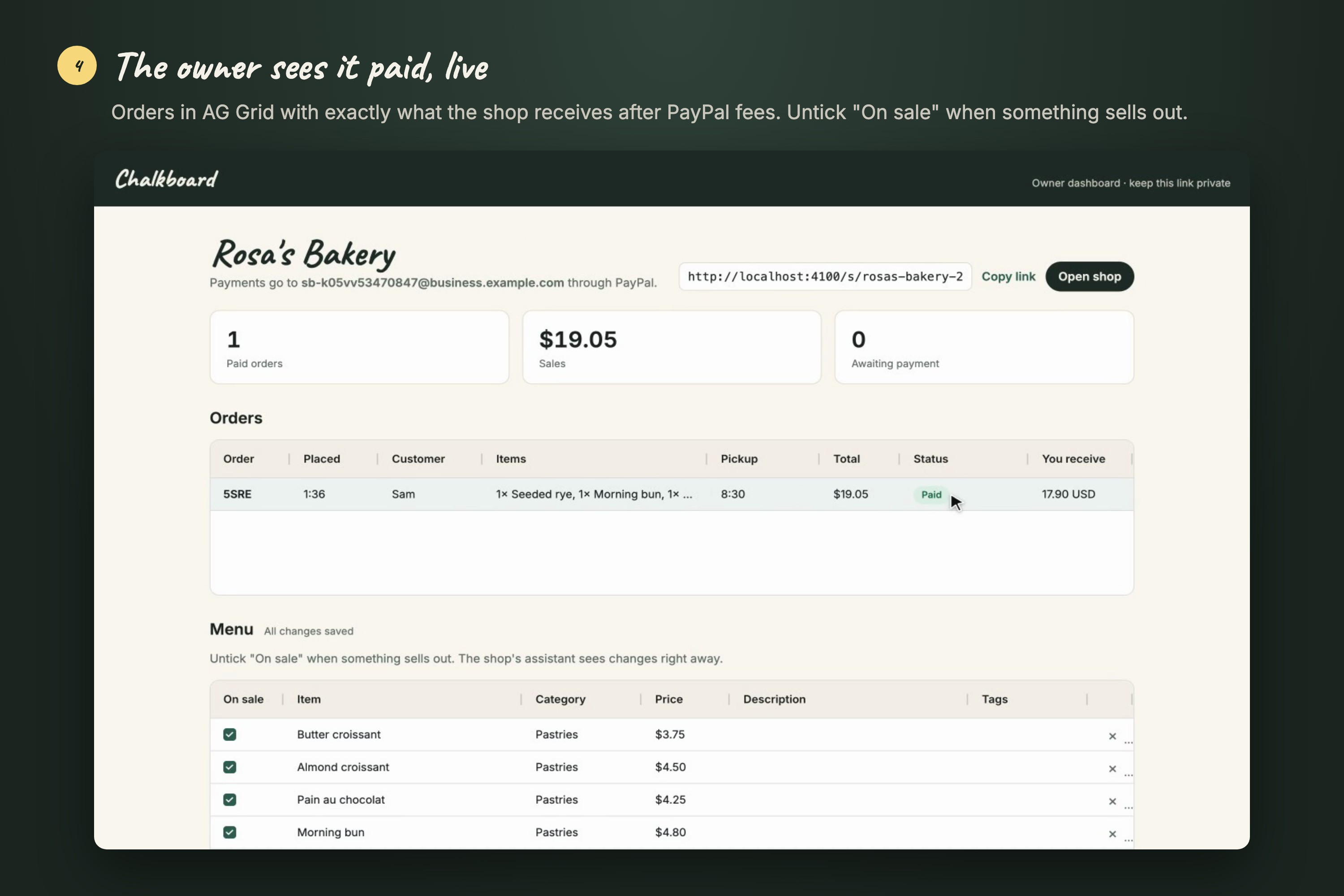
- Owner dashboard. Orders arrive live, showing exactly what the shop receives after PayPal fees. Unticking "On sale" takes an item off the menu immediately.
How we built it
- PayPal Orders API v2 (sandbox):
- Each checkout is an order with line items and an item total, and
payee.email_addressset to the shop, so money goes directly to the merchant. - Buyers approve through PayPal's own page. The server then captures, and reads
seller_receivable_breakdownto show the shop's net after fees. - We wrote an end-to-end check script that proves a sandbox payment lands in a different merchant's account.
- Each checkout is an order with line items and an item total, and
- Claude Opus 5.5:
- Menu reading: vision input with structured outputs against a Zod schema, including per-field uncertainty.
- Ordering assistant: tool use with two strict tools,
create_checkoutandcheck_order, plus prompt caching of the shop's menu.
- AG Grid Community: the menu review grid (highlighted uncertain cells with tooltips, an "On sale" checkbox column) and the live orders table, where the status flashes when a payment arrives.
- React + Vite front end, and an Express server running TypeScript directly on Node.js 24, deployed on Render from a blueprint.
Challenges we ran into
- Keeping the AI away from money. The assistant only chooses item ids and quantities. The server recalculates every price and total from the shop's menu before creating the PayPal order, so no chat message can change what anyone pays.
- Never losing a payment. If a buyer approves and then closes the PayPal window, the order is still captured on the next status check. Captures for the same order are de-duplicated, because the return page and the polling can race each other.
- Sandbox surprises.
- Our first sandbox accounts were set to India, where PayPal doesn't support domestic payments, so we moved to US test accounts.
- We also learned that PayPal only resolves the payee's merchant id at capture, not at order creation, which broke our first version of the payee check.
- Trusting a blurry photo. Chalk smudges, glare and handwriting are real. Rather than guess, the model reports uncertainty per field, and a human confirms it in the grid.
- Free hosting resets its disk. Render's free plan wipes stored files on restart, so the sample shop is re-created at startup and the demo always works.
Accomplishments that we're proud of
- A real end-to-end flow on the live site: menu photo, AI catalog, published shop, AI-built order, PayPal sandbox payment captured into the shop's account, and the order on the owner's dashboard, with the shop's net after fees (for example 8.24 USD on a 9.05 USD order).
- Reading a chalkboard menu takes about 10 seconds, and the smudged price is caught every time we've tried it.
- A clear trust boundary: the AI helps people decide and order, but PayPal and our server handle the money.
What we learned
- How PayPal's Orders API supports paying another account through
payee, and how to read exactly what a merchant receives after fees. - Structured outputs make vision results something you can build a UI on, especially once uncertainty is part of the schema.
- Agentic commerce works best when the agent assembles the cart and the human approves the payment on a trusted page.
What's next for Chalkboard
- An MCP endpoint for every shop (and WebMCP on its page), so assistants like Claude and ChatGPT can browse and order directly.
- PayPal merchant onboarding instead of typing an email, plus webhooks for payment events and refunds.
- Menu updates by message ("out of sourdough today"), multi-language menus, and a real database instead of JSON files.
Built With
- ag-grid
- anthropic
- claude
- express.js
- kokoro
- node.js
- paypal
- playwright
- react
- render
- typescript
- vite
- zod


