-
-
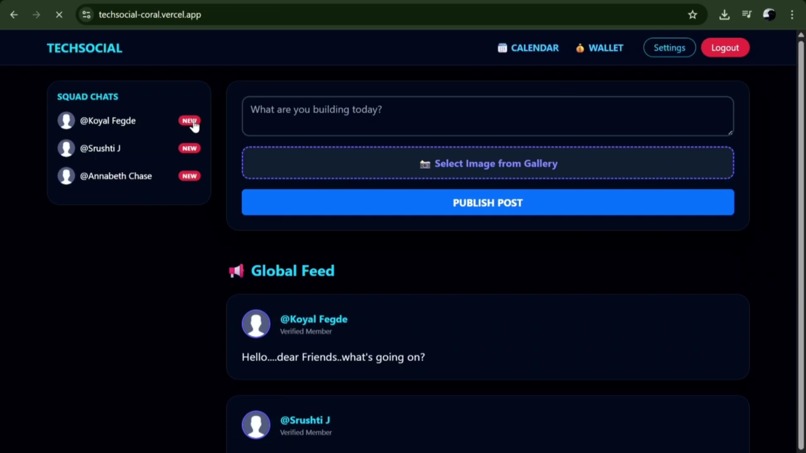
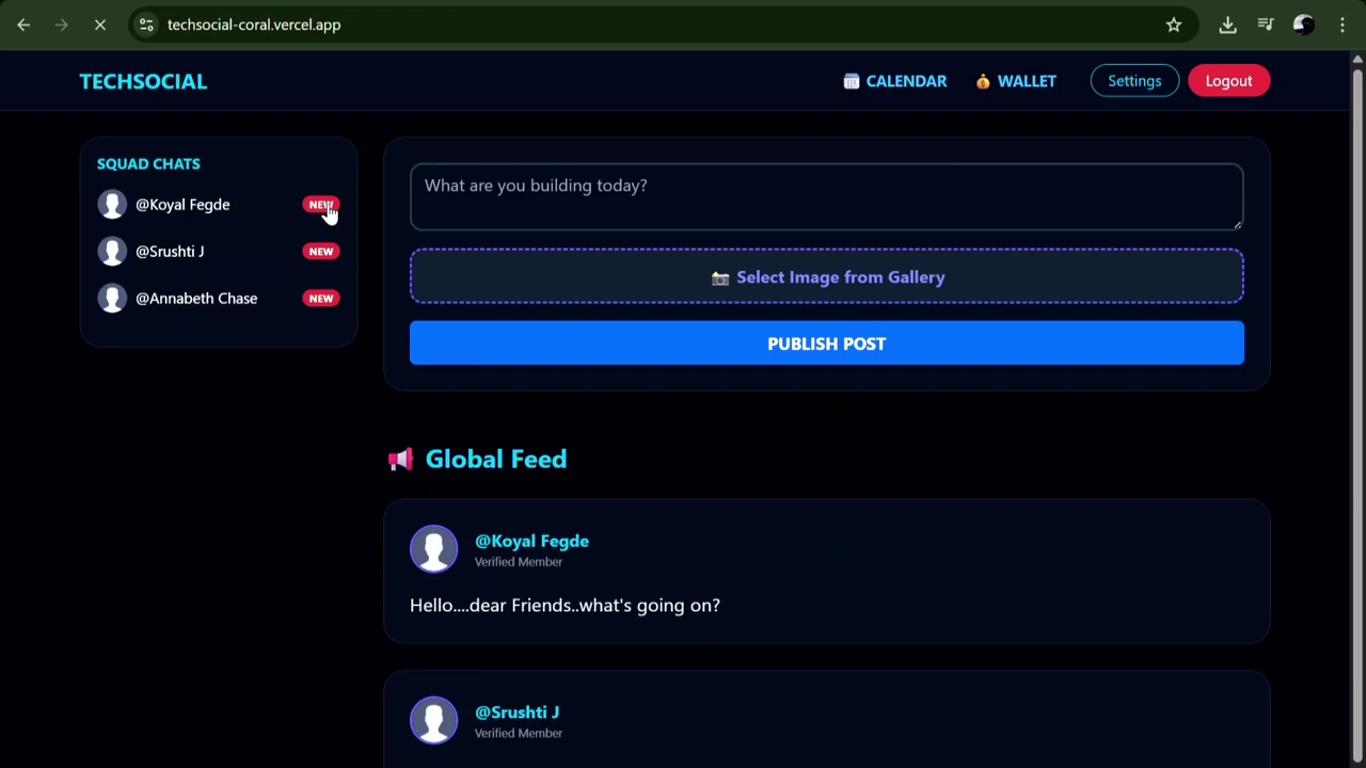
A dynamic, tech-centric ecosystem designed for seamless developer collaboration and knowledge sharing.
-
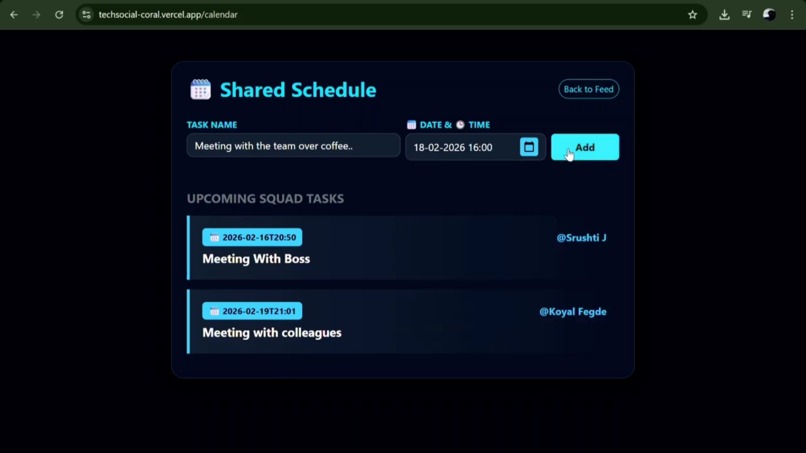
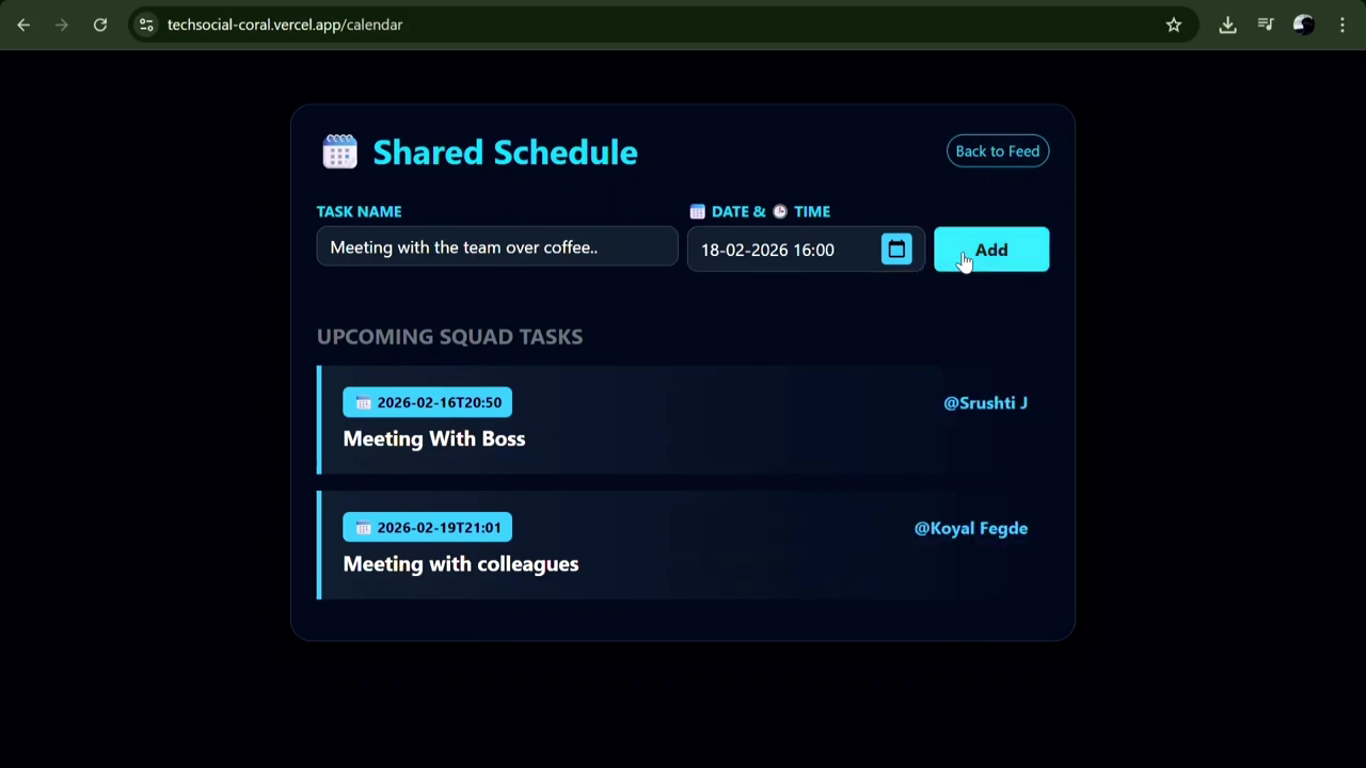
A shared calendar where users can update tasks, meetings, or events by selecting a specific date and time.
-
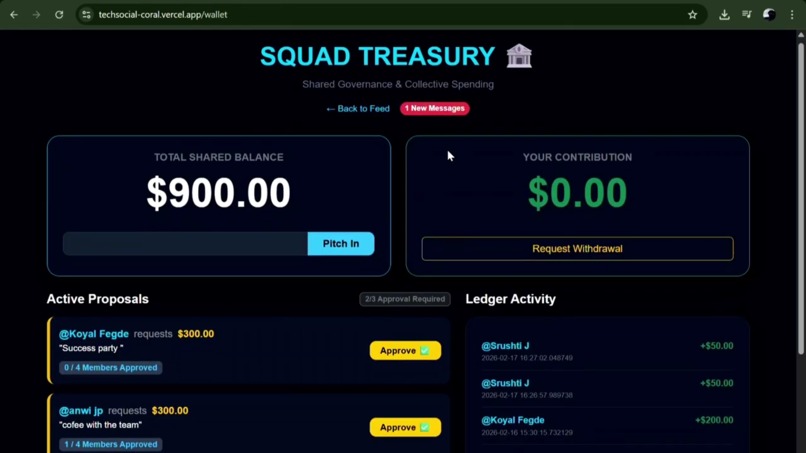
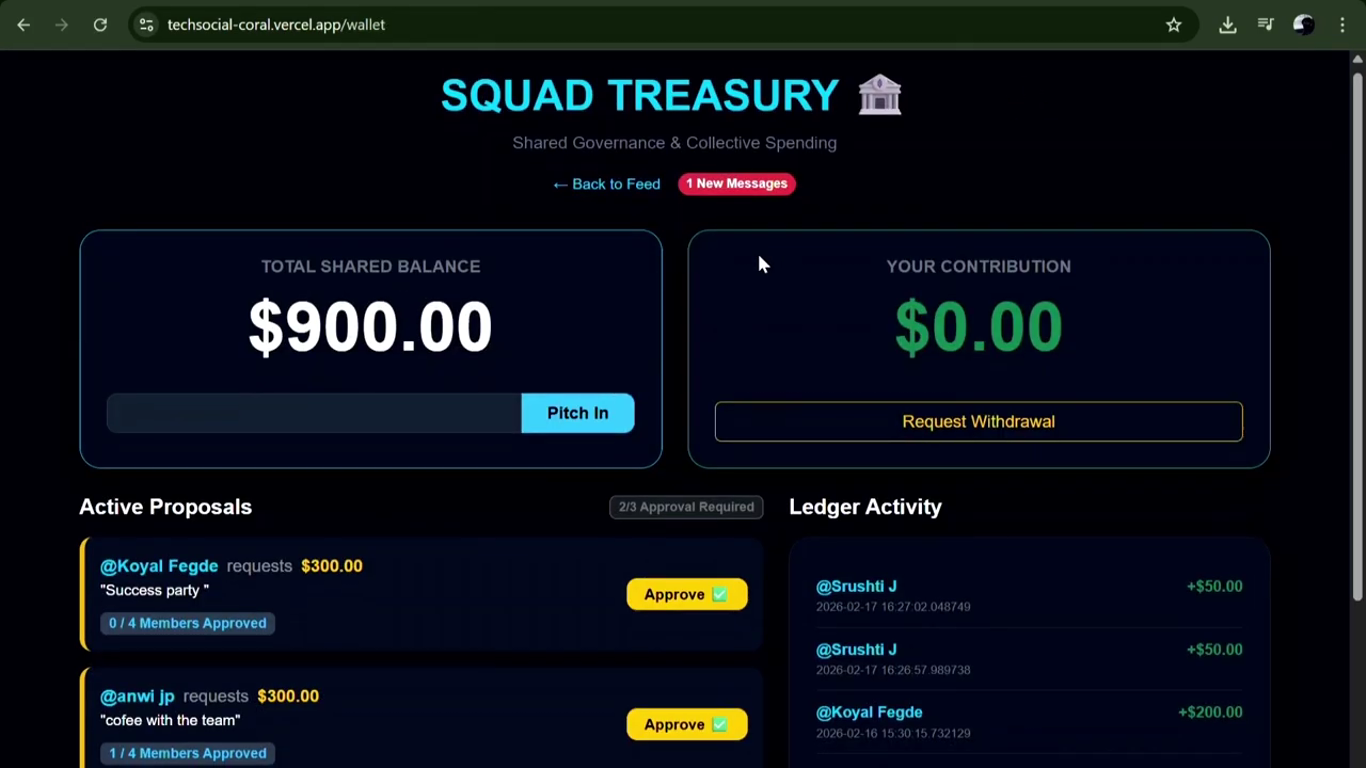
Integrated digital wallets utilizing peer-validated authorization to ensure fund security and integrity.
Inspiration
The "watercooler moment" is dying. With the rise of hybrid and remote work, tech employees—from HR managers to Software Engineers—have lost the casual connection that makes office life bearable. LinkedIn is too formal and corporate; Instagram is too personal. We wanted to build a dedicated "Third Space" for the tech workforce: a place to share your desk setup, vent about Monday morning meetings, celebrate small wins, and feel part of a Squad, regardless of where you are working from.
What it does
Tech_Social is a unified social platform designed to bring the "office vibe" online.
The Squad Feed: A noise-free stream for workplace banter, announcements, and daily updates.
Public Posts: A dedicated visual space (built with our posts upload system) for users to showcase their WFH setups, office views, or team lunches.
Employee Perks Wallet: Wallet the shows total shared balance, shows the amount contributed by each member, allows withdrawal of money by sending in a request, which is based on a voting system that if agreed by 2/3 members then the withdrawal is approved. And shows history of transactions.
Team Calendar:It involves a shared calendar where each user can update the tasks or meetings or events that they have scheduled for any specific day by selecting the date and time ... And everyone will be able to see whatever tasks everyone has for the day... And that way can schedule meetings or lunch breaks etc.
Direct Messaging: Instant, secure communication to keep the team connected beyond email and Slack.
How we built it
How We Built This Website: We built the backend using Flask and managed the data layer using Core Python modules with Raw SQL. This gave me full control over the database queries and kept the application lightweight
We Used Full Stack Approach.
We divided our project into 3 main parts: 1.Frontend → HTML + CSS + Bootstrap 2.Backend → Python (Flask) 3.Database → SQLite Frontend handles design, Backend handles logic, Database stores data.
Login Page (Authentication System)
•We created a login form using HTML. •When user enters username & password, form sends data using POST method. •Backend checks data from database. •If correct → Backend creates a session. •Session helps website remember logged-in user.
Register Page (Account Creation)
•We created a form with username, password, hobbies. •On submit, backend stores this data in SQLite database. •This creates a new user record.
Main Feed page (Core Page)
This is the main working page.
It includes: • Navbar for navigation Squad list (dynamic users) •Post creation form Display of all posts •We used: {% for %} loop to show users and posts dynamically. {{ }} to print data from backend. •Image upload using multipart/form-data. •Backend: Fetches posts from database •Sends them to HTML template •Template displays them dynamically
Edit Profile Page
•User can update username, bio, profile picture. •Backend updates database. •JavaScript is used for live preview of profile picture. •Live preview updates image instantly without refreshing page.
Chat Page (Messaging System)
•Messages stored in database. {% for %} loop displays chat history. •Condition checks who sent message: •If current user → show on right •Else → show on left Form sends new message using POST.
Calendar Page
•Simple page showing events. •Shared Calendar System All users have access to a common calendar. It is visible to every member of the team. • Add Tasks / Meetings / Events Users can select a specific date and time. They can add: Tasks Meetings Project deadlines Lunch breaks Office activities • Real-Time Visibility Whatever event a user adds becomes visible to all other members. This ensures transparency and avoids scheduling conflicts. • Daily View of Activities Members can see what tasks or meetings are planned for any specific day. This helps them plan their time effectively. • Better Coordination Since everyone can see others' schedules, Team members can plan meetings, discussions, or breaks accordingly.
Wallet Page
•Backend sends wallet balance and tokens. •HTML displays using {{ wallet['balance'] }}. •Data is fetched from database. • Shows Total Shared Balance •Displays the total group wallet amount. •Shows Contribution of Each Member •Displays how much money each member contributed to the shared wallet. •Withdrawal Request System (Voting Based) •A member can request to withdraw money. •The request goes to other members. •If 2/3 of members agree, the withdrawal is approved. •If not approved, the request is rejected. •Transaction History Displays full history of: Deposits Contributions Withdrawals Approved or rejected requests.
Challenges we ran into
- The "Stateless" Struggle (Vercel vs. Reality)
- The Challenge: Vercel is "Serverless," meaning it has no permanent memory. If you saved a profile picture to a folder, it would vanish after a few minutes.
- The Solution: Learning to use an external "Brain" (Supabase) to keep data alive even when the server goes to sleep.
- Engineering takeaway: Understanding the difference between Persistent Storage (Database) and Temporary Execution (Server).
- The "Circular Logic" of Notifications
- The Challenge: When a user creates a calendar event, you don't want them to get a notification for their own action.
- The Solution: Implementing the WHERE id != %s logic in SQL to filter the current user out of the "broadcast" loop.
- Engineering takeaway: Learning to handle Conditional Logic in a multi-user environment.
- Preventing the "Double-Vote" Glitch
- The Challenge: In a democratic wallet, a user could theoretically hit the "Vote" button 100 times to force a payout.
- The Solution: Using a Database Constraint (UNIQUE on user_id and request_id). This makes the database "reject" any attempt to vote twice.
- Engineering takeaway: Using the Database as a Security Guard rather than just a storage bin.
- The "Joining" of Data (SQL Joins)
- The Challenge: Posts only store a user_id (a number), but the UI needs a username and a profile_pic.
- The Solution: Mastering the JOIN command to stitch two different tables together in real-time.
- Engineering takeaway: Learning about Data Normalization—storing data once but using it everywhere.
- The "Secret Management" Headache
- The Challenge: How do you connect to Supabase without putting your password in the code for everyone on GitHub to see?
- The Solution: Learning to use Environment Variables (os.environ.get) to hide sensitive keys in Vercel’s secret vault.
- Engineering takeaway: Adopting Security-First Development habits early in your career.
Accomplishments that we're proud of
1. The "Public Posts" Feature: Successfully building a file upload system that lets users share their physical workspace digitally.
2. The "Office" Aesthetic: We moved away from the chaotic look of social media to a sleek, professional, yet fun interface that feels like a modern tech dashboard.
3. Stability: Achieving a crash-free deployment where users can register, post, and chat seamlessly.
4. The "Calendar":Instead of private schedules, we built a transparent team calendar. This feature gives every employee immediate visibility into the "Squad Schedule," allowing them to instantly spot when colleagues are in meetings versus when they are free. This simple visibility eliminates the back-and-forth of scheduling, making it effortless to find overlapping free time for spontaneous project collaboration or social breaks like team lunches.
5. "Shared Wallet":We are proud of designing the Tech Wallet logic to act as a "Squad Fund," where employees can accumulate credits to plan real-world team bonding—like coffee runs, dinners, or team trips—effectively bridging the gap between digital rewards and physical connection.
What we learned
We learned that** community tools require robust backends.** It’s not enough to just display text; you have to manage file permissions, session states, and data relationships to make the experience feel "native." We also learned the importance of user-centric design—building features that actually solve the loneliness of remote work.
What's next for Tech_Social
1. AI-Powered Workplace Wellness Bot: We plan to integrate a smart "Burnout Guard" AI. This bot will analyze the sentiment of team chats and activity levels. If it detects high stress or long working hours, it will automatically prompt employees to take a hydration break, stretch, or disconnect for a few minutes. It aims to prioritize mental health just as much as productivity.
2. Department-Specific Channels (Sector-Based Chat): To better serve diverse teams, we plan to implement Role-Based Access Control (RBAC) for our chat system. Instead of a single global chat, users will be automatically added to dedicated channels based on their department (e.g., #HR-Hangout, #Dev-Team, #Design-Studio, #Sales-Floor). This ensures relevant conversations happen in the right spaces while keeping the main feed open for cross-team culture.
3. Mobile App Integration: Recognizing that employees are often on the move, we aim to develop a Progressive Web App (PWA) or a Native mobile version (React Native). This will allow employees to share updates, check the team calendar, and stay connected with their squad directly from their smartphones during commutes or breaks.
4. Cloud Deployment & Scalability: Currently, TechSocial runs as a local web prototype. Our immediate next step is to deploy the application to the cloud using platforms like AWS, Heroku, or Vercel. This will make the platform accessible to remote teams anywhere in the world, moving from a "localhost" experiment to a live, production-ready tool for real offices.


Log in or sign up for Devpost to join the conversation.