-
-
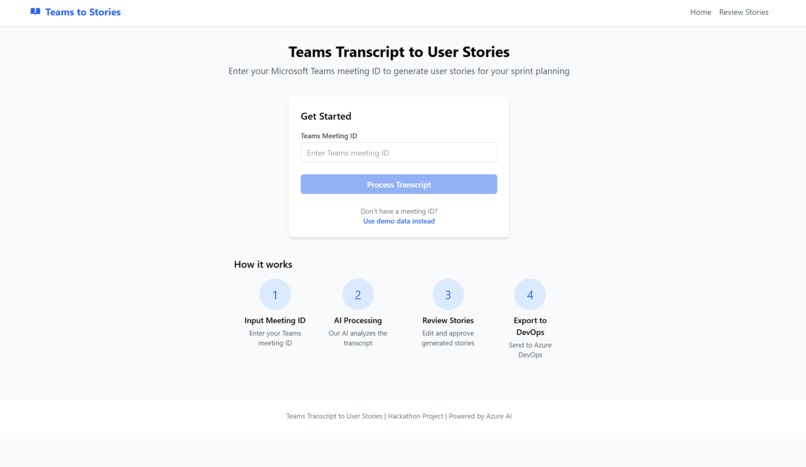
Azure Static WebApp Landing Page
-
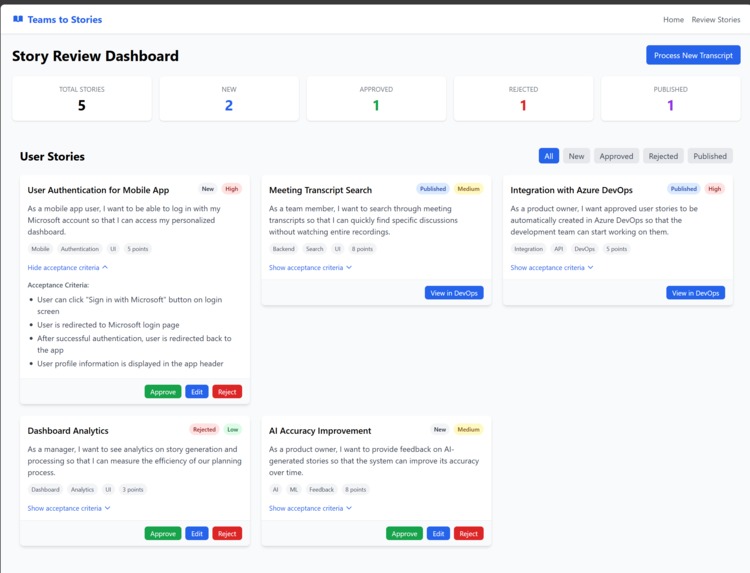
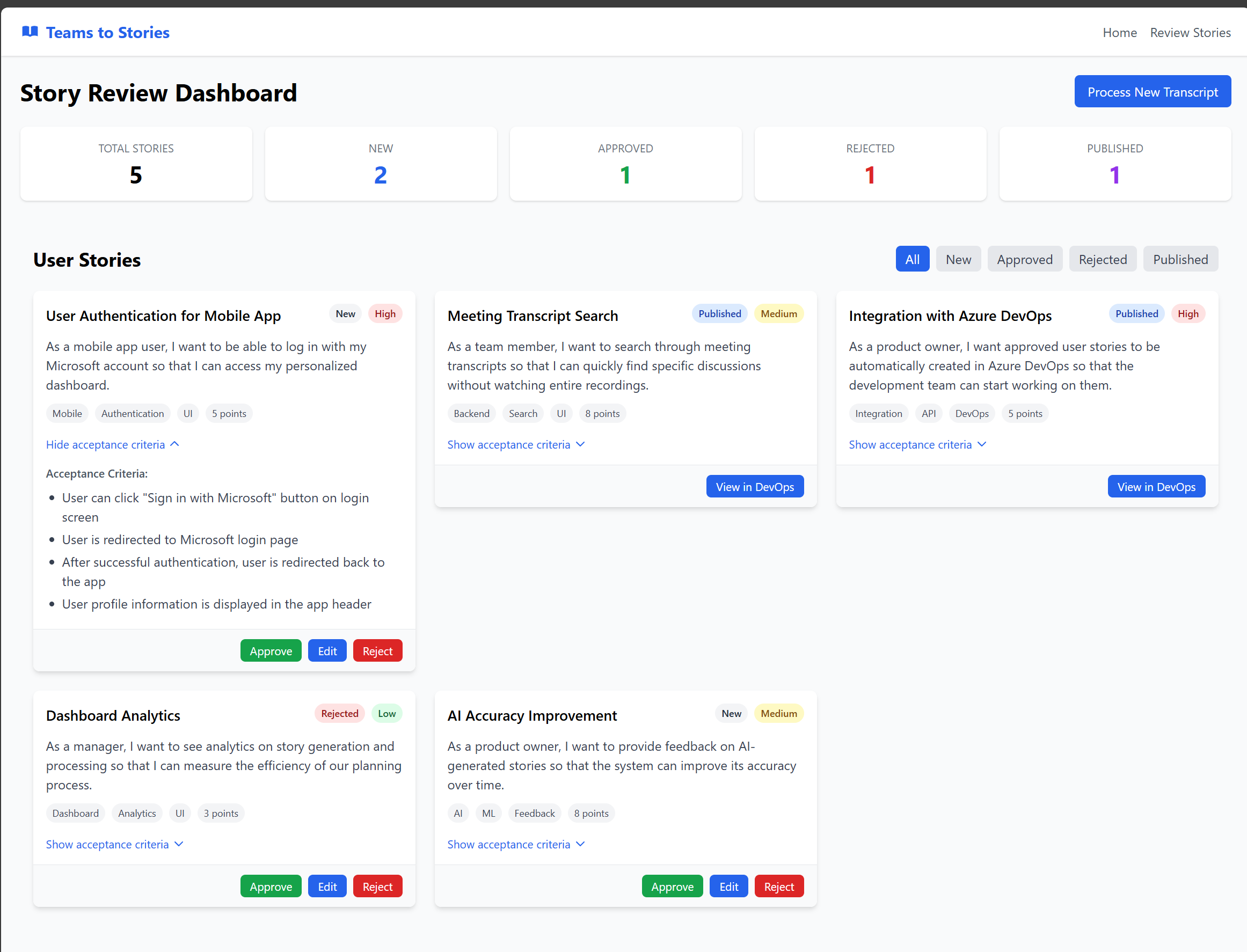
Story Review Dashboard
-
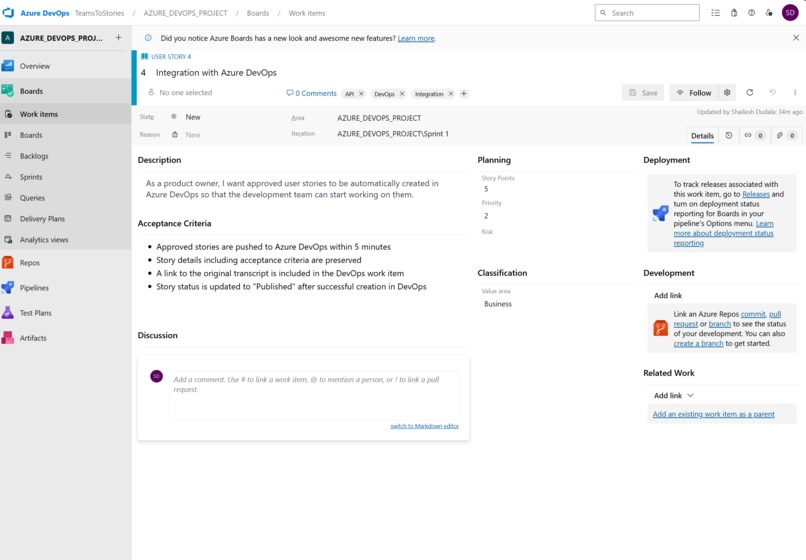
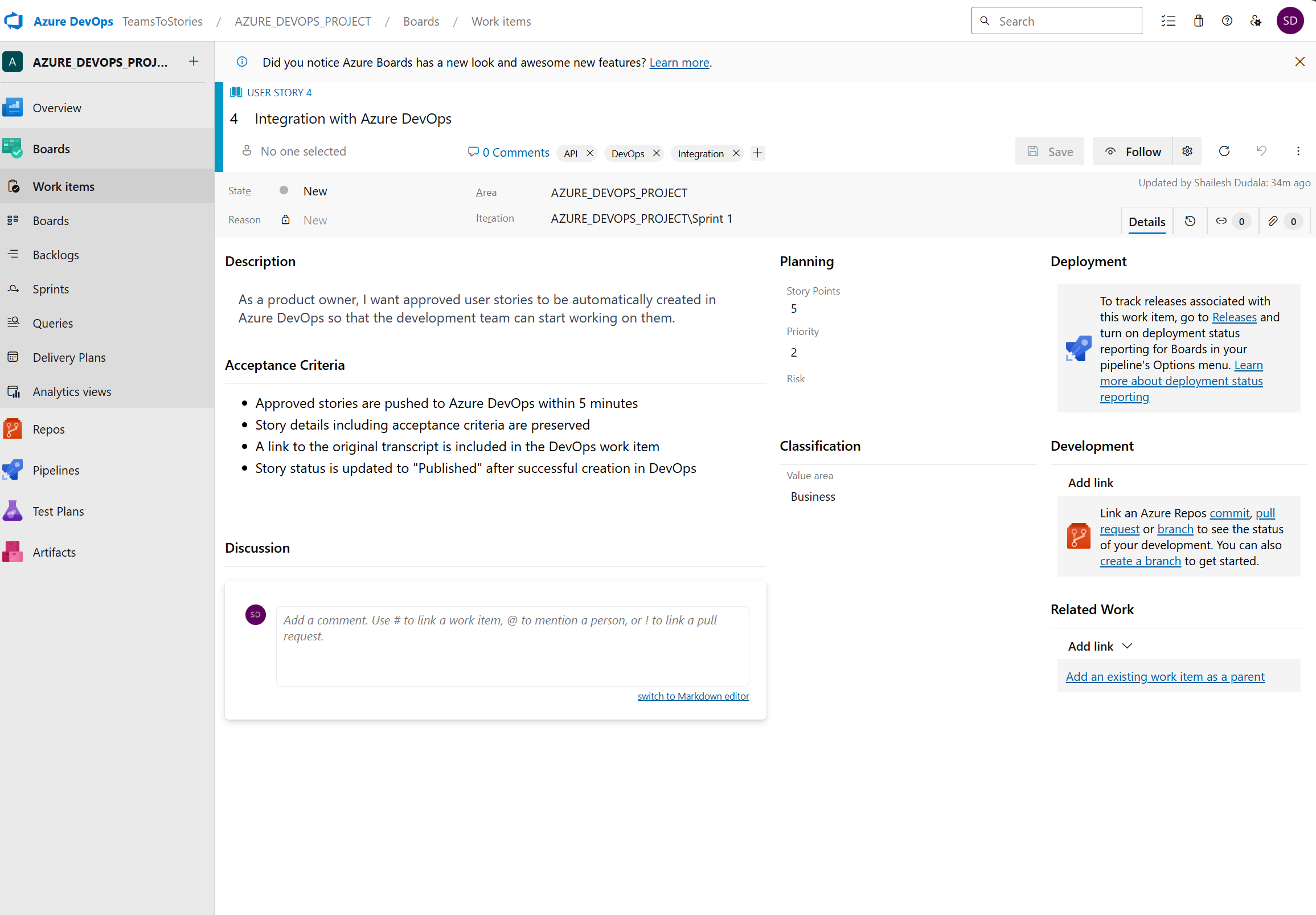
Auto Generated User Story
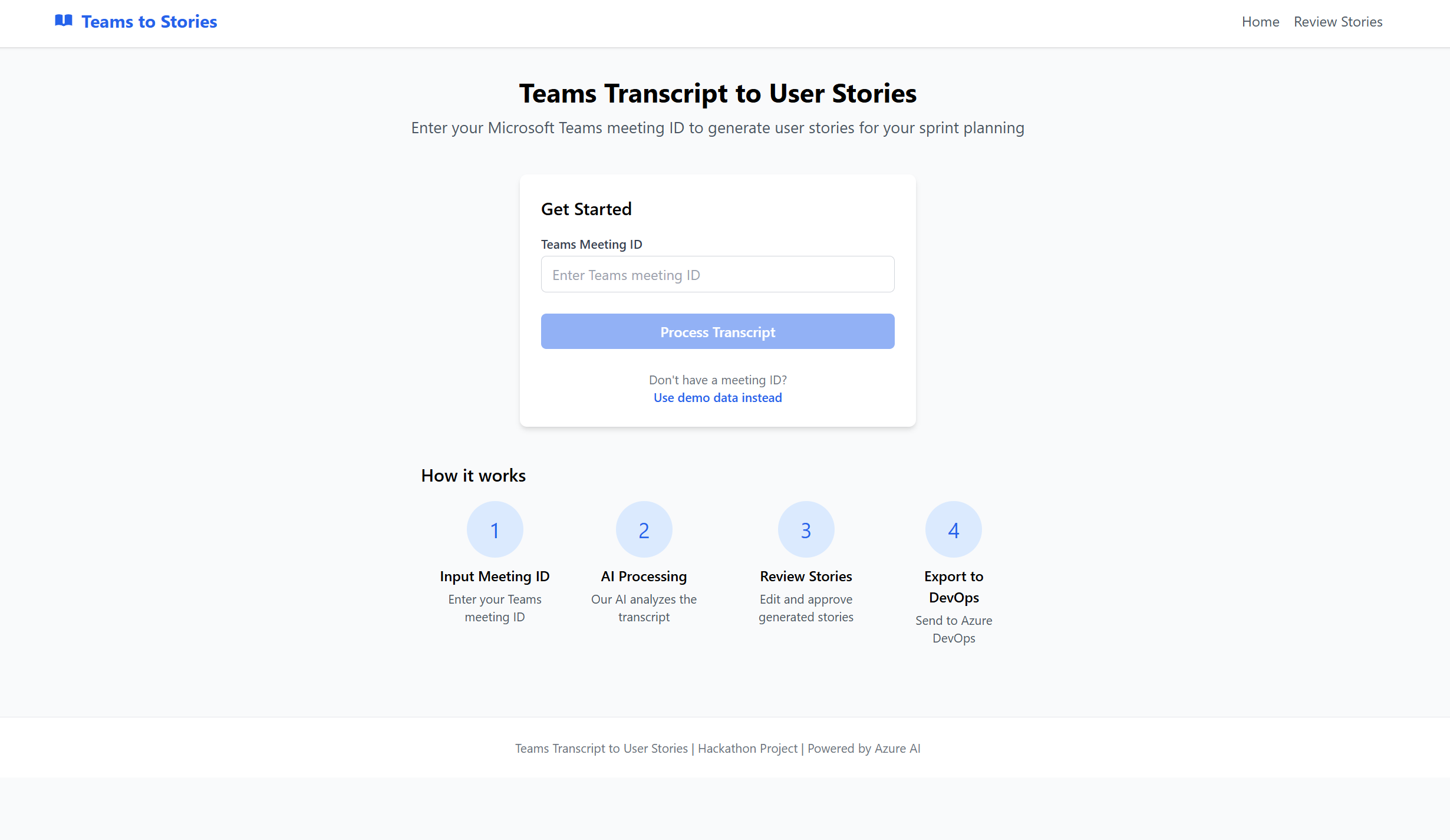
Inspiration
After countless planning meetings where action items were lost in lengthy transcripts or buried in team notes, we realized the process of converting conversations into user stories was both manual and inefficient. We asked: What if we could automate that? That's how Teams to Stories was born — a tool to streamline sprint planning and bring productivity back to developers.
What it does
Teams to Stories automatically transforms Microsoft Teams meeting transcripts into structured, reviewable user stories for Azure DevOps.
Users simply input a Teams meeting ID, and the app:
- Fetches the meeting transcript
- Stores it in Azure Cosmos DB
- Triggers an Azure Function that processes the transcript using Azure OpenAI
- Presents the AI-generated user stories in a clean UI for human review
- Upon approval, exports the stories directly to Azure DevOps Boards
It bridges the gap between discussion and execution — in just minutes.
How we built it
- Frontend: Built with React and hosted on Azure Static Web Apps, the UI allows users to input a Teams meeting ID, review stories, and export them.
- Backend & Pipeline:
- Microsoft Graph API: Fetches meeting transcripts based on the Teams ID.
- Azure Cosmos DB: Stores transcripts and triggers processing via Change Feed.
- Azure Functions: Automatically handle transcript-to-user-story conversion using Azure OpenAI.
- Azure DevOps REST API: Sends approved stories to the user’s sprint backlog.
- AI Layer: We used Azure OpenAI GPT-4 with structured prompts to extract key points and format them into clean, actionable user stories.
- Development Acceleration: GitHub Copilot played a major role in writing API integrations, function triggers, and even UI logic.
Challenges we ran into
- Transcript Access: Integrating with Microsoft Graph API and handling permissions for Teams transcripts was more complex than expected.
- Prompt Engineering: Getting consistent and high-quality user stories required multiple iterations of prompt design and output parsing.
- Change Feed Syncing: Ensuring Cosmos DB triggered the function pipeline without duplication or race conditions took careful testing.
- Balancing Automation and Control: We wanted speed, but also human oversight — adding the review step while keeping UX smooth was key.
Accomplishments that we're proud of
- A fully functional, end-to-end solution that goes from Teams transcript to DevOps backlog with real AI and cloud automation.
- Implemented a human-in-the-loop review interface to ensure quality and safety of generated content.
- Created a scalable architecture using Azure-native tools like Cosmos DB, Functions, and Static Web Apps.
- Used GitHub Copilot productively throughout development, especially for rapid API prototyping and UI logic.
What we learned
- How to build a modular, event-driven system with Cosmos DB Change Feed and Azure Functions.
- The importance of prompt tuning in AI pipelines to produce reliable, useful results.
- How to balance automation and human review in real-world use cases.
- The power of Copilot as a development accelerator and idea generator, especially in a fast-paced hackathon setting.
What's next for Teams Meetings to Azure DevOps User Stories
We’re excited about taking Teams to Stories even further:
- Microsoft Teams App Integration: Users will soon be able to trigger story generation from directly inside Teams using a bot or meeting app.
- Multiple Meeting Support: Extend the app to batch process and manage user stories across multiple meetings.
- Custom AI Models: Let teams train models on their own backlog history for even more personalized story formatting.
- Slack + Jira Support: Expand the ecosystem to support more collaboration tools beyond Teams and Azure DevOps.
- Analytics Dashboard: Show metrics like story turnaround time, coverage, and team engagement from meeting to sprint.
Here’s a well-structured "Built With" section that covers your full stack and aligns with your architecture:
🛠️ Built With
Frontend
- React – for building the responsive web UI
- Azure Static Web Apps – for hosting the frontend with seamless CI/CD
Backend & Serverless Pipeline
- Azure Functions – to orchestrate the transcript processing and AI generation
- Azure Cosmos DB – to store transcripts and trigger downstream processing via Change Feed
- Azure OpenAI Service (GPT-4) – to convert transcripts into structured, high-quality user stories
- Microsoft Graph API – to fetch Teams meeting transcripts using the meeting ID
- Azure DevOps REST API – to export reviewed stories directly into the team's backlog
AI & Productivity
- GitHub Copilot – as our AI pair programmer to speed up development and integrate Azure services more efficiently
- Prompt engineering – to fine-tune the output quality of user stories from OpenAI
Other Tools & Services
- JavaScript & TypeScript – primary languages for both frontend and backend code
- HTML/CSS – for UI layout and styling
- Visual Studio Code – primary development environment
- GitHub – for version control and CI/CD pipelines (used with Azure Static Web Apps)
🛠️ Built With
Frontend
- Angular – for building the responsive, component-based web UI
- Azure Static Web Apps – for hosting the frontend with seamless GitHub integration and CI/CD
- Angular – for building the responsive, component-based web UI
Backend & Serverless Pipeline
- Azure Functions – to handle transcript processing and trigger AI generation
- Azure Cosmos DB – to store transcripts and trigger downstream processing via Change Feed
- Azure OpenAI Service (GPT-4) – to transform transcripts into structured agile user stories
- Microsoft Graph API – to retrieve Teams meeting transcripts using the meeting ID
- Azure DevOps REST API – to publish approved stories directly to Azure DevOps Boards
AI & Productivity
- GitHub Copilot – used extensively to write functions, integrate APIs, and build Angular components quickly
- Prompt engineering – to fine-tune GPT responses into high-quality, usable user stories
Other Tools & Services
- TypeScript – primary language for both frontend and backend
- HTML/CSS – for structure and styling of the UI
- Visual Studio Code – our main development environment
- GitHub – for version control, project collaboration, and CI/CD
Built With
- angular.js
- azure
- copilot
- cosmosdb
- devops
- javascript
- openai
- python


Log in or sign up for Devpost to join the conversation.