Inspiration
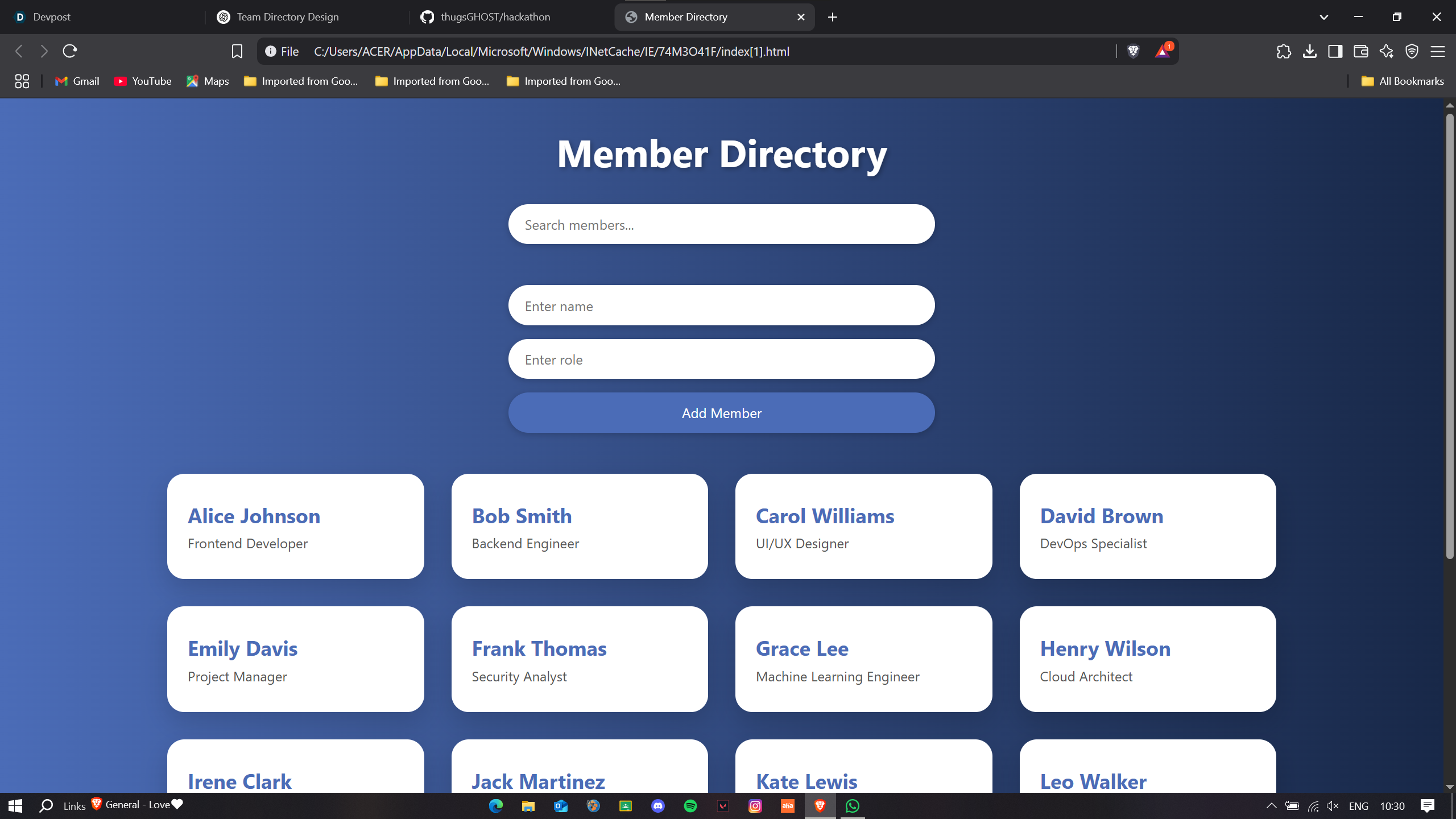
I’ve always appreciated clean, user-friendly interfaces that help people find what they need quickly. The idea of building a Member Directory came from noticing how often teams grow and evolve, and how valuable it is to have a centralized, visually appealing directory where you can learn who’s who at a glance. I wanted to build something simple yet professional, that could scale with a team and be used in different environments—like startups, clubs, or even class rosters.
What it does
This project helped me strengthen my skills in:
Responsive web design using CSS Grid and media queries
Enhancing user experience with animations and hover effects
DOM manipulation with JavaScript for dynamic interactivity
Structuring clean, scalable HTML/CSS for real-world use
I also got more comfortable with balancing visual aesthetics with functional design, which is something I always aim to improve.
How we built it
I started with basic HTML structure to define the layout of the directory and input fields.
Then I added CSS to bring the visual design to life, focusing on a modern gradient background, rounded cards, and subtle animations for a polished look.
For interactivity, I wrote JavaScript functions:
One for live filtering members by name or role.
Another for adding new members dynamically into the directory without needing to reload the page.
Challenges we ran into
At first, managing the grid layout for responsiveness across screen sizes was tricky—especially making sure it looked good on both desktops and mobile.
I also had a small bug in the JavaScript addMember() function (I forgot to use backticks in the template literal at first!), which caused HTML not to render properly when adding new members.
Fine-tuning the visual balance—colors, padding, text sizing—was more time-consuming than expected but totally worth the end result.
Accomplishments that we're proud of
Creating a visually appealing and functional UI from scratch without relying on frameworks or libraries.
Making the entire experience dynamic—users can add team members on the fly, and the search works in real time.
Building a design that’s fully responsive and looks great across all devices.
Implementing a smooth user experience with hover effects, clean layout, and intuitive input handling.
Keeping the codebase clean and maintainable, using CSS variables and semantic HTML.
What we learned
The power of CSS Grid and Flexbox for creating adaptive, card-based layouts.
How to use vanilla JavaScript effectively to manipulate the DOM and add interactivity.
The importance of user-centric design—small visual touches (like hover glows and button transitions) make a big difference.
How to debug common issues with innerHTML, input handling, and layout responsiveness.
The value of keeping code organized and scalable, especially when adding new features later on.
What's next for TeamBoard
Persistent storage using localStorage or integrating with a backend (like Firebase or a simple Node.js API) so member data doesn’t disappear on refresh.
Adding edit and delete options for each member card to manage the directory more fully.
Allowing users to upload profile pictures for each member for a more personalized experience.
Creating filters and categories (e.g., departments or skill tags) for more advanced search functionality.
Packaging TeamBoard into a reusable component or simple CMS so it can be embedded in different websites.


Log in or sign up for Devpost to join the conversation.