
Inspiration
Let’s face it - the McGill website is not the easiest to navigate. Whether you’re an incoming student trying to find out what courses are involved with a certain degree, or a U4 student trying to figure out what courses you need in order to graduate, we recognize that this can be challenging and overwhelming. That’s why we have created a web app that will help you plan your degree by organizing the courses you need to take based on the courses you have already taken and each course’s prerequisites.
What it does
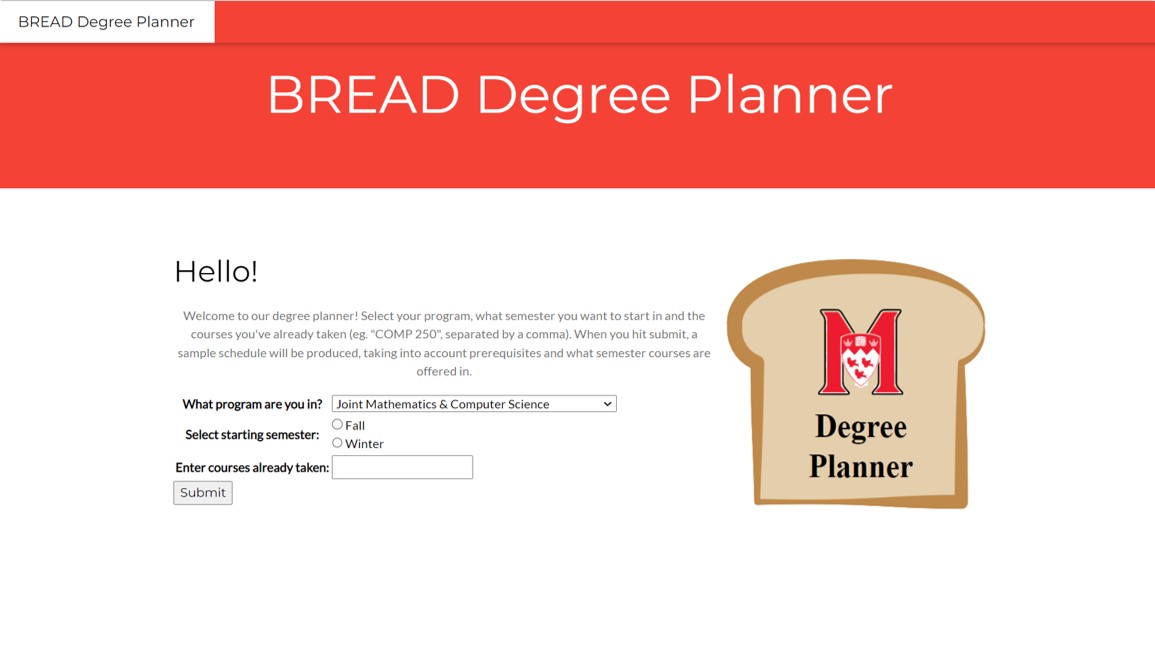
The Bread Degree Planner requires some inputs from the user before running. First, select your degree in the drop down menu. Then, indicate which semester you plan on starting from. This meant to help organize your schedule based on when courses are offered; some are available only in the fall, and vice versa. Finally, input a list of all the courses in your degree that you have taken thus far. This is to determine which courses you have left, and also what prerequisites you have already fulfilled. When you finish inputting the required data, press the submit button and a table will be generated at the bottom of the page. It is organized in columns - a course in a certain column has a prerequisite in the column directly to the left of it, and the courses in the first column are the ones you are eligible to take as of now. Each course also shows its corresponding prerequisites.
How we built it
First, we had to get data on all the programs and their courses, as well as pre- and co-requisites. To do this, we used web scraping to gather data off of the McGill webpages, using ArrayFields to format the information we gathered for use later on. We then used a tree structure to sort the courses based on their dependencies. The next step was to implement the front end. Using a Django HTML template, we created our basic webpage layout and implemented the fields required to gather the required information, namely the user’s program and the courses they have already taken, using a drop down menu and a text field. We used the program name to scrape the necessary data and create an ordered tree, and then parsed the inputted string for courses so we could remove those. Finally, we got the ordered courses as a list of lists, and passed the lists to the HTML files to format on the webpage in columns.
Challenges we ran into
Scraping the data ended up being much harder than we had anticipated - the reason for this was because, as previously mentioned, the McGill webpage is not very user friendly. It seemed like every program page was formatted differently - for example, sometimes it was “Prerequisite”, sometimes “Prerequisites” and sometimes even “Pre/Co-requisites”. Because of this we had to restructure the code countless times, and even had to hard code some requirements for certain degrees because they weren’t able to be generalized. Once that was done, we stored the values in a database. This is where we ran into one of our biggest challenges of the weekend - how could we create a shared database that we could all access individually? This took us hours to resolve, as once we decided to use PostgreSQL, we had to actually figure out how to set it up - which was a lot harder than it looked. Finally, we struggled with the front end development of our project, as none of us had any prior experience working on front end graphics. We had chosen Django because it supposedly limited the need for HTML and Javascript, but we ended up having to use it anyway. The most challenging part was figuring out how to input our python variable and functions into the HTML script.
Accomplishments that we're proud of
This is the first time any of us have ever done full stack development, so this was definitely a steep learning curve. We also used Django and PostgreSQL, which were brand new for us too. We’re super proud of how hard we worked with something we had to learn basically from scratch this weekend, and that we have something to show for it!
What we learned
Our team decided to really challenge ourselves for this hackathon, so pretty much everything we did we learned this weekend. Although we had all used python before, this was our first time using the Django framework, and all its features. Again, we have never done full stack and front end development before, which also meant the first time using HTML for some. We learned how to scrape data from the web and store it in a database. Finally, we learned how to manage and share open source databases, specifically using PostgreSQL.
What's next for Team Bread - Degree Planner
We believe that this project has a lot of potential, and there are so many other features we could implement given the time. We only had time to scrape data for a handful of programs, so ideally in the future we could implement them all. In addition, we initially had the intention of creating a complete schedule, taking into account the number of credits per semester, ensuring the correct prerequisites and taking into account when a section of each course is run (fall/winter semesters). Unfortunately we didn’t have time to implement all of this over the course of this hackathon, however we can definitely see this coming in the future.
Link to github: https://github.com/rianadutta/codejam


Log in or sign up for Devpost to join the conversation.