Summary
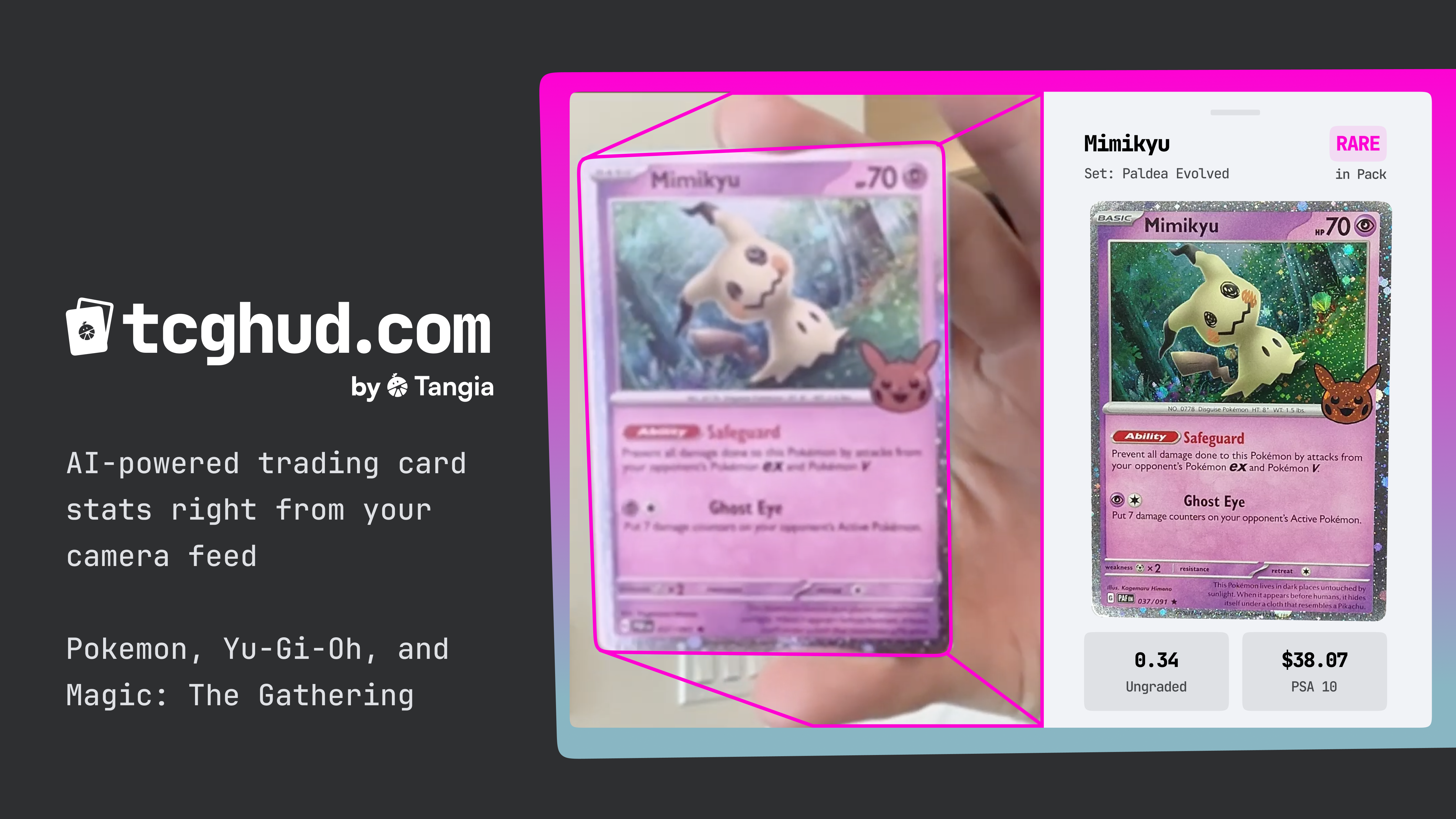
tcghud is an experimental AI tool for streamers to provide a real-time heads-up-display of trading card pack openings on stream.
It runs a custom-trained AI model right in the browser, trained on over 200k Pokemon, Yu-Gi-Oh, and Magic: The Gathering cards to identify and track cards shown in the camera feed.
It then ships a screenshot of the detected card to our API, and does a similarity search among those 200k cards in under 1 second. If found, it returns the results to the browser, and renders them in a drawer with the respective information (set, ungraded price, PSA 10 price, etc.)
Streamers can login and use the provided overlay link to connect the HUD to their streaming software via a browser source (demo: https://youtu.be/NQQ10myZnhs). This allows them to sync the browser session to their streaming software, so they can show stream the HUD as well without having to set up screen recording of the browser.
Mobile support is coming soon (if it’s not already released by the time you read this, since I probably can’t edit this easily :P). Mobile support now works :)
Motivation
The recent wave of TCG Card Shop Simulator being streamed served as a major inspiration for this work.
There’s a clear pattern in TCG increasing in popularity, and TCG Card Shop Simulator and the attention of larger influencers will certainly fuel that.
However, IRL pack openings lack the real time price stats that the video game world can offer.
tcghud enables this to provide real-time stats on cards shown to the camera.
Building
The development process looked roughly like:
- Build a dataset of over 200k cards with high quality images and price data from various public sources
- Create a synthetic dataset with random rotation, random linear blur (to account for motion blur in camera), many other random micro-adjustments, and superimpose on random background images from the unsplash 25k dataset.
- Train a custom YOLO11 model on the synthetic dataset using A100 80GB GPU
- Build an embeddings database of the entire raw dataset across 1000 cores in parallel. CPU cores were more cost-effective than GPUs for this task
- Build an API that will take in an image, downsample it, generate embeddings, and run nearest neighbor search against the custom dataset
- Build a (Remix) website that:
- Can run the custom YOLO11 model in the browser with tensor.js (which involved transpiling the model weights)
- Custom auth with Twitch and Google
- Coordinating disjoint browsers in real time to enable syncing with a separate browser source overlay
- Basic admin management like deleting accounts and rolling overlay keys
- Caching of static assets (like model weights) so that our egress bill does go turbo-nuclear
Without the randomized micro “corruption” of the images, the model would only be able to identify cards with perfectly still and vertical images, as we found in our first iterations of the model. Once we added rotation, blur, and other mutations to the training data, the model became far more robust in it’s ability to work with various cameras and environments.
For Streamers
After logging in from the top right menu, you will be given an overlay link.
This overlay can be added to your streaming software like OBS or Streamlabs, and syncs the card information popup with your active browser.
Future Work
It’s clear that the embeddings model used has bad training data when it comes to Japanese characters. It overly-focuses on them, but with such small characters it poorly matches them, creating seemingly random matches.
With English cards, the performance is much higher.
Lighting conditions also play an extreme role in accuracy.
For example, if a streaming setup has a blue-tint to the lighting, card matching accuracy drops extremely quickly. Our dataset could easily be adjusted for this by introducing synthetic hues to cards such that we can match on hued(?) cards. Another option is to try and color-balance the card at search time, which might be best done with an additional custom AI model solely trained on predicting actual card colors.
Mobile support is also another great future item. Currently, the mobile browser provisions far less memory than desktop browsers, meaning that even with a 5.5MB custom model loaded (expands to 11MB), the mobile browser rejects it for being too large. Training a smaller model is likely off the table, as performance would likely drop at least linearly (if not exponentially). We’re still working on how to add this to mobile browsers. A naive alternative is to make a custom mobile app as a companion.
The synthetic dataset could be further improved by adding additional adjustments like 3D warping to better detect cards that are not held flat, and then 3D manipulate the captured frame to re-flatten it with simple document analysis models.
Built With
- a100
- ai
- gpus
- python
- remix
- yolo11


Log in or sign up for Devpost to join the conversation.