-
-
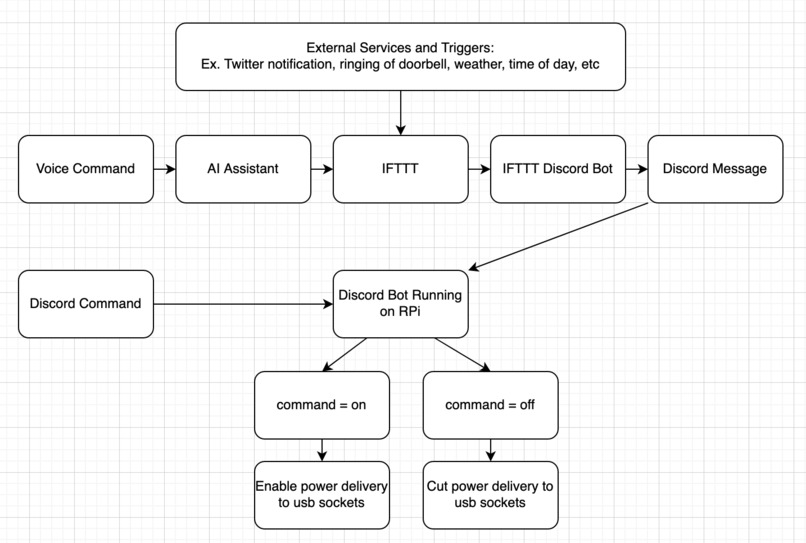
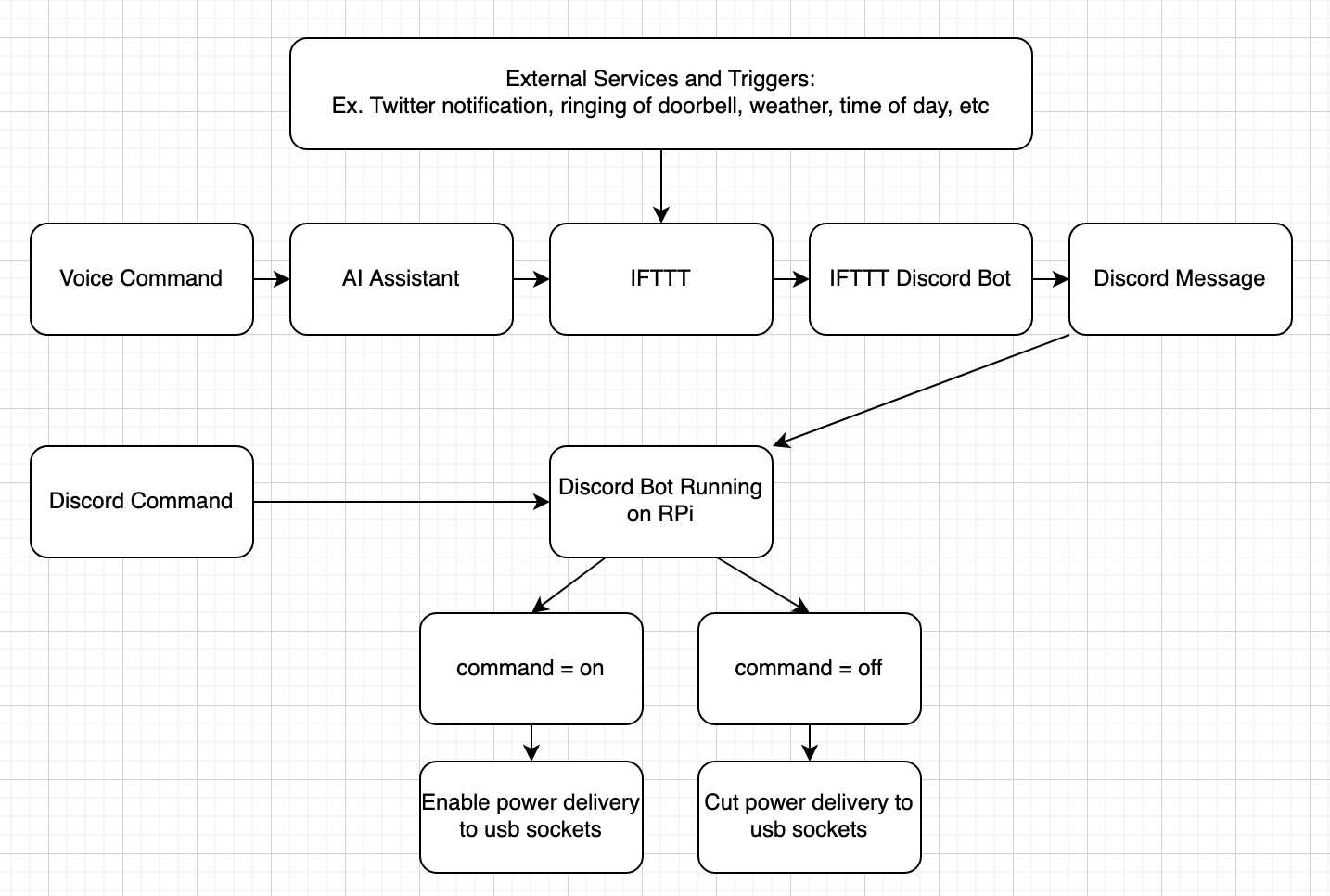
Diagram of how information flows.
Inspiration
For this hackathon, I decided to go outside of my comfort zone and build that utilized real-world hardware.
In my room I have some string lights that go all around the the top of the wall and provide ambient light. A major problem with these lights however is the fact that they essentially leds on wire and require the user to plug them in and out in order to turn them on and off. This is very annoying.
Since I am a college student and don’t want to waste money on needless products, I decided to use a raspberry pi that I had lying around to make my room lights smart and create something that I will continue to use after this hackathon ends.
What it does
I created a framework for integrating usb powered devices such as lights and desk fans with a raspberry pi to make them "smart" and controllable from external sources such as a voice assistant.
How we built it
I used IFTTT and the python wrapper for the discord api to act as the in-between for my google assistant and raspberry pi. Commands such as turning my room lights on and off were routed in a long daisy chain to the pi.
Here’s a quick run down of how it works. Step 1: I state a voice command. Step 2: The command is interpreted by the smart assistant and sent to IFTTT Step 3: IFTTT sends the command to discord using its discord bot Step 4: My discord bot running on the PI reads the command from discord Step 5: Depending on the command, the PI will either enable or disable power delivery to the usb sockets in order to turn and off the lights.
Challenges we ran into
Setting up the raspberry pi on the university's wifi network was a massive pain since the university uses WPA2 for its network and incorporates features such as dual authentication. The raspberry pi does not support WPA2 by default. I had to register my mac address with the university and manually edit configuration files in order to connect to the internet.
In addition, since the universities wifi network is so expansive, it was extremely hard to successfully get the IP address of the pi in order to ssh into it. Since I don't have a monitor/keyboard/mouse with me that I can use to graphically get the IP of the pi, I had to resort to having the PI send me its IP address through a discord message in order to successfully be able to ssh into it. Setting a static IP or using the pi's hostname did not work for me (probably due to the university's wifi).
Accomplishments that we're proud of
I'm proud of how reliable the system I created it is. It hasn't failed a single time even though I'm relying on a bunch of in between services. I am also proud of how little lag there is between the voice command and the lights turning off. My system's execution time is almost the exact same as the execution time of an actual smart home product.
What we learned
I learned a lot about networking and wifi configuration during this time. The biggest challenge I had to overcome was setting up the pi and I learned a lot while tackling that issue. I also definitely improved my skills in using the terminal fast and efficiently.
What's next for Smart Pi
This idea can be easily extended upon by allowing for multiple input and output methods. Any usb powered device such as a desk fan or similar items can also be turned smart using my code and a raspberry pi. In addition, more input methods can be added using IFTTT such as using the lights to indicate the weather in the morning, blinking the lights when someone rings your doorbell, and much much more.
I have created something that is practical and that I will actually continue to use. I am now able to turn of the lights from the comfort of my own bed!
Built With
- discord.py
- ifttt
- python
- raspberry-pi


Log in or sign up for Devpost to join the conversation.