-
-
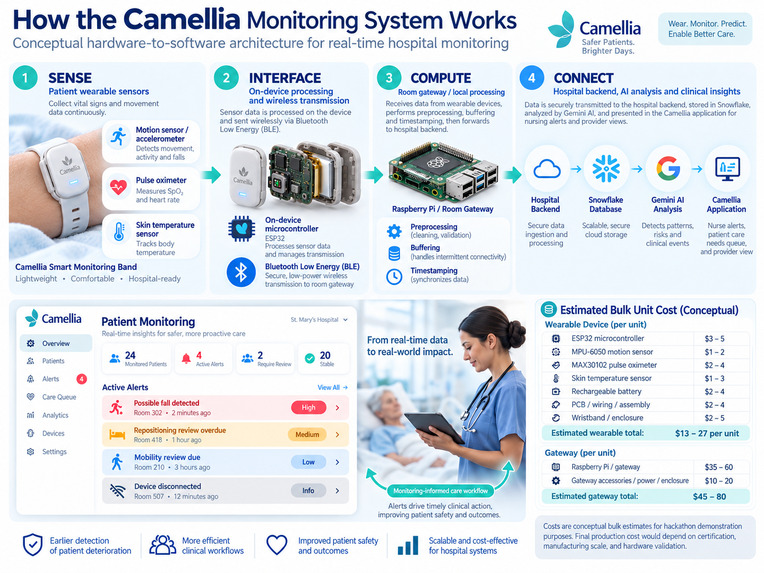
Patient vital report wrist band product chart
-
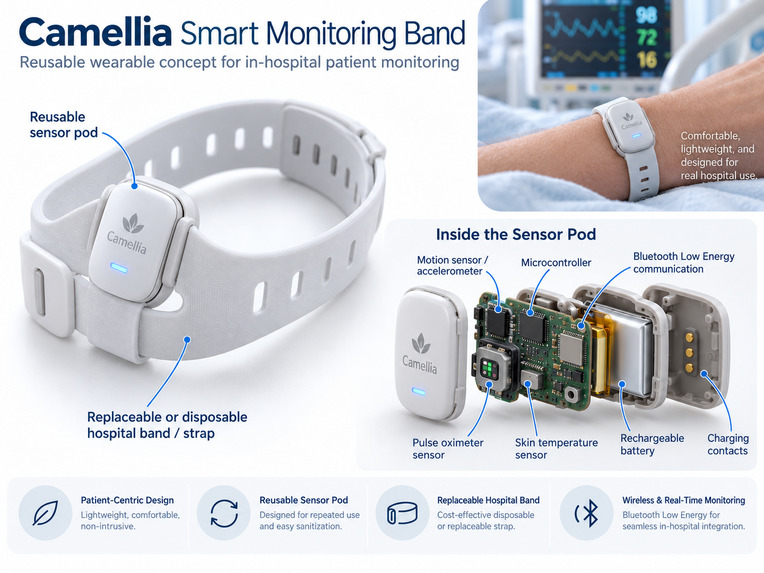
Patient vital report wrist band
-

Application Logo
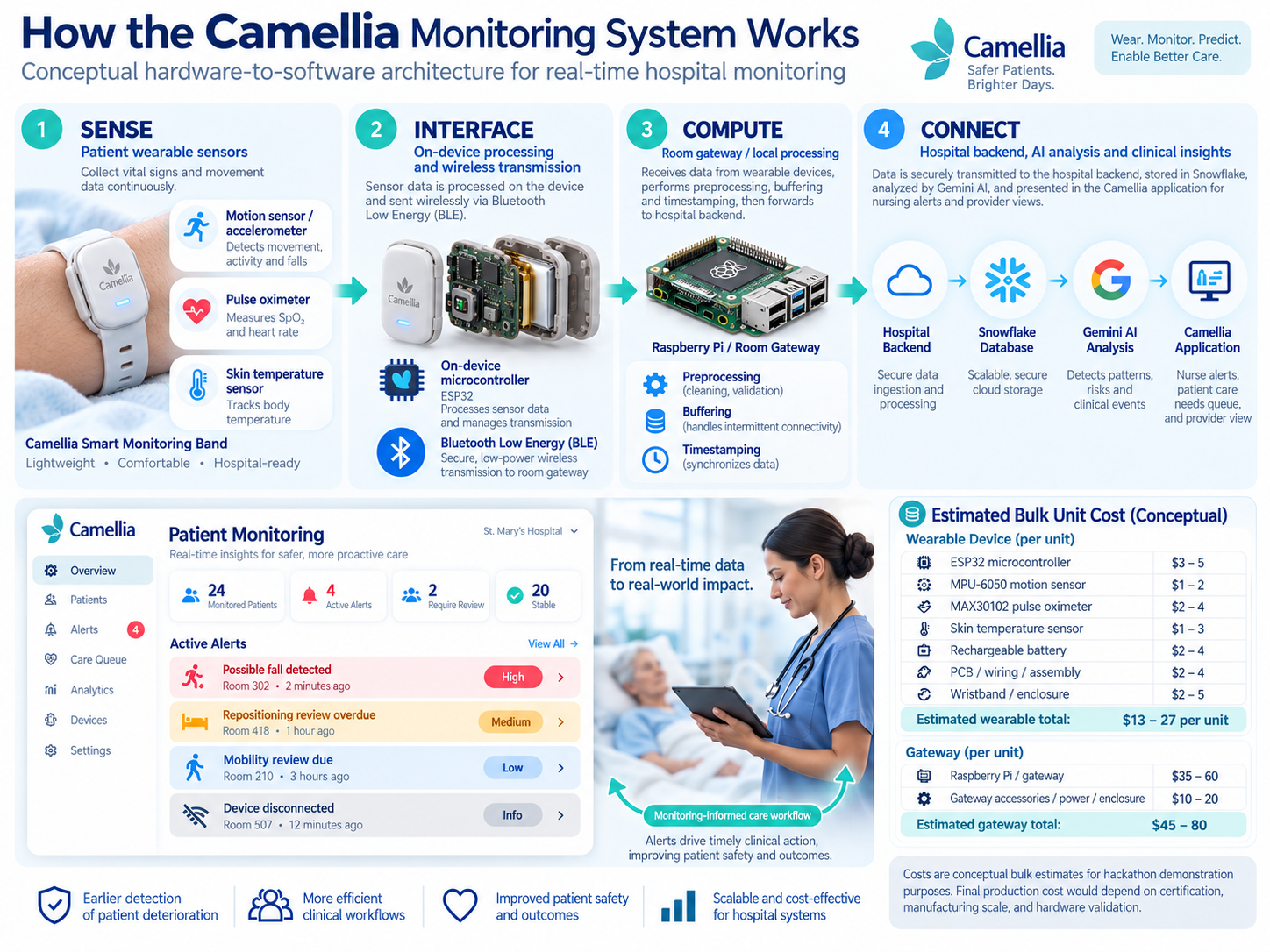
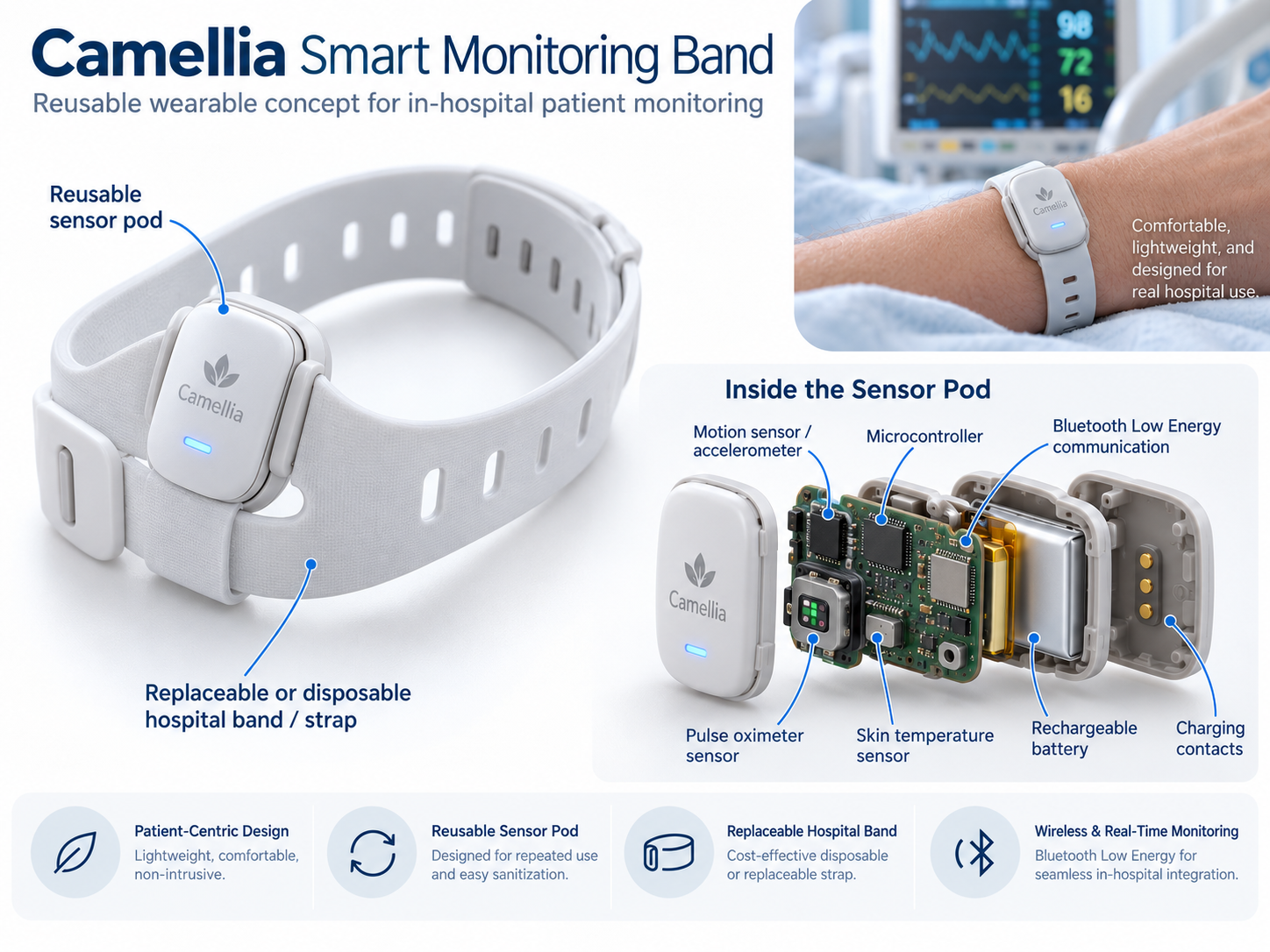

Camellia helps the right clinician find the right information early enough to act on it. It reads patient records from many organizations and formats, flags patients whose history matters for an upcoming procedure, and sends that flag, with the evidence attached, to the team that has to plan for it.
What inspired us
We interviewed the Chief CRNA associated with Dominion Anesthesia in Arlington, Virginia. Anesthesia staff do a second job on top of clinical care: finding pregnant patients whose conditions could complicate anesthesia at delivery. That information arrives in scattered provider messages and is typed by hand into spreadsheets or EHR watchlists. In one case, a patient with a serious condition needed planning across several specialties, but the anesthesia team only learned of it when she arrived for delivery. The information was already in her records. It had not reached the right people in time.
How we built it
A Java 21 and Spring Boot backend, a React and TypeScript frontend, and Snowflake as the data platform. Normalizers turn FHIR, HL7 v2 lab feeds, legacy practice exports and free-text notes into one record model. Four deterministic screening rules (OB anesthesia review, recurrent fractures, repeated abnormal labs, repeated visits for the same symptom) create flags that cite their source records and route OB cases to the anesthesia team's coordination board. Google Gemini powers plain-English search and a clinical assistant, inside guardrails: it turns questions into allow-listed search criteria, and a citation validator removes any reference to a record that was not actually retrieved. Role-based access is enforced on every endpoint, including what Gemini can see. 79 automated tests cover the rules, access control and citation checks.
What we learned
Gemini works best with a narrow job. We got the most reliable results by asking for structured JSON output, keeping the context small and checking every answer in code before showing it. Gemini never decides which records a user can see or what gets flagged: it turns questions into search criteria and summarizes records we already retrieved. We also learned to plan for rate limits. When the primary model was overloaded, the app fell back to a lighter model and showed which model answered.
Snowflake made us think in batches. We connected through the official JDBC driver with key-pair authentication, and the backend creates its own schema on startup. Each write took a few seconds, so we batched inserts and made seeding safe to re-run without creating duplicates. Snowflake treats primary keys as informational, so the app enforces uniqueness itself. Resource monitors and auto-suspend kept credit use under control.
AI sped up our coding, but it didn't replace our judgment. AI coding assistants let us produce working code far faster than we could have by hand, from data normalizers to UI components and test scaffolding. The speed only paid off because we reviewed what it wrote and tested it against real behavior: 79 backend tests and live checks against Gemini and Snowflake.
Splitting the hosting kept things simple. Vercel serves the React frontend as a static site and forwards every /api call to the Spring Boot backend on Render. The browser only ever talks to one domain, so session cookies and API calls worked unchanged. Getting there meant configuring cross-origin settings on the backend and keeping all secrets server-side, so no API key ever reaches the browser.
Challenges we faced
The Gemini API broke on us several times. Mid-build, requests started failing and we had to reset the API key more than once. Separately, the key was often rate limited on the primary model. We added retries, an automatic fallback to a lighter model, and a status panel that sends a live test request, so we could tell right away whether a problem was the key, the quota or our code.
Some buttons seemed to do nothing. Users clicked coordination actions like acknowledging an alert or changing its status, and nothing appeared to happen. The actions were actually saving, but each Snowflake write took 3.5 to 6 seconds. Meanwhile the other buttons were silently disabled and the screen didn't update until a second refresh. We added a spinner on the clicked button, locked the controls while saving, showed a "Saving…" message and displayed the server's response immediately.
A drop-down menu kept getting covered. The profile menu in the top bar kept disappearing behind other parts of the page, like the search panel and animated cards. The cause was a blur effect on the header: it trapped the menu inside the header's layer, so raising its z-index had no effect outside it. We fixed it by rendering floating menus outside the page layout and setting one layer order for the whole app: header, then pop-up menus, then side drawers, then notifications.

Log in or sign up for Devpost to join the conversation.