-
-
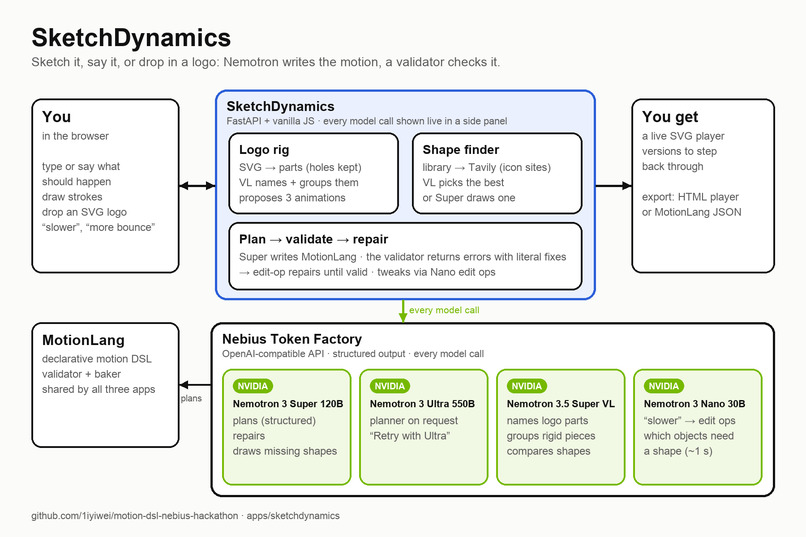
architecture card
What it does
SketchDynamics is an experimental animation tool that combines the power of LLMs with the precision of motion DSLs to create engaging animations from simple inputs like text prompts, SVG logos, or hand-drawn motion curves. It's designed to make animation creation accessible to everyone, from beginners to professionals.
Inspiration
The core UI features are inspired by several projects, including MoVer, LogoMotion, DrawTalk, OmniLottie, and Adobe Fresco motion.
How we built it
SketchDynamics is a thin, inspectable app on top of MotionLang, a declarative 2D motion language we designed for LLMs to write and machines to check.
The language. A MotionLang document lists actors (shapes, sketched strokes, or parts of an imported SVG, optionally grouped with a pivot), a timeline of 17 intent-level verbs (move_along, bounce, spring_to, draw_on, reveal, enter/exit, orbit, camera, …) arranged in seq/par/stagger blocks, and constraints (stay on screen, total duration, …). The model writes intent ("bounce three times", "wipe in from the left"), not keyframes. A deterministic Python baker turns that into per-frame tracks, and a small SVG player plays them. The JSON Schema and the verb reference in the system prompt are generated from the verb registry, so a new verb is usable the moment it's registered.
The core loop runs for every input, all on Nebius Token Factory:
- Plan: Nemotron 3 Super 120B (the default, with structured output constrained to the MotionLang schema) or Nemotron 3 Ultra 550B (one click, or "Retry with Ultra") writes a MotionLang document from what you said and anything you drew or imported.
- Validate: a tier-1 validator bakes the document and checks references, conflicting verbs, teleports, off-screen motion, invisible parts, and animations that change nothing (14 error codes). Every error carries a concrete fix: a JSON pointer and an exact edit.
- Repair: the errors go back to the planner. Small problem sets are fixed with edit ops rather than a full rewrite, so repairs converge instead of drifting. The loop stops early if the same problems survive a round, and then shows the closest attempt that still plays.
- Refine: "slower", "more bounce" go to Nemotron 3 Nano 30B with reasoning turned off, which answers in 1–3 s with a few id-addressed edit ops. If those fail it retries with reasoning, then escalates to the planner. Every result is a version you can go back to.
Input modes, from simple to rich. Each mode adds information to the same loop:
- Prompt only. Type or say what should happen ("a red ball drops in, bounces three times, then rolls off to the right while a blue square spins in the corner"). The planner creates the actors (shapes, text) and the timeline from scratch. Speech goes through the browser's speech recognition, so the model always receives text.
- Sketch + prompt. Strokes drawn on the canvas are captured as point lists in canvas coordinates, simplified (Ramer–Douglas–Peucker, at most 48 points) and labelled
s1,s2, … on screen, so you can refer to them ("along my line s1"). The planner sees each stroke's points, end points and bounding box. The document keeps the strokes as data, and verbs refer to them by id:move_along {"stroke": "s1"}follows the line exactly, and a stroke can also be an actor that draws itself on. - SVG + prompt. The importer splits the file into parts (it breaks up compound paths and keeps holes with their shapes). Nemotron 3.5 Super VL gets two renderings, a clean one and one with each part numbered, and names every part, groups parts that move as one rigid piece (a rotor with its hub as the pivot), and suggests three animation ideas, the first of which pre-fills the prompt. You can regroup, rename, split parts or move the pivot by hand. The path data never goes to any model: models see part ids, labels, boxes and colours, so a detailed logo costs no more tokens than a simple one.
- SVG + sketch. Draw a motion path over an imported logo ("the bolt zigzags down along my line while the cloud stays still"). Strokes always mean canvas space, so a part inside a group follows the line exactly where it was drawn, whatever its group's position.
Objects without a shape. The planner draws balls, boxes and text from basic shapes, so "a crystal drops from the sky" used to play as a ball. Before planning, Nano lists the objects a request shows that nothing on the canvas draws yet. For each one the app looks in its shape library, then searches the web with Tavily, restricted to icon sites with reusable files (SVG Repo, Wikimedia Commons). Super VL scores all candidates at once from a numbered grid, and if none reads well, Super draws a flat SVG icon and redraws it once with VL's critique. The user picks one, and it joins the scene as imported parts, so every mode above works with it. Found and drawn SVGs alike are reduced to plain paths by the importer, so nothing from the web runs in the page, and a pick can be saved to the library with its source and license.
The app is FastAPI plus vanilla JS with no build step. You sketch on a canvas, dictate with the browser's speech recognition or write the prompt into the text box, and import SVGs by drag and drop. A side panel streams every model call live: model, latency, tokens, and the validator verdict with the exact problems sent back for repair. Exports are a standalone HTML player or the MotionLang JSON. 288 tests run against a scripted fake model (and a fake Tavily), so the loop is tested without spending tokens.
Relation to MoVer and LogoMotion. LogoMotion has an LLM write animation code (JavaScript) and debug it by looking at rendered frames. MoVer verifies motion graphics against the prompt with a first-order-logic language. MotionLang sits between them. Like LogoMotion, we visually ground the artwork first (VL names, rigs and proposes motion). But the model writes a constrained declarative program, not code, so most failures are caught structurally before anything renders, with exact, machine-readable fixes. MoVer-style intent verification is the next layer: it would catch plans that are valid but miss the request.
Challenges we ran into
- Repairs that drift. Early on, each "fix" rewrote the whole document and often broke something else. Hint wording leaked into the output too: "fade it in (fade to 1)" became an invented
fade_toverb. Making hints literal and structural (an exact edit at a JSON pointer) and repairing with edit ops instead of rewrites made the loop converge. - Icons aren't drawn as objects. Real SVGs pack, say, all three turbine blades into one path per colour. We split compound paths (keeping holes), then gave the vision model a numbered overlay (set-of-marks) so it could tell 21 parts apart.
- Coordinate frames. Parts live inside groups, but users draw motion paths on the canvas. Making sketched paths always mean canvas space, whatever the parent, fixed a whole class of "follows my line, but 110 px off" bugs.
- Latency and variance. The same plan took 22 s or 87 s depending on how long the model reasoned. Fast edits on Nano without reasoning, structured output on Super, and streaming every call to the UI kept it usable and honest.
- Valid ≠ intended. A plan can pass every check and still not do what was asked (a move to where the part already is). New checks like
E_NOOPcatch some of these; the rest is what intent verification is for.
Accomplishments that we're proud of
- One prompt-to-animation loop that works across four input styles: text only, sketch plus text, SVG, and SVG plus a sketched motion path.
- Imported artwork gets rigged automatically (named parts, rigid groups, pivots) and stays fully editable by hand: group, ungroup, rename, split, set the pivot.
- A validator whose errors double as repair instructions, and a panel that shows every model call, so you can see why the result is valid instead of trusting it.
- A small, open, extensible motion language: 17 verbs, a spec, and a deterministic baker and player.
What we learned
Motion DSL really anchors the generation and validation process.
- A constrained language turns "is this animation right?" into checks a program can run, and those checks are the best prompt you can give a model: specific, local and actionable.
- Error-message wording matters as much as the system prompt: models copy hints literally.
- Matching each model to each job pays off: VL to read artwork, Super with structured output to plan, Nano without reasoning to edit, and Ultra as the fallback.
What's next
Turn this prototype into a real product!
Built With
- fastapi
- javascript
- json-schema
- nebius-token-factory
- nemotron-3-nano
- nemotron-3-super
- nemotron-3-ultra
- nemotron-3.5-super-vl
- numpy
- nvidia-nemotron
- openai-api
- pydantic
- pytest
- python
- svg
- tavily
- uv
- uvicorn
- web-speech-api

Log in or sign up for Devpost to join the conversation.