-
-
Jarvis For Your File System
-
Tech Stack
Seeq
Seeq is an intelligent desktop assistant that understands what’s on your screen and brings the right files to you, instantly.
It helps students and developers save hours by automatically surfacing relevant files, generating new notes, and handling file management, all through chat or voice commands powered by elevenlabs.
Inspiration
As students, we’ve all been buried under piles of files, lecture notes, assignments, practice problems, and random downloads wasting hours trying to find that one document we need.
Whether it’s digging through a never ending .docx, .txt, and .pdf files or scrolling through a chaotic desktop, the frustration is real and we've experienced it first hand.
We wanted to build something that doesn’t just search for files but understands what you’re doing and helps you focus on what matters the most That’s why we built Seeq, an AI-powered screen agent that brings contextually relevant files and resources to you as you work.
What It Does
Seeq acts as your on-screen AI collaborator. It can:
- Screen Agent - Detect what’s on your screen and display a popup with the most relevant files.
- Semantic File Search - Indexes your files in MongoDB using semantic descriptions instead of just filenames.
- Chat & Voice Interface - Talk to Seeq naturally to open, delete, sort, or summarize files.
- AI File Generator - Creates study notes, summaries, or practice problems from lecture or code files using semantic context.
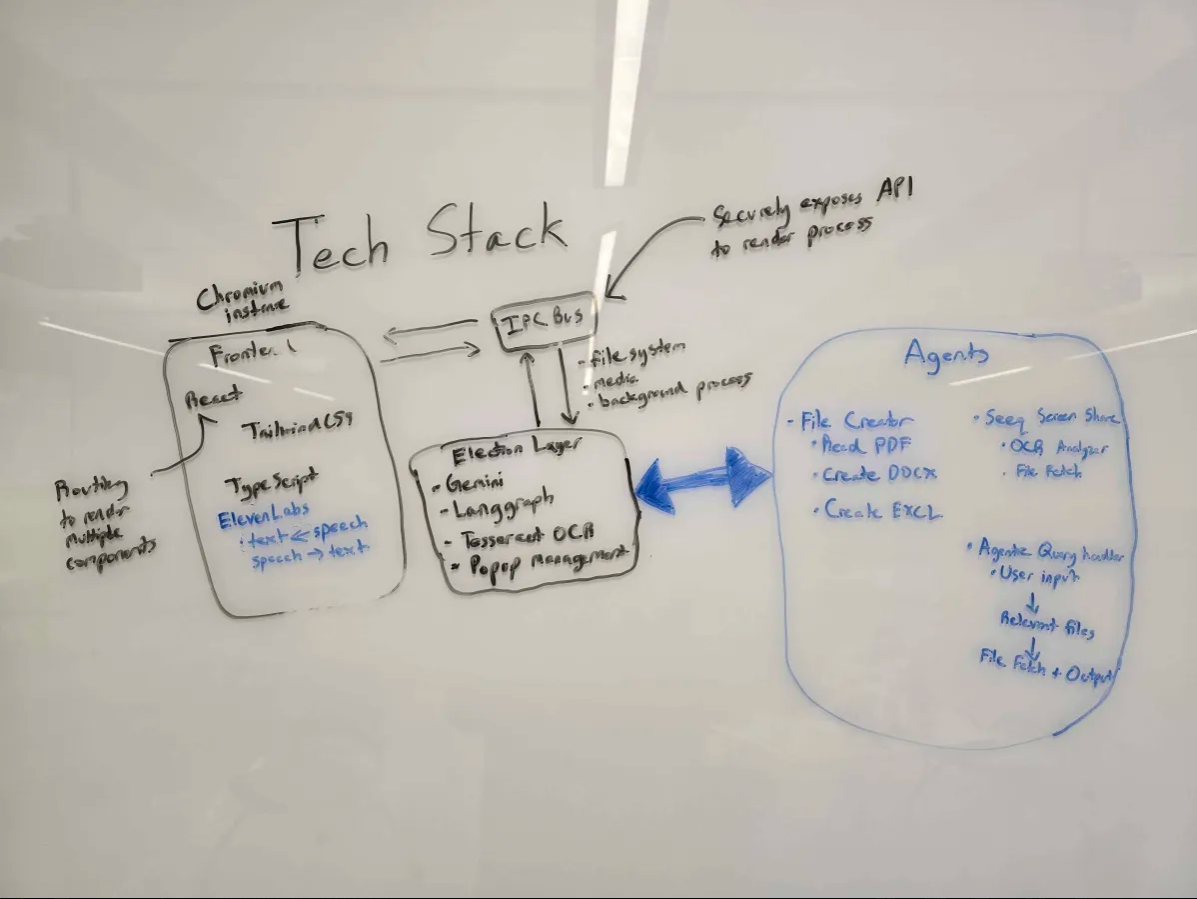
- Multi-Agent Intelligence - Combines a screen agent, file agent, and voice/chat agent using LangGraph for coordination.
- Gemini Integration - Powers reasoning, natural language understanding, and document generation.
How We Built It
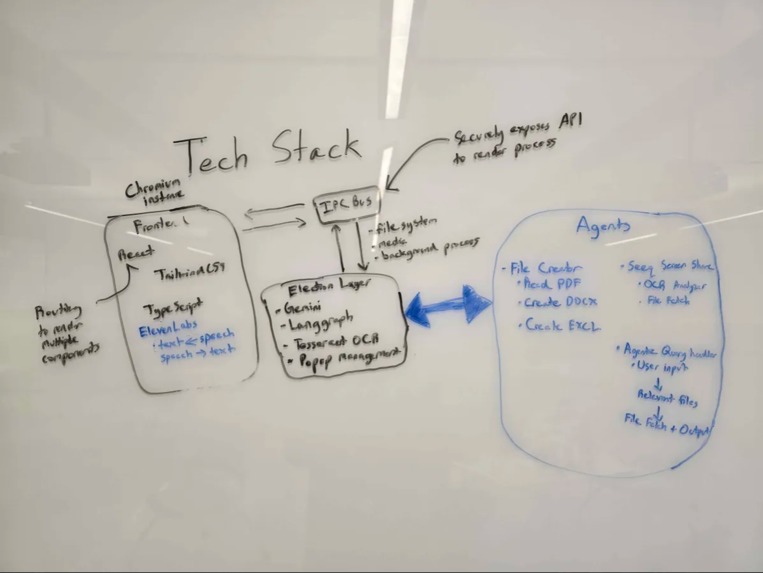
- Frontend: React + Electron for a native, smooth, desktop experience.
- Backend: Node.js + Express for API routes and system coordination.
- AI Frameworks:
- LangGraph for agent orchestration
- Gemini for natural language reasoning and generation
- LangGraph for agent orchestration
- Database: MongoDB with semantic embeddings for intelligent file retrieval.
- Voice Support: Integrated voice commands and transcribe speech to text with ElevenLabs for hands-free interaction.
Challenges We Ran Into
- Building real-time screen context detection while only paying attention to relevant OCR chunks.
- Designing fast, scalable semantic indexing in MongoDB which ensuring accurate results.
- Managing multi-agent communication between the screen agent, file agent, and voice agent.
- Integrating Gemini and LangGraph responses smoothly in Electron.
- Balancing responsiveness and accuracy during live AI assisted workflows.
Accomplishments We’re Proud Of
- Built a multi-agent AI system that adapts to user context in real time.
- Developed a semantic search engine for files that outperforms traditional keyword search.
- Created a modern desktop UI that’s responsive, distraction-free, and easy to use.
- Enabled automatic note and problem generation directly from a user’s codebase or lecture materials.
What We Learned
- How to use LangGraph Agents to orchestrate multiple AI agents with persistent context.
- The effectiveness of semantic embeddings for intelligent search and indexing.
- How to combine Gemini’s reasoning with desktop-level control for productivity.
- That great AI design is not just about intelligence — it’s about flow, trust, and usability.
What’s Next for Seeq
- Local privacy mode — ensuring all screen and file data stays fully on-device.
- Third-party integrations — Go beyond Word and Excel, create events in Notion and Google Calendar
- Learning Mode — Use the file generator agent to also generate mock exams
Built With
- agi
- gemini
- langgraph
- mongodb
- ocr
- rag
- react
- tailwind
- tesseract
- typescript


Log in or sign up for Devpost to join the conversation.