MINDSync
Problem Statement
MINDS currently faces significant challenges in managing event signups across multiple branches:
- Fragmented Management: Staff must manage numerous Google Forms and Sheets for different events, which is time-consuming and menial
- Dead Links & Scattered Information: Multiple dead links and calendars scattered across the internet create confusion
- Inconsistent Formats: Each branch creates its own calendar on different platforms with different formats, leading to:
- Repeated work across branches
- Confusion for volunteers and participants trying to sign up
- Difficulty in maintaining a centralized view of event coverage
Solution
Care App is a centralized event management platform that enables MINDS staff to efficiently manage signups for all branches and events across volunteers, caregivers, and care recipients in a scalable and maintainable manner.
By consolidating event management into a single platform, we eliminate the need for multiple Google Forms/Sheets, provide a consistent user experience, and give staff real-time visibility into event coverage across all branches.
Key Features
For Staff
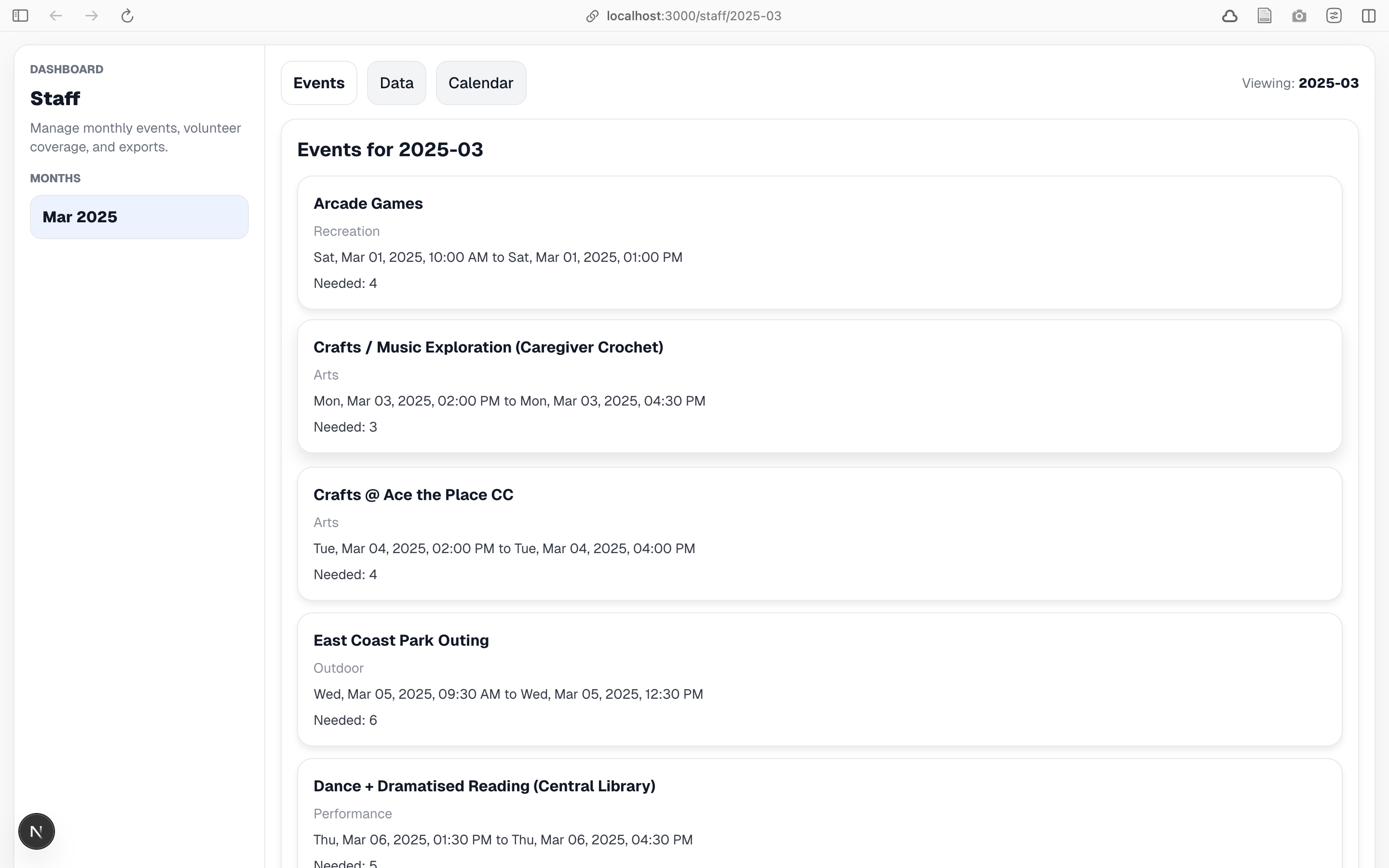
- Centralized Event Management: View and manage all events across branches in one unified platform
- Monthly Organization: Events organized by month with intuitive sidebar navigation
- Coverage Tracking: Real-time view of required vs. signed-up volunteers per event
- Multiple Viewing Modes:
- Events List: View all events with signup counts and status indicators
- Coverage Data: Dashboard showing coverage status (Enough/Not enough) for each event
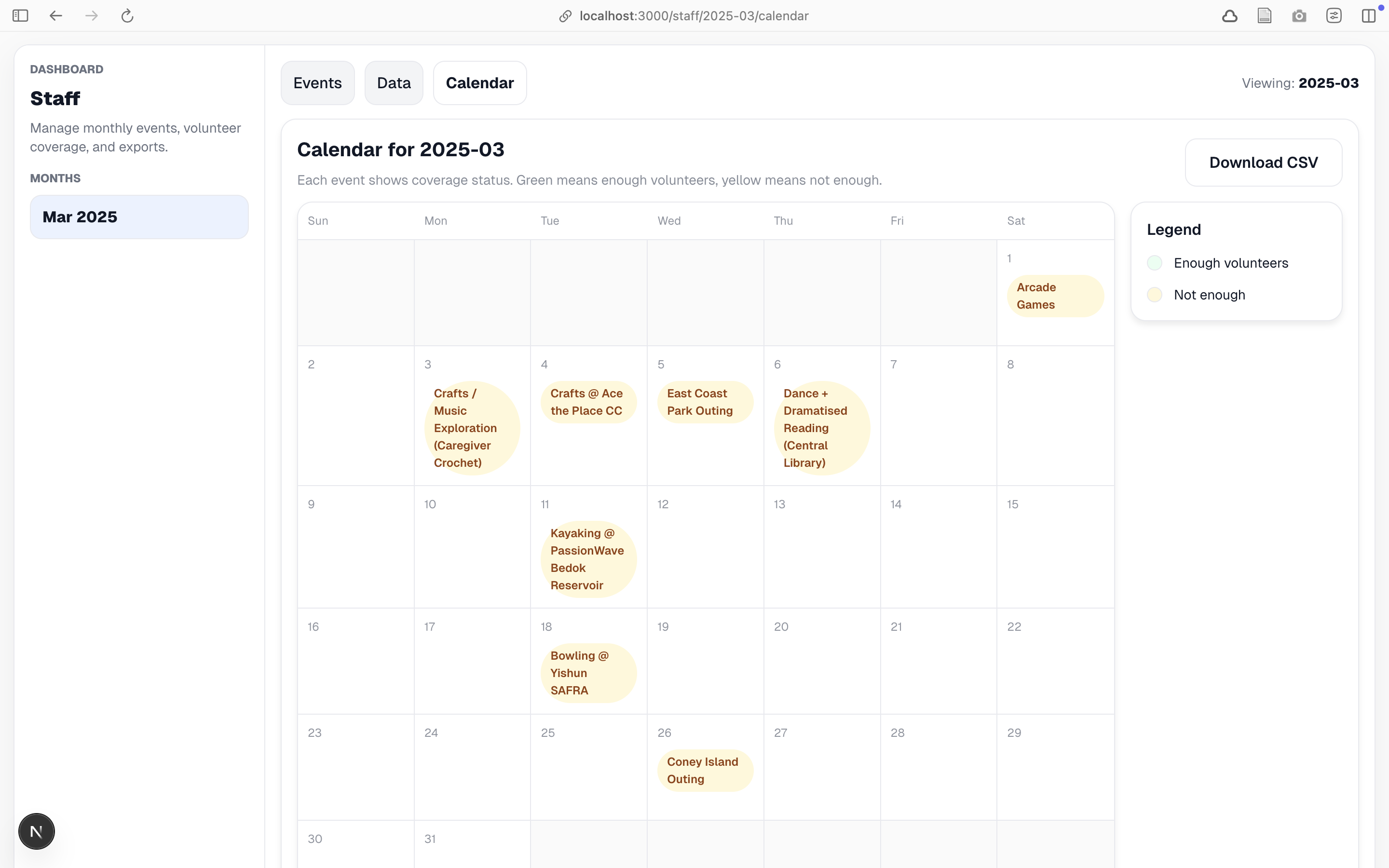
- Calendar View: Grid view showing events organized by day
- Data Export: Generate CSV reports for monthly event coverage analysis
- Event Details: Comprehensive view of individual events with full signup information
For Volunteers, Caregivers & Care Recipients
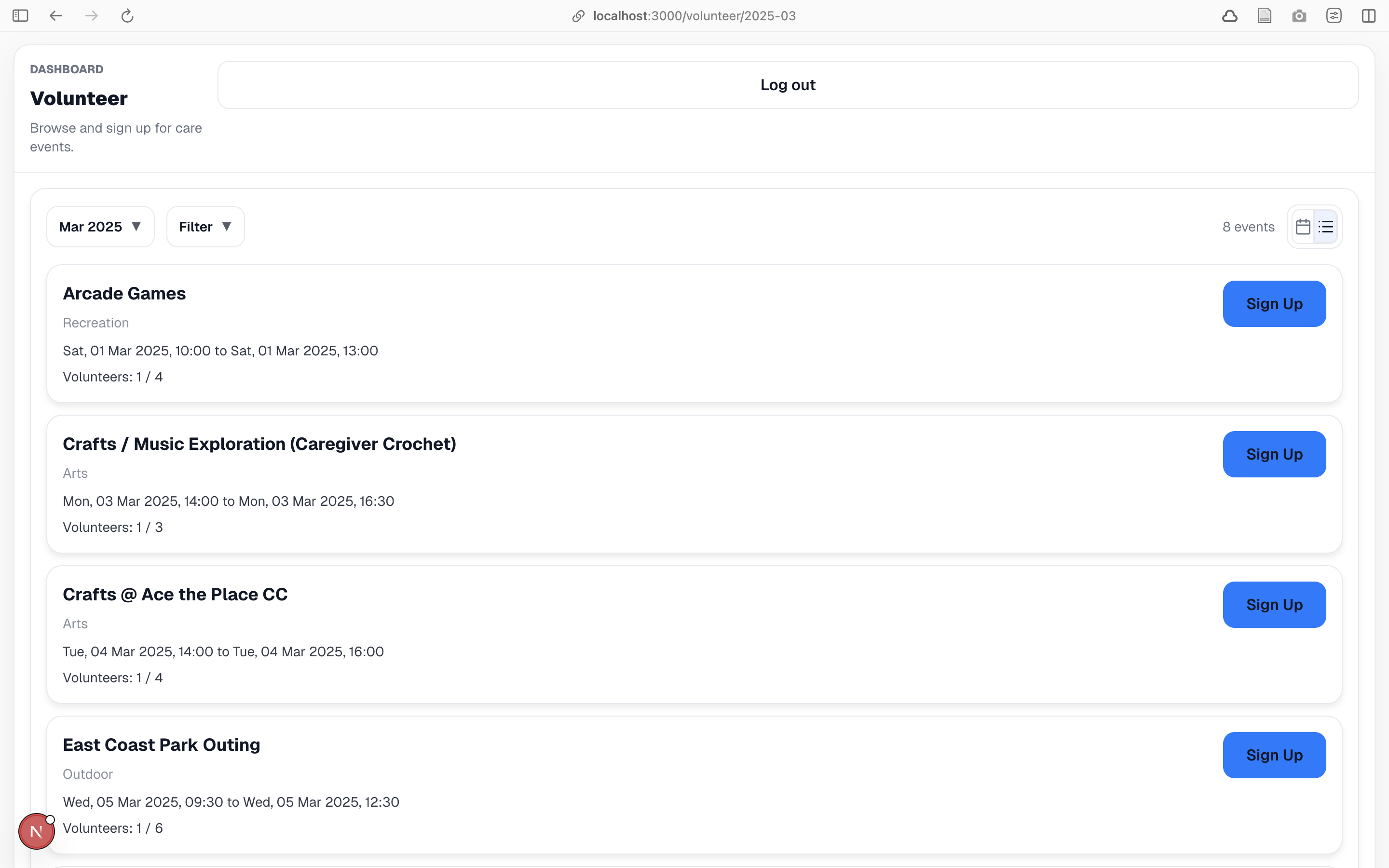
- Easy Event Discovery: Browse events by month with intuitive month selector dropdown
- Simple Signup Process: One-click signup/unsignup for events with real-time status updates
- Flexible Viewing Options:
- Card View: Detailed event cards with full information (name, type, date/time, duration, capacity)
- Calendar View: Visual calendar grid showing up to 3 events per day with "+X more" indicator
- Event Filtering: Filter events by type to find relevant opportunities quickly
- Real-time Status: See signup status (signed up/not signed up) and event capacity (full/available) at a glance
- Clean Interface: Full-width layout optimized for viewing and interacting with events
User Roles
The platform supports four distinct user roles, each with tailored functionality:
- Staff: Administrative users who manage events, view coverage data, export reports, and monitor signup status across all branches
- Volunteer: Users who can browse events, sign up for opportunities, and view their commitments
- Caregiver: Users who provide care services and can sign up for relevant events
- Care Recipient: Users who receive care services and can sign up for events
Each role has protected routes with automatic routing based on user profile, ensuring users only see relevant functionality.
Technology Stack
- Frontend Framework: Next.js 16 with App Router architecture
- UI Library: React 19
- Language: TypeScript (strict mode enabled)
- Backend: Supabase (PostgreSQL database, Authentication, Real-time capabilities)
- Styling: Tailwind CSS v4 (minimal usage), primarily inline styles
- Package Manager: npm
Architecture Highlights
- Server Components by Default: Optimized for performance with server-side rendering
- Client Components When Needed: Used only for interactivity, hooks, and browser APIs
- PostgreSQL RPC Functions: Centralized business logic at the database level for security and maintainability
- Role-Based Access Control: Middleware-level route protection with automatic role-based routing
Getting Started
Prerequisites
- Node.js 18+ and npm
- Supabase account and project
Setup
Install dependencies
cd care-app
npm install
Configure environment variables
Copy .example.env to .env:
cp .example.env .env
Then, add your Supabase credentials:
   NEXT_PUBLIC_SUPABASE_URL=your-project-url
   NEXT_PUBLIC_SUPABASE_ANON_KEY=your-anon-key
- Set up database
Apply the database migrations from care-app/supabase/migrations/ to your Supabase project. The migrations include:
- Event tables and relationships
- User profile management
- PostgreSQL RPC functions for signup operations
- Row Level Security (RLS) policies
- Run the development server
bash
npm run dev
Open http://localhost:3000 in your browser.
Available Scripts
npm run dev- Start development server (port 3000)npm run build- Build for productionnpm run start- Start production server (requires build first)npm run lint- Run ESLint
Project Structure
care-app/
├── app/                    # Next.js App Router directory
│   ├── layout.tsx          # Root layout with fonts and global styles
│   ├── page.tsx            # Root page (redirects authenticated users)
│   ├── login/              # Public authentication routes
│   ├── signup/             # Public signup routes
│   ├── app/                # Role-based routing entry point
│   ├── staff/              # Staff-protected routes
│   │   ├── [month]/        # Dynamic month routes
│   │   │   ├── page.tsx    # Events list view
│   │   │   ├── data/       # Coverage data view
│   │   │   ├── calendar/   # Calendar view
│   │   │   ├── events/     # Event detail pages
│   │   │   └── export/     # CSV export API route
│   ├── volunteer/          # Volunteer routes
│   ├── caregiver/          # Caregiver routes
│   ├── care-recipient/     # Care recipient routes
│   └── unauthorized/       # Unauthorized access page
├── lib/                    # Utility libraries
│   ├── supabase/           # Supabase client factories (server & browser)
│   └── utils/              # Shared utilities (month operations, etc.)
├── middleware.ts           # Next.js middleware for auth protection
├── next.config.ts          # Next.js configuration
└── supabase/               # Database migrations
    └── migrations/         # SQL migration files
Protected Routes
Routes prefixed with /staff, /volunteer, /caregiver, /care-recipient, /recipient, or /app require authentication. Unauthenticated users are automatically redirected to /login with the original path preserved for post-login redirect.
Key Benefits
- Centralized Management: All events and signups in one platform, eliminating the need for multiple Google Forms/Sheets
- Scalable Architecture: Handles multiple branches and events efficiently with PostgreSQL and optimized queries
- Maintainable Codebase: Single source of truth, consistent format, and well-organized code structure
- User-Friendly Interface: Intuitive design for both staff and participants with role-appropriate functionality
- Real-time Updates: Live signup status and coverage tracking without page refreshes
- Data Export: Easy reporting via CSV export for analysis and record-keeping
- Secure: Role-based access control, RLS policies, and secure authentication via Supabase
- Consistent Experience: Unified platform eliminates confusion from scattered calendars and dead links
How It Works
Event Management Flow
- Staff creates events (via database or admin interface) with details like name, type, date/time, duration, and required volunteer count
- Events are organized by month and displayed in monthly views
- Volunteers/Caregivers/Care Recipients browse events, filter by type, and sign up with one click
- Staff monitors coverage in real-time through the coverage data view
- Staff exports data as CSV for reporting and analysis
Signup Process
- Users click "Sign Up" on an event card
- System checks authentication and event capacity
- Signup is recorded in the database (or existing cancelled signup is reactivated)
- UI updates immediately to reflect new signup status
- Staff can see updated coverage counts in real-time
Month-Based Organization
- Events are automatically organized by month based on their date
- Users navigate between months using dropdown selectors or sidebar navigation
- Each month view shows all events for that period with signup information
- Staff can export coverage data for any month
Built With
- next.js
- react
- supabase
- tailwind
- typescript

Log in or sign up for Devpost to join the conversation.