Inspiration
A friend of mine was organizing a crypto event, and after we got the venue, we were standing in a large empty hall trying to figure out where everything should go. Where should the rooms or different areas be? Where should the furniture go? How much space do we actually have?
Most of the planning was happening in our heads and through conversations.
That made me think about how we plan physical spaces today. We have AI agents that can reason about complex problems, but they usually cannot directly work with the structured space we are looking at.
I wanted to build something where a person could brainstorm with an agent, see ideas take shape directly on the canvas, and have both the human and the agent work on the same space at the same time.
That idea became Taxis.
What it does
Taxis is a spatial planning canvas for designing physical spaces.
You can use it to plan a house, office, event, restaurant, exhibition, warehouse, studio, or other physical environments.
The key idea is that both the human and the AI agent can work on the same plan.
A person can manually create, move, resize, rotate, duplicate, and delete rooms and objects while an agent can perform these same types of spatial operations through WebMCP.
The human does not have to wait for the agent to finish before making changes. Both can contribute to the same evolving plan. For example, while an agent is arranging rooms, a person can add doors, adjust objects, or make other changes themselves.
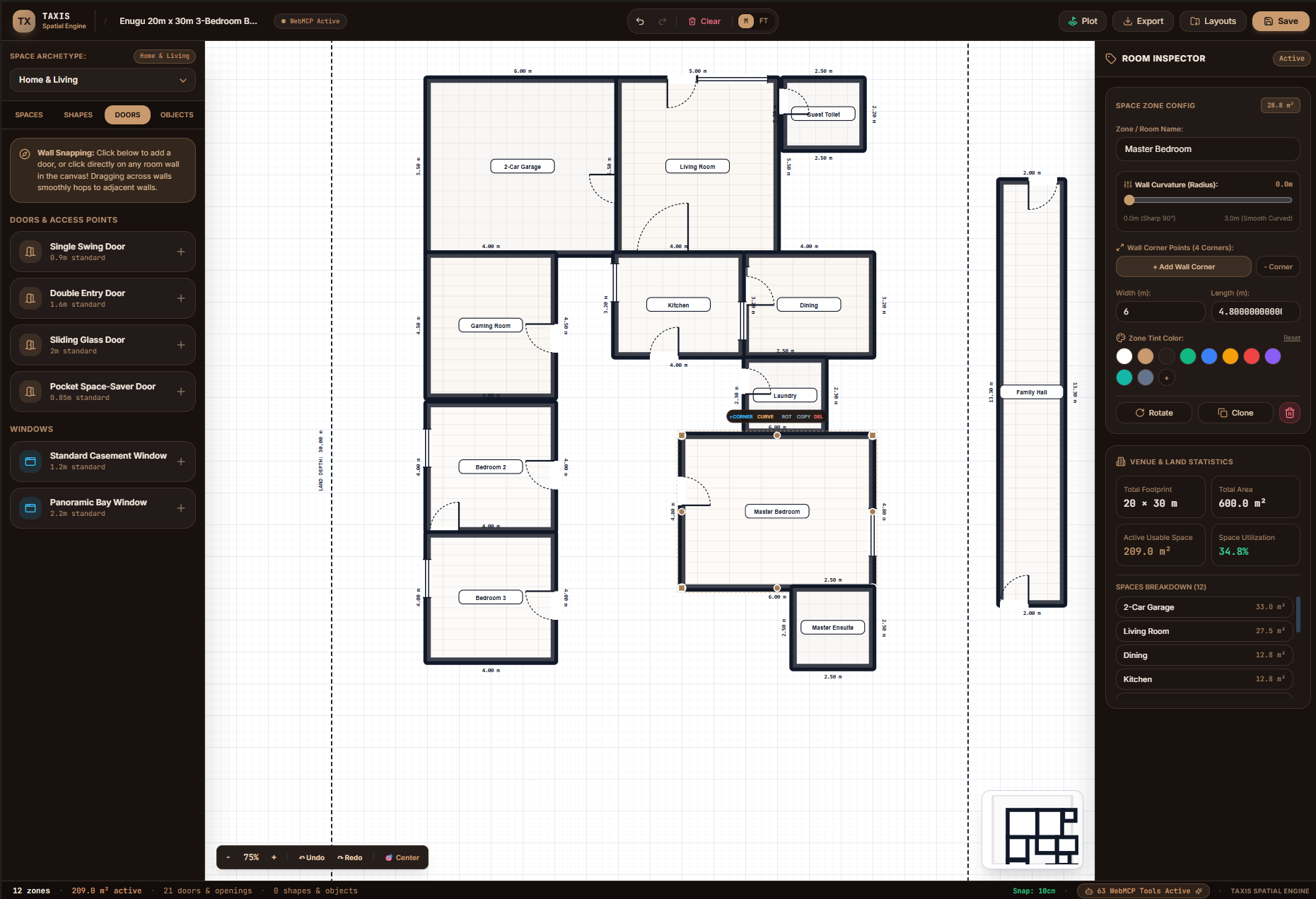
We demonstrated this by giving the agent a plot of land and asking it to create a practical bungalow layout with rooms, living spaces, a gaming room, and a garage. The result can then be inspected and edited directly on the canvas.
How we built it
Taxis is a browser-based spatial planning application built with TypeScript and Vite.
The application represents rooms and objects as structured spatial data, including their dimensions, positions, rotations, and other properties.
We expose the application's spatial operations as WebMCP tools using document.modelContext.registerTool().
These tools allow an agent to interact directly with the application's structured state, including creating, moving, resizing, rotating, duplicating, and deleting spatial elements.
This means the agent is not generating an image of a floor plan. It is directly manipulating the actual objects inside the application.
WebMCP provides the interface that allows an external agent to work with the same application state that the human is editing.
Challenges we ran into
One of the more difficult parts was making resizing and reshaping reliable.
At one point, when resizing certain objects, the pointer interaction could incorrectly switch between resize and reshape behavior, causing the cursor to loop between the two interaction modes. We had to refine the interaction logic so that the application could correctly distinguish between resizing an object and reshaping it.
Another challenge was making the spatial operations reliable when they are being performed through agent tools. The application has to maintain a consistent structured state while rooms and objects are being created and modified.
We also had to make the WebMCP tools clear enough for an agent to understand what operations were available and how they affected the spatial canvas.
Accomplishments that we're proud of
We built a working spatial planning application where a human and an AI agent can interact with the same structured canvas.
We are particularly proud of the fact that the agent is not simply generating a static floor plan. It can directly manipulate the objects inside the application while the human can continue editing the same space.
We demonstrated this by using an agent to plan a bungalow on a 20m × 30m plot of land, including bedrooms, living spaces, a gaming room, and a garage.
The same underlying system is not restricted to houses. The spatial canvas and its agent tools can be applied to many different types of physical spaces.
What we learned
We learned that the most interesting part of agent integration is not simply asking an AI to generate something.
Giving an agent access to the structured state and actions of an application changes what the agent can actually do.
WebMCP allowed us to expose meaningful spatial operations so that an agent could work directly inside the same environment as the human.
We also learned that human and agent collaboration does not have to be a handoff where one finishes and the other takes over. Both can contribute to the same evolving workspace. The human can make subjective decisions and adjustments while the agent handles spatial operations and repetitive work.
What's next for Taxis
The current version is a foundation for a broader spatial planning system.
Next, we want to improve the spatial reasoning capabilities of the agent, including better constraint checking, collision detection, capacity planning, and more intelligent arrangements.
We also want to expand the types of spaces and objects that can be represented, making Taxis useful for everything from homes and offices to retail spaces, warehouses, exhibitions, studios, and other physical environments.
The long-term goal is to make Taxis a general-purpose spatial workspace where people and agents can plan, experiment, and build together.
Built With
- agents
- ai
- architecture
- cad
- context
- css
- css3
- html5
- javascript
- local
- lucide
- model
- node.js
- protocol
- react
- storage
- svg
- tailwind
- typescript
- vercel
- vite
- webmcp
- zustand

Log in or sign up for Devpost to join the conversation.