-
-
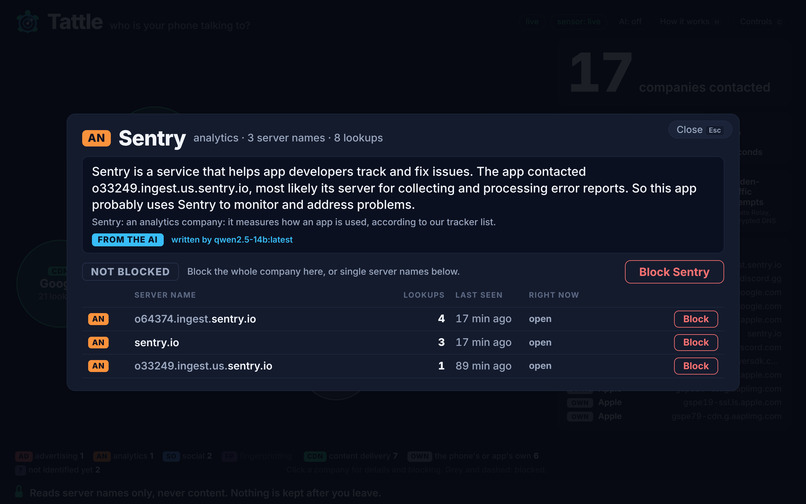
Tattle’s AI explains in plain English which companies an app is contacting.
-
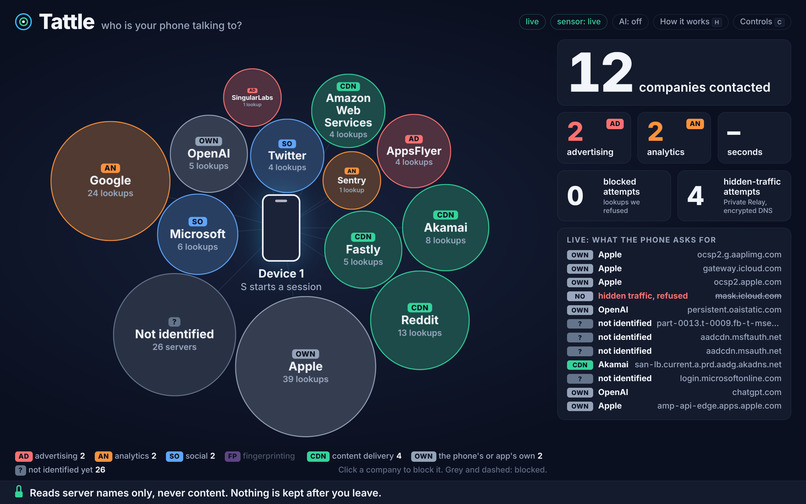
User Interface
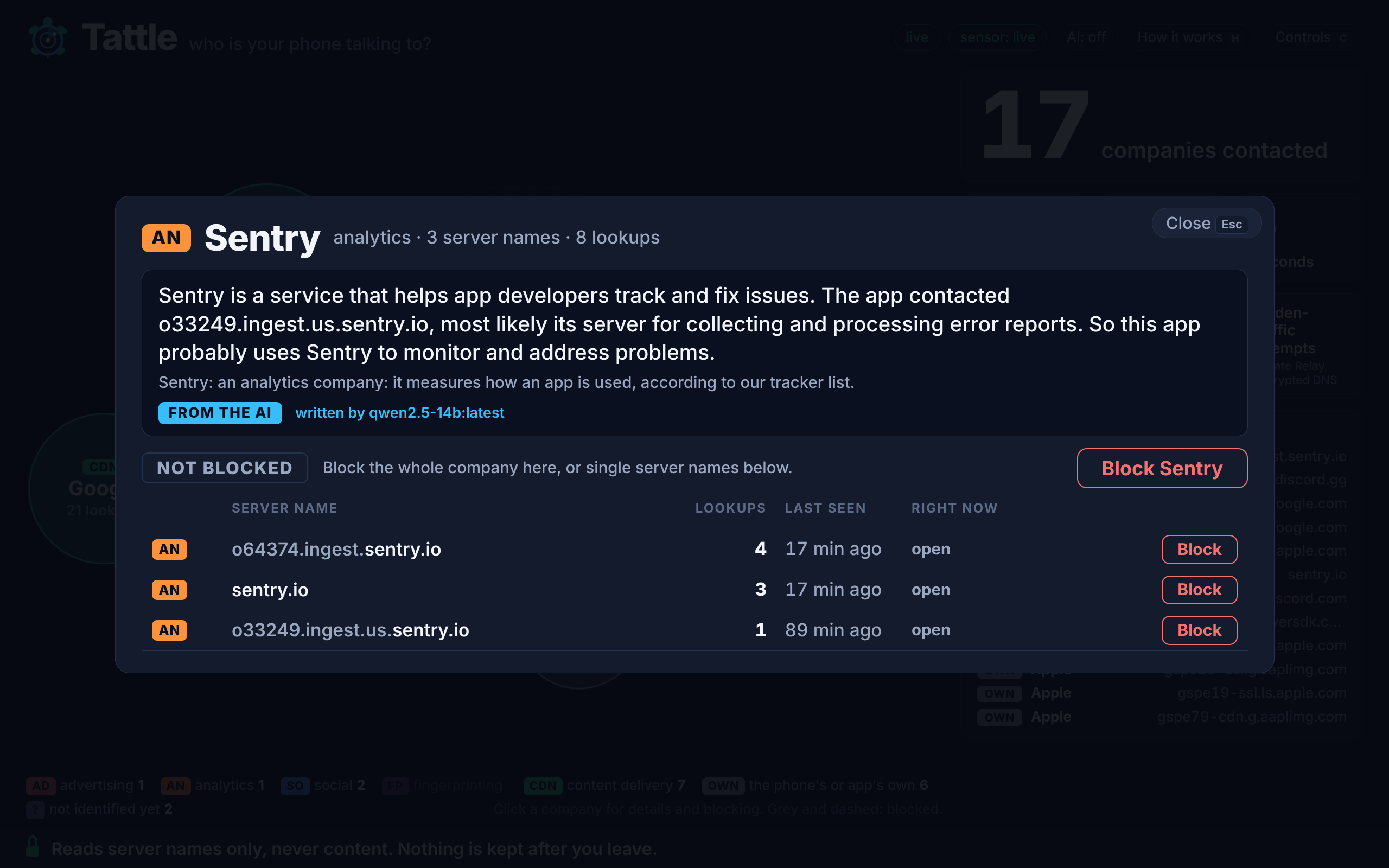
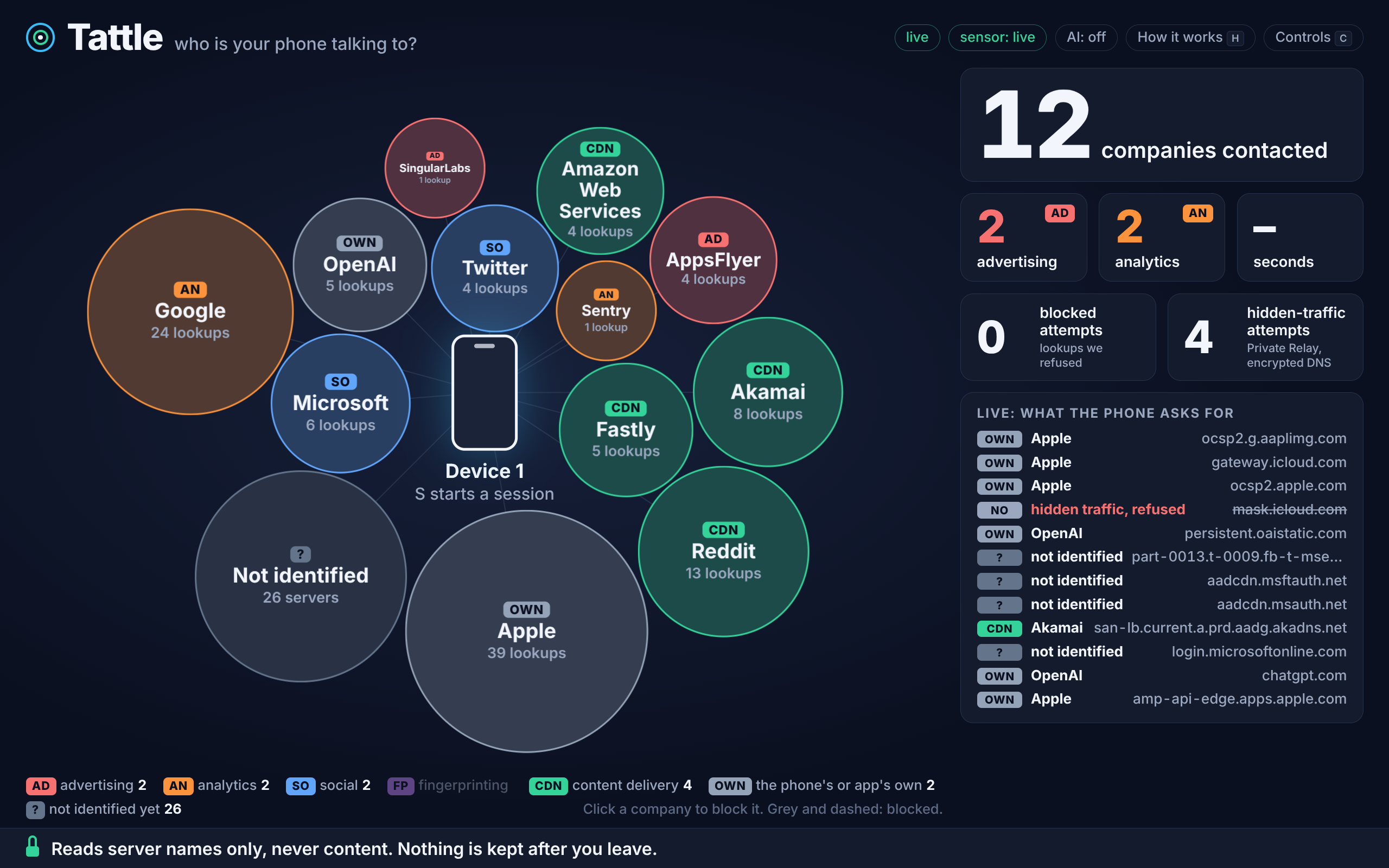
Tattle: who is your phone talking to?
Hand someone a phone, they open an app, and a screen fills with every company that app quietly contacts: live, in plain English, with one click to block one.
Inspiration
We come from a cybersecurity background, so we know how big a problem it is when companies quietly collect your data. Most people have no idea how much their phone shares. Privacy policies are long and vague, and the traffic itself is invisible. We wanted to make it visible. Tattle shows, live, exactly which third-party companies your apps are talking to, so anyone can see it for themselves in seconds.
What it does
Tattle is a laptop that acts as a Wi-Fi hotspot. A phone joins it, with nothing installed on the phone. Before an app can connect to a server it has to ask "where is this server?" (a DNS lookup), and on our Wi-Fi we are the one it asks. So we see the name of every server the phone looks up, and never what is sent afterwards.
The screen shows the phone in the middle and one bubble per company around it, coloured and tagged by what the company does: advertising, analytics, social, fingerprinting, content delivery, or the app's own servers. A click on a bubble opens a panel that says who the company is and lists every server name the phone asked for. One more click blocks the company: we answer "that name does not exist", the app cannot reach it, and a counter shows the app trying again and again while it keeps working.
Who it helps
Anyone who wants to know what an app really does and has no time for packet captures. The tools that show this today are buried in settings, show raw server names, or need installing and configuring. Tattle takes a minute and reads like a sentence. From our simulated test session: "In 58 seconds, Demo Game contacted 14 companies: 9 advertising, 1 analytics, 1 social, and 3 others."
How we built it
Tech stack:
- Hotspot: Linux, NetworkManager, a virtual access-point interface on the laptop's one Wi-Fi card,
iptablesfor the DNS redirect. - Resolver ("sensor"): Python, one file, one dependency (
dnslib). - Backend: Python, FastAPI, WebSocket, state in memory. Optional Postgres for the history of our own test phones.
- Screen: plain HTML, CSS and JavaScript. No framework, no build step, nothing loaded from the internet.
- Tracker data: Disconnect's tracking-protection list (CC BY-NC-SA 4.0), about 4,400 domains, plus 65 hand-written entries.
- AI: an open-source model served by Ollama on an AMD Radeon PRO W7900 through ROCm, reached over an SSH tunnel.
- Tests: 101 backend tests, 35 resolver tests, and a 21-step end-to-end check that runs without Wi-Fi.
- In the product: Ollama (open source, on the AMD GPU) names the servers no list knows, writes the session summary and explains each company in the detail panel. The screen never waits for it and labels its answers as guesses.
AI tools we used:
- AI coding assistants: Claude Code, used for help writing the hotspot scripts. All code was reviewed by the team.
Challenges we ran into
- The hotspot took three tries on real hardware. The network manager refused our virtual interface until it had a hardware address of its own, then moved the laptop's own Wi-Fi onto it. We stopped forcing a layout and let the script use whichever interface was left free.
- The phone avoided us twice. First it quietly used its cellular connection, then it sent its lookups to a leftover VPN server. Turning cellular data off fixed the first; redirecting all DNS traffic, whatever its destination, fixed the second.
- Blocking looked broken. We blocked an app's server and a message still went through. DNS blocking only acts when the phone asks for a name; it had the answer already and kept a connection open. Shortening every answer's lifetime to 10 seconds made blocks take hold at the app's next connection.
- The tracker list is written for websites. Phone-only advertising servers and the phone maker's own servers were missing, and one social network's servers showed up under its parent company. We found these by reading live lookups, not by tests.
- A looked-up name is untrusted input. A phone can ask for a name made of markup. We resolve and show plain host names only; anything else is refused and counted.
- The screen was built in the last three hours before feature lock, as a plain page instead of the planned framework app: no build to forget before the demo.
Accomplishments that we're proud of
- A working end-to-end demo: connect a real phone, open an app, and watch the trackers appear live
- Turning raw network metadata into something a non-technical person understands instantly
- A tracker database built on the open-source Disconnect list, so categorization is grounded in real data rather than guesses
- Plain-language explanations from an open-source model running on AMD cloud hardware
- A design that makes privacy feel tangible instead of scary or technical
What we learned
- How much a single app can reveal about you through DNS lookups alone, even when the content is encrypted [add a surprising example you saw while testing]
- How DNS and hostname metadata really work in practice, including limits like encrypted DNS that hides lookups
- How to turn technical data into explanations people actually care about
- How to split a project cleanly between frontend, backend, and AI work with a shared contract between us
What's next for Tattle
- One-tap blocking of trackers, so you can see a tracker and shut it down
- Handling encrypted DNS and newer TLS features so more traffic stays visible
- A privacy score per app, so you can compare apps before installing them
- A standalone box (for example a Jetson or Raspberry Pi) that anyone can plug in at home
- Explanations that work offline with a smaller on-device model


Log in or sign up for Devpost to join the conversation.