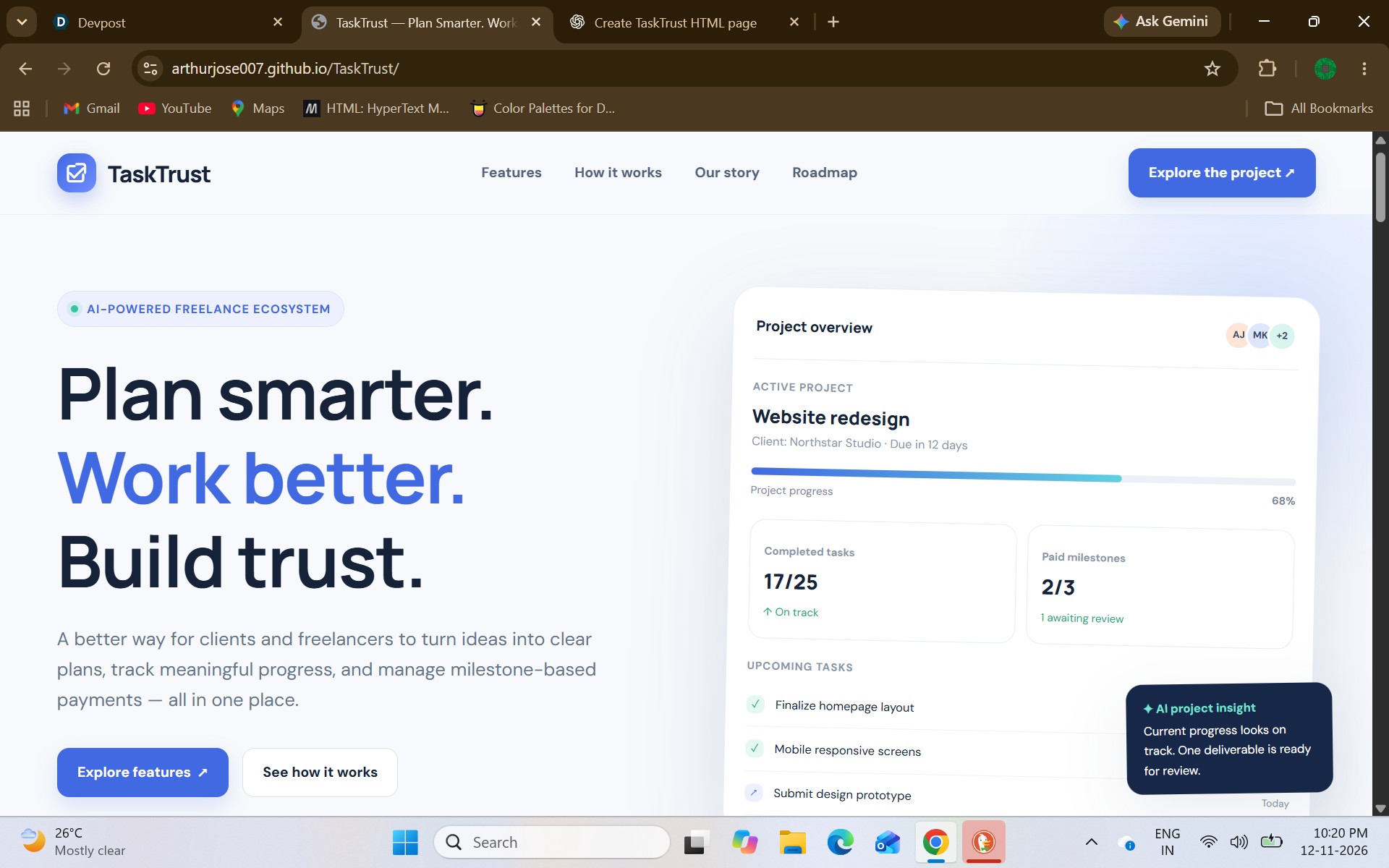
MASTER PROMPT: Build TaskTrust – AI-Powered Freelance Project & Payment Management Platform
Act as a senior full-stack developer, UI/UX designer, and SaaS product architect. Build a complete, modern, responsive web application called TaskTrust.
The application should connect clients and freelancers through AI-powered project planning, milestone management, deliverable reviews, progress tracking, and secure PayPal payments.
Do not build just a static landing page. Build a functional SaaS application with authentication, role-based dashboards, interactive components, API integration, and realistic workflows.
1. Design Direction
Create a premium SaaS interface inspired by modern products like Linear, Stripe, Notion, and Vercel.
Visual identity:
- Product name: TaskTrust
- Primary color: Deep navy / dark blue
- Accent color: Vibrant electric blue
- Secondary accent: Soft violet for AI features
- Background: Clean white and very light grey
- Cards: Rounded corners (12–16px)
- Typography: Inter or Geist
- Icons: Lucide
- Use subtle shadows, smooth transitions, and clean spacing.
- Avoid excessive gradients, unnecessary animations, and cluttered layouts.
The website should feel like a real production-ready SaaS product, not a generic AI-generated template.
Support both light and dark modes.
2. Website Structure
Create the following public pages:
Home Page (/)
Build an attractive landing page with:
Navigation
- TaskTrust logo
- Features
- How It Works
- For Clients
- For Freelancers
- Pricing
- Login
- Get Started
Hero Section
Headline: "Freelance Projects. Smarter Planning. Stronger Trust."
Description: "Manage freelance projects with AI-powered planning, transparent milestones, intelligent progress tracking, and secure payments."
CTA buttons:
- Start Your Project
- Explore Features
Add a professional dashboard preview showing:
- Active projects
- Completed milestones
- Pending payments
- AI project insights
- Project progress chart
Problem Section Highlight common freelance problems:
- Unclear project requirements
- Missed deadlines
- Payment disputes
- Poor communication
- Unorganized deliverables
Solution Section Explain how TaskTrust solves these problems using AI and milestone-based workflows.
Features Section Create attractive feature cards for:
- AI Project Planner
- Smart Milestone Generator
- AI Progress Assistant
- Deliverable Review Assistant
- Freelancer Dashboard
- PayPal Payment Integration
How It Works Show a simple four-step process:
- Describe your project.
- AI generates tasks and milestones.
- Collaborate and track progress.
- Approve milestones and process payments.
Separate Client and Freelancer Benefits
CTA Section "Ready to make freelancing more transparent?"
Footer Include About, Features, Contact, Privacy Policy, Terms, and social links.
3. Authentication
Implement a complete authentication interface.
Pages:
- /login
- /register
- /forgot-password
Registration fields:
- Full name
- Password
- Confirm password
- Account type (Client / Freelancer)
Requirements:
- Form validation
- Password visibility toggle
- Loading states
- Error handling
- Protected routes
- Persistent authentication
- Role-based navigation
Clients and freelancers must have separate dashboard experiences.
4. Client Dashboard (/client/dashboard)
Create a professional dashboard with a sidebar.
Sidebar navigation:
- Overview
- My Projects
- Create Project
- Milestones
- Deliverables
- Payments
- AI Assistant
- Settings
Dashboard overview:
Display summary cards:
- Total Projects
- Active Projects
- Completed Projects
- Pending Payments
Include:
- Recent projects
- Upcoming milestones
- Payment activity
- Project progress chart
- AI-generated project insights
Each project should display:
- Project name
- Assigned freelancer
- Project status
- Budget
- Completion percentage
- Next deadline
5. AI Project Planner
Route: /client/create-project
This is one of the most important features.
Create a beautiful AI-powered project creation interface.
Step 1: Project Description
Provide a large text area:
Placeholder: "Describe the project you want to build. Include your requirements, expected features, budget, and preferred timeline..."
Example: "I want to build an e-commerce website with user authentication, product listings, shopping cart, payment integration, and an admin dashboard."
Step 2: Project Information
Allow clients to enter:
- Project title
- Project category
- Budget
- Expected completion date
- Additional requirements
Step 3: Generate with AI
Add a prominent button: "Generate Project Plan with AI"
Display a loading animation while AI processes the requirements.
The AI should generate structured JSON containing:
- Project overview
- Project title
- Tasks
- Task descriptions
- Milestones
- Estimated duration
- Suggested budget allocation
- Deliverables
- Dependencies
- Recommended timeline
Step 4: Review and Edit
Allow clients to:
- Edit generated tasks
- Add or remove tasks
- Edit milestone deadlines
- Modify estimated budgets
- Review deliverables
- Regenerate the plan
Step 5: Publish Project
Save the approved project plan and make it available for freelancer assignment.
IMPORTANT: AI-generated plans must be editable. Never automatically publish or commit a project without client confirmation.
6. Smart Milestone Management
Route: /client/projects/:id/milestones
Build a milestone management interface.
Each milestone should contain:
- Milestone title
- Description
- Associated tasks
- Budget allocation
- Start date
- Due date
- Status
- Deliverables
- Approval status
Statuses:
- Not Started
- In Progress
- Submitted
- Under Review
- Approved
- Revision Requested
- Completed
Display milestones using a visual timeline.
Allow clients to review, approve, or request revisions for submitted milestones.
Maintain a complete history of status changes.
7. Freelancer Dashboard (/freelancer/dashboard)
Create a separate dashboard optimized for freelancers.
Sidebar:
- Overview
- My Projects
- My Tasks
- Milestones
- Deliverables
- Earnings
- AI Assistant
- Settings
Overview cards:
- Active Projects
- Pending Tasks
- Completed Milestones
- Total Earnings
Include:
- Assigned projects
- Upcoming deadlines
- Recent activities
- Earnings overview
- Project progress
Freelancers should be able to open projects and view their requirements, assigned tasks, milestones, budgets, and deadlines.
8. Task Management
Route: /freelancer/tasks
Create an interactive task management system.
Features:
- List view
- Kanban board
- Task filtering
- Search
- Priority labels
- Deadline indicators
Task statuses:
- To Do
- In Progress
- Review
- Completed
Freelancers should be able to:
- Update task status
- Add progress notes
- View task descriptions
- Track deadlines
- Submit completed work
9. Deliverable Submission and AI Review
Route: /freelancer/deliverables
Allow freelancers to submit completed work.
Submission features:
- File uploads
- External project links
- Text descriptions
- Submission notes
Clients should have a review interface displaying:
Original Requirements vs Submitted Deliverables
Integrate AI to analyze submitted deliverables against the agreed project requirements.
AI review output:
- Requirement matching
- Completed requirements
- Missing requirements
- Potential issues
- Suggestions for improvement
- Overall review summary
Provide two client actions:
- Approve Deliverable
- Request Revision
IMPORTANT: AI reviews should be recommendations only. Final approval must remain with the client.
10. AI Progress Assistant
Build an AI assistant accessible from both dashboards.
The interface should look like a modern AI chat application.
Capabilities:
- Summarize project progress.
- Identify overdue tasks.
- Highlight upcoming deadlines.
- Explain milestone status.
- Answer project-related questions.
- Suggest improvements to project timelines.
- Help freelancers prioritize tasks.
The assistant should use the authenticated user's authorized project data as context.
Include:
- Chat history
- Message timestamps
- Typing indicator
- Suggested prompts
- Clear conversation action
Do not expose another user's private project information.
11. PayPal Payment Integration
Route: /client/payments
Integrate PayPal Developer Sandbox.
Payment workflow:
- Client reviews a submitted milestone.
- Client approves the milestone.
- Client initiates its associated payment.
- PayPal checkout opens.
- Client completes the Sandbox payment.
- Backend verifies and captures the transaction.
- Payment status is updated.
- Freelancer can view the payment status.
Payment statuses:
- Pending
- Processing
- Paid
- Failed
- Refunded
Create a payment history table containing:
- Transaction ID
- Project
- Milestone
- Amount
- Date
- Payment status
Also create a freelancer earnings page showing:
- Total earnings
- Pending payments
- Completed payments
- Transaction history
SECURITY REQUIREMENTS:
- Never expose PayPal secret credentials in frontend code.
- Create and capture orders through the backend.
- Verify payment status with PayPal APIs.
- Use webhooks where appropriate.
- Never mark a payment as successful based only on a frontend callback.
- Use PayPal Sandbox credentials during development.
12. Notifications
Implement an in-app notification system.
Notification examples:
- New project assigned.
- Task deadline approaching.
- Freelancer submitted a milestone.
- Client requested revisions.
- Milestone approved.
- Payment completed.
Include:
- Notification bell
- Unread count
- Notification dropdown
- Mark as read
- Notification history
13. Technical Architecture
Use a clean and scalable architecture.
Recommended technology stack:
Frontend:
- Next.js
- React
- TypeScript
- Tailwind CSS
- shadcn/ui
- Lucide React
- Recharts
Backend:
- ASP.NET Core Web API
- Entity Framework Core
- PostgreSQL or SQL Server
- JWT authentication with secure token handling
AI:
- LLM API integration
- Structured JSON responses
- Server-side AI service
- Prompt templates
- Input validation and output parsing
Payments:
- PayPal Developer Platform
- PayPal Sandbox
- Server-side order creation and capture
File storage:
- Secure file upload and storage
- File type and size validation
- Access-controlled downloads
Architecture principles:
- Separate UI, business logic, and data access.
- Use reusable components.
- Use typed API models.
- Implement centralized error handling.
- Keep AI and PayPal credentials on the backend.
- Implement role-based authorization on the server.
- Validate all important operations server-side.
14. Database Design
Create appropriate entities and relationships for:
- Users
- UserRoles
- ClientProfiles
- FreelancerProfiles
- Projects
- ProjectTasks
- Milestones
- Deliverables
- DeliverableFiles
- Payments
- Transactions
- Notifications
- AIConversations
- AIChatMessages
- ProjectActivityLogs
Use appropriate foreign keys, timestamps, indexes, and status fields.
Ensure that clients can access only their projects and freelancers can access only projects assigned to them.
15. Responsive Design
The website must work properly on:
- Desktop
- Laptop
- Tablet
- Mobile
Requirements:
- Responsive navigation
- Collapsible dashboard sidebar
- Mobile-friendly tables
- Responsive charts
- Proper spacing and typography
- Accessible buttons and forms
16. UI/UX Quality Requirements
Pay special attention to these details:
- Professional dashboard layouts.
- Consistent spacing and alignment.
- Beautiful empty states.
- Skeleton loading states.
- Confirmation dialogs for important actions.
- Toast notifications.
- Form validation messages.
- Smooth page transitions.
- Search and filtering.
- Pagination for large lists.
- Meaningful error states.
Use realistic sample data for the initial UI, but clearly distinguish demo data from real backend records.
17. Development Instructions
Build the application incrementally.
Phase 1:
- Landing page
- Authentication
- Role-based dashboards
- Navigation and responsive layouts
Phase 2:
- Project creation
- AI project planner
- Task management
- Milestone management
Phase 3:
- Deliverable submissions
- AI reviews
- AI progress assistant
Phase 4:
- PayPal Sandbox integration
- Transaction history
- Notifications
Phase 5:
- Testing
- Security validation
- Responsive optimization
Before implementing, define the project structure, database schema, API endpoints, and user workflows.
Do not generate all pages as disconnected mockups. Ensure navigation, state management, API contracts, and database relationships work together.
If an API key or external service credential is unavailable, create a clearly identified integration configuration and a safe development mock mode. Never pretend that an external transaction or AI request succeeded when it did not.
Final Goal
Deliver a polished, functional, production-oriented SaaS platform called TaskTrust.
The final experience should make users feel that they are using a real freelance project management platform where AI handles project planning assistance, clients and freelancers collaborate transparently, and milestone payments are managed securely.
Tagline: Plan Smarter. Work Better. Build Trust.
