TaskPilot, AI Agent That Sees Your Screen and Takes Control
Inspiration
Every developer has written an automation script that worked perfectly — until it didn't. A CSS class changed. A button moved. A modal appeared that wasn't there before. The script breaks, and you spend an hour debugging something that a human would have handled in five seconds.
Traditional automation is brittle because it's blind. Selenium needs selectors. RPA tools need coordinates. Puppeteer needs a DOM. None of them actually see the screen. They just poke at it based on assumptions about what's there.
But when you ask a colleague to "book the cheapest flight to New York," they don't need an API. They open a browser, look at the screen, read what's there, and make decisions based on what they see. They adapt when the UI changes. They notice when something goes wrong. They use judgment.
We wanted to build an agent that works the same way. One that observes the screen like a human, understands what it sees using Gemini's multimodal vision, and executes actions based on natural language intent. No selectors. No hardcoded coordinates. No brittle scripts. Just vision, reasoning, and action.
That's TaskPilot.
What It Does
TaskPilot is a hybrid desktop and browser AI automation agent. You describe what you want in plain English, or say it out loud, and the agent takes over, navigating UIs, clicking buttons, typing text, and completing multi-step workflows across apps and websites.
It runs in two modes:
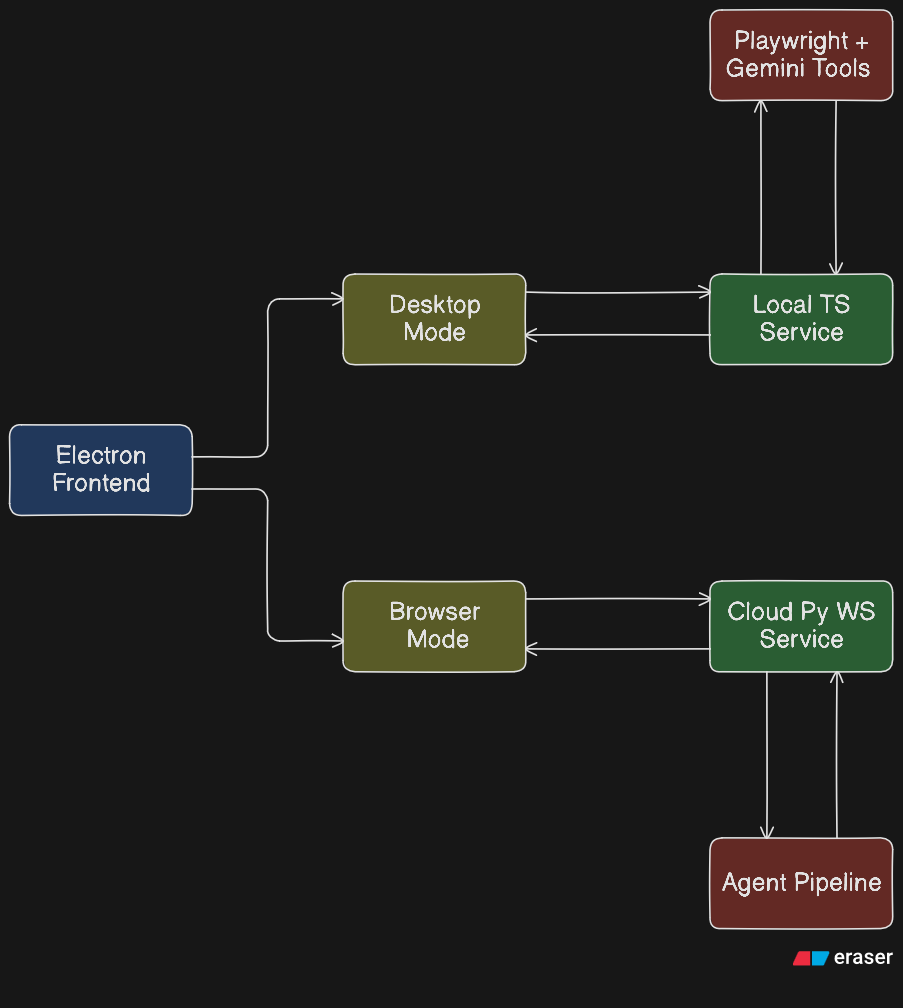
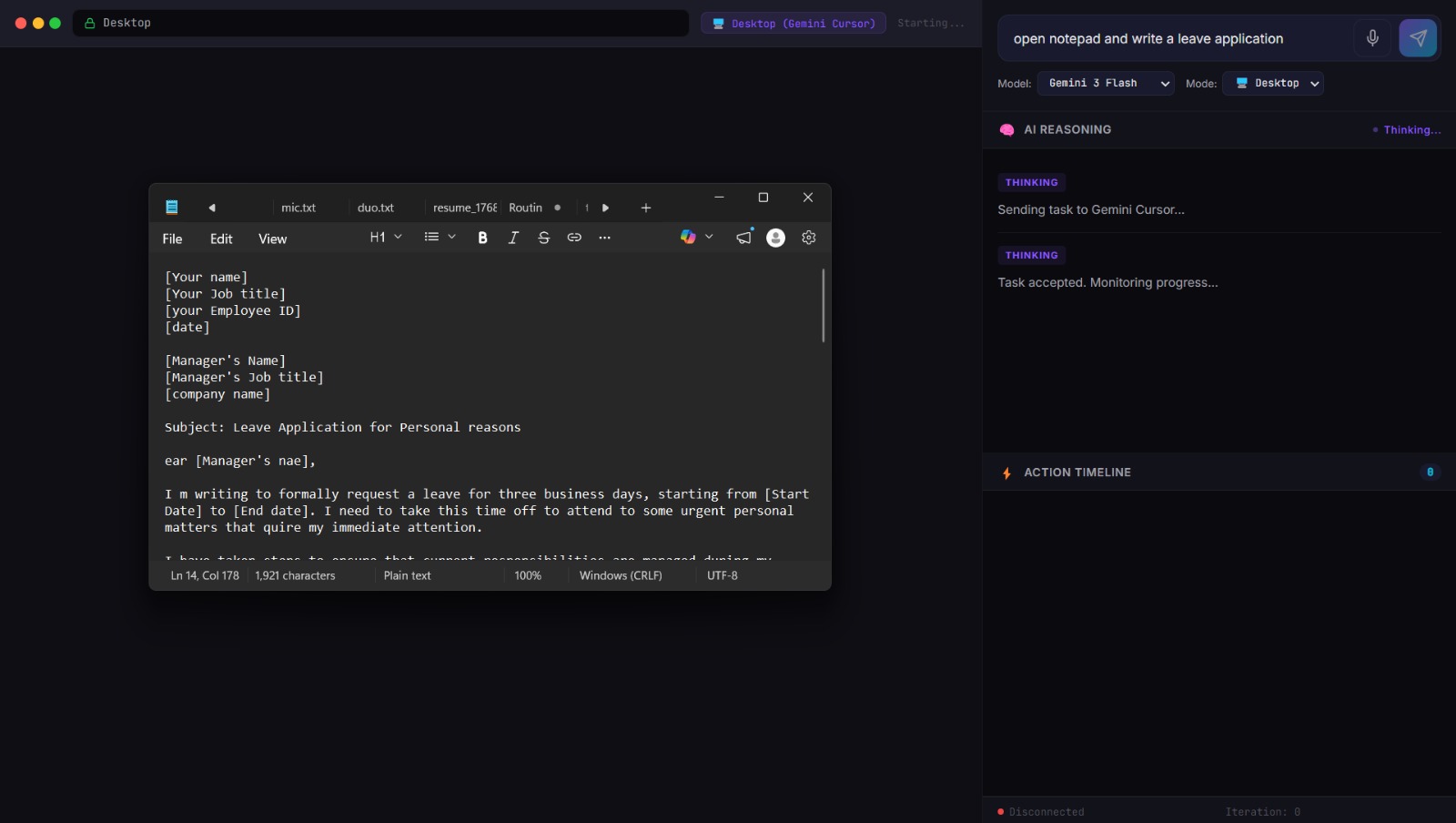
- Desktop Mode :- Controls your actual OS. Opens apps, switches windows, types text, executes multi-app workflows. Works on Windows, macOS, and Linux.
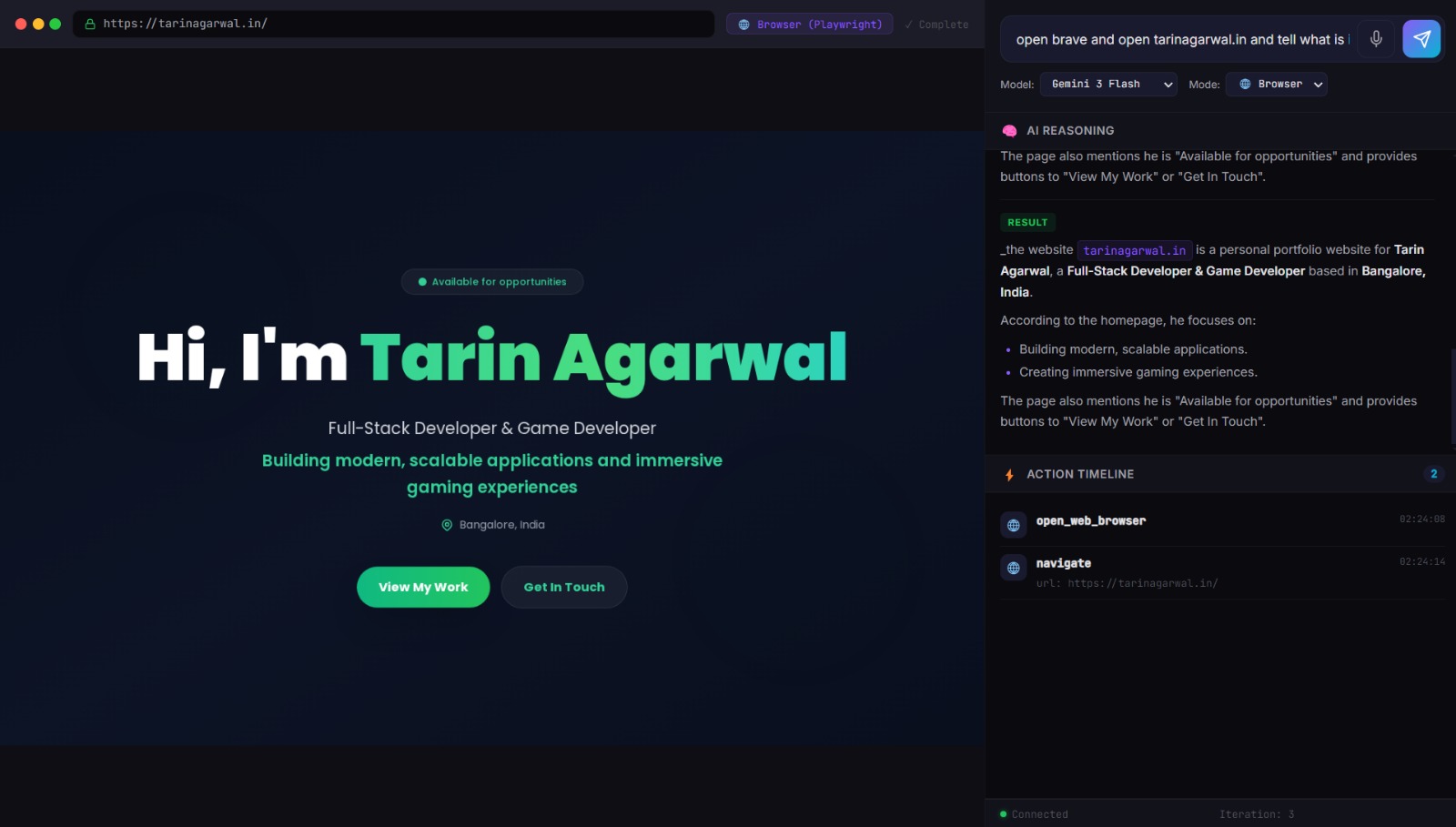
- Browser Mode :- Spins up a cloud Playwright browser on Google Cloud Run, runs a Gemini Computer Use vision loop, and streams live screenshots and reasoning back to you in real time.
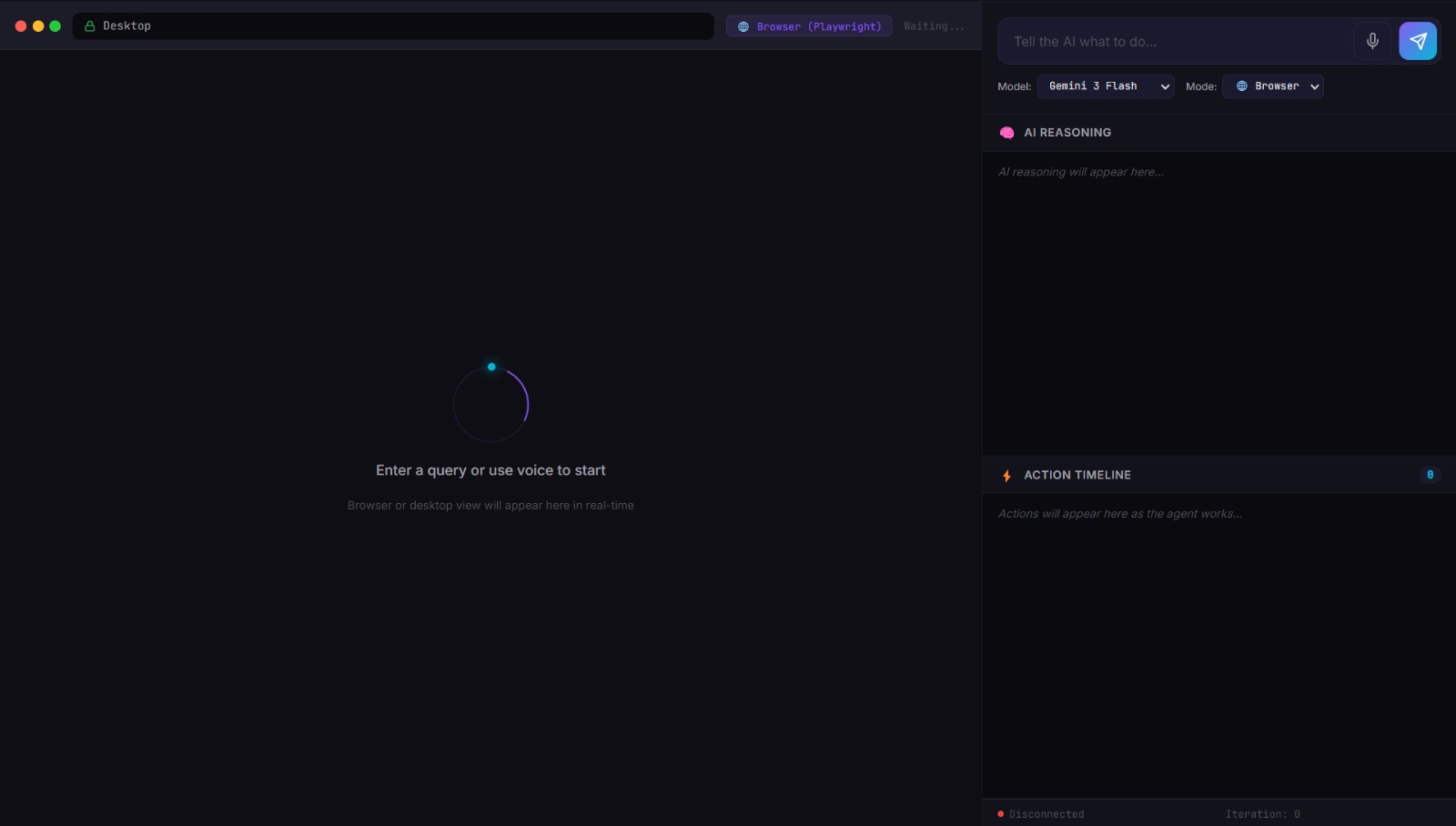
Both modes share a single Electron desktop UI with:
- Live screenshot feed showing exactly what the agent sees
- Reasoning panel with markdown-rendered AI thinking
- Action timeline logging every step with timestamps
- Voice input button for hands-free task submission
- Model selector (Gemini 2.5 Flash, Gemini 2.0 Flash)
- Safety confirmation flow for risky actions
The agent handles everything from "open Notepad and type hello" (instant, zero LLM calls) to "find the cheapest laptop on Amazon and compare the top three results" (multi-step Gemini vision loop with live screenshot streaming).
How We Built It
TaskPilot has three components working together.
1. clawd-cursor (TypeScript/Node.js) — Desktop Agent
The desktop agent runs locally and controls the OS through a 5-layer execution pipeline. The key insight behind the pipeline: taking a screenshot and sending it to a vision LLM is expensive and slow. Most tasks don't need it. So we built five layers, each cheaper and faster than the last, and only escalate when the current layer can't handle the task.
- Layer 0 — Browser (Playwright CDP): For browser tasks, we go straight to Chrome DevTools Protocol. No screenshots, no LLM. Read the DOM, find elements, interact programmatically. Free and instant.
- Layer 1 — Action Router (Regex + Shortcuts): Pattern matching maps common intents to direct actions. "Scroll down" becomes a keyboard shortcut. "Open Notepad" becomes a shell command. No LLM involved.
- Layer 1.5 — Smart Interaction (1 LLM Call): A single cheap text LLM call plans the steps, then executes them via CDP or the accessibility tree. One call, no screenshots.
- Layer 2 — A11y Reasoner (Accessibility Tree + Cheap LLM): Reads the OS accessibility tree — a structured representation of every UI element on screen — and feeds it to a cheap text model. Still no screenshots.
- Layer 3 — Computer Use (Vision LLM): Only when all else fails do we take a screenshot and send it to Gemini or Anthropic Computer Use. By this point, 80%+ of tasks have already been handled above.
The result: simple tasks complete in under 2 seconds with zero LLM calls. Complex tasks that genuinely require vision get the full Gemini treatment.
2. computer-use-preview (Python) — Browser Agent Backend
The cloud browser agent runs on Google Cloud Run and implements the Gemini Computer Use vision loop. Each iteration: capture a Playwright screenshot → send to Gemini with task history → extract function calls → execute actions → repeat. Screenshots and reasoning stream back to the Electron frontend over WebSocket in real time.
Session management uses a worker thread per connection with a command queue, keeping the async WebSocket handler non-blocking. Screenshot pruning keeps only the last 3 screenshots in the Gemini context window, replacing older ones with text summaries to manage token costs on long sessions.
3. frontend (Electron) — Unified Control UI
The Electron app is the user's window into both modes. It connects to the local clawd-cursor REST API for desktop mode and to the Cloud Run WebSocket for browser mode. The UI is identical either way — the user just flips the mode selector.
Voice input records audio via the Web Audio API, sends it to the Python server, and transcribes it with Google Cloud Speech-to-Text. The transcribed text drops straight into the task input.
The Full Google Cloud Stack:
| Service | Role |
|---|---|
Gemini (gemini-2.5-flash, gemini-2.0-flash) |
Vision loop, task decomposition, UI understanding |
| Google Cloud Run | Hosts the Python browser agent WebSocket server |
| Google Artifact Registry | Docker image storage for Cloud Run deployments |
| Google Cloud Speech-to-Text | Voice input transcription |
| Google Cloud Firestore | Session memory persistence |
| Vertex AI | Optional cloud inference mode for Gemini |
Infrastructure as Code:
Deployment is fully automated. ./deploy.sh builds the Docker image, pushes it to Artifact Registry, and runs terraform apply to provision Cloud Run and all required GCP APIs. One command, no manual console steps.
Challenges We Ran Into
The "blind clicking" problem. Early versions of the browser agent would sometimes click coordinates that looked right in the screenshot but were slightly off in the actual browser due to DPI scaling differences. We fixed this by normalizing coordinates relative to the Playwright viewport and adding a cursor indicator in the frontend so users can see exactly where the agent is about to click.
Context window management. Long browser sessions accumulate a lot of screenshots. Sending all of them to Gemini on every iteration would be prohibitively expensive. The screenshot pruning strategy — keeping only the last 3 screenshots and summarizing older ones as text — was the right balance between context retention and cost.
Thread safety in the Python server. The WebSocket handler runs in an async event loop, but Playwright and Gemini calls are blocking. Getting the threading model right — async handler, queue-based worker thread, run_coroutine_threadsafe for sending messages back — took several iterations to stabilize.
Cross-platform desktop control. Windows uses PowerShell for accessibility queries. macOS uses JXA (JavaScript for Automation) and System Events. Linux has neither. We ended up with platform-specific script directories and a runtime check that routes to the right implementation. Linux falls back to browser-only mode.
Pipeline layer ordering. Deciding which layer handles which task isn't always obvious. We went through many iterations before settling on the current order. The key insight: the accessibility tree is almost always faster and cheaper than a screenshot, and it's surprisingly capable for most UI tasks. Vision is the fallback, not the foundation.
Accomplishments That We're Proud Of
The 5-layer pipeline. The performance difference is real and measurable. Tasks that took 43 seconds and 18 LLM calls in a naive vision-first approach now complete in 2.6 seconds with zero LLM calls. That's not an optimization — it's a different architecture.
Real-time streaming that makes the agent feel alive. Watching the agent's reasoning stream alongside live screenshots transforms the experience from a black box into a collaborator. Users can see the agent thinking, catch mistakes early, and intervene if something is going wrong.
Dual-mode architecture with a single UI. Desktop control and cloud browser automation are fundamentally different execution environments, but the user experience is identical. Flip the mode selector and the same interface connects to a completely different backend.
Safety gates that build trust. The confirmation flow for risky actions ; pause, show the user what's about to happen, require explicit approval — isn't just a safety feature. It's what makes people comfortable giving an AI agent access to their desktop. Control and trust go together.
One-command cloud deployment. ./deploy.sh handles everything: Docker build, Artifact Registry push, Terraform provisioning, Cloud Run deployment. No manual console steps, no CI/CD pipeline to configure. A hackathon project that deploys like a production service.
What We Learned
Vision is the fallback, not the foundation. The instinct when building a visual agent is to route everything through the vision model. That's wrong. Vision is expensive and slow. Build the cheap layers first :- pattern matching, accessibility trees, keyboard shortcuts, and use vision only when they fail. Your users will notice the difference.
The accessibility tree is underrated. Most developers don't think about the OS accessibility tree as an automation primitive. But it's a structured, real-time representation of every UI element on screen, with labels, roles, and positions. For a huge range of tasks, it's more reliable than a screenshot and orders of magnitude cheaper.
Streaming makes agents feel alive. Sending screenshots and reasoning updates to the frontend in real time — rather than waiting for the task to complete, fundamentally changes how the agent feels to use. Users can see the agent thinking. They can intervene if it's going wrong. It transforms a black box into a collaborator.
Safety gates build trust. When users see the agent pause and ask "I'm about to send this email, confirm?" they feel in control. That feeling of control is what makes people comfortable giving an AI agent access to their desktop. Safety isn't a constraint on capability, it's what enables it.
Google Cloud's ecosystem is genuinely cohesive. The integration between Gemini, Cloud Run, Artifact Registry, Speech-to-Text, and Firestore is seamless. Shared credential model, consistent SDK patterns, and complementary capabilities made the stack come together faster than mixing services from different providers would have.
What's Next for TaskPilot
Scheduled and triggered automation. Right now, TaskPilot runs tasks on demand. The next step is letting users schedule recurring tasks ("every morning, check my email and summarize unread messages") or trigger them on conditions ("when my build finishes, open the test results").
Multi-agent task decomposition. Complex workflows could be broken into parallel subtasks handled by multiple agent instances simultaneously. "Research three competitors and compile a comparison" could run three browser sessions in parallel and merge the results.
Richer memory and context. The agent currently has session-level context. Adding cross-session memory :- remembering that you always use a specific folder for downloads, or that you prefer a particular search engine; would make it significantly more useful over time.
Visual QA testing mode. The same vision pipeline that lets the agent navigate UIs can be used to verify them. A dedicated QA mode that takes a spec ("the checkout button should be visible and clickable on mobile") and validates it against a live screenshot would be a natural extension.
Expanded platform support. The macOS JXA scripts are functional but limited. Deeper macOS integration using the Accessibility API directly, and proper Linux desktop automation support, are the next platform targets.
Built With
- electron
- express.js
- gcp
- gemini
- playwright
- python
- typescript

Log in or sign up for Devpost to join the conversation.