-
-
Banner image
-
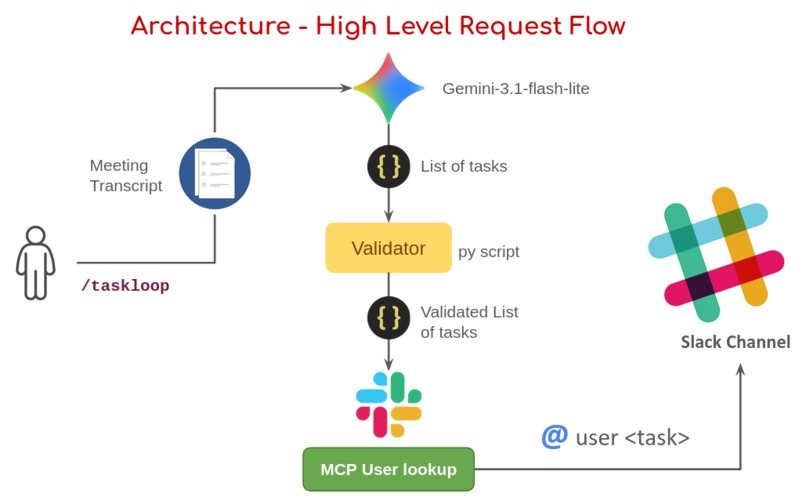
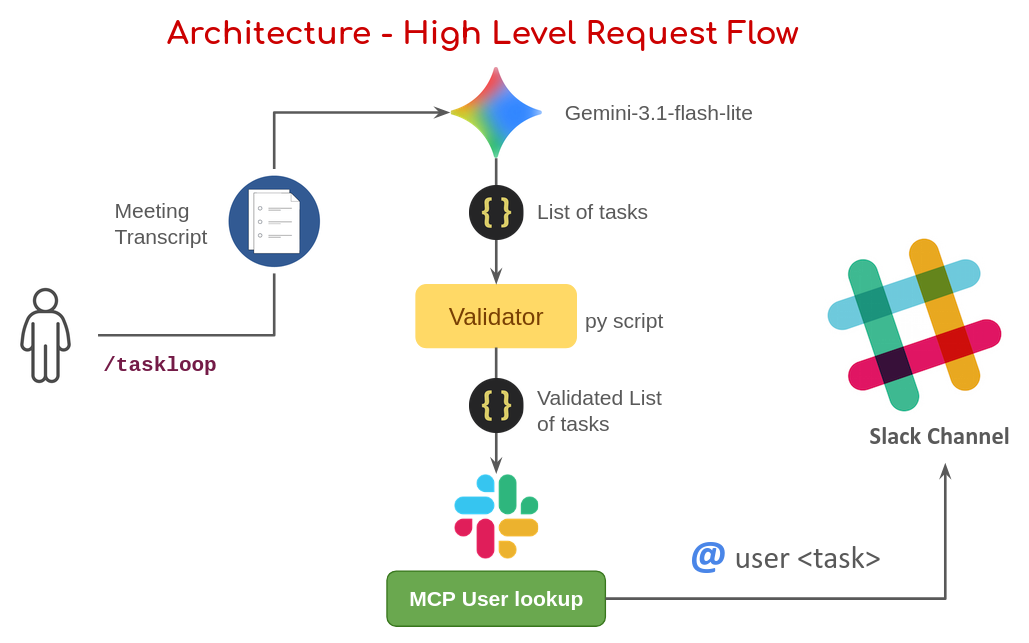
High-level architecture diagram
-
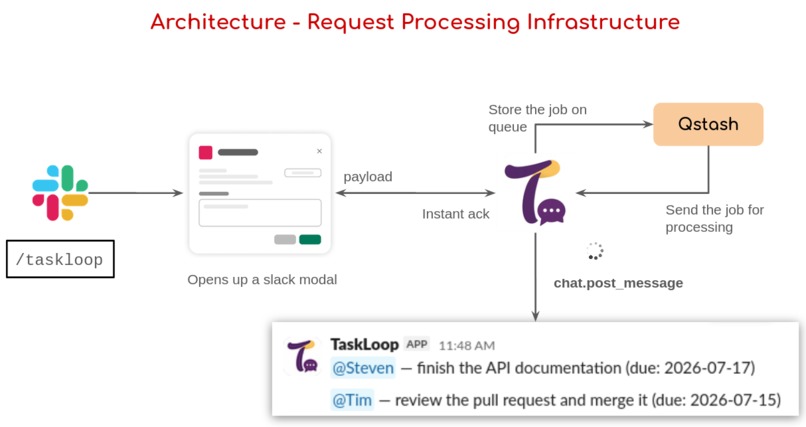
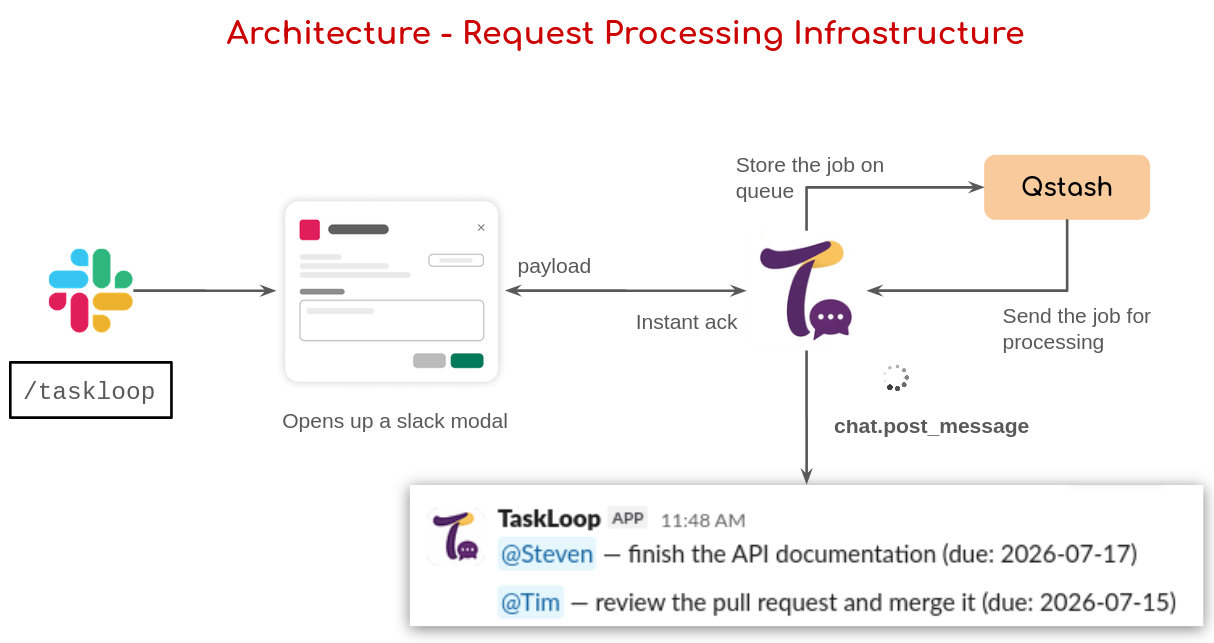
Request processing architecture
-
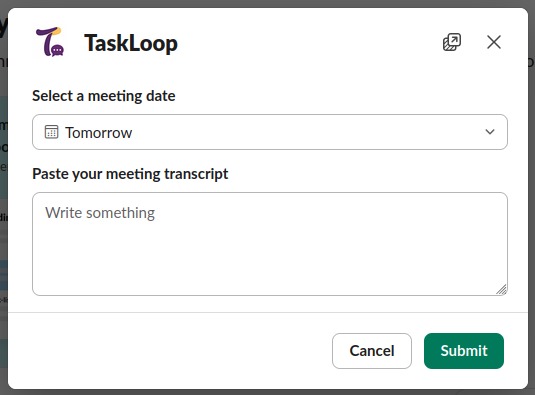
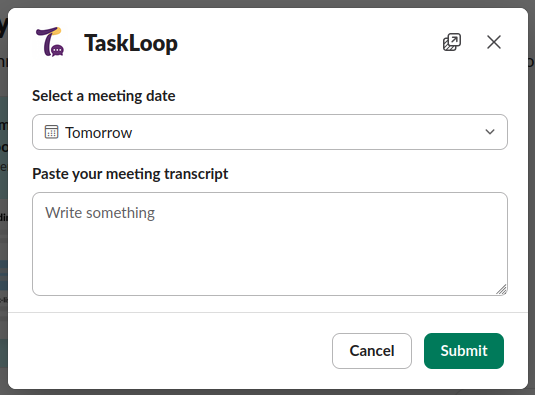
Transcript submission modal
-

TaskLoop tagging your team mates in the slack channel

Inspiration
Many teams now use online meeting tools and hold their important team meetings online. The meetings sometimes run for hours with tasks assigned to different team members. Now, not everyone notes down these tasks. And after a week or so, the team forgets who is doing what.
Wouldn't it be better if there was a way to put up all the tasks discussed in the meeting in a workspace, where the members are tagged with the tasks they need to complete and a due date?
But now we have another boring task. Someone would need to document the tasks and post them in the slack channel manually. Boring, right? Wouldn't it be wonderful if we have an agent that can do this for us?
And TaskLoop is exactly that agent who does this boring job of tagging your team mates with their to-do list right in the channel, so everyone now knows who needs to do what.
What it does
You run /taskloop in a channel, paste in a meeting transcript, pick the meeting date, and hit submit.
That's all. TaskLoop reads it, pulls out real action items — owner, task, due date — and posts them back into the channel with the right people actually @mentioned.
If it can't confidently match a name, it says so plainly instead of guessing and pinging the wrong person.
How we built it
The pipeline is:
- Gemini extracts action items from the transcript.
- A small validator confirms each one is grounded in a real line from the transcript (no hallucinated tasks). - Then each owner's name gets resolved to a real Slack user through Slack's official MCP server user lookup tool.
Because Slack only waits 3 seconds for a response, the actual processing runs asynchronously:
- The request handler just acknowledges instantly and hands the job to a queue (Upstash QStash).
- QStash delivers it to a separate function that does the real processing work and posts results directly to the channel a few seconds later.
To support any workspace — not just my own — TaskLoop runs a full OAuth install flow. Each workspace that installs it gets its own bot and user tokens, stored in Upstash Redis, so the MCP lookups and posting always use the right workspace's credentials.
Stack
- Flask, deployed on Vercel
- Gemini for extraction
- Slack's official MCP server for user lookups
- Upstash QStash for background processing
- Upstash Redis for storing each workspace's tokens after install
Challenges we ran into
Almost every layer taught me something the hard way. Slack's MCP server rejects bot tokens — it needs a real user OAuth token, which took a while to figure out since the error was a plain 401 with no explanation.
The 3-second timeout in slack when it doesn't receive a response back was the trickiest architectural piece — getting an instant, reliable acknowledgment while the real work happens completely separately, in a function that has no memory of the original request at all. But this taught me decoupling and the fire-and-forget architectural pattern.
Accomplishments that we're proud of
Getting a real, working MCP client integration against Slack's own official server — not a mock, not a simulated tool call — actually resolving real usernames in a real workspace. Building an async pipeline that reliably handles transcripts with 8+ action items without ever hitting Slack's timeout. And making TaskLoop genuinely multi-workspace: any team can install it through a real OAuth flow, not just the one we built it in.
What we learned
That "MCP integration" isn't one fixed pattern — it's a client/server relationship, and here it meant becoming a client of Slack's own MCP server, not building one myself. That serverless environments change assumptions you don't think about until they break: no persistent state, ephemeral filesystems, strict response-time windows. And that a queue isn't just "a to-do list" — it's a way to split one slow operation into two independent, fast ones.
Mostly, I learned to actually read error messages carefully and check the real, live response instead of guessing — nearly every hard bug in this project was solved by looking at what actually came back, not by assuming.
What's next for TaskLoop
Direct integration with Zoom and Google Meet, so transcripts flow in automatically instead of being pasted manually. Smarter handling of ambiguous names, maybe with an interactive picker instead of just flagging the conflict. And eventually, tracking whether action items actually get completed, not just posted.

