-
-
Task Tracker
-
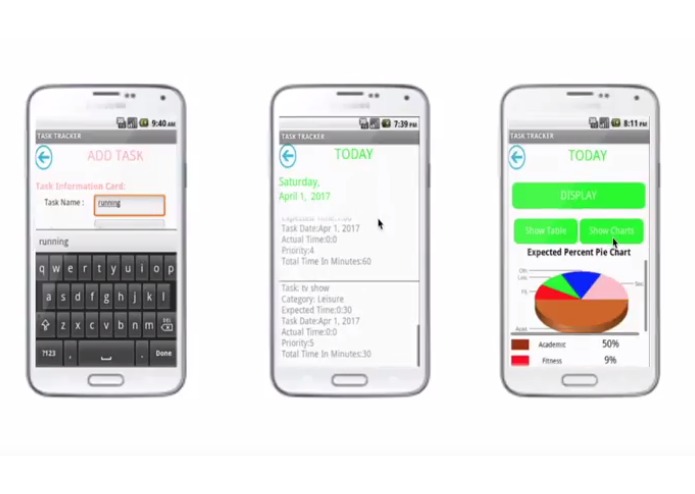
Task Tracker (Mobile Display)
-

Praneeth Arrepu: Head in Marketing and Advertisement
-
Rohit Nemani: Task Tracker Project Lead; Head of Program function and development
-
Supraj Janampalli: Head of App Design and compatibility


Inspiration
Many people suffer from the habit of procrastination which results in them falling behind and losing control of time. They aim to accomplish so much in such little time but fall short in doing so. This problem of procrastination is growing as serious rates, likely due to the introduction of new and improved distractions that are even harder to ignore. In fact, according to Dr. Steel, Phd, a physiologist at the University of Calgary, the population suffering from chronic procrastination increased from 5% to 26% between 1978 and 2007. Also, in a different meta-analysis experiment, Steel found that 80-95% of 2007 college students admitted to procrastination that negatively affected their classwork.
What it does
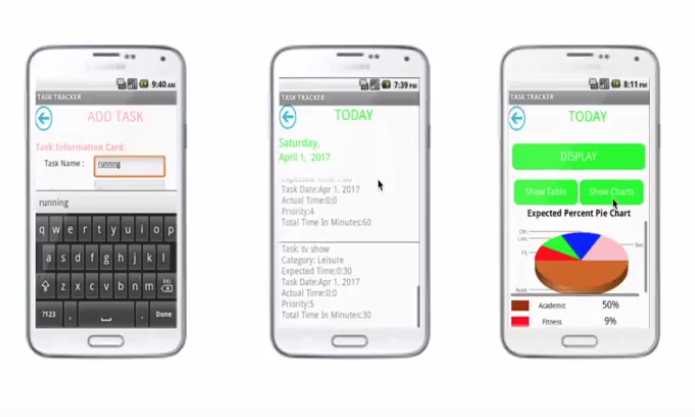
Task Tracker is a solution to this problem that aims to attack it from all directions. The app helps users with achieving balance and becoming more productive by showing the user a comparison between how long they expected to spend on each task and how long they actually ended up spending. The app also puts every task into one of five categories, which are also compared for balance. Lastly, Task Tracker sorts the users tasks in the order the user must complete them to be most efficient based on information the user inputs about the task.
The user can use this information to become more productive by decreasing the difference between the expected time and real time spent and can also become more balanced by trying to match the amount of total real and expected time put into each category. They will also become more efficient by completing the tasks in the order for most efficiency.
How we built it
We built the app using MIT app inventor. This was minor challenge we faced during development of the app was learning the block language that we were unfamiliar to. To learn the language quickly, we spent some time looking through tutorials and creating the sample apps to learn the functions of the app inventor and the basics of how to code. Once we knew these, we began to program our app and used the guess and check method to overcome other programming hurdles.
Most of out functions were programmed through complex decision structures that we created through the guess and check method and repetitive testing. An epitome was programming the sort function to work in all cases despite similarities in priority and expected time. We did this by adding multiple tasks with the same and different priority levels and programming the app to repeat the sort method between every 2 consecutive tasks until it is fully organized. The program uses one of our several algorithms, sort using an if...then case structure with variables programmed to change values for every run based on the given index.
Challenges we ran into
Time constraint: One major challenge was completing the app and all necessary parts for submission prior to the deadline. We heard about the competition and applied late and had less time but solved this issue by splitting up the tasks and working together.
MIT App Inventor language: A minor challenge we faced during development of the app was learning the block language that we were unfamiliar to. To learn the language quickly, we spent some time looking through tutorials and creating the sample apps to learn the functions of the app inventor and the basics of how to code. Once we knew these, we began to program our app and used the guess and check method to overcome other programming hurdles.
Sorting: When developing the application, the sort function was a problem due to the complexity of the algorithm and the required knowledge of programming. To solve this problem we used the guess and check method. We developed several algorithms, and learned how they processed the information. we finally were able to make the current algorithm for sorting using a if...then case structure with variables programmed to change values for every run based on the given index.
Pie Charts: The last major programming challenge we faced was with the Pie Chart APIs. MIT app inventor does not have a function for charts and diagrams so I had to learn how to program and recreate APIs that I plugged into the show charts section of the Compare pages. These APIs take real time data from the app and convert them to show the information. I had a hard time formatting and setting up these charts but learned through online resources.
Scalability: The scalability of the app was a minor setback in the design development process. The app was originally designed for mobile use since we were only able to test with the Samsung Galaxy S4. The text and buttons sizes and placement was based around this device. Towards the end of our process, we began testing using the Lenovo Yoga Tablet. Due to the large variance in size, the app was not able to format properly and we had to rescale everything using percents to match both tablet and mobile devices.
Accomplishments that we're proud of
We are proud of the many of our features that we were able to create despite the time constraint and our lack of knowledge of the language when we started the app. One major example are the Pie Chart Apis on the compare pages. For these we learned how to program, format, as well as embed live API charts into a web viewer of the app that could take changing real time variables within the app and use them to compose the charts. As side from the sort function, the update page functioning was also an accomplishment. Since there is no given timer, we programmed the stopwatch on our own and created many split functions to make the app able to add to the time already existent on the app. We also were able to program the app to allow people to stop the timer, take breaks, and then start the timer again and still allow for the time to compile under the actual time of the same task.
What we learned
The development of Task Tracker demonstrates our ability to improve learn quickly and apply our knowledge. For the challenge, we had to learn a new language and create many complex functions using it in a small time period.
As we developed this app, we experienced the entire software development life cycle. Which is we gathered requirements. First we had a big picture of what we wanted to develop. Then we brainstormed among this group and with other students and documented what features would be useful in the app. Then we went through the list of features and determined which are feasible and could be developed in the timeline. After this we went into Design mode. Where we designed each page of the app and functionality of each page. How many buttons will be present and what each button would do. We also created sketch of each page to determine the look and feel of the App. Once we have finalized the design it is time to actually build the app. We started with building pages and adding blocks to each page for the intended functionality. Some of the functionality was straight forward and could be coded easily. Some of the functionality like sorting et., needed more research and learning before we could add the code. Once a page is developed and is supposed to be functional, then one of use (other than the person who developed the code) would test that page and document and defects (where the functionality didn't meet the design). Then the developer would go back and fix the code to work correctly. There were several iterations of coding and testing of both page display and code blocks before we could get to the page working exactly as deigned. At the end we tested the overall app end to end making sure that every single page is tested int he entire flow. Now we have an app working as designed.
What's next for Task Tracker
We have many new improvements in mind for Task tracker. One idea is an Edit Task function on the Task Menu Page allows the user to add tasks, remove tasks and update tasks but an improvement for the app would be another option to edit the task by changing the name, category or expected time after the task has already been added. Another upgrade to this app would be an online account system so that each user can make an account that would save all data in the app. This would allow users to use the app on different devices. Also, we are planning to add a points system by which users gain and lose points for managing their time in an organized, efficient manner. This would motivate users to do betters and increase competition among users who would be able to share their scores through the app.
Download Task Tracker from the MIT App Inventor Gallery
Mobile Edition: http://ai2.appinventor.mit.edu/#5958962175016960
Tablet Edition: http://ai2.appinventor.mit.edu/?galleryId=4965598663278592
Check out our portfolio/manual:
https://magic.piktochart.com/output/21512675-task-tracker-manual-lenovo-app-challenge
Read our Final Reflection at:
https://drive.google.com/file/d/0BwV18UpjNu_paVROZjNGSDlSZ1U/view?usp=sharing


Log in or sign up for Devpost to join the conversation.