Inspiration
My tendency to forget tasks inspired this solution. Often, I start the day with a clear plan but struggle to remember it later. This app aims to address that by generating task lists based on simple prompts or keywords.
What it does
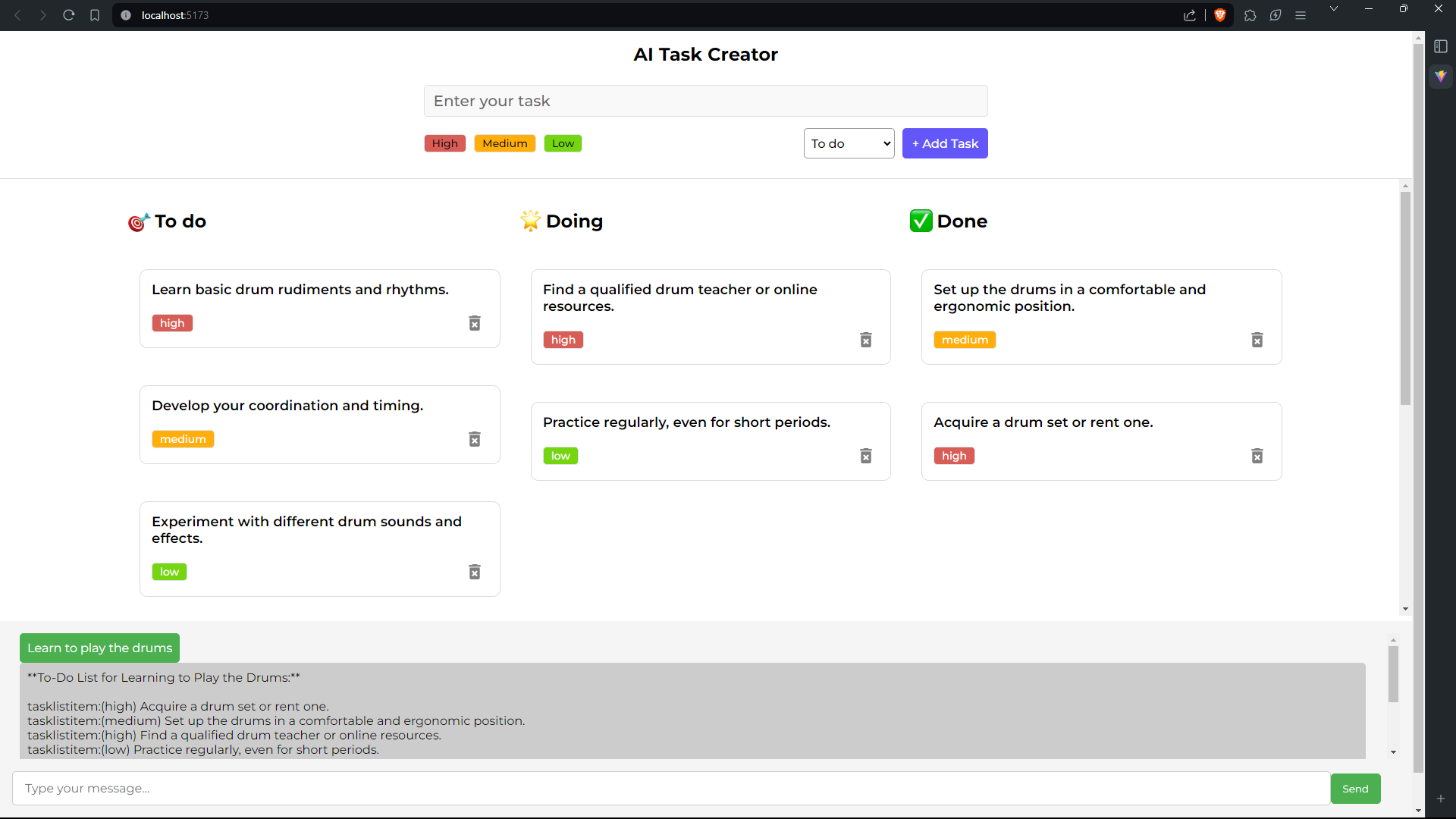
The web app takes user input and creates a task list accordingly, simplifying task management.
How we built it
I developed this app over four days with assistance from Ania Kubow and Code Bless You. Ania provided guidance on integrating the backend with Gemini AI, while Code Bless You's tutorials were invaluable for quickly setting up the frontend.
Challenges we ran into
- The main challenge was formatting the history for submission to Google AI, as my expertise in JavaScript, React, and Node.js was limited.
- Another important one is the process of deploying full-stack code to hosting services like vercel
Accomplishments that we're proud of
- Successfully creating a functional app with room for improvement.
- Integrating code from Ania Kubow and Code Bless You.
- Implementing automatic rendering of responses and importance tags from Gemini API calls.
What we learned
- How the backend influences the frontend.
- Appreciation for the infrastructure enabling API calls.
- Building web apps for diverse purposes.
- Task management and project outlining.
- How to manage vercel.json for deploying backend servers
- How to connect endpoints between frontend and backend
- How unsafe code can be, hence it is always good to take time researching safe practices, especially with endpoints in your codebase.
What's next for AI Task Creator
- Implementing a "Resources" button for task list items to display AI summaries on hover.
- Adding daily, weekly, and monthly calendar plans.
- Creating a calendar-style interface for project overviews.
- Integrating with Google Calendar, Tasks, and other third-party apps.
- Connecting with assistant apps and home automation interfaces.
- Introducing progress tracking and contextual task creation.
- Modifying existing tasks
- AI automatic modification and appending of task items
- Day, date and time features
- Dark Mode (Light mode seared my irises)
- Standalone apps
Original Words Before AI Formatting
Inspiration
I was inspired to create this solution due to my forgetful nature. I wake up each day with a view of what to do in the day, but a few hours later, I forget most of the tasks I have in mind and I find it a hassle to start setting up tasks one after the other, however, I have learnt many times that starting is the hard part; once you get that start, you find your way to the finish.
What it does
This webapp is built to take that first step for you. It takes a simple prompt, even if it is just a few key words and creates a task list for you to navigate.
How we built it
I built this webapp in 4 days with the help of Miss Ania Kubow. She goes fast but her content includes everything you need to get the backend working with Gemini AI. link
For the frontend, Code Bless You was heavenly. His explanations are succint and leave nothing wanting, although it uses more of a template styled teaching guide, it was helpful to get this up and running quickly with the frontend link
Challenges we ran into
- The biggest challenge I ran into was sending the history to Google AI in the correct format. I think it is because I only know a bit of Javascript syntax and barely any react or nodejs in the first place. -- Another important one is the process of deploying full-stack code to hosting services like vercel
Accomplishments that we're proud of
- I am incredibly happy that I have a working app. Basic as it might seem, there is a lot of room for improvement. I plan to add context scraping, where the task list items will have a resources button that previews a page summary by gemini in a small PIP-like window. These previews will be compiled to assist with relevant tasks.
- With help from gemini, I made Ania Kubow and Code Bless You's codes work together.
- I got responses and importance tags from gemini api calls render automatically
- How to manage vercel.json for deploying backend servers
- How to connect endpoints between frontend and backend
- How unsafe code can be, hence it is always good to take time researching safe practices, especially with endpoints in your codebase.
What we learned
- How the backend drives the frontend when needed
- Appreciation for the countless API calls we make everyday and the infrastructure that enables them
- How to build a webapp for any idea
- How to outline and manage tasks when building anything
- How to have fun even when things blow up in your face
What's next for AI Task Creator
- Resources button for task list items that shows an ai summary pop-up of relevant information on hover
- Daily, Weekly and Monthly calender plans.
- Calender style interface (for those who want project style overviews)
- Google Calender, Tasks and other third-party apps integration
- Integration with Assistant apps and home automation interfaces
- Progress Tracking and Contextual Task Creation


Log in or sign up for Devpost to join the conversation.