Tandemcode
▶ Try it live: tandemcode-app.vercel.app · 🎬 Watch the demo video
They pedal, you steer. The coding-agent harness for learners: an AI coding agent you ride along with, so you understand the code it writes instead of just shipping it.




- 🗺️ Watch it work on a map. Your project is drawn as a map, and the agent is a marker moving to every file it reads or edits.
- 🚲 Tandem mode, on by default. The agent asks how you would do it, and writes nothing until you say "go ahead".
- 💡 Learn as you go. Every step is explained in plain words, and each task ends with What you learned, a quiz and a "your turn" exercise.
- ✅ Done means checked. The harness runs your tests when the agent says it's finished, and sends failures back.
- ↩️ You stay in control. Approve every command, stop or steer mid-run, undo just what the task changed.
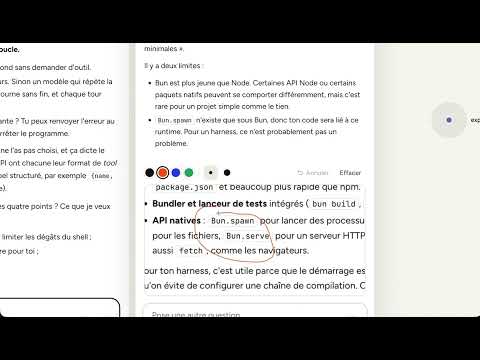
- ✏️ Ask without interrupting. Select anything to ask about it, or sketch what you mean in the Scratchpad.
- 🔓 Any model. Our own Tandemcode agent on Claude by default, or open models: Qwen3-Coder on your own GPU, or Ollama offline with no API bill. MIT licensed.

Open Source × AI Hackathon 2026 (Galsen Dev): track Éducation & apprentissage. The live demo runs on our own machine when we're online. Any time, you can run it on your own computer with an Anthropic API key, or with an open model through Ollama (Quick start).
En bref. De plus en plus de développeurs et d'étudiants livrent du code écrit par une IA qu'ils ne savent ni lire, ni expliquer, ni corriger : l'IA fait le travail et ils n'apprennent rien. Tandemcode garde l'humain dans la boucle. L'agent se déplace sur une carte de votre projet, le mode Tandem (par défaut) l'arrête pour vous demander votre avis avant d'écrire du code, chaque étape est expliquée en mots simples, et vous pouvez demander « pourquoi », rejouer et annuler. Il fonctionne avec notre agent Tandemcode sur Claude (par défaut) ou avec des modèles ouverts (Qwen3-Coder sur notre GPU, Ollama hors ligne, sans facture d'API). Licence MIT. Vidéo de démo : https://youtu.be/h9uvHVJPNxg
The problem
Developers and students increasingly ship code an AI wrote that they can't read, explain or fix: the AI does the work, and they don't learn.
Coding agents make this worse by design. They are built to finish the task, not to teach: you get a long text log and a diff at the end, so it is hard to see where the agent is, why it chose what it did, or to step in before it writes the code. And most of them are tied to one paid, proprietary model, which keeps them out of many classrooms.
The solution
Tandemcode makes the agent's work visible, interruptible and teachable, so the learner stays the one who decides and understands.
Learn while it builds
- Tandem mode, on by default: you design, the agent teaches. (Solo mode lets the agent just build.)
- It asks how you would do it, pushes back on a flawed choice, and gives hints before full code.
- It explains each new term in plain words and ends with "What you learned".
- The harness blocks file writes until you approve the step. You can also skip a step. Tandem mode is inspired by VibeWise (MIT).
- Quiz me. After a step, the tutor asks three short questions about what you just built, one at a time, and tells you what you got right.
- Lesson notes. Download any thread as a study sheet: what you asked, the decisions you made, the ideas explained, what you learned, the quiz, the files changed and the checks run. It is built from the session itself, so it costs nothing and invents nothing.
- Share a session. Export a thread as a file; anyone can open it in Tandemcode and replay it step by step on the map, read-only. A teacher can show how a feature was built, and a student can show how they got there.
See it work
- A live project map. Folders and files are circles. The agent is a marker that moves to each file it reads or edits. Fresh edits glow, failures show, and the camera follows the work.
- Plain-language steps. Every action gets a short label and a "why". Any diff has "Explain this change". This works in English or French.
- Rewind. Scroll the Steps list and the map moves back through the run, one step at a time.
Stay in control
- Approve every shell command.
- Stop the agent at any time, or steer it mid-run.
- Ask a side question without interrupting. Ask reads a short brief of the thread, so it stays cheap.
- Undo puts back only the files a task changed. Keep commits them with a message the model writes.
- Done means checked. When the agent says it's finished, the harness runs the project's tests. A failure goes back to the agent ("not done yet"). A missing test tool is reported, not blamed on the agent.
Practical
- Any model. The Tandemcode agent (our own loop, on Claude Sonnet by default), the Claude Code engine, our own GPU (one-click Brev + vLLM, auto-stop), Ollama on your own computer, NVIDIA or OpenRouter. Switch mid-session and the conversation carries over. The map, Tandem mode and approvals work the same on all of them.
- Costs in view. Tokens per thread, spend estimates, GPU time, and compact or clear a thread's context on demand.
- Computer use. The agent drives your Chrome as text (page text plus numbered controls), so open models can test the web apps they build.
- Comfort. Three themes (Default, a muted Dark, and Stone), voice prompting, works on a phone.
- Live online demo. Each visitor gets a private, sealed Docker sandbox (docs/PUBLIC-DEMO.md).
Made for learning
- Three first-launch questions (have you used AI to code, your level, your language), so the tutor starts at the right pace. A short tour and contextual tips explain the screen as you meet it.
- "What you learned" after each task: the ideas it used (tap one for its explanation), Quiz me, a Your turn exercise, and Save to notes.
- Scratchpad: ask a side question, or sketch what you mean, while the agent keeps working. Draw with the mouse, or drop in a screenshot and circle what should change; Claude and Claude Code see the drawing. Select any part of the agent's work to ask about it, save the answer to your notes, or turn the note and sketch into a real task.


Status
Working and tested end to end:
- the Tandemcode agent on Claude Sonnet 5.5 (the default), Claude Opus, and the Claude Code engine;
- Qwen3-Coder on our GPU, locally and through the online demo;
- Undo and Keep, the done-check, the browser tools, and the sandbox isolation.
Included but not yet tested end to end by us: the Ollama preset (qwen3-coder:30b) and NVIDIA-hosted Nemotron.
The default agent runs on Claude, so it needs an Anthropic API key. For no API bill, set up Ollama or your own GPU in Settings → Agents.
Quick start
Requires Node ≥ 22.18.
git clone https://github.com/Djbrl/codetandem-harness && cd codetandem-harness
npm install
npm start            # → http://localhost:3000, then add a key or a model in Settings → Agents
npm run mock         # the interface on a scripted model, no key or network (for development and the tests)
The default Tandemcode agent needs an Anthropic API key: add it in Settings → Agents, or put ANTHROPIC_API_KEY in a
.env file (copy .env.example) and restart. Settings → Agents also sets up Ollama (it checks your install and
downloads the model) and the one-click GPU (Brev + vLLM).
Open any folder from the app, or start from an empty project; WORKSPACE=/path npm start sets the default folder.
Self-hosting on your own GPU machine instead: run scripts/serve-vllm.sh on it, then set TUNNEL_HOST
(the server keeps the SSH tunnel up), and optionally BREV_INSTANCE and GPU_HOURLY_USD for the
status bar. See .env.example, which also explains when the server reads .env.
Terminal-only harness: npm run agent -- workspace "your task".
Settings and sessions are saved in ~/.agent-stage/ (the project was called agent-stage before; the folder keeps
that name so existing data still loads).
Architecture
browser (React, web/)  ──HTTP + Server-Sent Events──▶  Hono server (src/server.ts)
                                                          ├─ our agent loop (src/agent.ts)
                                                          │    ├─ model clients ──▶ OpenAI-compatible APIs (src/model.ts), Claude (src/anthropic.ts)
                                                          │    └─ tools (src/tools.ts, src/browser.ts) ──▶ files, shell, Chrome; locked to the project
                                                          ├─ Claude Code engine (src/claudecode.ts, Agent SDK)
                                                          └─ done-check (src/verify.ts) · git checkpoints (src/git.ts)
Dependencies
Server: hono, @hono/node-server, playwright-core (drives your installed Chrome), @anthropic-ai/sdk,
@anthropic-ai/claude-agent-sdk, zod. UI: react, react-dom, d3-hierarchy, vite, @vitejs/plugin-react. Checks: typescript (type checking only).
Node 24 runs the TypeScript directly; there is no build step for the server. Tests use Node's built-in runner, with
no extra dependency: npm test runs the unit tests (file tools, done-check, checkpoints, sessions, the demo's
network filter) and an end-to-end smoke test that boots the server on the scripted model, runs a task through the API,
approves its commands and undoes it. npm run typecheck checks the server and the UI. GitHub Actions runs the
typecheck, the UI build and the tests on every push and pull request.
Live demo from your own computer, one private sandbox per visitor: npm run public (docs/PUBLIC-DEMO.md).
More detail: docs/ARCHITECTURE.md · how it was made: docs/HOW-WE-BUILT-IT.md
How AI is used
The model is the agent. It decides which tool to call (list_files, read_file, write_file, edit_file, search,
run_command, the browser tools), the harness runs it inside the project folder, and the model gets the result back,
until the task is done. The harness keeps the model honest: it checks "done" by running the tests, enforces the Learn
write lock, and refuses a checkpoint until the learner's question got a visible answer.
The same model also writes the plain-language step labels, file summaries, "Explain this change", commit messages for Keep, and the summary when you compact a thread. On your own GPU all of that is free.
Why open-weight models matter. A learner or a school should be able to run the whole thing on hardware they control: Ollama on a laptop or a lab machine, or one GPU shared by a class, with no per-token bill and no code leaving the building. Claude is the default because it gives the strongest results out of the box, but nothing in Tandemcode depends on it.
AI tools used to build it (Claude Code, Mobbin MCP) are listed in docs/HOW-WE-BUILT-IT.md.
Models
| Model | Provider | Role |
|---|---|---|
claude-sonnet-5-5 |
Anthropic API, in the Tandemcode agent (our loop) or through the Claude Code engine | default agent; cost shown in Usage |
claude-opus-5-5 |
Anthropic API, same two ways | strongest results |
Qwen/Qwen3-Coder-30B-A3B-Instruct-FP8 |
self-hosted with vLLM on one L40S GPU (script) | open-weight agent model we develop and demo with |
nvidia/nemotron-3-super-120b-a12b |
NVIDIA API | hosted open-weight model (preset) |
qwen3-coder:30b (or any model you pull) |
Ollama on your own computer | offline or classroom use, no API bill (preset included) |
| any OpenAI-compatible model | vLLM, LM Studio, OpenRouter | add it in Settings → Agents |
Contributing
Contributions are welcome, including AI-assisted ones (see how in CONTRIBUTING). Start with CONTRIBUTING.md, our Code of Conduct and the issues labelled good first issue. Found a security problem? Please report it privately, as explained in SECURITY.md. Changes per release: CHANGELOG.md.
License
MIT. Third-party notices: THIRD_PARTY_NOTICES.md.
Built With
- css
- dockerfile
- html
- javascript
- python
- shell
- typescript

Log in or sign up for Devpost to join the conversation.