Inspiration
Study apps remember what a student has practiced, while AI assistants are good at explaining difficult ideas. The problem is that these two sides usually do not share context. A chat assistant cannot reliably see the card on screen, understand which topics the student repeatedly misses, or make its explanation available during the next study session.
I built Tandem to explore what happens when a study app and an agent work on the same persistent state instead of communicating through copied text or brittle interface automation.
What it does
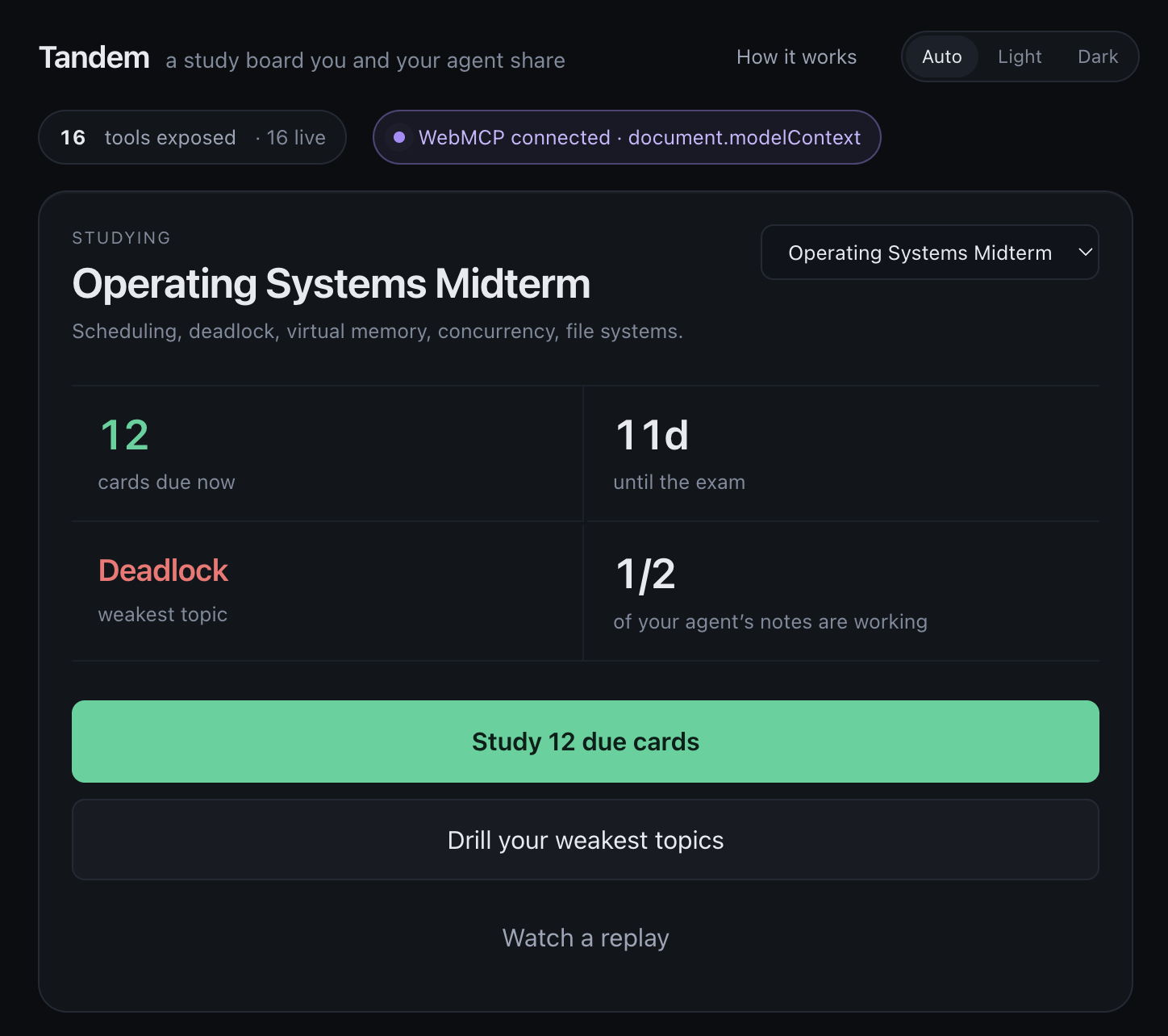
Tandem is a working spaced-repetition study board for students and their AI agents.
The student can create decks, study flashcards, reveal answers, grade recall, inspect weak topics, and follow a revision plan. Through WebMCP, an agent can directly access the structured learning state and help with the same workflow.
For example, the agent can:
- Rank topics using real lapse counts and difficulty data
- Start a study session focused on the weakest material
- See the exact card currently on screen
- Check whether an earlier explanation actually improved the student’s results
- Replace an ineffective explanation and save the new one directly on the card
- Build a revision plan from the exam date and weak-topic history
- Request permission to remove a card without being able to approve the deletion itself
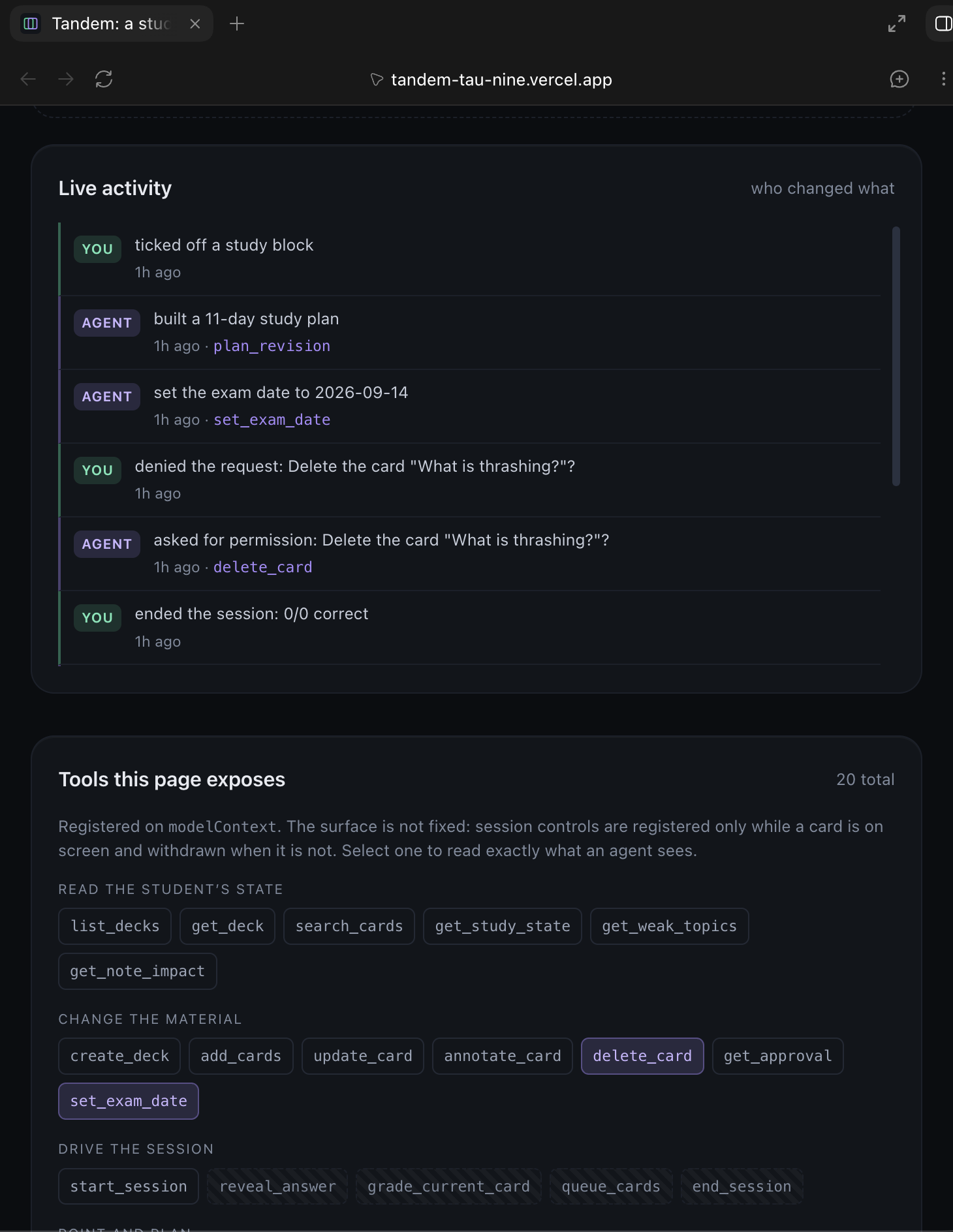
Agent actions and human actions appear together in a visible activity feed, so the collaboration remains understandable rather than happening invisibly.
Why WebMCP
This use case needs more than an agent clicking through a website.
A student should not have to repeatedly explain which deck, topic, or card they are viewing. Tandem exposes that information as typed WebMCP tools. When the student says “the card currently on screen,” the agent can call get_study_state and receive the exact card, session position, reveal state, and study progress.
WebMCP also lets the agent work with durable application state. An explanation written with annotate_card becomes part of the card and remains available in future sessions instead of disappearing in a chat transcript.
The tool surface changes with the application state. Tandem exposes 16 live tools on the dashboard. When a study session begins, session-specific tools such as reveal_answer, grade_current_card, queue_cards, and end_session become available, bringing the live surface to 19 tools. They are withdrawn again when the session ends.
Human and agent collaboration
Tandem deliberately keeps important decisions with the student.
For destructive actions, delete_card does not delete anything. It creates a permission request in the interface and returns a pending result. The student sees exactly which card would be removed and how many recorded reviews would be lost. Only the student can press the confirmation button. The agent can later read the decision through get_approval, but it cannot approve its own request.
This creates a clear division of responsibility: the agent can inspect, explain, organize, and propose, while the student remains responsible for studying, grading, and irreversible decisions.
How I built it
Tandem is built with React 19, TypeScript, and Vite and deployed on Vercel. Study data is stored locally in the browser, so the project requires no account or backend.
The WebMCP adapter registers tools through document.modelContext, supports contextual registration and withdrawal, and reads current application state when each tool executes. Every tool has a typed input schema, a detailed agent-facing description, structured output, and safety annotations.
The app includes 20 tools covering deck inspection, card search and editing, study sessions, note-impact analysis, revision planning, interface highlighting, and human approval.
Challenges
One challenge was ensuring that tools never operated on stale React state. The executors therefore read the current store at call time instead of capturing an old snapshot when they are registered.
Another challenge was designing a dynamic tool surface without duplicate registrations. The registry compares the tools that should currently exist with the tools already registered and changes only the difference.
The most important design challenge was human approval. A simple confirm: true argument would only be the agent claiming that permission had been given. Tandem instead separates requesting, deciding, and reading the result into different actions, with the actual decision taking place in the user interface.
Accomplishments
I am especially proud that Tandem is a complete study product rather than a static WebMCP demonstration. The same structured tools used by the agent affect the real interface and persistent study data.
The project includes automated coverage for the spaced-repetition scheduler, tool schemas, contextual tool registration, note-impact calculation, revision planning, approval boundaries, accessibility states, and an end-to-end agent simulation.
What I learned
Building Tandem changed how I think about agent-enabled websites. A useful tool description is not just API documentation; it explains when an agent should use the tool and where the human boundary begins.
I also learned that WebMCP is most valuable when it exposes domain logic and live context that would be difficult to reconstruct from screenshots or interface automation.
What’s next
Next, I would add optional cross-device synchronization, richer study analytics, document-to-deck importing, and longer-term measurements of whether agent-written explanations improve retention across multiple review cycles.
Built With
- css3
- html5
- react
- typescript
- vercel
- vite
- vitest
- webmcp


Log in or sign up for Devpost to join the conversation.