-
-
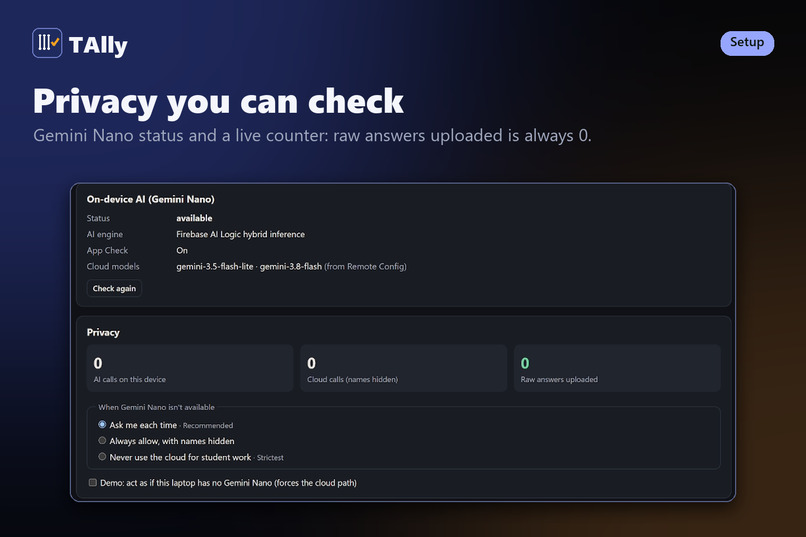
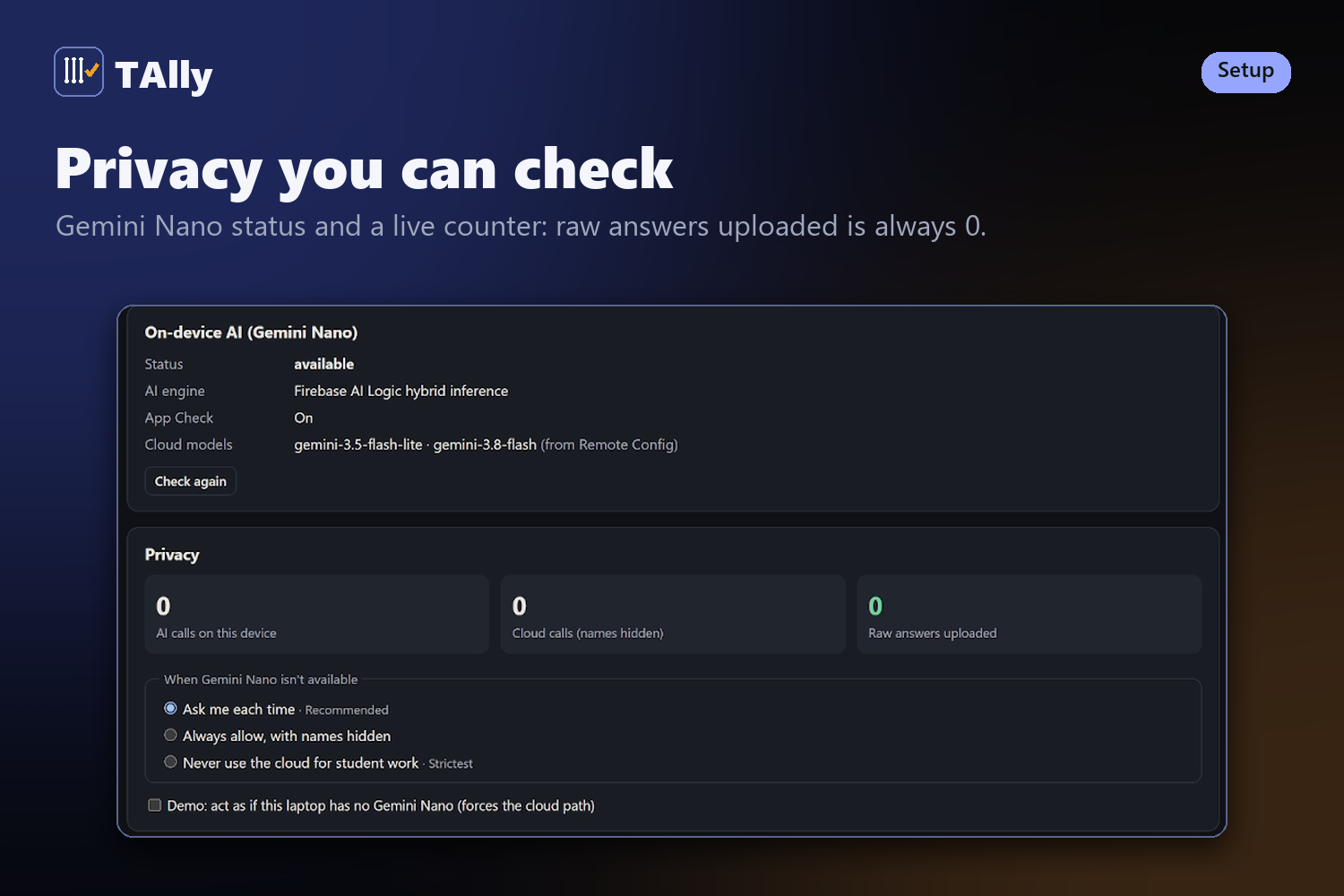
Privacy you can check: Nano is available, and the counter shows raw answers uploaded = 0.
-
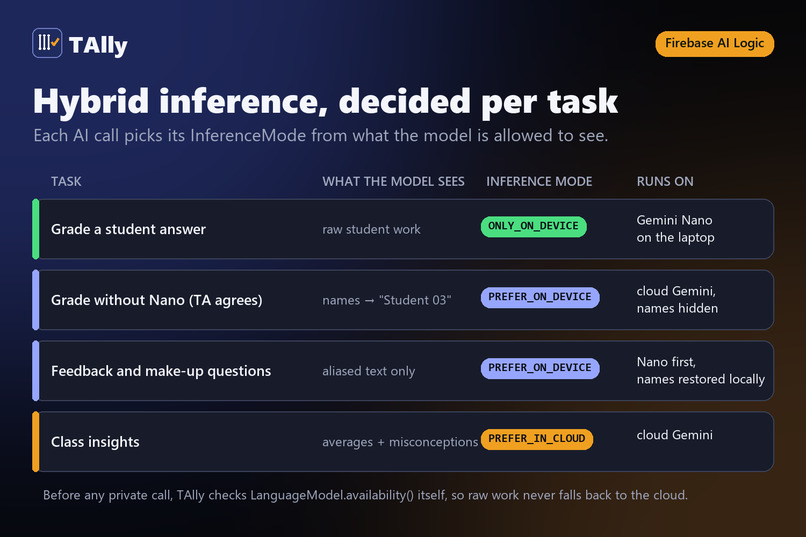
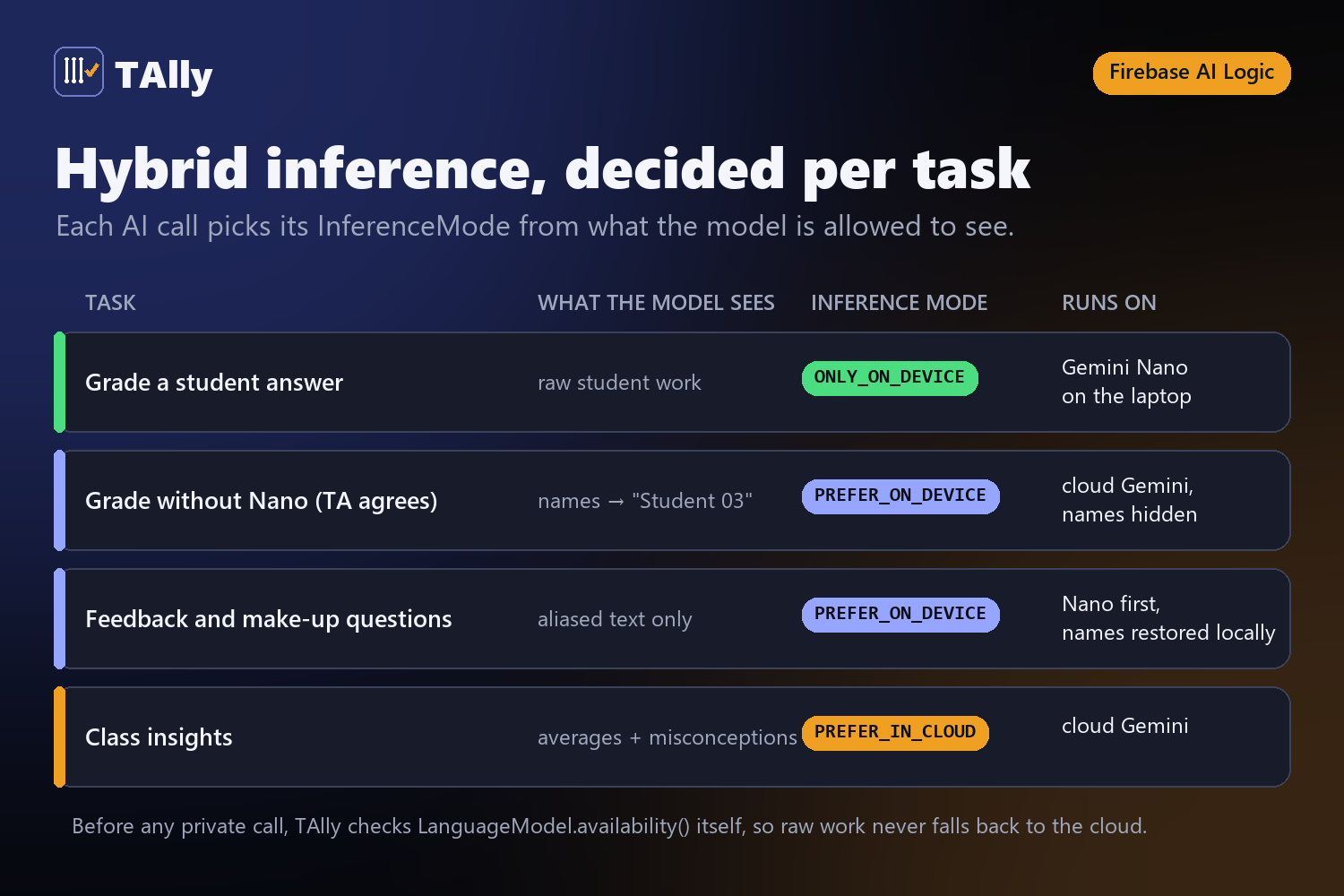
Hybrid inference per task: InferenceMode chosen by what the model may see
-
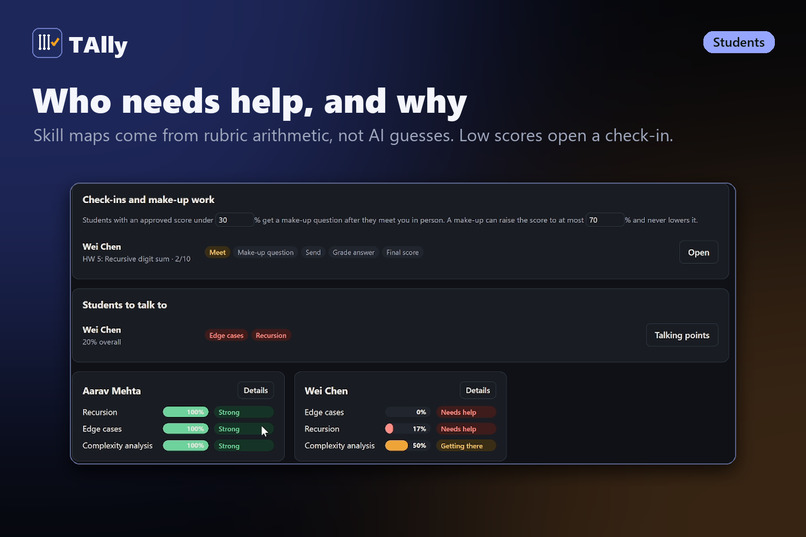
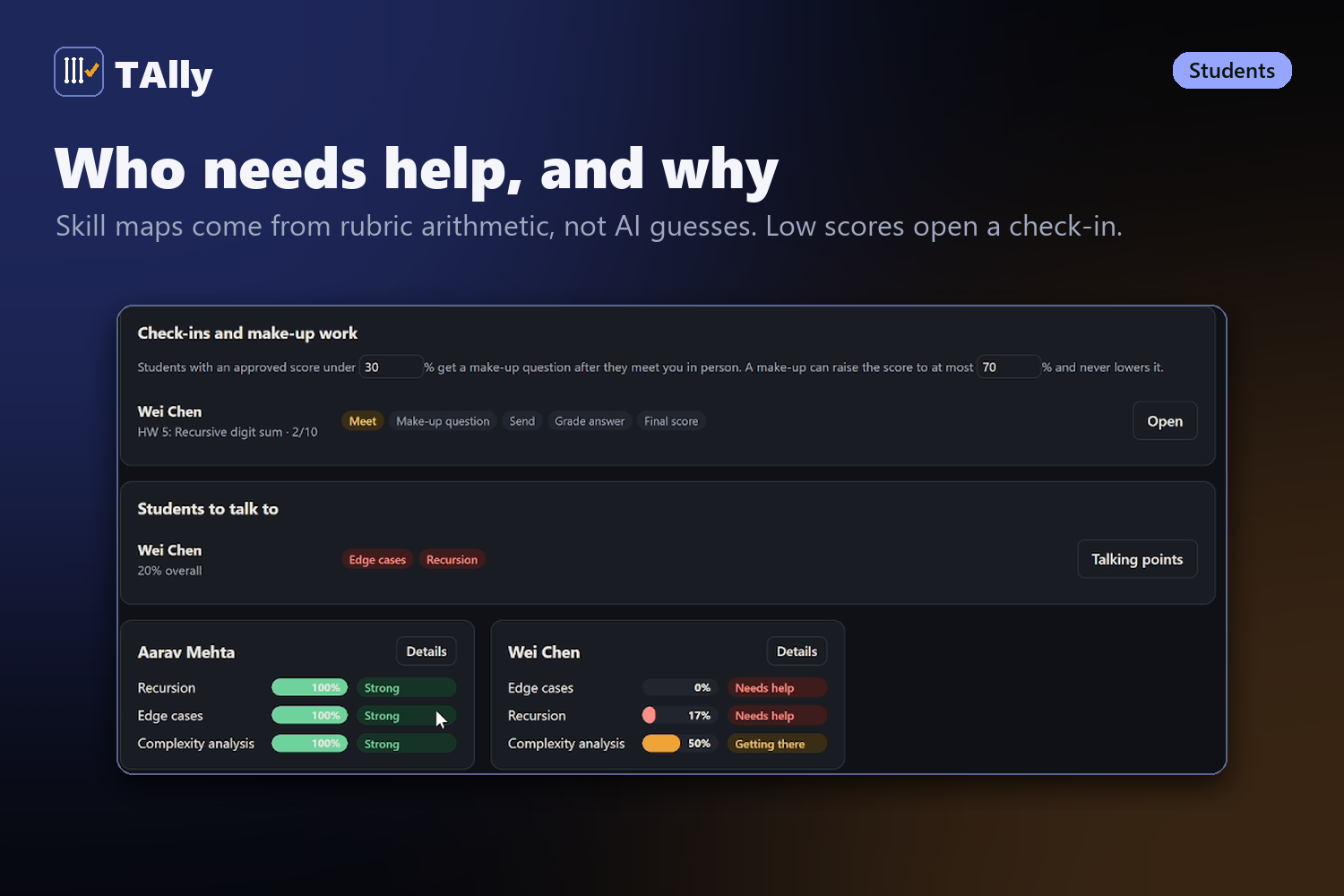
Who needs help, and why: check-ins, "Students to talk to" and the skill maps.
-
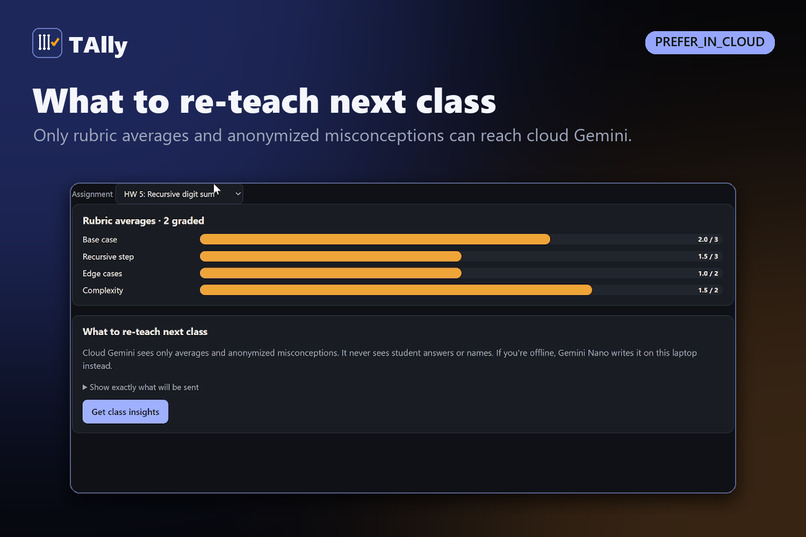
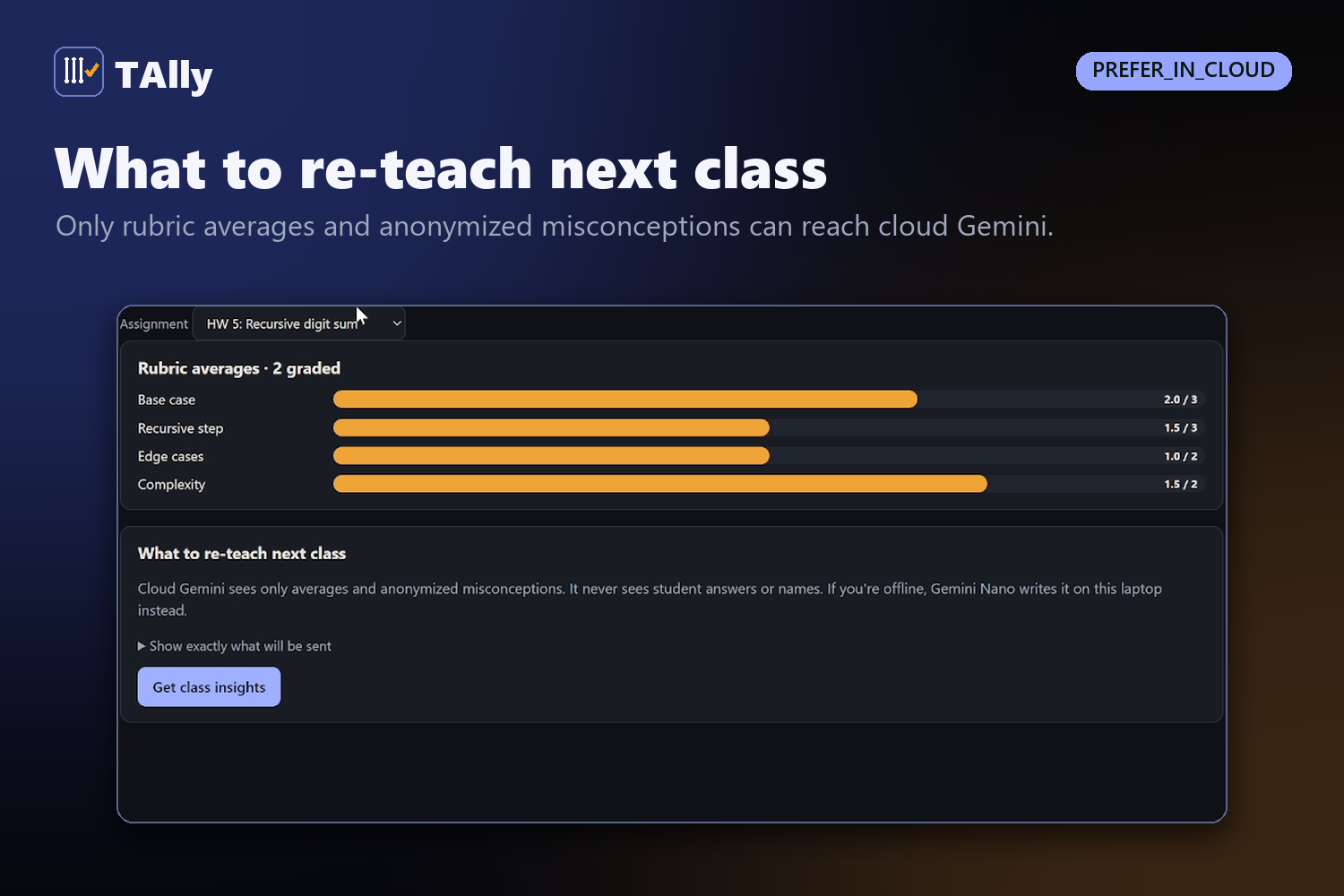
What to re-teach next class: rubric averages, labeled with the cloud mode it uses.
-
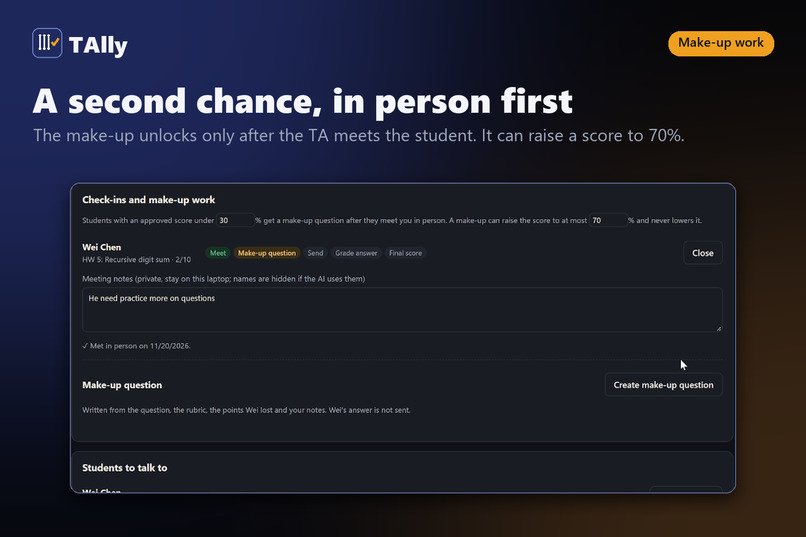
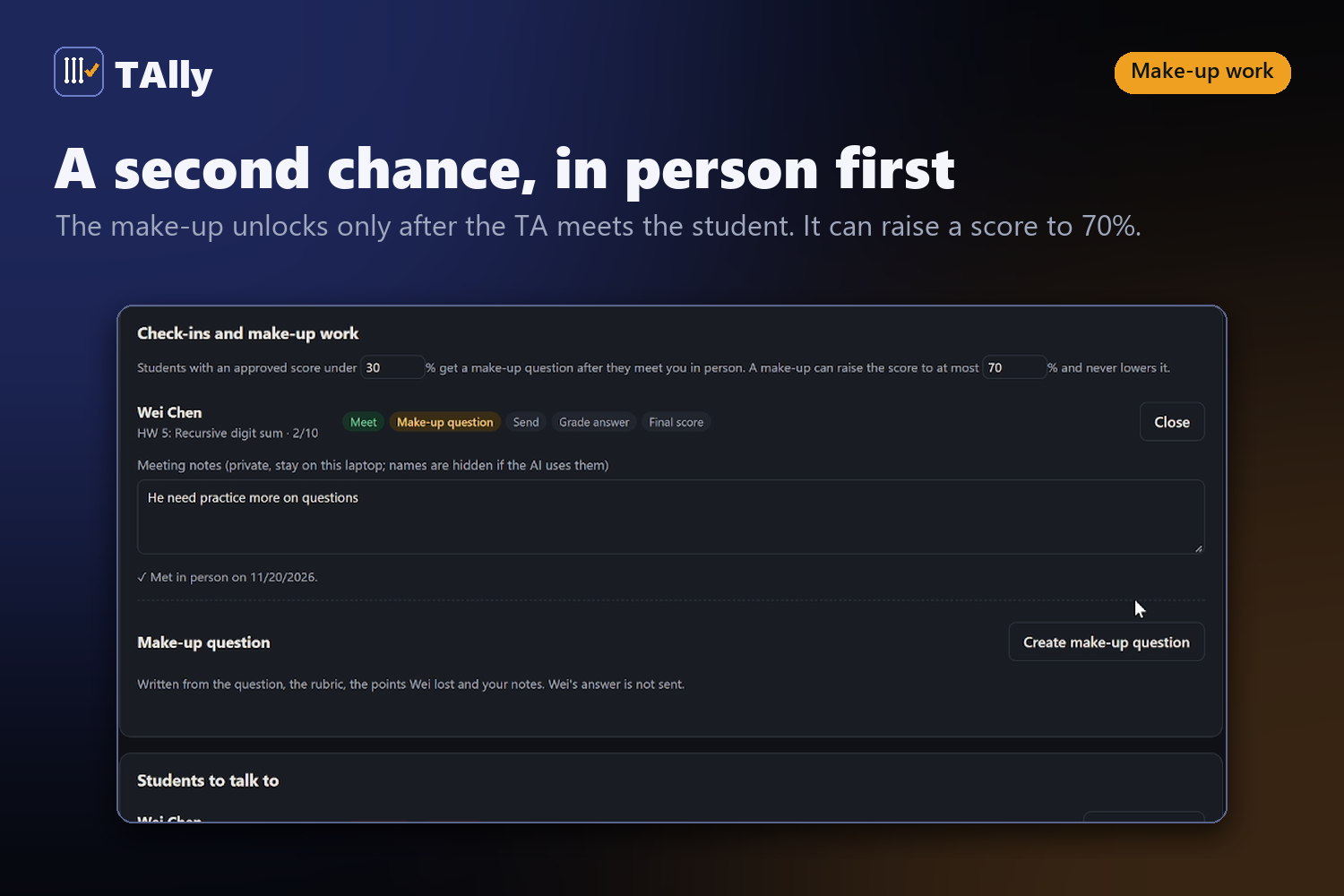
A second chance, in person first: meeting notes, "Met in person" and Create make-up question.
-
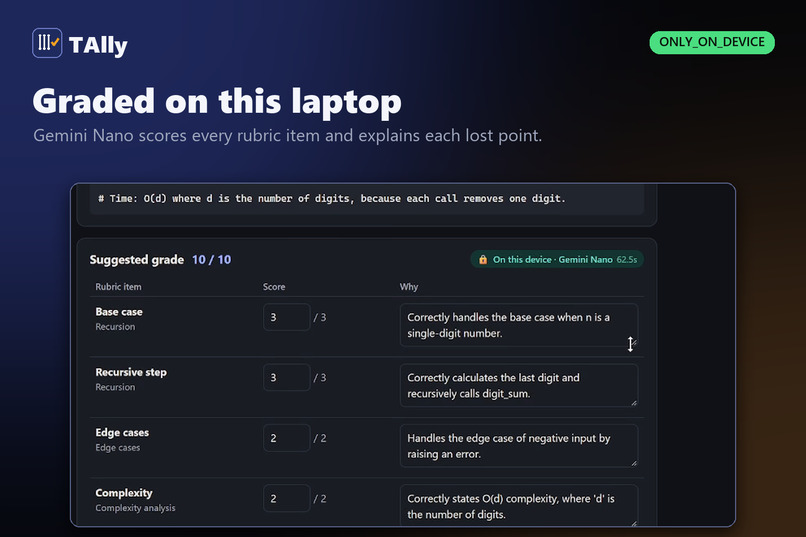
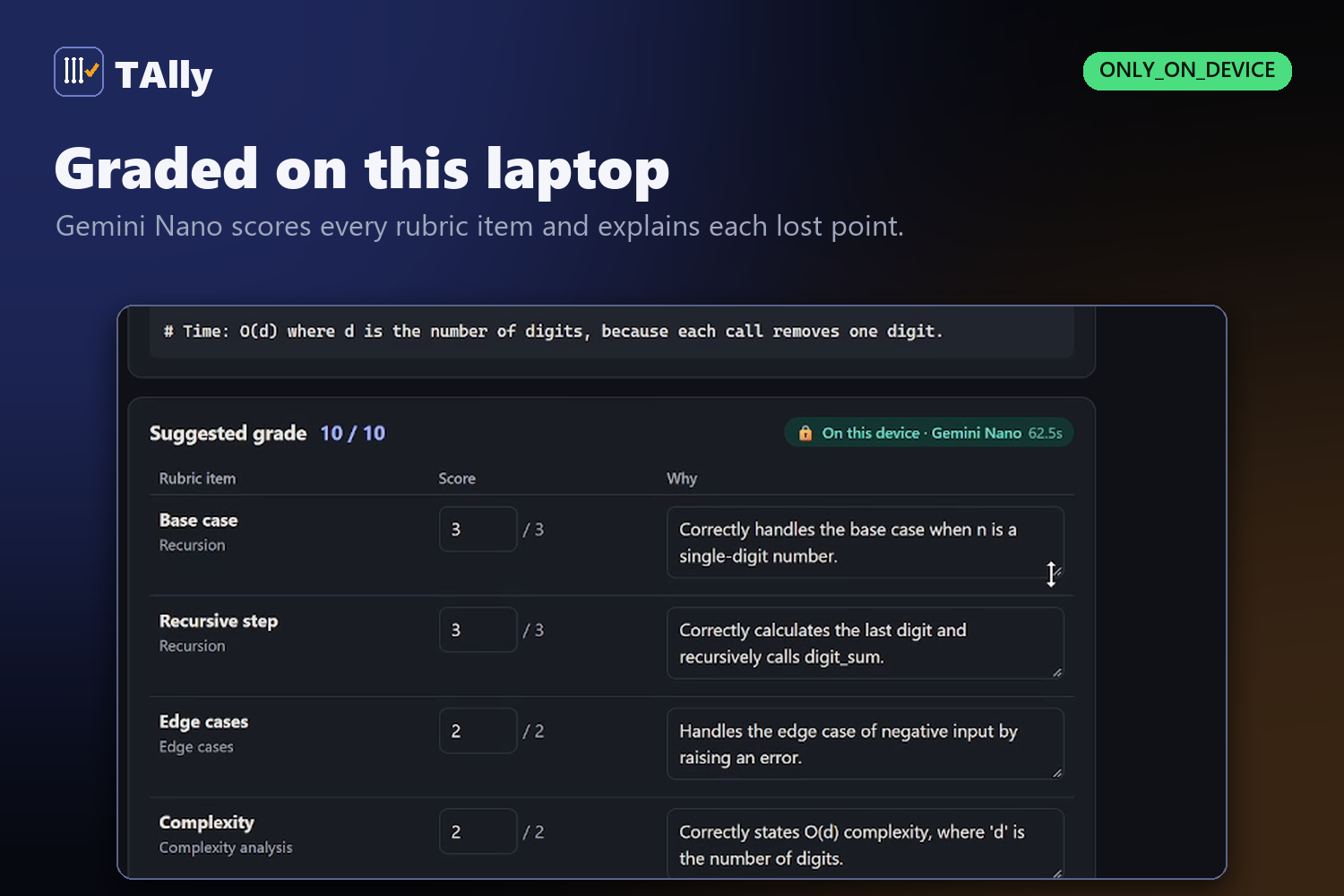
Graded on this laptop: Aarav's 10/10 with the "On this device · Gemini Nano 62.5s" label.
-
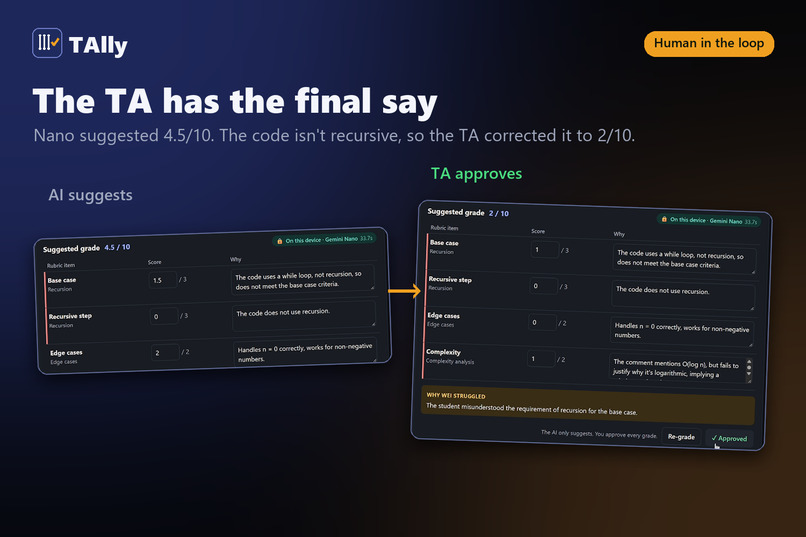
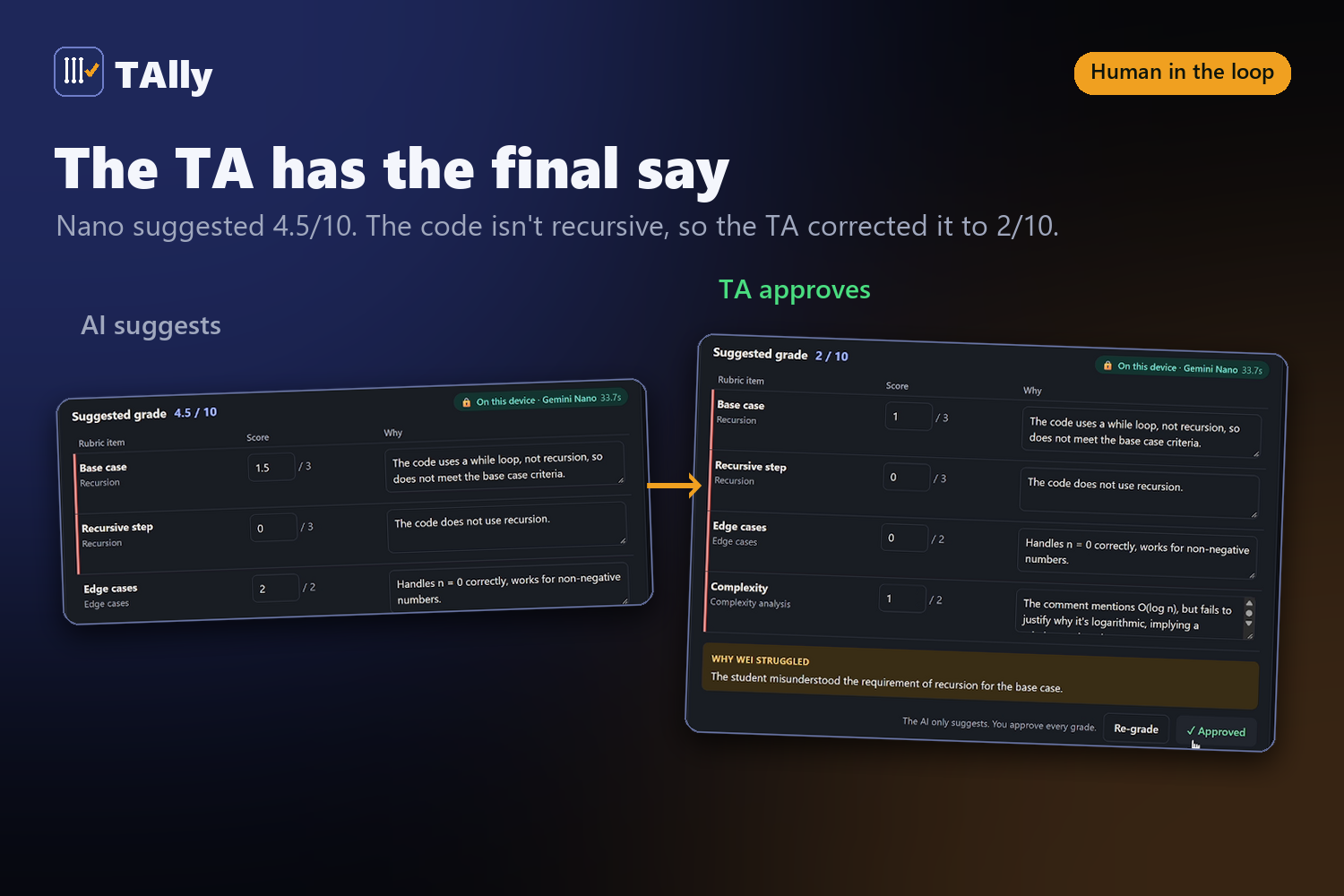
The TA has the final say: Nano's 4.5/10 next to your corrected, approved 2/10.
Inspiration
We're two students, and we've both had assignments come back as just a number, with no idea which line cost us the points. The TAs aren't the problem: they grade dozens of submissions a week and don't have time to explain every mistake. AI could explain every lost point, but student work is protected (FERPA in the US), and many schools don't allow pasting it into cloud chatbots. So we asked: what if the AI ran on the TA's own laptop? On-device AI removes the privacy blocker, and hybrid inference keeps the app useful on laptops that can't run a local model.
What it does
TAlly is a grading copilot that runs in Chrome. A TA adds an assignment with a rubric, a class roster and the students' answers (pasted or uploaded as files), or starts from the built-in demo class.
- Grade: a suggested score for every rubric item, a reason for each lost point, and the student's main misunderstanding. Every score can be edited, and nothing counts until the TA approves it.
- Feedback: a short personal message for each student: one thing they did well, what they should have written and why, and a next step. The TA edits it, approves it and emails it.
- Students: skill maps (strong / getting there / needs help) computed from rubric scores across assignments, and a "Students to talk to" list with talking points.
- Check-ins and make-up work: a student whose approved score is under 30% gets a make-up question, but only after the TA marks that they met in person. The AI writes a new question that tests the same skills, using the rubric, the points lost and the TA's meeting notes, never the student's original answer. A make-up can raise the score, up to 70%, and never lowers it.
- Class: rubric averages and a plan for what to re-teach next class, built from averages and anonymized misconceptions only. The page shows the exact text that is sent.
- Setup: a privacy counter of on-device calls, cloud calls and raw answers uploaded. The last one is always 0.
How we used Firebase AI Logic
Each task picks its InferenceMode based on what the model is allowed to see:
- Grading an answer (an assignment or a make-up) uses
ONLY_ON_DEVICE. The raw answer stays on the laptop. - Grading without Gemini Nano happens only if the TA agrees. Names, emails and student IDs are first replaced with aliases like "Student 03", and the call uses
PREFER_ON_DEVICE. The TA can open a preview of exactly what the cloud would see. - Feedback drafts and make-up questions use
PREFER_ON_DEVICEon aliased text. Real names are put back on the laptop. - Class insights use
PREFER_IN_CLOUD, because the input is only averages and anonymized misconceptions.
Other details:
- A privacy gate we added after reading the SDK source. When Chrome's
LanguageModelAPI is missing, the SDK creates no on-device adapter, so evenONLY_ON_DEVICErequests go to the cloud. TAlly callsLanguageModel.availability()itself and hands raw work to the SDK only when Nano is ready. - One JSON Schema for both sides. Each rubric becomes a schema that goes to Nano as
responseConstraintand to cloud Gemini asresponseJsonSchema. Every rubric item is a required key, and each is answered in a fixed order: the line being judged, a verdict, a reason, then a score. The code makes the score agree with the verdict and keeps it within the item's points. - Every result shows where it ran ("On this device · Gemini Nano" or "Cloud · names hidden"), using
response.inferenceSource. Grades also show how long they took. - Remote Config holds the cloud model names and the longest answer sent to Nano, so they can change without a new build.
- App Check with reCAPTCHA Enterprise protects the Gemini calls, anonymous Authentication signs each TA in, and Hosting serves the app.
How we built it
React, TypeScript and Vite, with the Firebase JS SDK and Firebase Hosting. Student answers and real names stay in the browser's local storage. Skill levels and make-up rules are plain arithmetic over rubric scores, so every "weak area" traces back to graded items. 14 unit tests cover the name replacement, schema handling, skill levels, make-up rules and the class-insights input. A mock AI mode lets the interface run without Firebase.
Challenges we ran into
ONLY_ON_DEVICEisn't a guarantee on its own. Reading the SDK source showed that without Chrome'sLanguageModelAPI, requests go to the cloud anyway. We put our own availability check in front of every private call.- Gemini Nano on an ordinary laptop. The laptop we tested on is just under Chrome's 16 GB RAM requirement for Nano. Early on-device grades skipped rubric items or misread the code: one took 80 seconds and said a correct answer was missing
n % 10. After we made every rubric item a required key and made Nano quote the line before judging it, the same answer was graded in 41 seconds, with every item scored and every reason matching the code. Scores can still be a little generous, which is why the TA approves every grade. - Keeping a secret out of the bundle. Before the first deploy, we found that reading the whole
import.meta.envobject copied the App Check debug token into the production JavaScript. Each setting is now read by name, and the build fails if the token ever appears in the output.
Accomplishments that we're proud of
- The "raw answers uploaded" counter stays at 0 because of how the code is built, not because of a setting.
- Hybrid inference is a privacy decision for each task, not just a fallback.
- The make-up flow turns a low score into a conversation and a second chance.
- The hosted app works end to end even without Nano: grading in the cloud with names hidden took 5 to 8 seconds in our tests.
What we learned
- Small on-device models do much better when the schema makes them show evidence before they score.
- Choosing an
InferenceModeis as much about privacy as about speed. - Privacy has to be enforced in code and visible in the interface, so the TA can check it.
What's next
- Optional Google sign-in, plus Firestore sync of approved, de-identified scores (the per-TA security rules are already deployed), so a TA's class follows them across devices.
- An Android version with Gemini Nano through Firebase AI Logic.
- Importing rosters and submissions from tools such as Canvas.
- Rubrics for essays and math, not just code.
Built during the submission period
TAlly was built from scratch during the submission period (Nov 11 to 30, 2026). It contains no pre-existing code of ours. It uses open-source libraries (React, Vite, the Firebase JS SDK), and we used an AI coding assistant (Claude Code) while building it.
Testing notes for judges
- Open https://tally-grading.web.app in desktop Chrome. A made-up demo class (6 students, 2 Python assignments) loads on the first visit.
- With Gemini Nano: use Chrome 139 or newer, enable
chrome://flags/#prompt-api-for-gemini-nano-multimodal-input, relaunch, then click Setup → Download Gemini Nano. Grades then show "On this device". On a laptop near Chrome's hardware limit, also setchrome://flags/#optimization-guide-on-device-modelto Enabled BypassPerfRequirement. - Without Nano: TAlly asks before using the cloud and can show exactly what would be sent. Setup also has a switch that acts as if the device had no Nano.
Built With
- chrome-prompt-api
- firebase-ai-logic
- firebase-app-check
- firebase-authentication
- firebase-hosting
- firebase-remote-config
- gemini-api
- gemini-nano
- react
- recaptcha-enterprise
- typescript
- vite
- vitest
