-
-
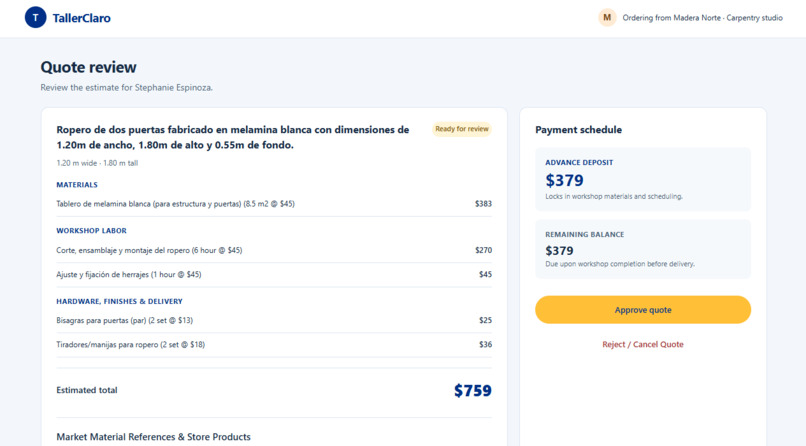
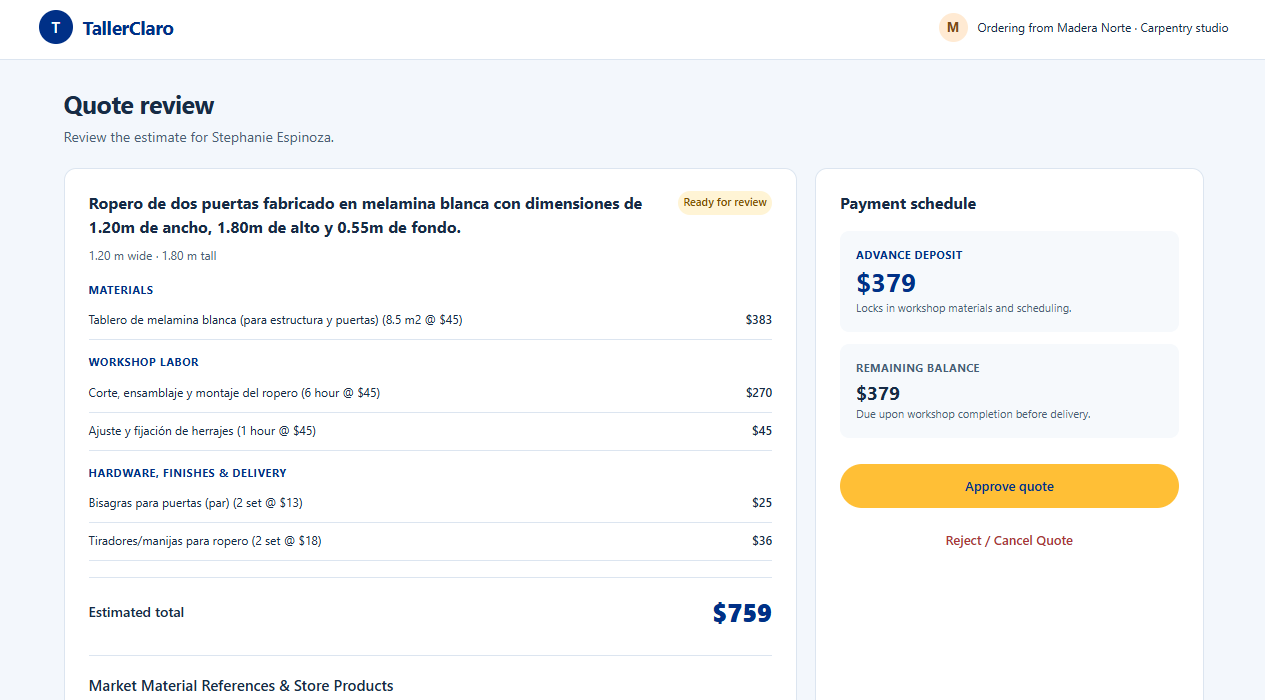
The customer describes the piece and AI builds an itemized quote with materials, labor and hardware.
-
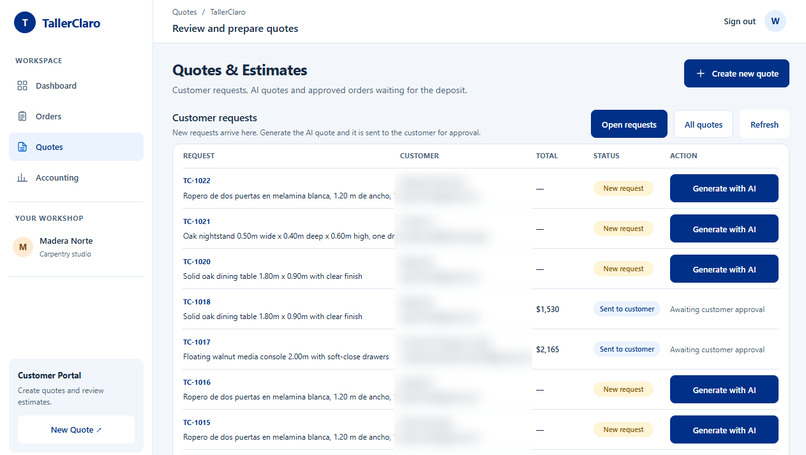
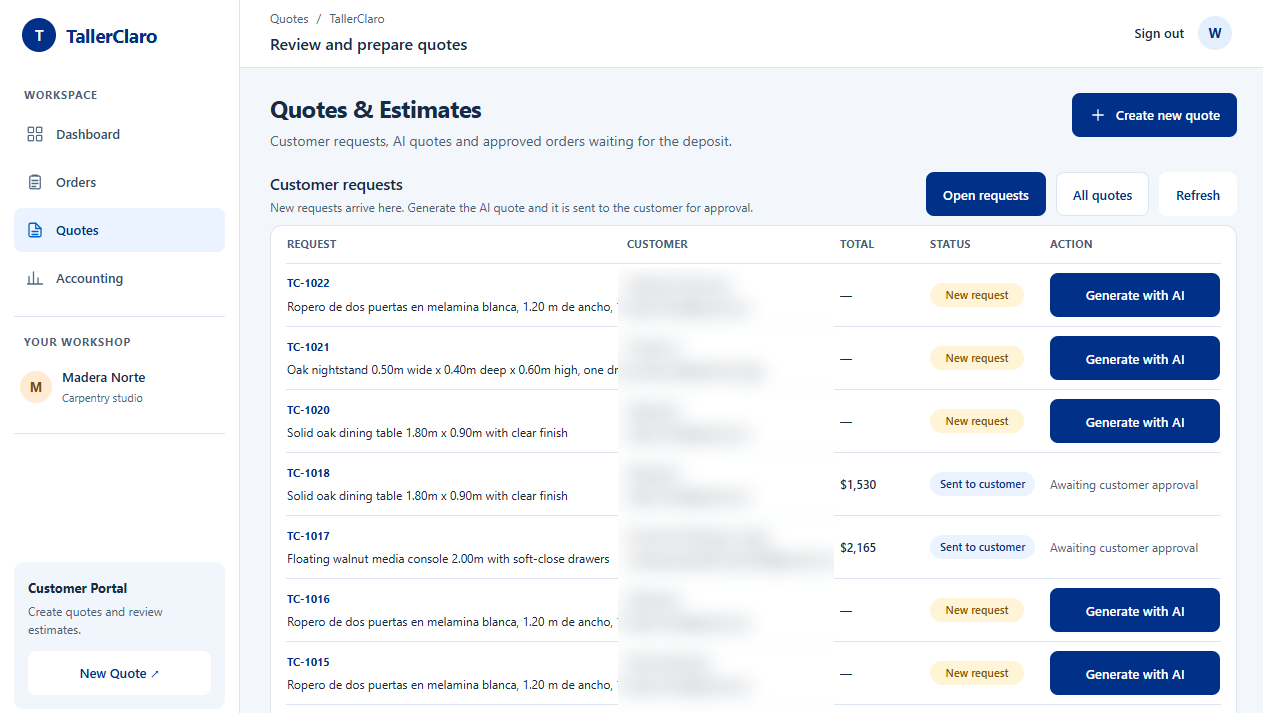
Workshop inbox: new customer requests, one click to generate the AI quote.
-
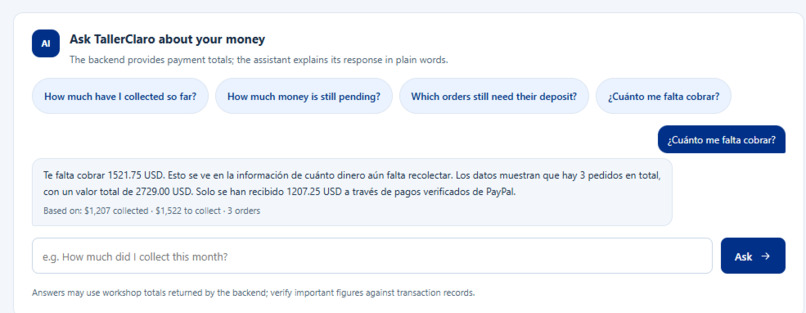
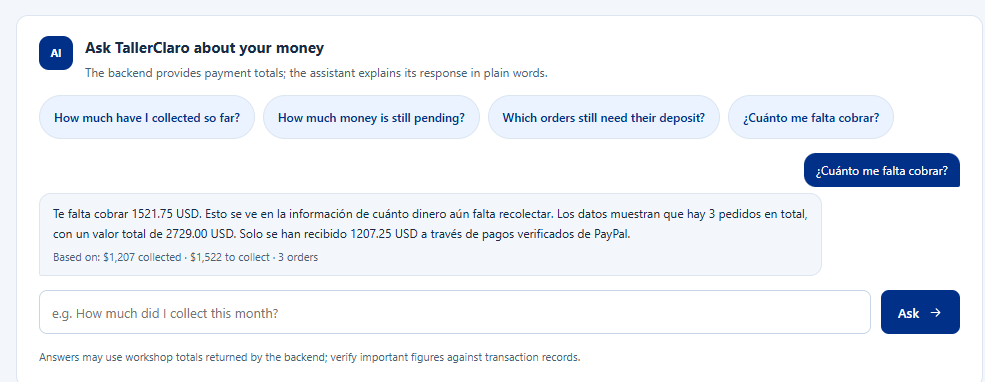
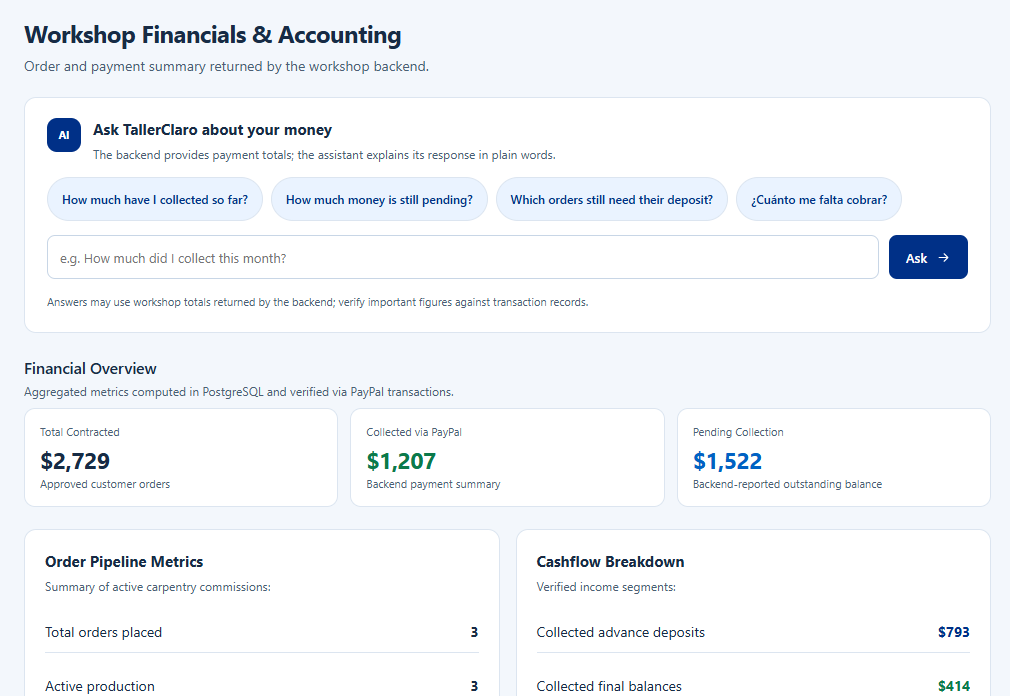
AI bookkeeper answers in plain language: how much is still pending.
-
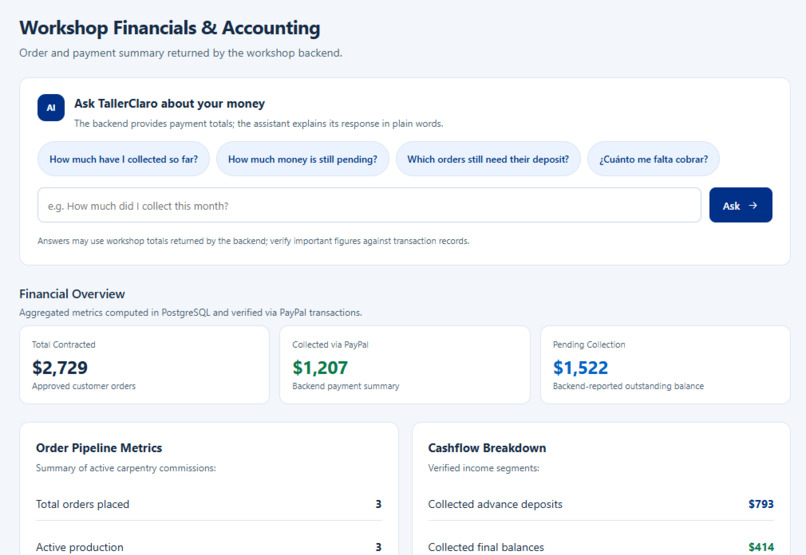
Workshop financials computed from verified PayPal payments.
-
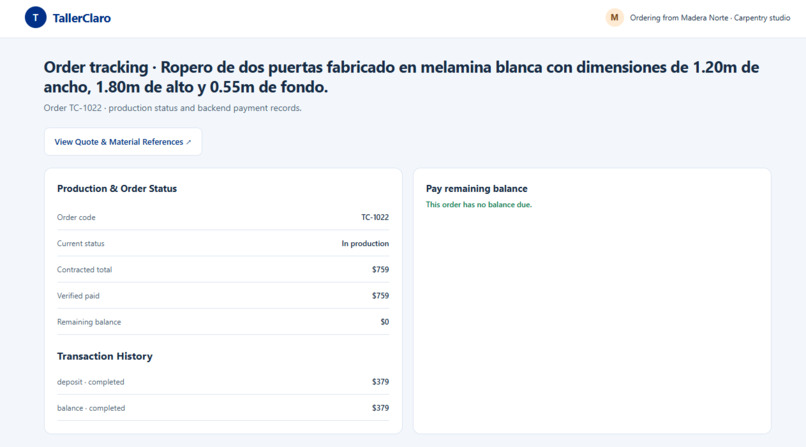
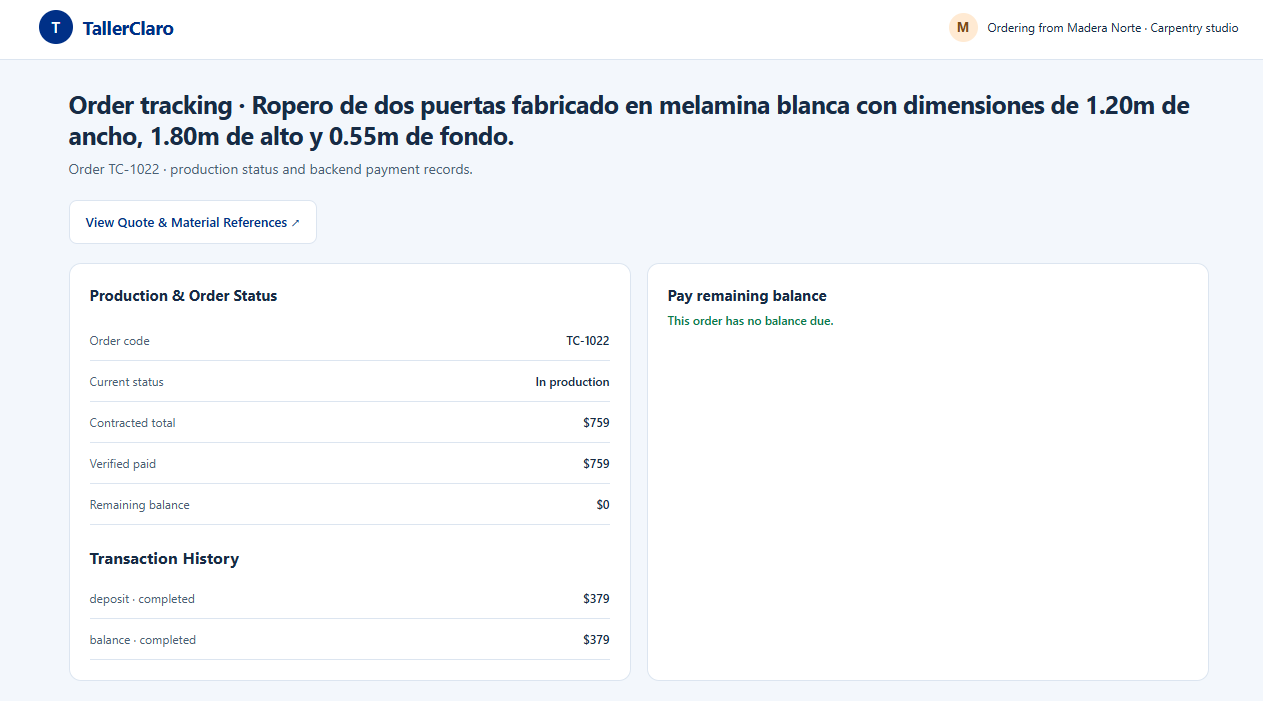
Order tracking: deposit and balance paid with PayPal, verified by the backend.
Inspiration
In Peru and across Latin America, small carpentry workshops lose money and trust on every job. Quotes are scribbled on paper or sent over WhatsApp, material prices change week to week, customers are afraid to pay upfront, and the carpenter rarely knows how much is still owed to them. We wanted to give a one-person workshop the tools a big company has: clear quotes, safe payments and simple bookkeeping.
What it does
TallerClaro is an AI quoting, payment and bookkeeping assistant for small carpentry workshops.
- The customer describes the piece in their own words, by typing or by voice ("A two-door white melamine wardrobe, 1.20 m wide, 1.80 m tall…").
- AI turns it into an itemized quote: materials, labor hours and hardware, grounded in live market prices fetched with Channel3.
- The workshop reviews it from its inbox and sends it with one click. The craftsperson stays in control.
- The customer approves and pays a 50% deposit with PayPal (Orders v2: create, approve, server-side capture). The order moves to In production automatically.
- The customer follows the order with a short order code (e.g. TC-1022) and pays the remaining balance with PayPal; the deposit is already discounted.
- The workshop asks its AI bookkeeper in plain language: "How much is still pending?". The answer is computed from verified PayPal payments in PostgreSQL and explained in simple words, in English or Spanish.
How we built it
- Backend: Python + FastAPI with a layered architecture (domain, application, infrastructure, presentation) and a Unit of Work. AI and PayPal calls run outside database transactions.
- Payments: PayPal Orders v2 REST API (Sandbox), with OAuth server-side only, idempotent capture, and the order status updated from verified captures, never from the return URL.
- AI: an LLM generates the structured quote and powers the bookkeeping assistant. Only aggregated totals, never customer personal data, are sent to the model.
- Live prices: Channel3 product search for lumber, boards and hardware references.
- Data: PostgreSQL (Supabase).
- Frontend: React + Vite, responsive, with a customer portal and a workshop dashboard.
- Deployment: API on Render, frontend on Vercel.
- Security: the workshop signs in with a bcrypt-hashed password; customers use signed, expiring access tokens, so they never need an account.
- Quality: 327 backend tests and 39 frontend tests.
Challenges we ran into
- Separating what the customer can do (no login, a secure token) from what only the workshop can do (generate quotes, see money).
- Making PayPal payments trustworthy: the UI only shows "paid" after the backend verifies and captures the order with PayPal.
- Getting AI quotes to be structured and consistent enough to price real materials.
- Integrating the work of a six-person team and deploying it end to end in the last days.
Accomplishments that we're proud of
- A complete, working flow in production: request → AI quote → approval → PayPal deposit → tracking → PayPal balance → AI bookkeeping.
- Two-step payments (deposit and balance), which match how custom carpentry is actually sold.
- A bookkeeping assistant that a non-technical craftsperson can actually use.
What we learned
How to design around real payment states (created, approved, captured) instead of trusting the browser, how to keep AI useful but under human control, and how much clear UX matters for people who are not used to software.
What's next for TallerClaro
- WhatsApp notifications and quote links.
- Photo-based requests and receipt scanning to track material spending against each deposit.
- Support for other trades: upholstery, metalwork, tailoring.
- PayPal live mode with real workshops in Lima.
Try it out
- Live demo: https://tallerclaro.vercel.app (the free API server may take ~50 seconds to wake up on the first request)
- Workshop login: user
taller/ passwordTallerClaro2026! - PayPal Sandbox buyer:
[email protected]/<y6)O4-4 - Suggested test: open
/#/customer/newin one window and request a piece; in a private window open/#/dashboard, sign in, go to Quotes → Generate with AI; back in the customer window press Check for updates → Approve → Start PayPal Checkout → Open PayPal Checkout, pay with the sandbox buyer, close the PayPal return tab, and press Verify & Confirm Payment.
Built With
- channel3
- fastapi
- paypal
- postgresql
- python
- react
- render
- supabase
- vercel
- vite

