-
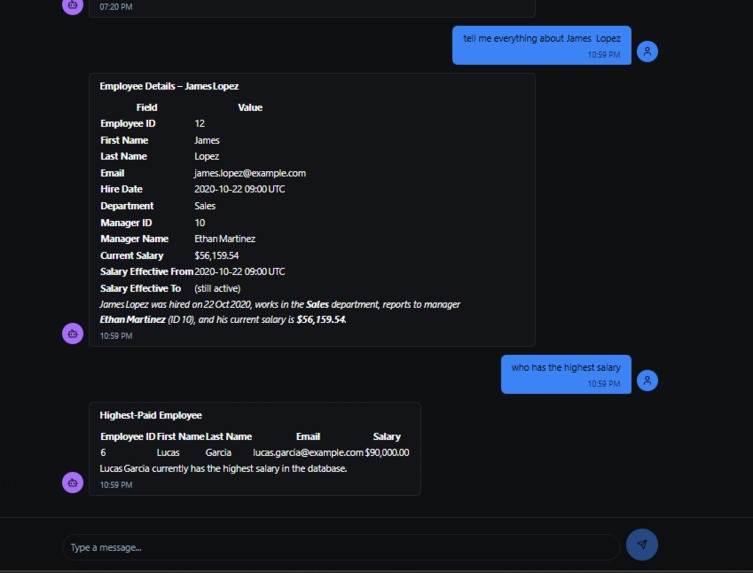
talk with database.
-
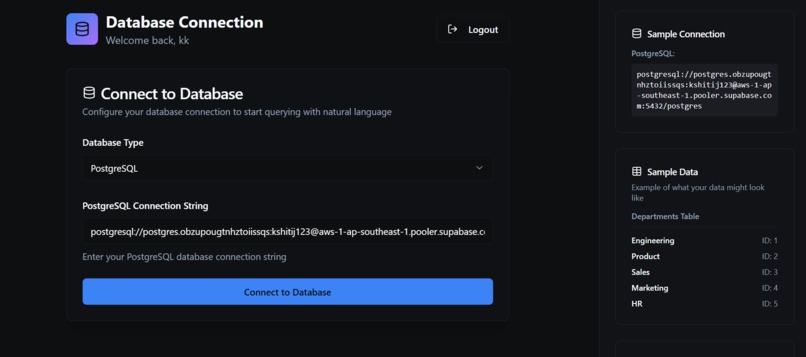
connect to database
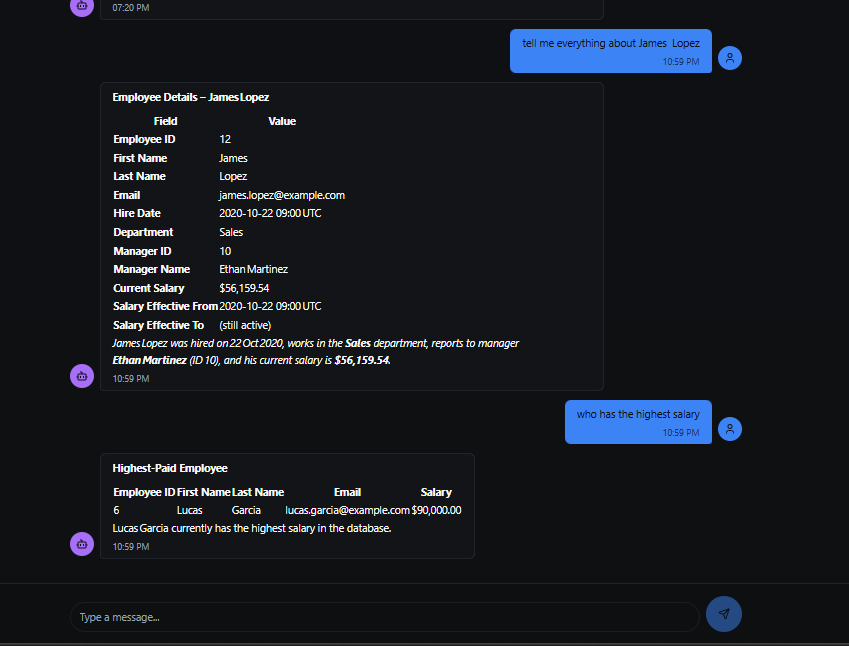
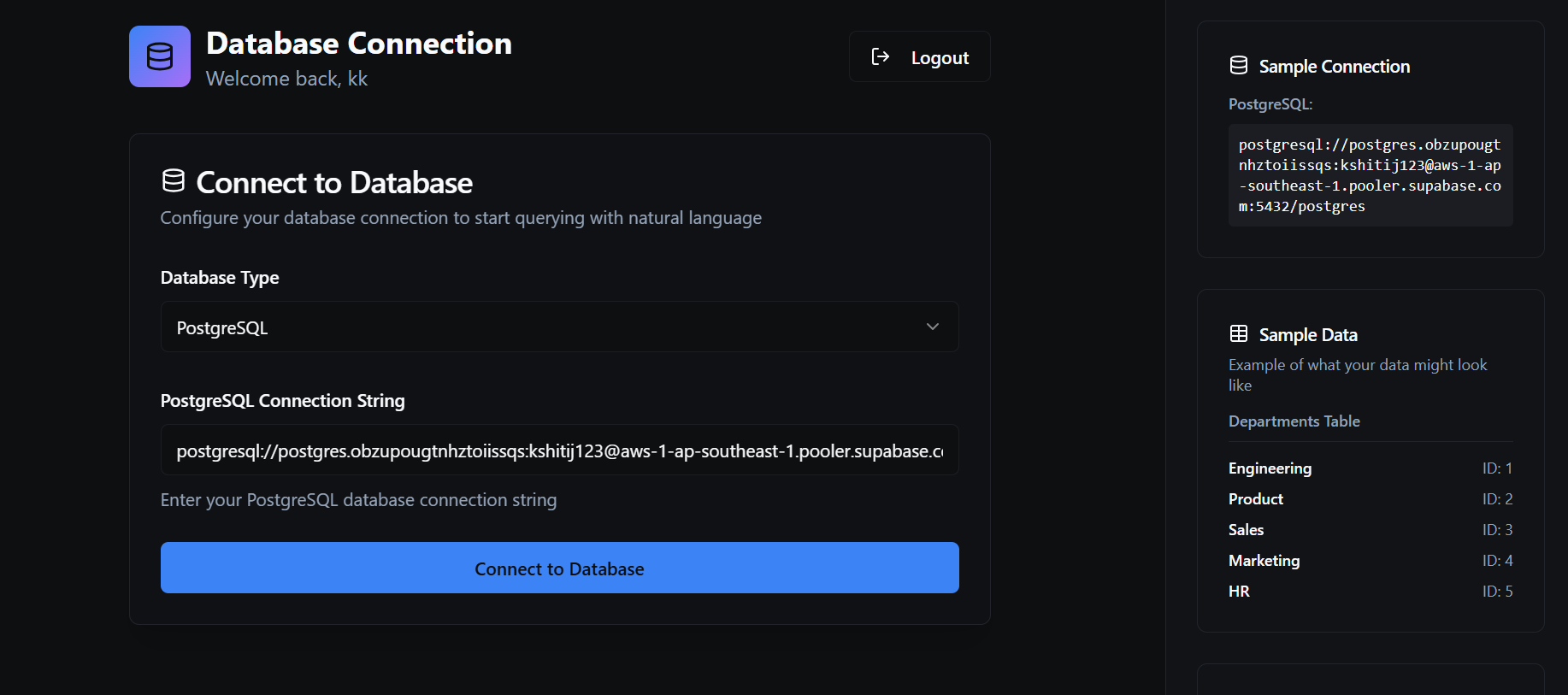
Talk2Database






A powerful Agentic-Ai application that converts natural language queries into SQL commands and executes them against your database. Built with FastAPI, Streamlit, and Langgraph and LangChain Tools, Talk2Database makes database interaction accessible to everyone, regardless of their SQL expertise.
🚀 Features
- Natural Language to SQL: Convert plain English questions into optimized SQL queries
- Multi-Database Support: Compatible with MySQL, PostgreSQL, and SQLite databases
- AI-Powered Query Generation: Uses advanced LLM models (Groq/Llama) for intelligent query creation
- Interactive Web Interface: User-friendly Streamlit frontend with authentication
- RESTful API: FastAPI backend with comprehensive API endpoints
- Query Validation: Automatic SQL query checking and optimization
- Secure Authentication: User registration and login system
- Docker Support: Containerized deployment for easy scaling
- AWS Integration: Ready for cloud deployment with CI/CD pipeline on EC2 with ECR.
🏗️ Architecture
Talk2Database follows a modern microservices architecture with clear separation of concerns:
Workflow Diagram

The application workflow consists of the following steps:
- User Authentication: Secure login/registration system
- Database Connection: Connect to your target database
- Natural Language Input: User enters questions in plain English
- AI Processing: LangGraph workflow processes the query through multiple stages:
- SQL Agent initialization
- Table listing and schema retrieval
- SQL query generation using LLM
- Query validation and optimization
- Query execution and result formatting
- Response Generation: Natural language response with query results
📋 Prerequisites
Before installing Talk2Database, ensure you have the following:
- Python 3.12+ installed on your system
- Docker (optional, for containerized deployment)
- Database Access: MySQL, PostgreSQL
- API Keys: Groq API key for LLM functionality
- Git for cloning the repository
Required Environment Variables
Create a .env file in the project root with the following variables:
# LLM Configuration
GEMINI_API_KEY=your_gemini_api_key_here

# Database Configuration (optional)
USE_DB=false
DATABASE_URL=your_database_connection_string
DATABASE_HOST=localhost
DATABASE_PORT=5432
DATABASE_USER=your_username
DATABASE_PASSWORD=your_password
DATABASE_NAME=your_database

# Session Management
SESSION_SECRET_KEY=your_secret_key_here
SESSION_EXPIRE_MINUTES=60

# CORS Settings
BACKEND_CORS_ORIGINS=http://localhost:3000,http://localhost:8501

# Logging
LOG_LEVEL=INFO

# LangSmith (optional, for debugging)
LANGSMITH_TRACING=true
LANGSMITH_ENDPOINT=https://api.smith.langchain.com
LANGSMITH_API_KEY=your_langsmith_api_key
LANGSMITH_PROJECT=talk2database
🛠️ Installation
Method 1: Local Development Setup
Clone the repository:
git clone https://github.com/your-username/Talk2Database.gitCreate and activate virtual environment:
python -m venv venv
# On Windows venv\Scripts\activate
# On macOS/Linux source venv/bin/activate
3. **Install dependencies**:
   ```bash
   pip install -r requirements.txt
Set up environment variables:
cp .env.example .env
# Edit .env with your configuration
Run the application:
# Start FastAPI backend
uvicorn app.main:app --host 0.0.0.0 --port 8000 --reload
# In another terminal, start Streamlit frontend streamlit run app/frontend/Talk2SQL.py --server.address=0.0.0.0 --server.port=8501
### Method 2: Docker Deployment

1. **Clone and navigate to project**:
   ```bash
   git clone https://github.com/your-username/Talk2Database.git
- Build and run with Docker: ```bash # Build the Docker image docker build -t talk2database .
# Run the container docker run -p 8000:8000 -p 8501:8501 --env-file .env talk2database
3. **Using Docker Compose**:
   ```bash
   docker-compose up -d
Method 3: Using UV Package Manager
If you have uv installed:
# Install dependencies
uv sync

# Run the application
uv run uvicorn app.main:app --host 0.0.0.0 --port 8000
🎯 Usage
Live Demo
🌐 Try the deployed application: https://talk2database-by-kshitij.vercel.app/
Getting Started
Access the Application:
- Live Demo: https://talk2database-by-kshitij.vercel.app/
- Local Frontend: http://localhost:8501
- Local API Documentation: http://localhost:8000/docs
Create an Account:
- Navigate to the Streamlit interface
- Click on "Sign Up" tab
- Create your user account
Connect to Database:
- Select your database type (MySQL/PostgreSQL)
- Enter your database connection string
- Example:
mysql+pymysql://user:password@host:port/database
Start Querying:
- Enter natural language questions
- Get instant SQL results and explanations
Example Queries
Here are some example natural language queries you can try:
"Show me all employees hired in 2023"
"What is the average salary by department?"
"Find the top 5 customers by total orders"
"List all products with low inventory"
"Show me monthly sales trends"
Sample Database Connection Strings
MySQL:
mysql+pymysql://username:password@localhost:3306/database_name
PostgreSQL:
postgresql://username:password@localhost:5432/database_name
SQLite:
sqlite:///path/to/database.db
🔌 API Documentation
Authentication Endpoints
POST /api/v1/auth/signup
Register a new user account.
Request Body:
{
  "username": "string",
  "password": "string"
}
Response:
{
  "id": 1,
  "username": "string"
}
POST /api/v1/auth/login
Authenticate user and create session.
Request Body (Form Data):
username: string
password: string
Response:
{
  "id": 1,
  "username": "string"
}
Database Operations
POST /api/v1/setup-connection
Establish connection to target database.
Request Body:
{
  "connection_string": "mysql+pymysql://user:pass@host:port/db"
}
Response:
{
  "message": "Database connection established successfully!"
}
POST /api/v1/query
Execute natural language query against connected database.
Request Body:
{
  "query": "Show me all employees in the sales department"
}
Response:
{
  "result": "Based on your query, here are the employees in the sales department: [query results]"
}
Error Responses
All endpoints return appropriate HTTP status codes with error details:
{
  "detail": "Error description"
}
Common status codes:
400: Bad Request (invalid input)401: Unauthorized (authentication required)500: Internal Server Error503: Service Unavailable (database connection issues)
⚙️ Configuration
Application Settings
The application can be configured through environment variables or the app/core/config.py file:
| Setting | Default | Description |
|---|---|---|
PROJECT_NAME |
"Talk2SQL" | Application name |
VERSION |
"1.0.0" | Application version |
API_V1_STR |
"/api/v1" | API prefix |
USE_DB |
false | Enable database features |
SESSION_EXPIRE_MINUTES |
60 | Session timeout |
LOG_LEVEL |
"INFO" | Logging level |
Database Configuration
Configure database connections through environment variables:
USE_DB=true
DATABASE_HOST=localhost
DATABASE_PORT=5432
DATABASE_USER=postgres
DATABASE_PASSWORD=password
DATABASE_NAME=mydb
LLM Configuration
The application uses Groq's Llama models by default. Configure through:
GROQ_API_KEY=your_api_key
📁 Project Structure
Talk2Database/backend/
├── app/
│   ├── __init__.py
│   ├── main.py                 # FastAPI application entry point
│   ├── logging_config.py       # Logging configuration
│   ├── api/
│   │   ├── __init__.py
│   │   └── v1/
│   │       ├── __init__.py
│   │       ├── auth.py         # Authentication endpoints
│   │       └── endpoints/
│   │           ├── __init__.py
│   │           ├── database_connection.py  # DB connection API
│   │           └── sql_query.py           # Query execution API
│   ├── core/
│   │   └── config.py           # Application configuration
│   ├── frontend/
│   │   ├── Talk2SQL.py         # Streamlit frontend application
│   │   └── users.db            # SQLite user database
│   ├── models/
│   │   └── __init__.py         # Pydantic models
│   └── services/
│       ├── __init__.py
│       ├── sql_agent.py        # Core SQL agent implementation
│       └── sql_agent_instance.py  # Singleton agent instance
├── .github/
│   └── workflows/
│       └── deploy.yml          # AWS deployment pipeline
├── docker-compose.yml          # Docker Compose configuration
├── Dockerfile                  # Docker image definition
├── requirements.txt            # Python dependencies
├── pyproject.toml             # Project metadata and dependencies
├── setup.py                   # Package setup
├── workflow_graph.png         # Architecture diagram
├── employee.db               # Sample SQLite database
├── users.db                  # User authentication database
└── README.md                 # This file
Key Components
app/main.py: FastAPI application with CORS middleware and route registrationapp/services/sql_agent.py: Core LangGraph-based SQL agent with workflow managementapp/frontend/Talk2SQL.py: Streamlit web interface with authentication and chat functionalityapp/core/config.py: Centralized configuration management with environment variable support
🤝 Contributing
We welcome contributions to Talk2Database! Here's how you can help:
Development Setup
- Fork the repository on GitHub
Clone your fork:
git clone https://github.com/your-username/Talk2Database.git
cd Talk2Database/backend
Create a feature branch:
git checkout -b feature/your-feature-nameSet up development environment:
python -m venv venv
source venv/bin/activate  # or venv\Scripts\activate on Windows
pip install -r requirements.txt
Make your changes and test thoroughly
Run tests (if available):
pytestCommit your changes:
git add .
git commit -m "Add: your feature description"
Push to your fork:
git push origin feature/your-feature-nameCreate a Pull Request on GitHub
Contribution Guidelines
- Follow PEP 8 style guidelines for Python code
- Add docstrings to all functions and classes
- Include type hints where appropriate
- Write clear commit messages
- Update documentation for new features
- Add tests for new functionality
Areas for Contribution
- Database Support: Add support for more database types
- LLM Integration: Support for additional language models
- UI/UX Improvements: Enhance the Streamlit interface
- Performance: Optimize query processing and caching
- Security: Improve authentication and authorization
- Documentation: Improve guides and examples
🔧 Troubleshooting
Common Issues and Solutions
1. Database Connection Issues
Problem: "Failed to connect to database: Connection refused"
Solutions:
- Verify database server is running
- Check connection string format
- Ensure database credentials are correct
- Verify network connectivity and firewall settings
- For cloud databases, check security groups/firewall rules
2. Authentication Errors
Problem: "Invalid credentials" or login failures
Solutions:
- Check if user account exists (try registering first)
- Verify password is correct
- Clear browser cache and cookies
- Check if SQLite database file has proper permissions
3. API Key Issues
Problem: "API key not found" or LLM errors
Solutions:
- Ensure
GROQ_API_KEYis set in.envfile - Verify API key is valid and has sufficient credits
- Check API key permissions and rate limits
4. Docker Issues
Problem: Container fails to start or port conflicts
Solutions:
- Check if ports 8000 and 8501 are available
- Verify Docker daemon is running
- Check
.envfile is properly mounted - Review container logs:
docker logs <container_id>
5. Import/Module Errors
Problem: "ModuleNotFoundError" or import issues
Solutions:
- Ensure virtual environment is activated
- Reinstall dependencies:
pip install -r requirements.txt - Check Python version compatibility (3.12+)
- Verify all required packages are installed
6. Query Processing Issues
Problem: "Query failed" or unexpected results
Solutions:
- Check database schema and table names
- Verify query is relevant to connected database
- Try simpler queries first
- Check LLM model availability and limits
Getting Help
If you encounter issues not covered here:
- Check the logs: Look at application logs for detailed error messages
- Search existing issues: Check GitHub issues for similar problems
- Create an issue: Open a new GitHub issue with:
- Detailed error description
- Steps to reproduce
- Environment details (OS, Python version, etc.)
- Relevant log outputs
Performance Tips
- Database Optimization: Ensure proper indexing on frequently queried columns
- Query Limits: Use reasonable limits for large datasets
- Caching: Consider implementing query result caching for repeated queries
- Resource Monitoring: Monitor CPU and memory usage during heavy workloads
🌟 Acknowledgments
- LangChain: For providing the framework for building LLM applications
- FastAPI: For the high-performance web framework
- Streamlit: For the intuitive web interface framework
- Groq: For providing fast LLM inference
- Contributors: Thanks to all contributors who help improve this project
Built with ❤️ by the Kshitij Kumrawat
For more information, visit our GitHub repository or contact us at [email protected].

Log in or sign up for Devpost to join the conversation.