-
-
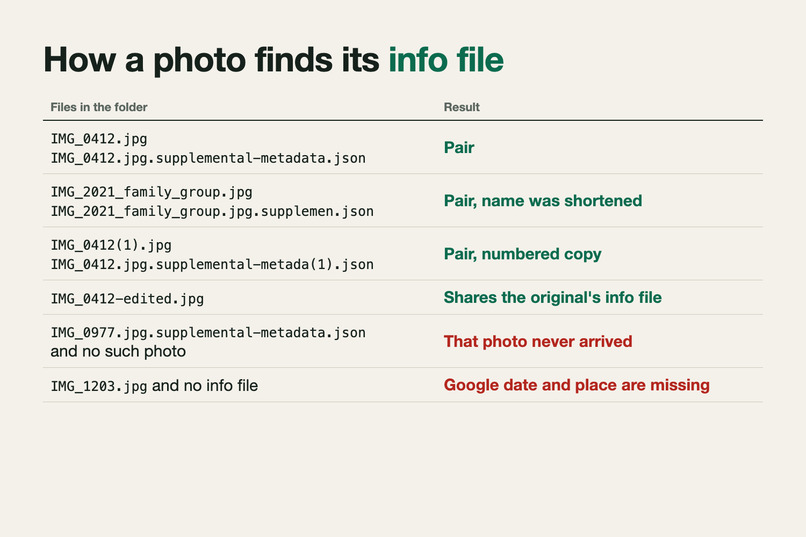
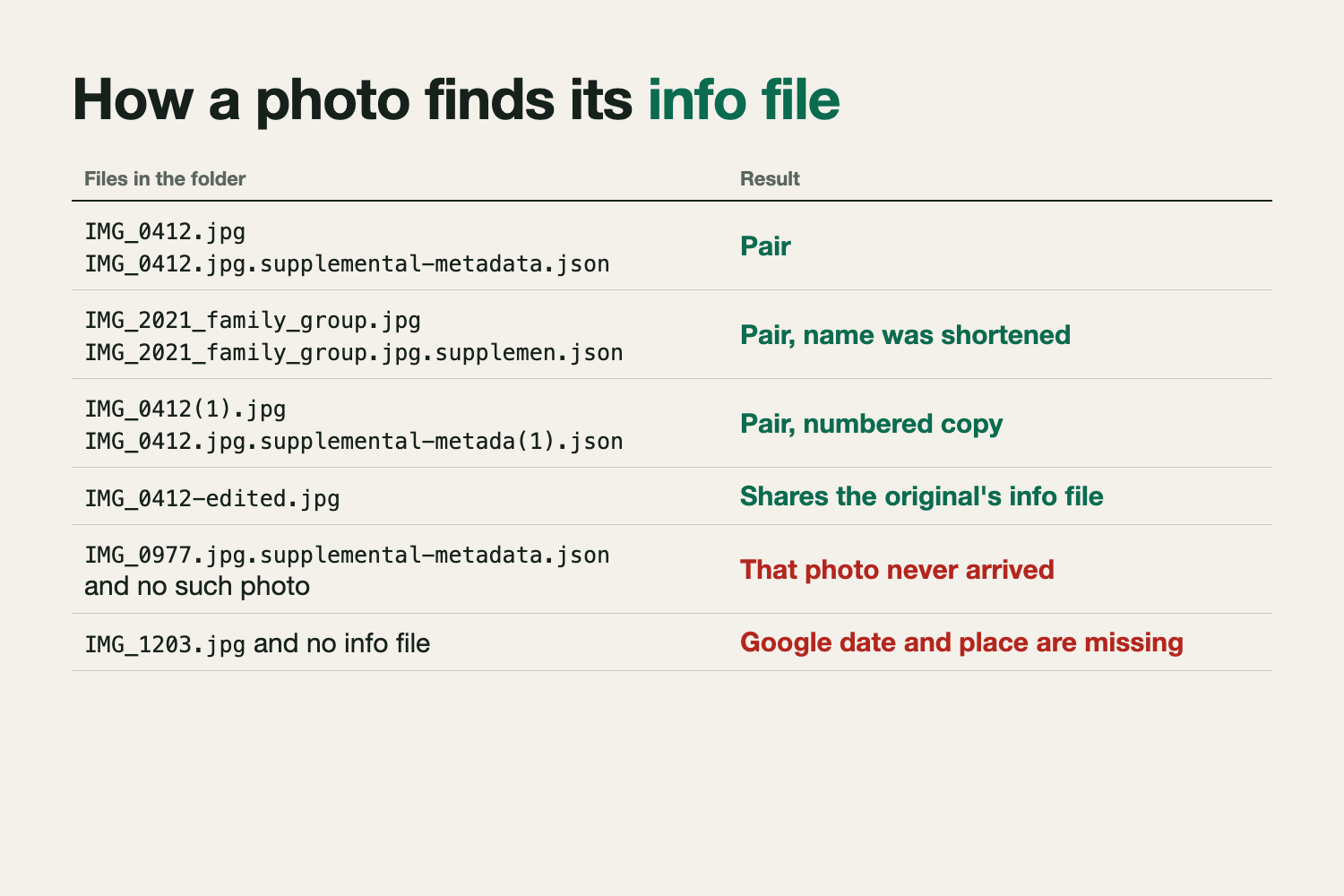
Pairing rules: shortened names, numbered copies and edited copies pair; an info file with no photo means that photo never arrived
-
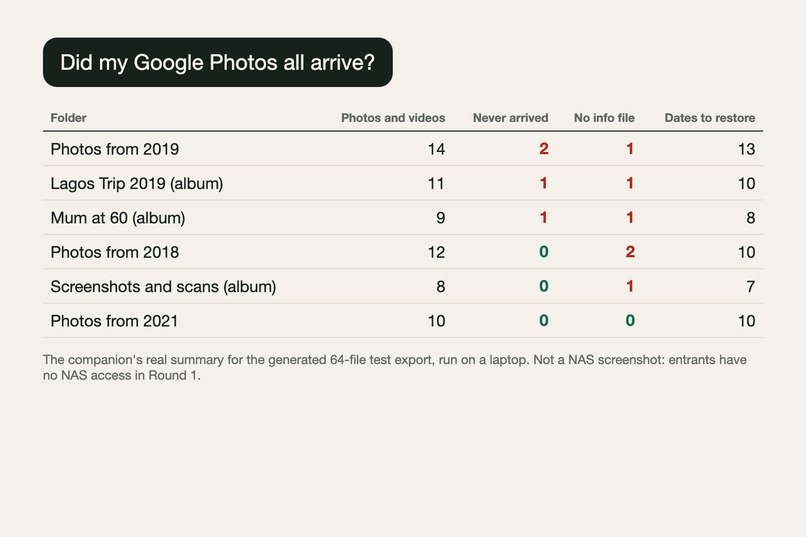
Real companion summary for a 64-file test export with planted faults: 4 never arrived, 6 without info files
-
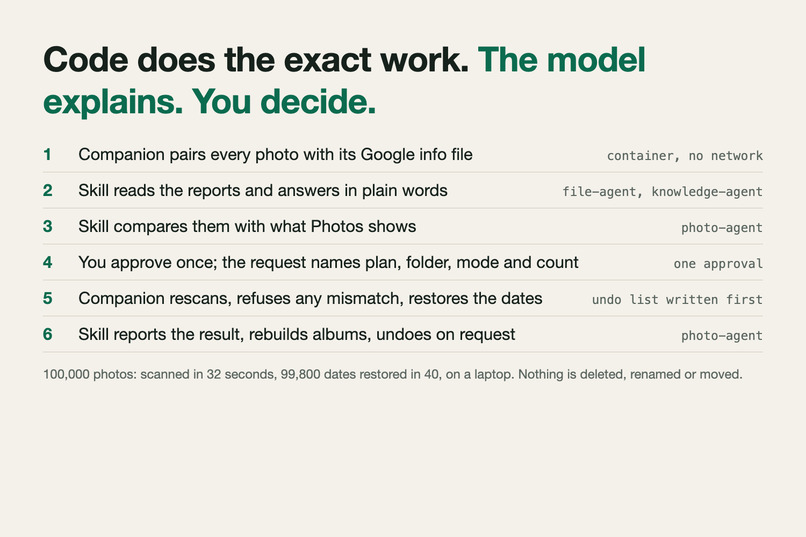
Code does the exact work, the model explains, you approve once. 100,000 photos scanned and restored in under 80 s
-
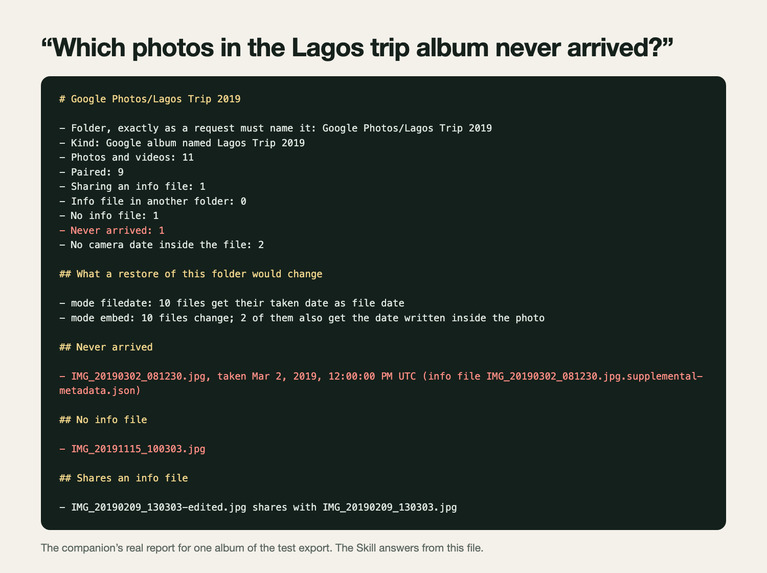
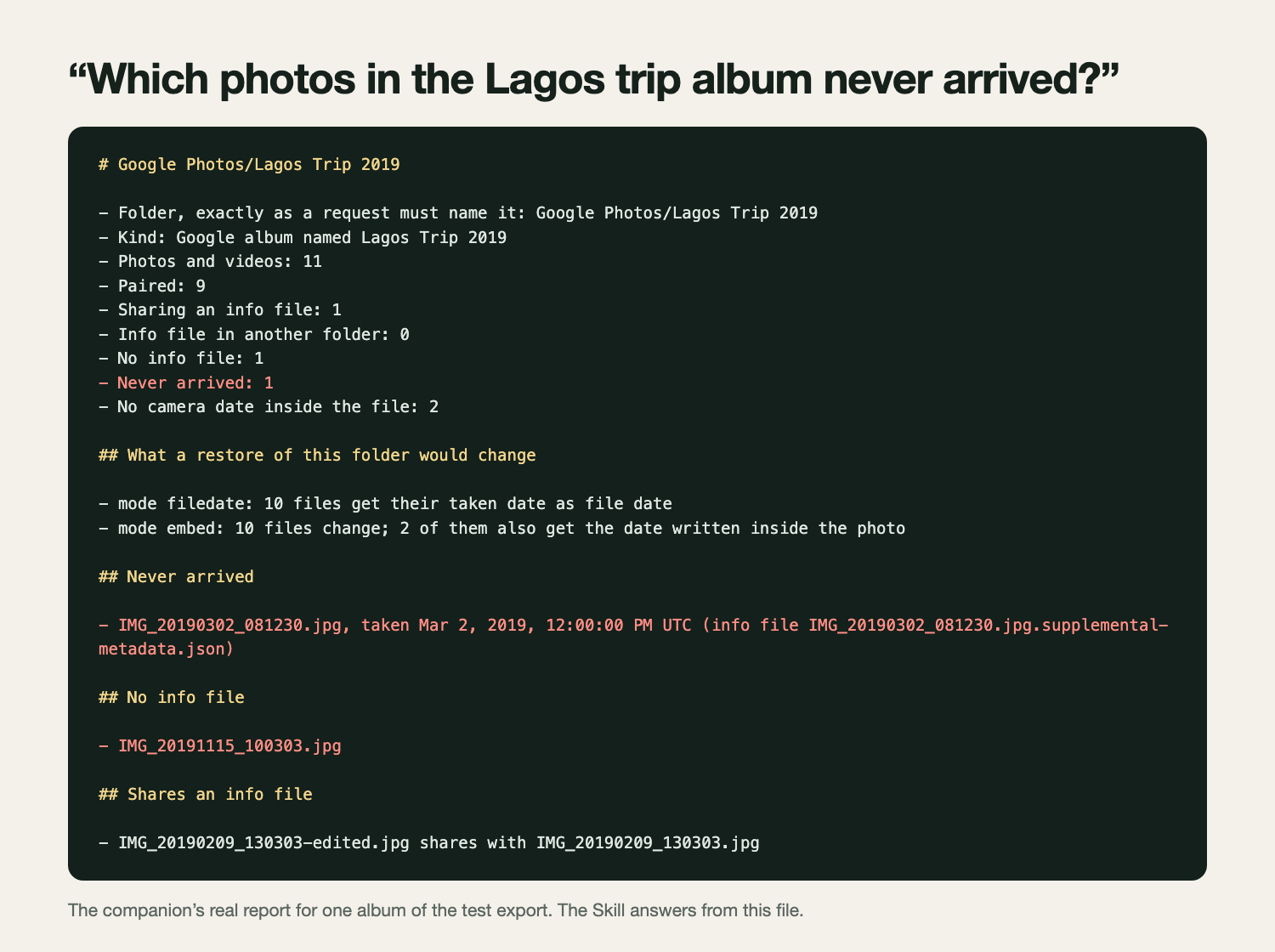
Ask about one album: the real per-album report the Skill answers from, naming the photo that never arrived and its date
-
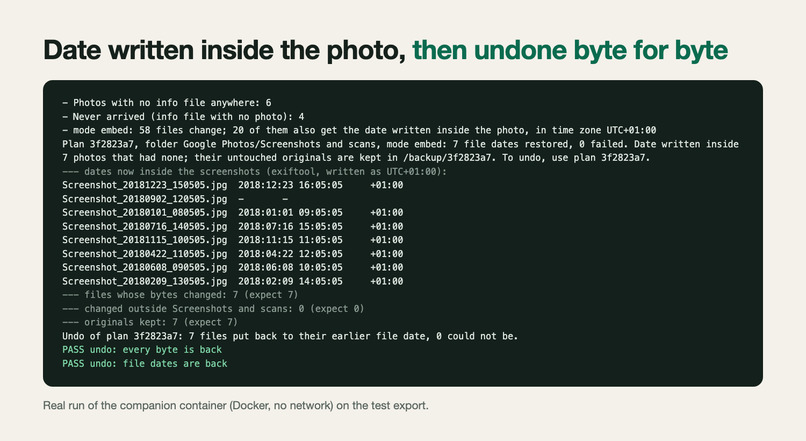
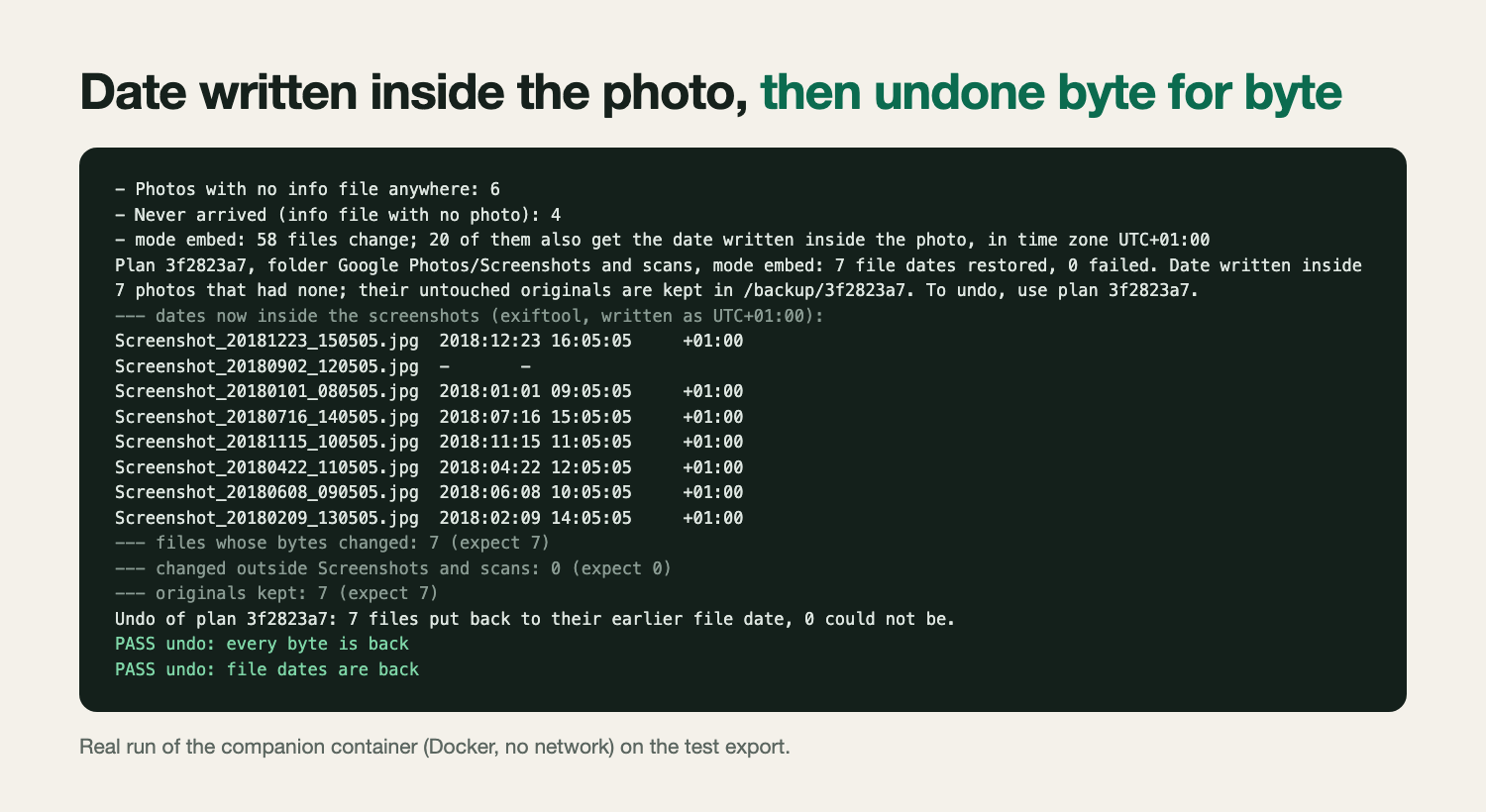
Real container run: taken date written inside 7 photos, other files untouched, then undone byte for byte
-
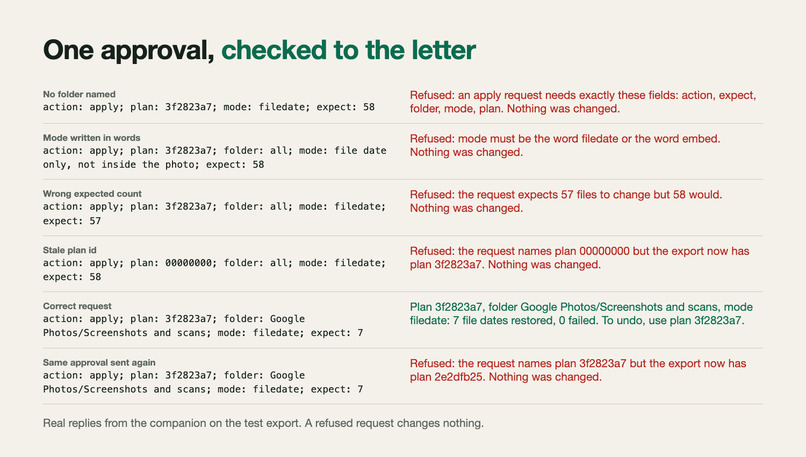
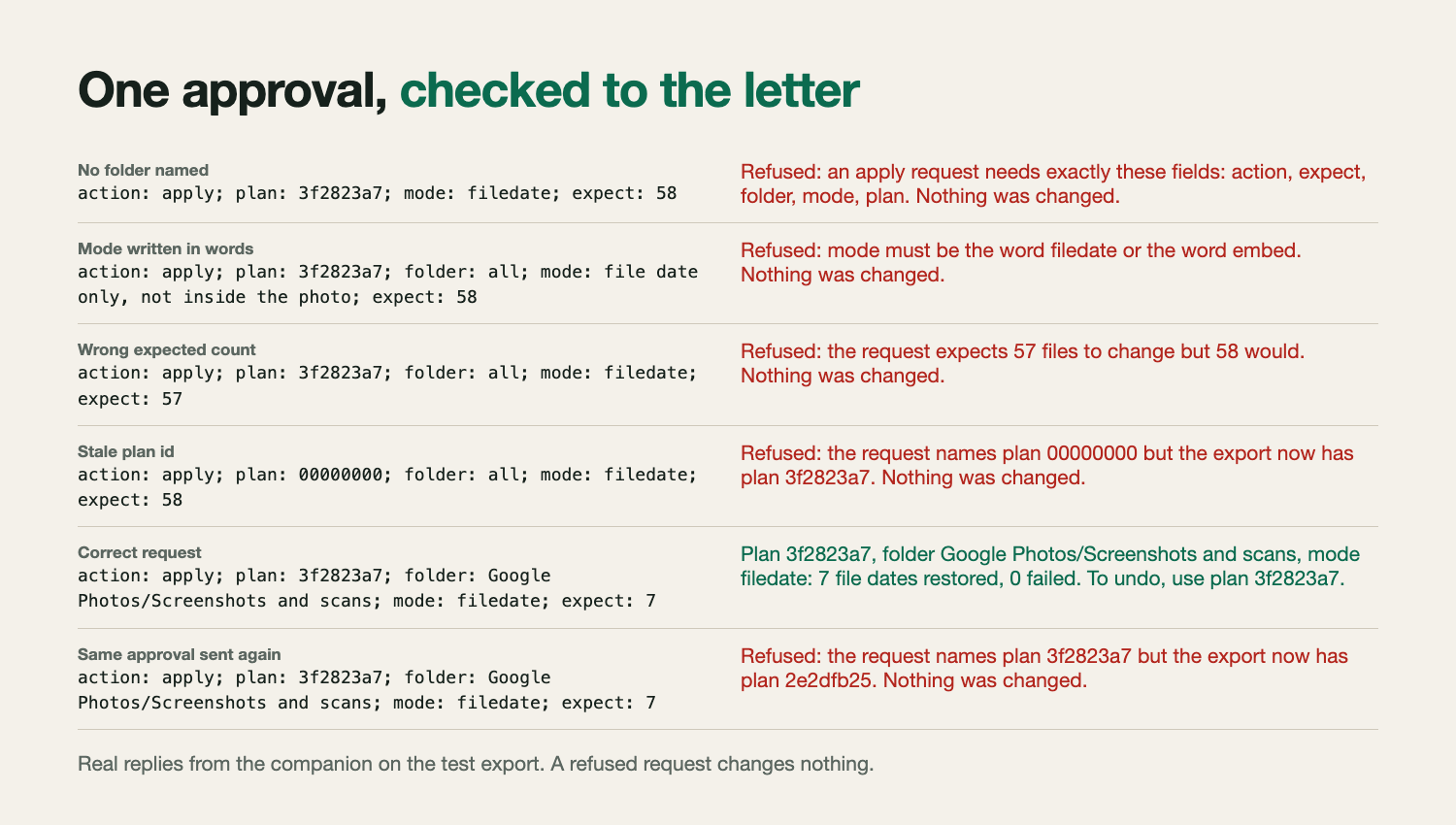
One approval, checked to the letter: real companion replies refusing five bad requests and carrying out the good one
-
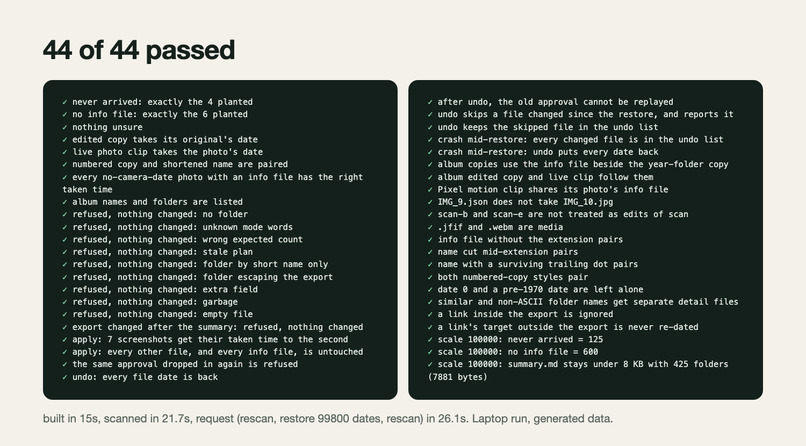
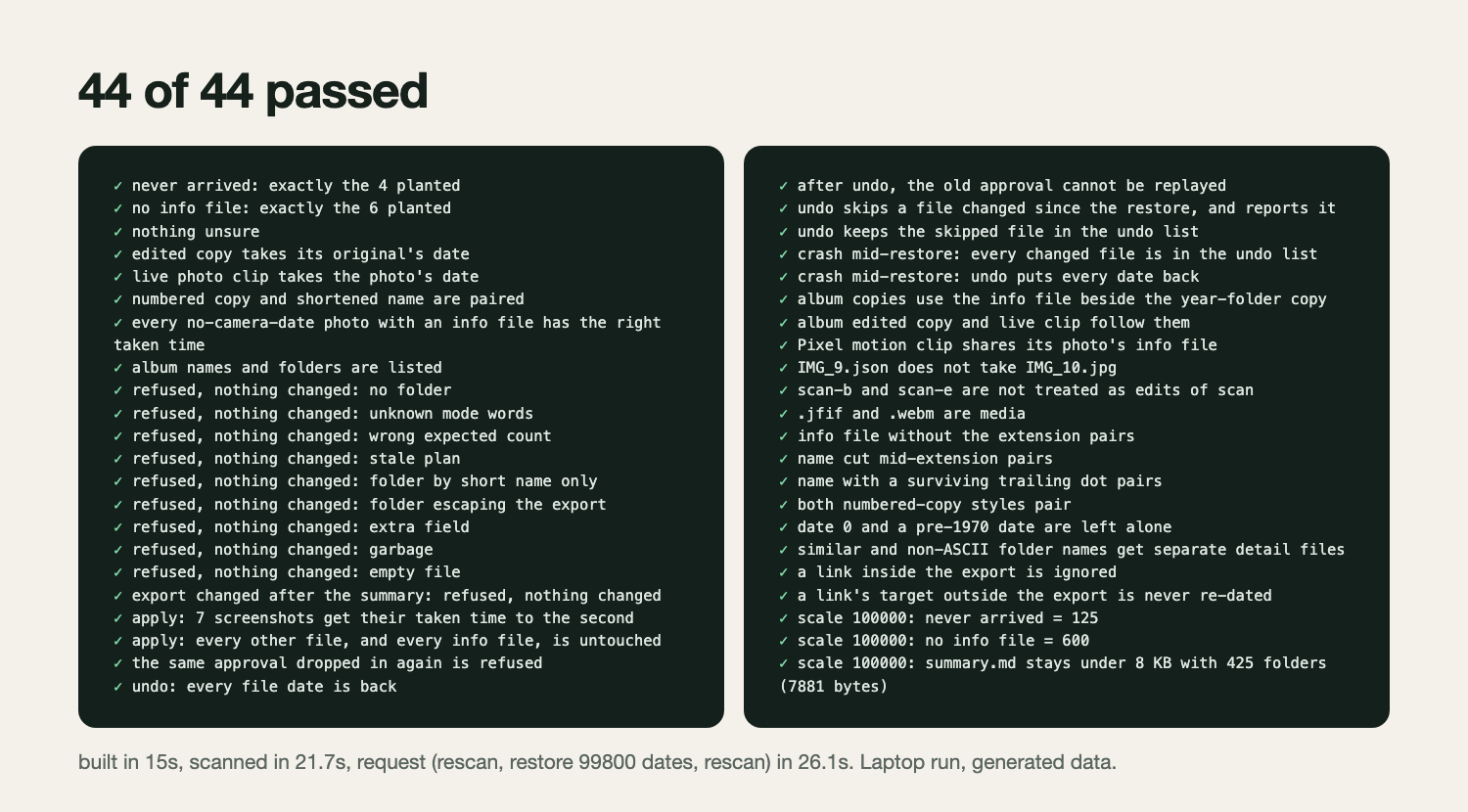
44 of 44 companion tests pass: planted faults, refused requests, crash mid-restore, undo, and a 100,000-photo run
Inspiration
In September a NAS owner posted on r/DataHoarder after exporting years of Google Photos in 159 archives: "I still don't know whether the archive is complete or whether all albums survived." 197 people upvoted it and 87 replied. On r/UgreenNASync, UGREEN owners ask how to move a Google Photos library to their NAS and describe what happens after the copy: old photos got new dates when they were unpacked and "are all just jammed into one day".
UGREEN's own import guide tells owners what to do about it, by hand: "Confirm that every Google Takeout archive part was downloaded and extracted" and "Check the UGREEN Photos timeline for incorrect export-date groupings."
That is a checklist for a person with tens of thousands of photos and no tool. The tools that exist (immich-go, GooglePhotosTakeoutHelper, ExifTool) need a terminal and a second computer. The people asking bought a NAS so they would not need those.
What it does
You ask Uliya "Did my Google Photos all arrive?" and get totals for the whole library and the names of what is missing.
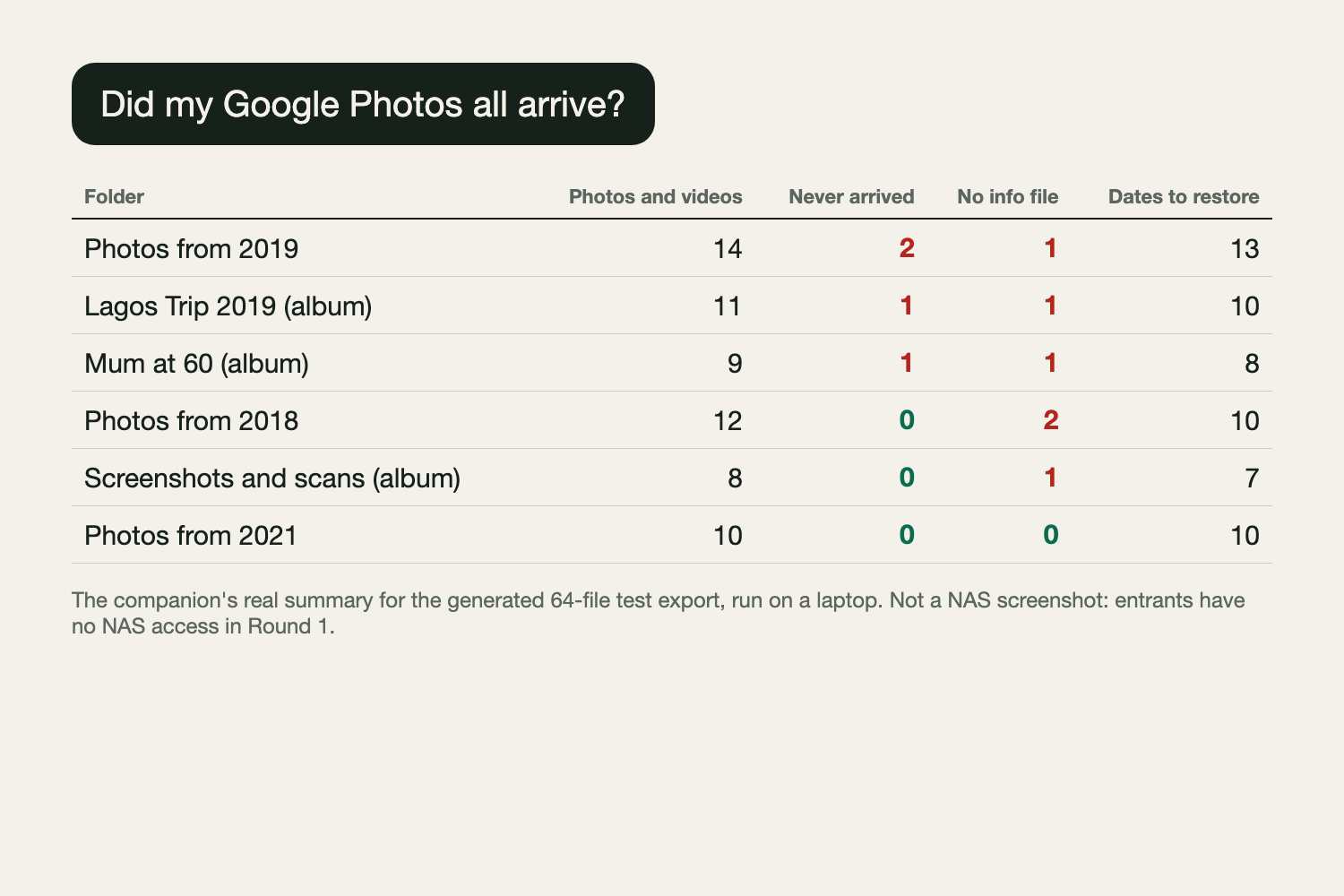
- It tells you which photos never arrived: Google listed them, with their original name and date, and they are not on the NAS. Those are the download parts to fetch again.
- It tells you which photos are here without Google's date, place and description.
You can ask about it in your own words: "which photos in the Lagos trip album never arrived, and when were they taken?"
It compares its findings with what the Photos app shows on the import day.
You say "fix the dates". It tells you exactly how many files will change, the NAS asks you once, and the dates are restored. If you choose, the date is also written inside photos that have none, after the original is copied aside.
"Undo that" puts every date, and every byte, back.
It never deletes, renames or moves a photo.
How we built it
The design rule: code does the exact work, the model does the talking, and the owner makes the decision.
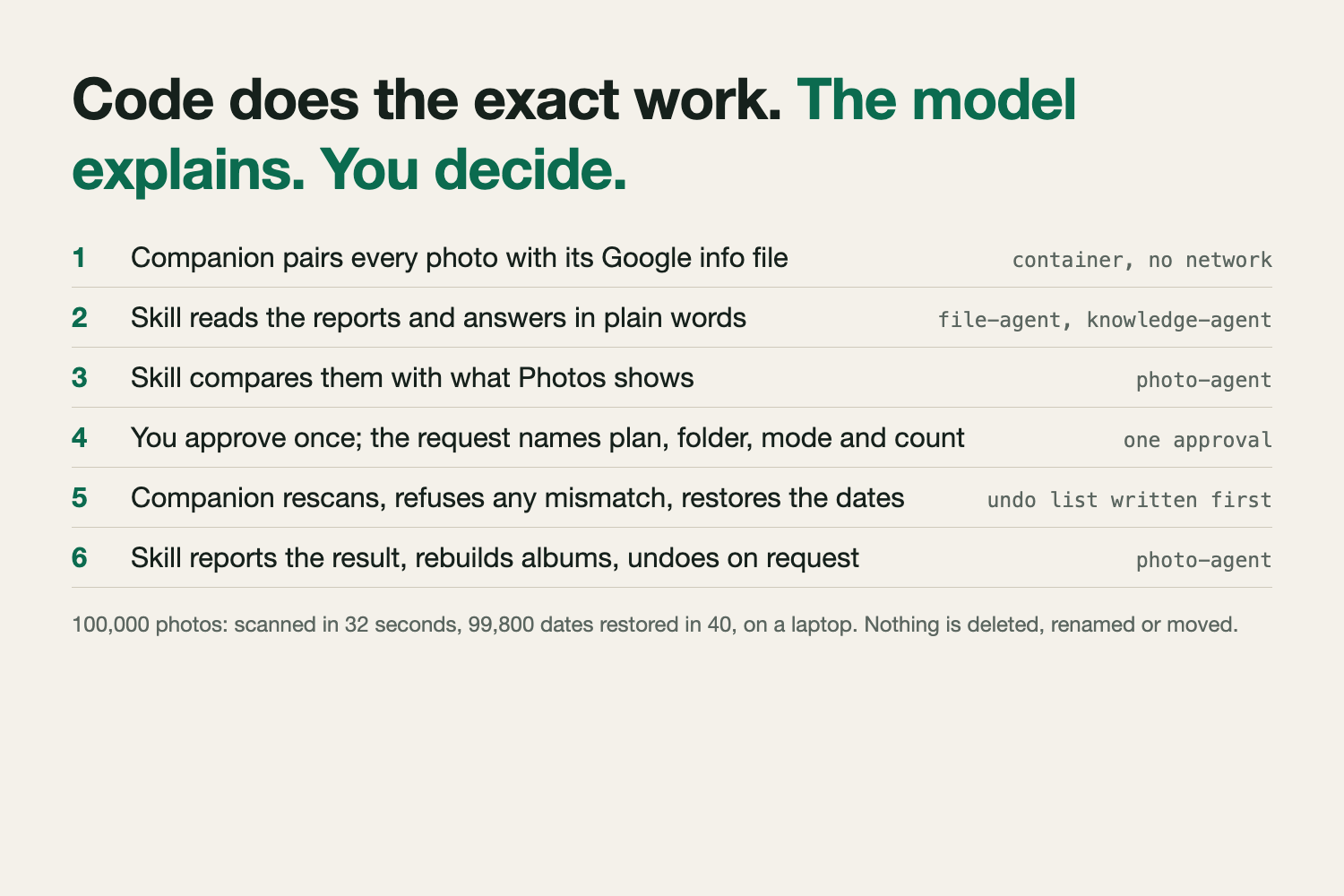
A language model at 18 tokens a second cannot pair tens of thousands of file names without mistakes. So a small companion container does that part, which UGREEN allows on the finalist NAS. It reads every name and every Google info file, pairs them by eleven rules, and writes plain Markdown and CSV reports into the export. It has no network access.
The pairing rules cover what Takeout actually produces: info-file names cut short at 51 characters, two styles of numbered copy, edited copies and live photo clips that have no info file of their own, and album copies whose info file sits beside the year-folder copy. They were checked against the matching code in immich-go and GooglePhotosTakeoutHelper; no code was copied.
The Skill is Markdown only and uses three of UGREEN's agents:
- file-agent (
ug-filesystem) reads the summary and the per-folder detail, and, after you agree, writes a one-line request file. - knowledge-agent (
ug-knowledge) answers open questions over the reports withcollect-evidence, naming the file each fact comes from. - photo-agent (
ug-photo) usessearch-pictureby folder and date to ask what Photos itself shows on the import day, before and after, andcreate-album-conditionto rebuild each Google album from its folder.
The request file is how one approval can safely cover thousands of changes. Every summary carries a plan id. The request must name that id, the folder, the mode and the number of files expected to change. The companion rescans the export first and refuses any mismatch, so an approval can never be applied to something different from what you were shown. The old date of each file is logged before that file is touched.
Without the companion the Skill still works, a few folders at a time, by listing names through file-agent.
Status: tested off the NAS only. Entrants get NAS access as finalists.
Challenges we ran into
A clean count that hid two faults. My first design counted photos and info files per folder. In my test set one album balanced exactly, with one photo missing its info file and one info file missing its photo. Counting was dropped; everything is paired by name.
Steps the NAS cannot do. An independent review against UGREEN's capability catalog found my Markdown-only draft asking for things no action offers: a listing that continues after a given name, and counts per folder. It also put the real cost on the table: at 30 files per run, a 40,000-photo library would take over a thousand runs. That is what moved the exact work into the companion.
Will Photos show the restored date? Nobody documents which date the Photos app uses when a photo has no camera date, or whether it re-reads a changed file. So the companion can also write the date inside the photo, which is the field every photo app reads. It only does this for photos that have none, and it keeps the untouched original.
An approval that outlives what was approved. A second review ran the companion against hostile inputs. A request with no folder restored every folder. A mode written as "file date only, not inside the photo" switched on writing inside the photo. A stop part-way through left changed files with no undo record. All three are now tests: the request format is exact, anything else is refused, and the undo record is written first.
Accomplishments that we're proud of
- The Skill passes UGREEN's official checker with 0 errors and 0 warnings.
- The companion passes 44 tests. On a generated 64-file export with planted faults it names exactly the 4 photos that never arrived and the 6 without info files. Nine kinds of malformed or stale request are refused with nothing changed. A stop part-way through a restore can still be undone.
- 100,000 generated photos: scanned in under 35 seconds, 99,800 dates restored in under 45 seconds, on a laptop.
- A container run that restores 7 dates, writes them inside the 7 photos, leaves the other 120 files byte-identical, and then undoes all of it byte for byte.
What we learned
"Is it all there?" cannot be answered by counting, and it cannot be answered by a model reading file names either. The honest split is the one a careful person would use: a tool that follows exact rules produces the list, and something that can explain it stands between the list and the decision.
What's next for Takeout Arrival Check
Run the three tests on the finalist NAS and learn how the Photos app treats a restored date. Then the same check for iCloud exports, where owners report the same broken order.
