-
-

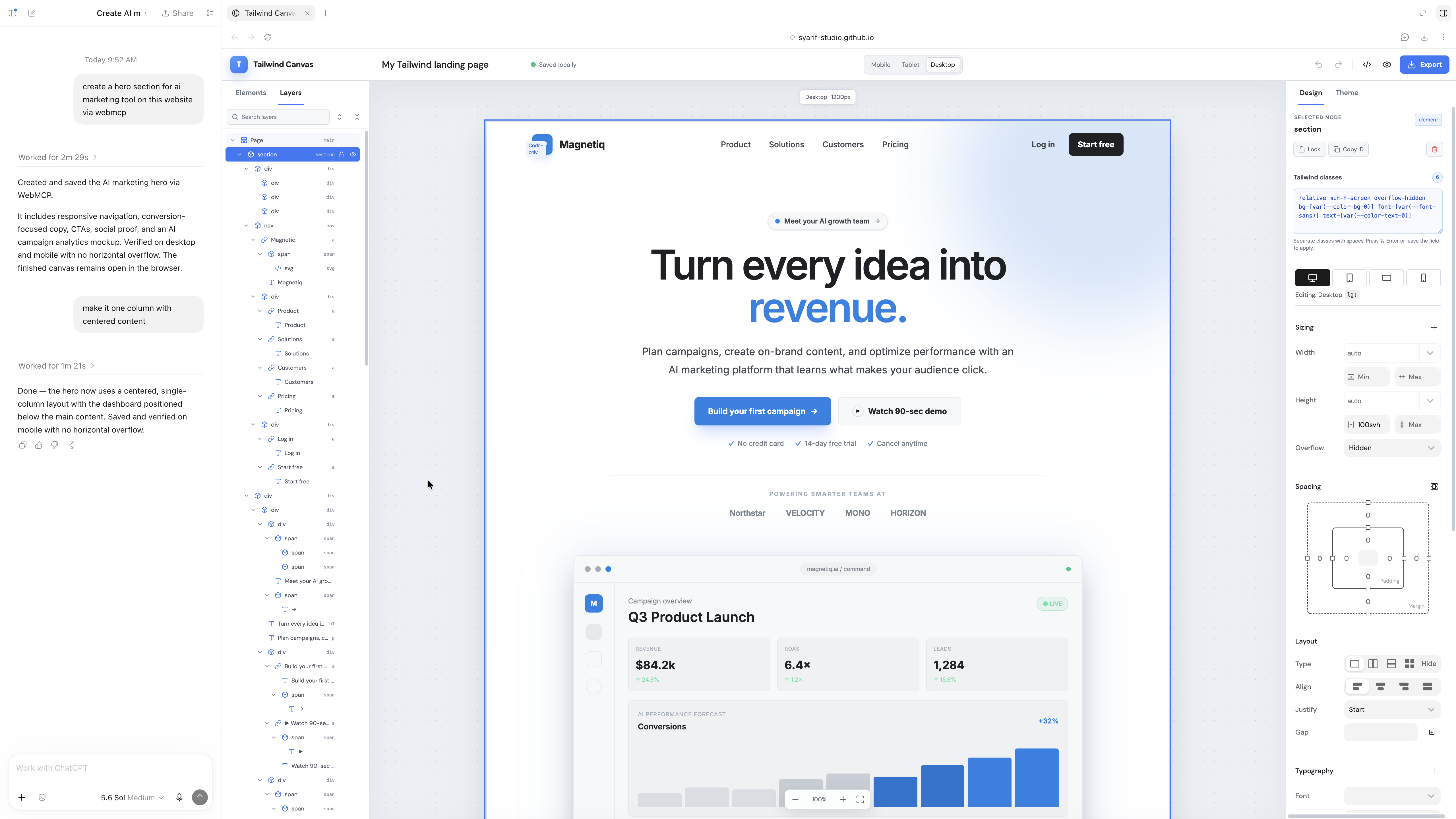
Tailwind editor screenshoot
Inspiration
I'm a WordPress developer, and I've been building a plugin that brings AI directly into the WordPress editor.
The plugin already supports Codex chat inside WordPress and connections to external MCP servers. However, many WordPress users are beginners or non-technical users. Setting up an external MCP server can be confusing, and pairing or configuring an AI coding agent can create even more friction.
When I discovered WebMCP, I saw a much simpler approach: instead of asking users to configure integrations manually, they could simply open the editor inside the ChatGPT app and start working with AI immediately.
The idea is simple: open the editor, start chatting, and the AI just works.
What it does
Tailwind Editor with WebMCP is a simplified version of my custom WordPress editor.
It provides a visual editor powered by Tailwind CSS and exposes editor capabilities through WebMCP, allowing ChatGPT to interact directly with the page.
The AI can understand the available editor actions and use them to modify the website without requiring the user to manually configure an external MCP server.
The goal is to make AI-assisted website building accessible even to users who do not know what MCP is.
How we built it
The demo is based on a simplified version of the custom editor I have been developing for WordPress.
The editor uses Tailwind CSS for styling and WebMCP to expose its functionality to AI agents.
Instead of building a separate integration layer or requiring users to connect an MCP server, the editor exposes its available actions directly from the web application.
ChatGPT can then discover those capabilities and interact with the editor while the user continues working visually.
Challenges we ran into
One of the biggest challenges with AI-powered editors is not necessarily the AI itself, but the integration experience.
Traditional MCP integrations often require users to configure servers, connections, permissions, or pairing steps. That may be acceptable for developers, but it can be difficult for typical WordPress users.
Another challenge is designing editor tools that are clear enough for an AI agent to understand while still keeping the editing experience simple for humans.
WebMCP helped demonstrate how much of that integration complexity can be moved away from the user.
Accomplishments that we're proud of
I'm especially proud that the demo shows how an AI agent can interact with a web-based editor without requiring users to understand the infrastructure behind it.
The same type of workflow that would normally require configuring an MCP server can become much closer to:
Open the page → ask ChatGPT → see the page change.
It also gave me a way to experiment with bringing together three things I've been working with for some time: WordPress-style visual editing, Tailwind CSS, and AI agents.
What we learned
The biggest lesson was that AI integration is not only about giving the model more capabilities. The way users access those capabilities is equally important.
For technical users, setting up MCP manually may not be a major problem. For a large ecosystem like WordPress, however, reducing setup steps could make a significant difference.
WebMCP makes the web application itself part of the AI integration layer. This creates an interesting possibility where websites and web applications can describe what an AI is allowed to do without requiring users to configure separate infrastructure.
What's next for Tailwind Editor with WEBMCP
The current project is a simplified demonstration, but the larger goal is to bring the same WebMCP experience into my full WordPress editor.
I want to explore exposing more editing capabilities, such as creating and modifying sections, updating Tailwind classes, changing content, working with images, and managing complete page layouts.
Ultimately, I would like WordPress users to be able to open their editor inside an AI-enabled browser or ChatGPT app and simply describe what they want to build.
No MCP configuration.
No complicated pairing process.
Just open the editor and start building with AI.
Built With
- javascript
- react
- tailwind

Log in or sign up for Devpost to join the conversation.