-
-
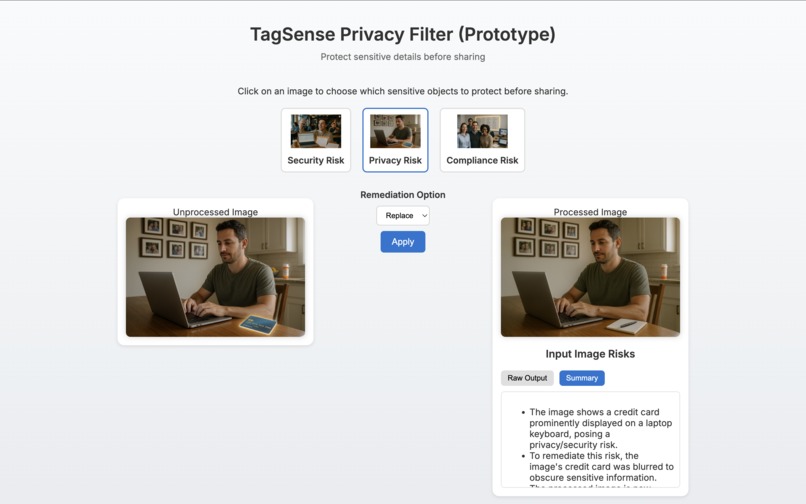
TagSense UI – Select an image, choose blur/hide/replace, and instantly preview secure output with AI-generated summary.
Inspiration
Every day, millions of photos are shared online without realizing how much sensitive data leaks in the background — from credit cards on a desk to whiteboard notes in offices. A simple selfie or team picture can accidentally expose private, confidential, or compliance-sensitive details. With Chrome’s new on-device AI models, we saw an opportunity to empower users to protect themselves automatically before pressing upload.
What it does
TagSense is an image privacy pre-processor that:
- Lets users select an image and apply privacy actions (blur, hide, or replace).
- Compares input vs output images, identifying what changed.
- Highlights sensitive categories like credit cards, laptops, documents, and whiteboards.
- Provides a raw AI output for transparency and a clean summary for quick review.
- Helps users decide if the image is compliant for sharing or if more steps are needed.
How we built it
- Frontend: Static web app built with HTML, CSS, and JavaScript.
- AI Integration: Used Chrome’s experimental Prompt API and Summarizer API with the on-device Gemini Nano model.
- Image Handling: Pre-processed image variants (blur/hide/replace) stored locally for demo purposes.
- Extension Support: Packaged as a Manifest V3 Chrome Extension with Origin Trial token for enabling Prompt API locally.
- UI Features:
- Tabbed interface for switching between raw AI output and summary.
- Scrollable output containers for long responses.
- Responsive card-based design for selecting and comparing images.
- Tabbed interface for switching between raw AI output and summary.
Challenges we ran into
- Getting the Prompt API enabled with Origin Trials on GitHub Pages vs Chrome Extensions.
- Debugging the “No output language specified” error — solved by explicitly setting
outputLanguage: "en". - Handling cases where the model wasn’t available locally — we had to add default messages and fallback flows.
- Designing a UI that is both developer-friendly (raw JSON) and user-friendly (summarized text).
Accomplishments that we're proud of
- Built a working end-to-end privacy-aware workflow using Chrome’s on-device AI.
- Designed a clean UI where users can see exactly what changed between input and output images.
- Integrated live summaries that explain compliance status in plain English.
- Created a Chrome Extension + Web Demo, making it easy for both users and judges to try.
What we learned
- How to work with Chrome’s experimental AI APIs (Prompt API, Summarizer API) and handle their quirks.
- The importance of feature detection and graceful fallback for experimental tech.
- That small UI details (tabs, hover effects, captions) make a huge difference in usability.
- Privacy is not just about blurring faces — objects in the background can leak just as much.
What's next for TagSense – Turning Images into Actionable Insights
- User Uploads: Support real user-uploaded photos, not just sample images.
- Dynamic Remediation: Use on-device AI to automatically apply blur/hide/replace without relying on pre-processed variants.
- More Object Categories: Extend detection beyond office items (location clues, personal documents, license plates).
- Metadata Scrubbing: Automatically remove EXIF/location data before upload.
- Collaboration & Compliance Mode: Build enterprise integrations where companies can enforce image compliance policies.
TagSense aims to evolve from a prototype into a practical safeguard for everyday photo sharing, ensuring that images are not only beautiful but also safe and compliant.


Log in or sign up for Devpost to join the conversation.