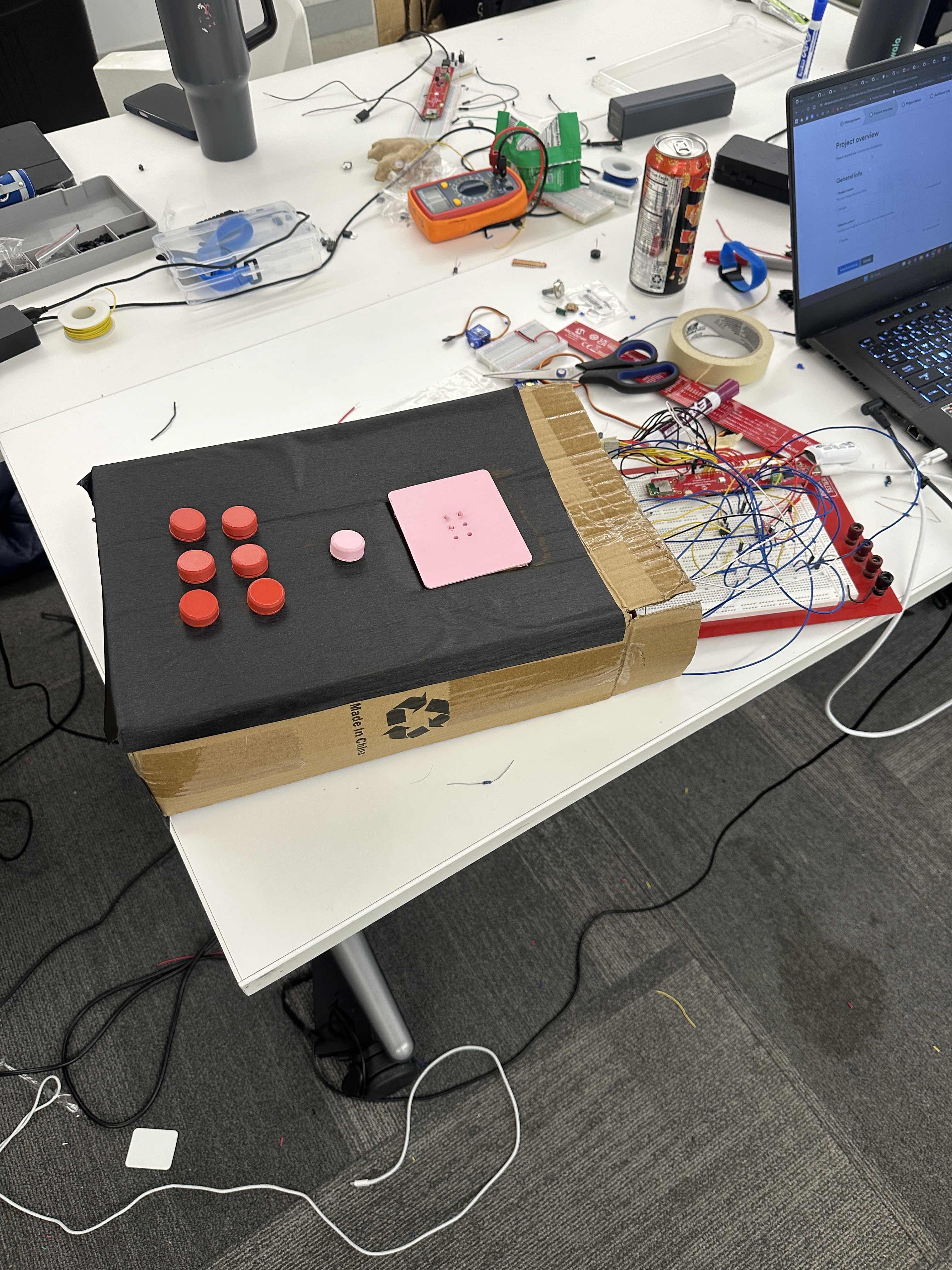
BrailleBuddy — Tactile Braille Learning Kit
Educate the Future Track | Microchip Curiosity + CircuitPython
Project Overview
BrailleBuddy is a hands-on, interactive braille learning device designed for children with visual impairments. Using a Microchip Curiosity board running CircuitPython, the kit teaches braille through physical input and tactile feedback — letting kids write a braille letter with buttons and immediately feel the correct dot pattern pop up on a tactile surface, while hearing an audio pronunciation of the letter.
The core learning loop is: press → confirm → hear → feel → reset. No screens. No sight required. Just touch and sound.
Problem Statement
Children with visual impairments often struggle to access engaging, interactive educational tools. Most braille learning resources are passive (books, charts) or expensive electronic devices. BrailleBuddy provides an affordable, tactile, and auditory learning experience that reinforces the connection between braille dot patterns and the letters they represent.
Target Users
- Children aged 5–12 with visual impairments
- Early braille learners in classroom or home settings
- Teachers and therapists supporting visually impaired students
How It Works — User Flow
[BOOT]
  └─ Press START button
       └─ Boot sound plays
            └─ Device enters IDLE / INPUT state

[INPUT STATE]
  └─ Child presses any combination of the 6 braille input buttons (2×3 grid)
       └─ Press START/CONFIRM button
            └─ Device enters FEEDBACK STATE

[FEEDBACK STATE]
  └─ Audio plays the letter name repeatedly (e.g., "A... A... A...")
  └─ Corresponding braille dots POP UP on the tactile output surface (2×3 whack-a-mole)
  └─ After ~5 seconds, audio prompts: "Press middle button to try again. Hold to quit."

[RESET]
  └─ Short press on START/CONFIRM → all dots retract → return to INPUT STATE

[QUIT]
  └─ Long press on START/CONFIRM → shutdown sound → device powers off / deep sleep
Hardware Components
Input Side
| Component | Description |
|---|---|
| 6× Tactile push buttons | Arranged in a 2×3 grid — maps to braille cell dots 1–6 |
| 1× Control button | Center button for Start / Confirm / Reset / Quit (long press) |
| Microchip Curiosity Board | Main microcontroller running CircuitPython |
Output Side
| Component | Description |
|---|---|
| 6× Mini solenoids or micro servos | Drives the pop-up tactile dot surface (one per braille dot) |
| Speaker + audio amplifier board | Plays pre-recorded .wav audio files for each letter |
| Optional: LED indicator | Visual status indicator for sighted helpers/teachers |
Tactile Output Surface ("Braille Whack-a-Mole")
- A 2×3 grid of spring-loaded pins or small servo-driven pegs
- When a letter is confirmed, the pins corresponding to that letter's braille pattern extend upward
- On reset, all pins retract to a flat surface
- Physical layout matches the standard braille cell (dots 1–6, left column top-to-bottom, right column top-to-bottom)
Braille Dot Layout Reference
Input Buttons          Tactile Output Surface
┌───┬───┐              ┌───┬───┐
│ 1 │ 4 │              │ ● │ ● │  ← Dots 1, 4
├───┼───┤              ├───┼───┤
│ 2 │ 5 │              │ ● │ ● │  ← Dots 2, 5
├───┼───┤              ├───┼───┤
│ 3 │ 6 │              │ ● │ ● │  ← Dots 3, 6
└───┴───┘              └───┴───┘
  LEFT side              RIGHT side
  (input)                (output)

[CONFIRM]              [CONFIRM]
Standard braille uses this same 2×3 numbering — left column dots 1, 2, 3 (top to bottom), right column dots 4, 5, 6 (top to bottom).
Software Architecture — State Machine
States:
  BOOT  →  IDLE  →  FEEDBACK  →  IDLE
                         └──────────────→  SLEEP (long press)

State Details:
  BOOT      : Play boot sound, initialize all pins LOW (dots retracted)
  IDLE      : Poll 6 input buttons, track which are pressed
  FEEDBACK  : Activate solenoids for confirmed pattern, loop audio, start 5s timer
  SLEEP     : Retract all dots, play exit sound, enter deep sleep
Key CircuitPython Modules Used
digitalio— button inputs and solenoid/servo digital outputsaudioio/audiopwmio—.wavaudio playback from flash storagetime— press duration detection (long press threshold ~1.5s) and feedback timerstorage/os— loading audio files from onboard flash
Button Press Logic
Short press on CONFIRM:
  - In IDLE state     → trigger FEEDBACK
  - In FEEDBACK state → reset to IDLE (retract dots, stop audio)

Long press on CONFIRM (hold > 1.5s):
  - Any state → trigger SLEEP / shutdown
Block Diagram Breakdown
Use this section to directly map each block in your diagram.
Block 1 — Power & Microcontroller
- Microchip Curiosity Board (central block)
- USB or battery power input
- CircuitPython firmware running state machine
Block 2 — User Input
- 6× Braille Input Buttons → GPIO digital inputs (pins D0–D5)
- 1× Control Button → GPIO digital input (pin D6) with timer for long-press detection
Block 3 — Audio Output
- Flash Storage (onboard) → stores pre-recorded
.wavfiles (A.wav, B.wav … Z.wav + boot.wav + exit.wav) - Audio output pin → DAC or PWM pin
- Audio amplifier module (e.g., MAX98357 or PAM8403) → drives speaker
- Speaker (8Ω, small form factor)
Block 4 — Tactile Output (Pop-Up Dots)
- 6× Solenoid drivers / servo PWM outputs → pins D7–D12 (or PWM pins)
- Driver board (e.g., ULN2003 Darlington array for solenoids, or direct PWM for servos)
- 6× Solenoids or micro servos → each controls one pop-up pin on the tactile surface
- Physical spring return mechanism retracts pins when solenoid is de-energized
Block 5 — Braille Lookup Table (Software)
- Dictionary in CircuitPython code:
{ "A": [1,0,0,0,0,0], "B": [1,1,0,0,0,0], ... } - Maps confirmed button combination → which dots to raise + which audio file to play
Block 6 — State Machine Controller (Software)
- Orchestrates transitions between BOOT → IDLE → FEEDBACK → IDLE → SLEEP
- Handles short press vs. long press timing
- Calls audio playback and solenoid actuation functions
Block Diagram (Text Layout for Drawing)
┌────────────────────────────────────────────────────────────┐
│                  MICROCHIP CURIOSITY BOARD                  │
│                    (CircuitPython)                          │
│                                                             │
│  [Input Handler]──────────[State Machine]──────────────┐   │
│       │                        │                        │   │
│  6 Button GPIOs           Braille Lookup            Audio   │
│  1 Control GPIO           Table (dict)             Engine   │
│       │                        │                        │   │
│  Debounce +                Dot Pattern             .wav     │
│  Long-press                  Array                Files    │
│  Detection                    │                        │   │
│                               │                        │   │
└───────────────────────────────┼────────────────────────┼───┘
                                │                        │
              ┌─────────────────┘                        │
              ▼                                          ▼
   ┌─────────────────────┐                   ┌──────────────────┐
   │  SOLENOID DRIVER    │                   │  AUDIO AMPLIFIER │
   │  (ULN2003 or PWM)   │                   │  (MAX98357 etc.) │
   └──────────┬──────────┘                   └────────┬─────────┘
              │                                       │
              ▼                                       ▼
   ┌─────────────────────┐                   ┌──────────────────┐
   │  6× POP-UP SOLENOIDS│                   │     SPEAKER      │
   │  (Tactile Surface)  │                   │  (Letter audio)  │
   └─────────────────────┘                   └──────────────────┘

   INPUT SIDE                OUTPUT SIDE
   ┌───┬───┐                 ┌───┬───┐
   │ 1 │ 4 │                 │↑  │↑  │
   │ 2 │ 5 │  ──CONFIRM──►   │↑  │   │   (example: letter "B" = dots 1,2)
   │ 3 │ 6 │                 │   │   │
   └───┴───┘                 └───┴───┘
   Press buttons             Dots pop up
Audio Files Required
| File | Description |
|---|---|
boot.wav |
Boot-up chime / welcome sound |
A.wav – Z.wav |
Pre-recorded letter pronunciation (26 files) |
prompt_reset.wav |
"Press middle button to try again" |
prompt_quit.wav |
"Hold middle button to quit" |
exit.wav |
Shutdown sound |
Tip: Record these in one session using any phone voice memo app. Keep each file under 3 seconds. Convert to 16-bit mono
.wavat 22050 Hz for CircuitPython compatibility.
Team Roles (4 People)
| Person | Role | Responsibilities |
|---|---|---|
| Person 1 — Firmware Lead | CircuitPython dev | State machine, button polling, long-press logic, braille lookup table, solenoid/servo actuation calls |
| Person 2 — Audio + Integration | CircuitPython dev | Audio playback module, .wav file recording & conversion, wiring buttons to board, final firmware integration support |
| Person 3 — Electronics | Hardware | Wiring all solenoids/servos to Curiosity board, driver circuit assembly, testing each actuator independently |
| Person 4 — Mechanical Build | Physical | Building the 2×3 pop-up tactile surface, enclosure, button grid layout, overall presentation for demo |
Parallel Work Strategy
Hours 0–3    Person 1: Write state machine + braille lookup table (no hardware needed yet)
             Person 2: Record + convert all .wav files, wire button inputs to board
             Person 3: Wire one servo/solenoid, verify it fires from a test script
             Person 4: Design + start building pop-up surface enclosure

Hours 3–8    Person 1: Integrate button input + actuation calls (uses Person 3's wired board)
             Person 2: Integrate audio playback into Person 1's state machine
             Person 3: Wire remaining 5 actuators, test all 6 fire correctly
             Person 4: Complete mechanical pop-up surface, mount buttons

Hours 8–11   ALL: Full hardware + firmware integration on assembled device

Hours 11–13  ALL: Testing, bug fixes, edge cases (invalid combos, rapid presses)

Hours 13–15  ALL: Demo polish, rehearse presentation, fallback prep
Key dependency: Person 3 must have at least one working servo/solenoid by hour 3 so Person 1 can test actuation code. Everything else is fully parallel.
Development Timeline (15 Hours, 4-Person Team)
| Phase | Owner | Task | Time |
|---|---|---|---|
| 1 | P1 | State machine skeleton + braille lookup table | 2 hrs |
| 2 | P1 | Button polling, debounce, long-press detection | 1 hr |
| 3 | P1 | Solenoid/servo actuation calls per dot pattern | 1 hr |
| 4 | P2 | Record + convert all .wav audio files |
1.5 hrs |
| 5 | P2 | Audio playback module + integration into state machine | 1 hr |
| 6 | P3 | Wire buttons + all 6 actuators to Curiosity board | 2 hrs |
| 7 | P3 | Driver circuit assembly + independent actuator testing | 1 hr |
| 8 | P4 | Build 2×3 pop-up tactile surface mechanism | 4 hrs |
| 9 | P4 | Enclosure + button grid mounting | 1 hr |
| 10 | ALL | Full system integration + bug fixes | 2 hrs |
| 11 | ALL | Demo rehearsal + polish | 1.5 hrs |
| Total | ~15 hrs |
Fallback Plan
If the mechanical pop-up surface isn't finished in time for the demo, the project still stands on its own with audio feedback. Present the tactile surface as a work-in-progress and demo the full button → audio flow. Judges care more about the concept and execution of the learning loop than the mechanical finish.
Why This Wins "Educate the Future"
- Accessible by design — built specifically for children who cannot use screen-based tools
- Multisensory learning — combines tactile, auditory, and kinesthetic feedback for deeper retention
- Affordable hardware — solenoids and push buttons are low-cost; total BOM under ~$30
- Extensible — future versions can add numbers, common words, or a two-player quiz mode
- Empowering — lets kids write braille, not just read it, building real fluency
Quick-Start Checklist
- [ ] Person 2: Record all
.wavfiles on day one, convert to 16-bit mono 22050 Hz - [ ] Person 3: Verify one servo fires from a CircuitPython test script before wiring all 6
- [ ] Person 1: Write and test state machine logic with
print()statements before hardware is ready - [ ] Person 4: Prioritize the mechanical mechanism over aesthetics — function first, looks second
- [ ] ALL: Sync at hours 3, 8, and 11 to catch blockers early
Built With
- microchip
- micropico
- pykit
- python
- ruler

Log in or sign up for Devpost to join the conversation.