-
-
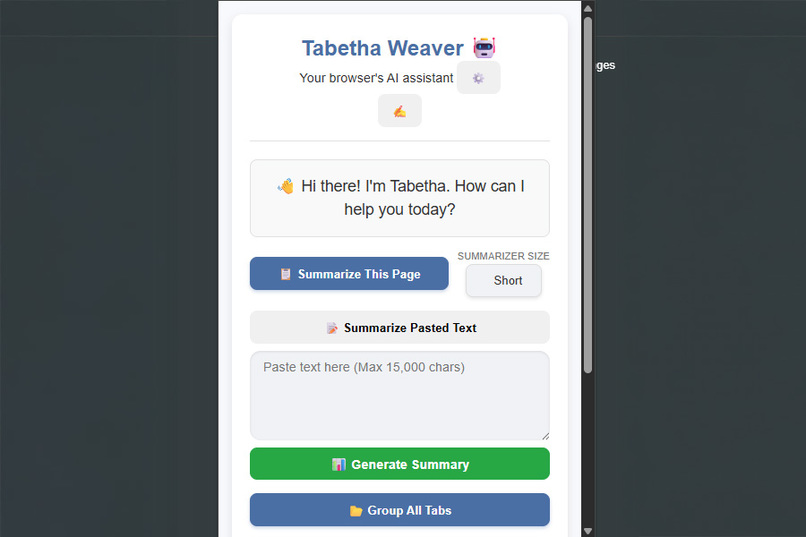
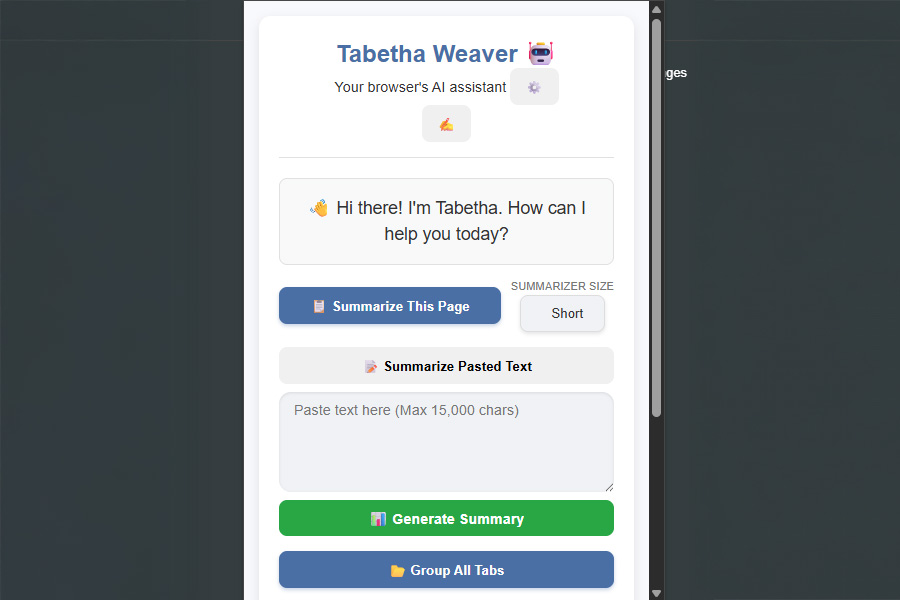
The core Tabetha Weaver popup interface. It provides an immediate place to talk or get summarizes on your text.
-
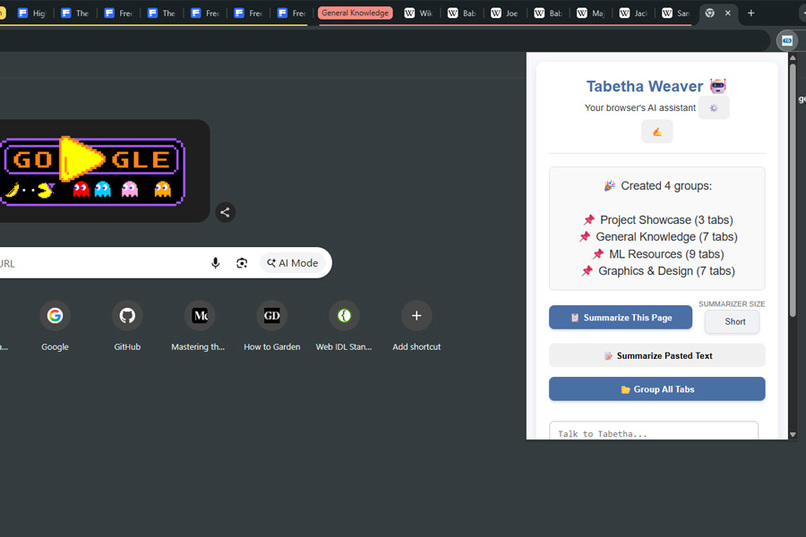
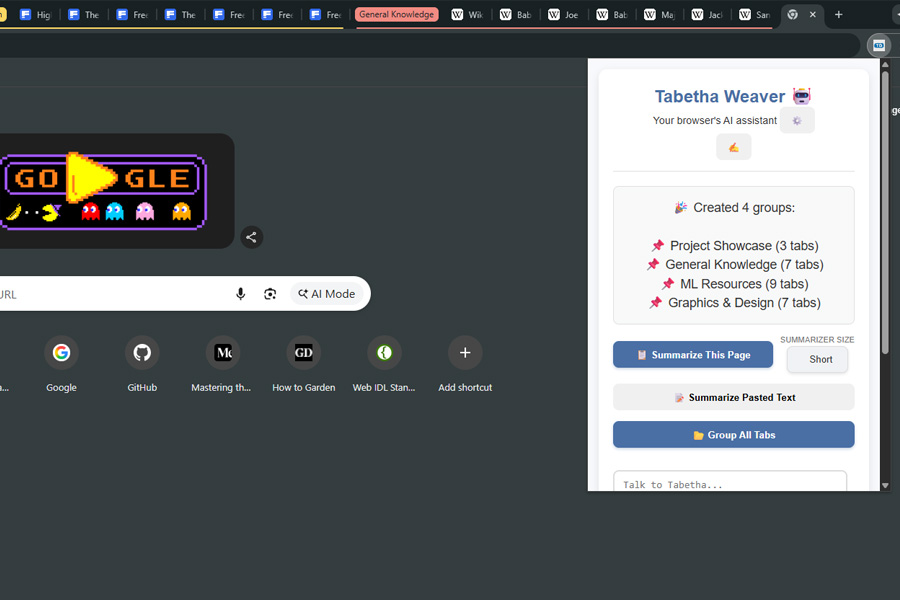
After a confirmation from the user. Tabetha will generate a nice auto grouping of all tabs and show an overview before/after..
-
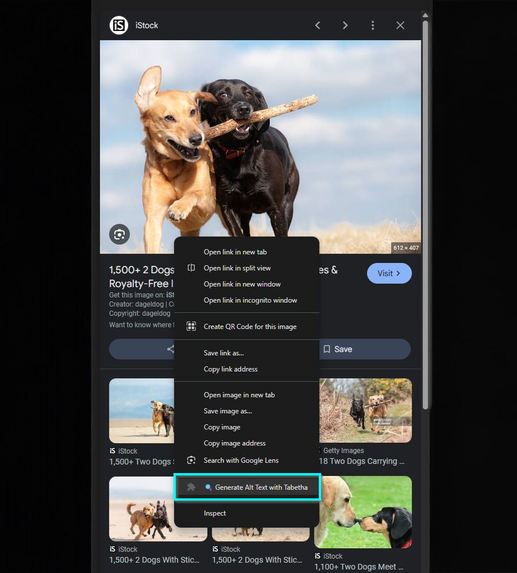
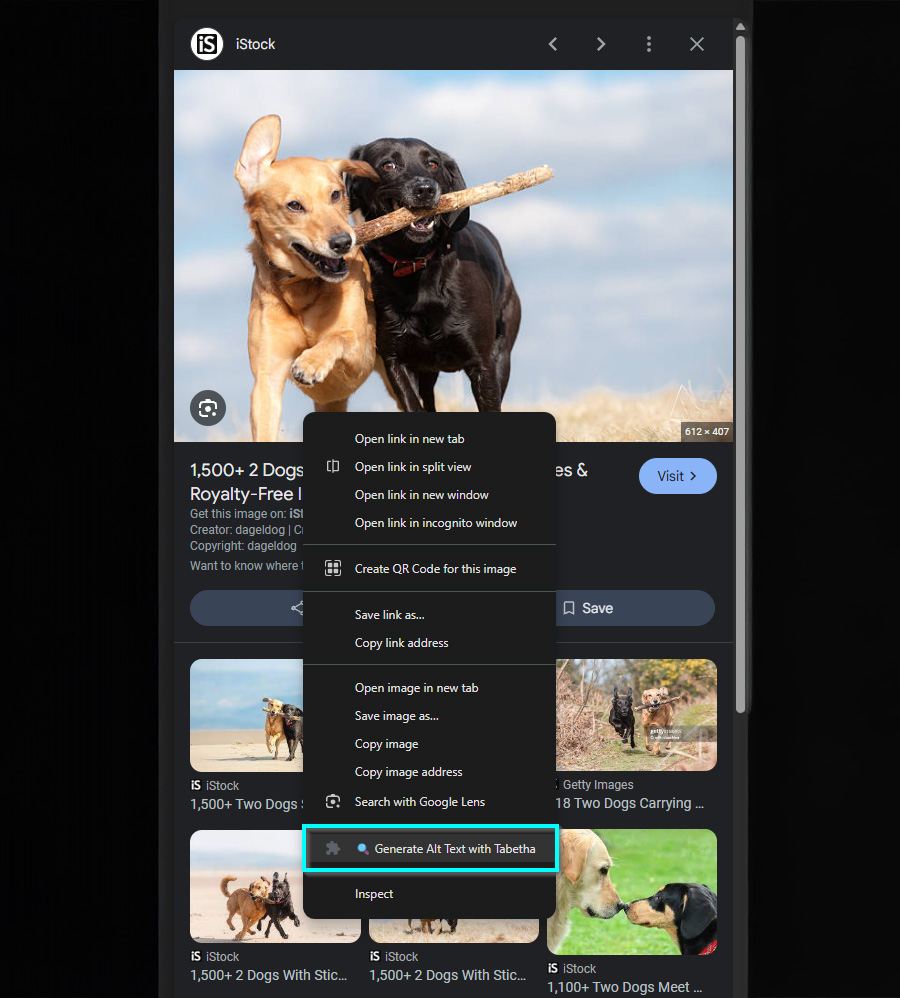
Showcasing the Alt Image Text generator with Tabetha Weaver. Giving good SEO descriptions for your images. From files on your PC to the web!
-
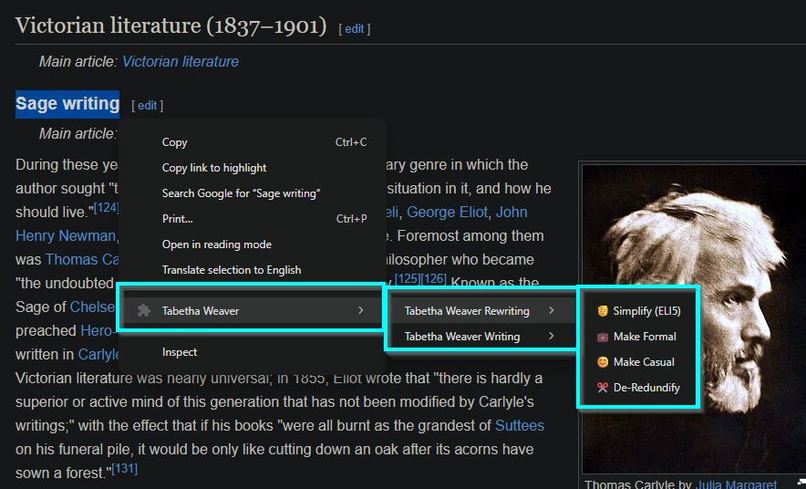
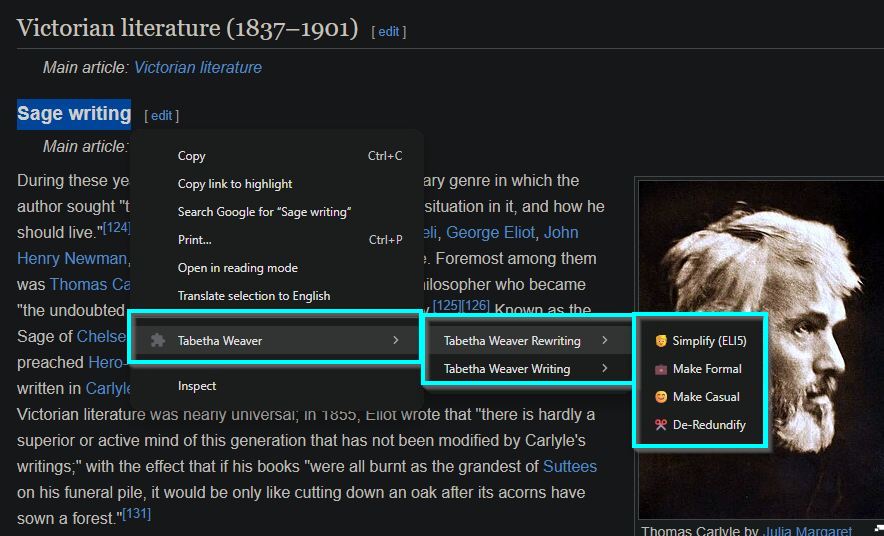
A comprehensive writing suite accessed through the right click context menu on highlighted text. Helping users understand the content needed
-
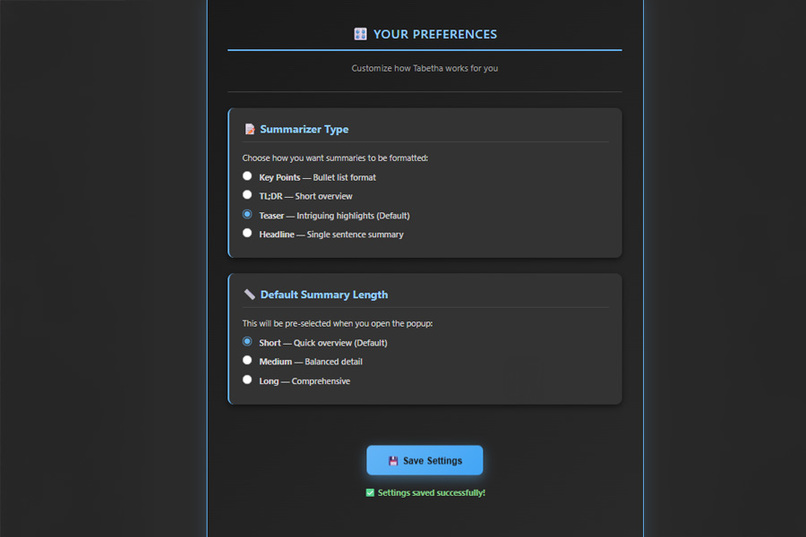
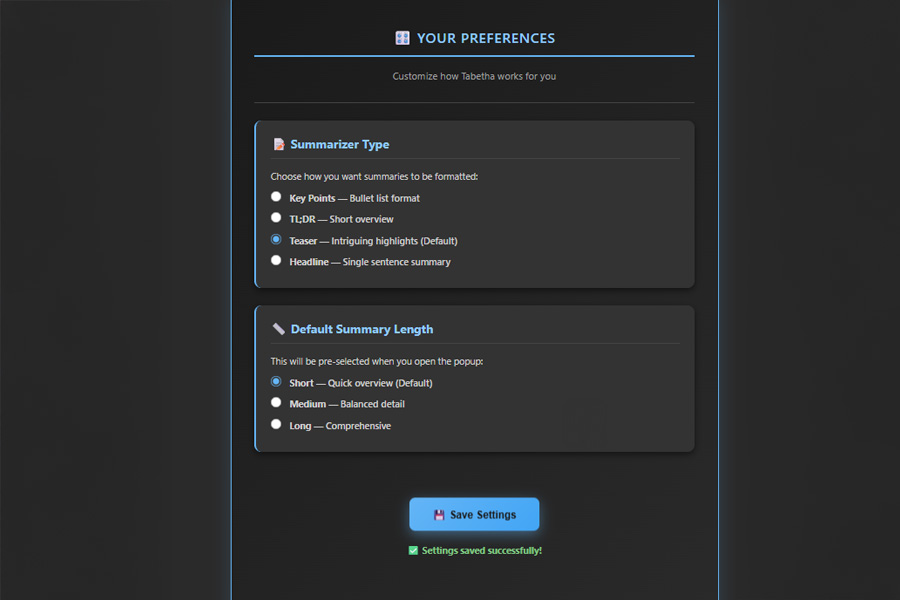
Users can choose the summary Type (Key Points, Headline, etc.) and Length (Short/Medium/Long). Also Provides context on the rewriter/writer.
Tabetha Weaver 🤖
Your personal AI browser expert powered by Chrome's built-in AI APIs.
💡 Inspiration
This was my first hackathon ever, and I jumped at the opportunity without hesitation. After years of coding as a personal passion, I finally found the perfect outlet to showcase my creative abilities and technical skills. What excited me most was the chance to work with Chrome's new built-in AI APIs and the fact I could win prize money for my coding efforts — a frontier I'd never explored before. Building something useful that real people can enjoy? That's the dream. 🚀
🎯 What It Does
Tabetha Weaver is your personal AI browser expert that empowers you to work smarter with content:
- 🖼️ Alt Text Generation - Right-click any image to generate SEO-optimized, accessibility-friendly alt text
- ✏️ Text Rewriting - Transform selected text with 4 distinct tones (Simplify, Formal, Casual, De-Redundify)
- ✍️ Content Creation - Generate entirely new writing from scratch using reference material and custom instructions
- 📋 Smart Summaries - Condense any webpage or pasted text into digestible summaries (4 format options!)
- 📚 Page Summarization - Instantly understand long articles, essays, or documentation
- 🤖 AI Chat - Talk to Tabetha directly for quick answers and assistance
- 📂 Intelligent Tab Grouping - Automatically organize your cluttered browser tabs using AI-powered naming
Tech Stack: Summarizer API • Rewriter API • Writer API • LanguageModel API • Context Menus • Chrome Storage
Note: Started implementing the Proofreader API but ran out of time — it's on the roadmap! ✅
🛠️ How We Built It
Tabetha was built as a Chrome extension leveraging Google's cutting-edge AI APIs:
- Popup Interface - Sleek, intuitive UI for all features
- Context Menu Integration - Right-click access to rewriting and writing tools
- Service Worker Architecture - Background processes handle heavy lifting
- Chrome Storage API - Seamless state management across popup/background
- Native Content Scripts - Injected execution to bypass CSP restrictions
- Real-time Debugging - Built-in debug mode for transparency
The extension handles everything from fetching page content, to intelligently grouping tabs by domain, to wrapping responses with copy/clear buttons for easy use.
🚧 Challenges We Overcame
1. CSP (Content Security Policy) Headaches 😤
- Had to learn that
unsafe-inlineisn't an option for Chrome Store - Solution: Used
chrome.scripting.executeScript()to inject functions into page context - This was my biggest learning curve but taught me extension security fundamentals
2. API Limitations & Context Size
- Originally planned to use LanguageModel for dark mode transformation
- Quickly hit the wall: Large inputs + full page DOM = AI context explosion
- The model couldn't contextualize all the HTML/CSS information
- Pivot: Focused on language-based features (text, images, summaries) — much more practical ✅
- Chrome's native dark mode (
#enable-force-dark) is better anyway!
3. Tab Grouping Complexity 🧩
- Started with naive approaches that didn't scale
- Had to implement: URL-based domain grouping → AI naming pipeline → safe group creation
- Handling edge cases: already-grouped tabs, discarded tabs, pinned tabs, invalid URLs
- Solution: Multi-step validation + creative error recovery
4. Documentation Detective Work 🔍
- APIs were brand new (like, just released)
- Docs were sparse and sometimes unclear
- Trial & error taught me more than I expected
- Learned the importance of reading Chrome API docs very carefully
5. First Extension Ever!!!
- Service workers? Context scripts? Message passing? All new to me
- Debugging was tricky without traditional console access
- But once it clicked — the architecture made perfect sense
🎉 Accomplishments I'm Proud Of
This is my first hackathon and I actually shipped something useful! That alone is huge for me — past projects never made it this far.
Technical Wins:
✅ Tab Grouping Algorithm (Took 3+ days!)
- Implemented URL-based domain grouping
- Connected AI to generate creative group names
- Handled browser API quirks and edge cases
- When I got it working → pure elation 🎊
✅ Built a Production-Ready Extension
- CSP-compliant code
- Clean error handling & user feedback
- Debug mode for transparency
- Chrome Store-ready (minimal deps, proper permissions)
✅ Mastered Chrome Extension Architecture
- Service workers
- Message passing
- Content scripts & injection
- Storage API
- Context menus
✅ Multi-API Integration
- Seamlessly combined 4+ different Chrome AI APIs
- Proper error handling across all of them
- User-friendly fallbacks
📚 What I Learned
Technical:
- Chrome Extension development from zero to hero
- Service workers and how they differ from regular scripts
- Content Security Policy (the hard way! 😅)
- Message passing for extension communication
- API design patterns — how to handle availability checks, downloads, quota limits
- Proper error handling for AI models (QuotaExceededError, NetworkError, etc.)
Broader Insights:
- Iteration is key — my first solutions were clunky, but refinement works
- Constraints breed creativity — CSP limitations forced me to learn better patterns
- Real APIs > Mock APIs — debugging with actual AI models taught me production thinking
- Documentation matters — made me appreciate good API design even more
🚀 What's Next for Tabetha Weaver
Short-term (If time permits):
- ✅ Proofreader API — Was halfway done! Would add grammar/spell-checking
- 🌍 Translator API Integration — Transform innerText across any webpage
- 🎨 Dark Mode Toggle — Once Chrome allows extension-driven force-dark
Long-term Vision:
- 📊 Better analytics (which features users love most?)
- 🔌 Expand API support as Google releases more
- ⚙️ Advanced settings per feature
- 📱 Mobile companion app?
- 🌐 Multi-language support for UI
💭 Personal Note
Going into this hackathon, I wasn't sure if I could ship something polished. I've coded for years but never had an outlet that felt real — like something people would actually use.
Tabetha Weaver changed that.
Building this extension taught me that I can ship, I can debug complex systems, and I can create something that makes people's lives easier (even if it's just organizing browser tabs 😄).
Here's to my first of many hackathons. 🍾
Built with ❤️ during the Chrome Built-in AI Hackathon


Log in or sign up for Devpost to join the conversation.