Chrome Extension with Gemini Nano: A Journey into On-Device AI
Introduction
In the rapidly evolving landscape of artificial intelligence, the ability to run AI models directly on user devices has become increasingly important for privacy, performance, and offline capabilities. This project explores the development of a Chrome extension that leverages Google's built-in Gemini Nano model through Chrome's Prompt, Writer and Summarizer APIs, creating a seamless on-device AI experience with real-time model download progress monitoring.
What Inspired This Project
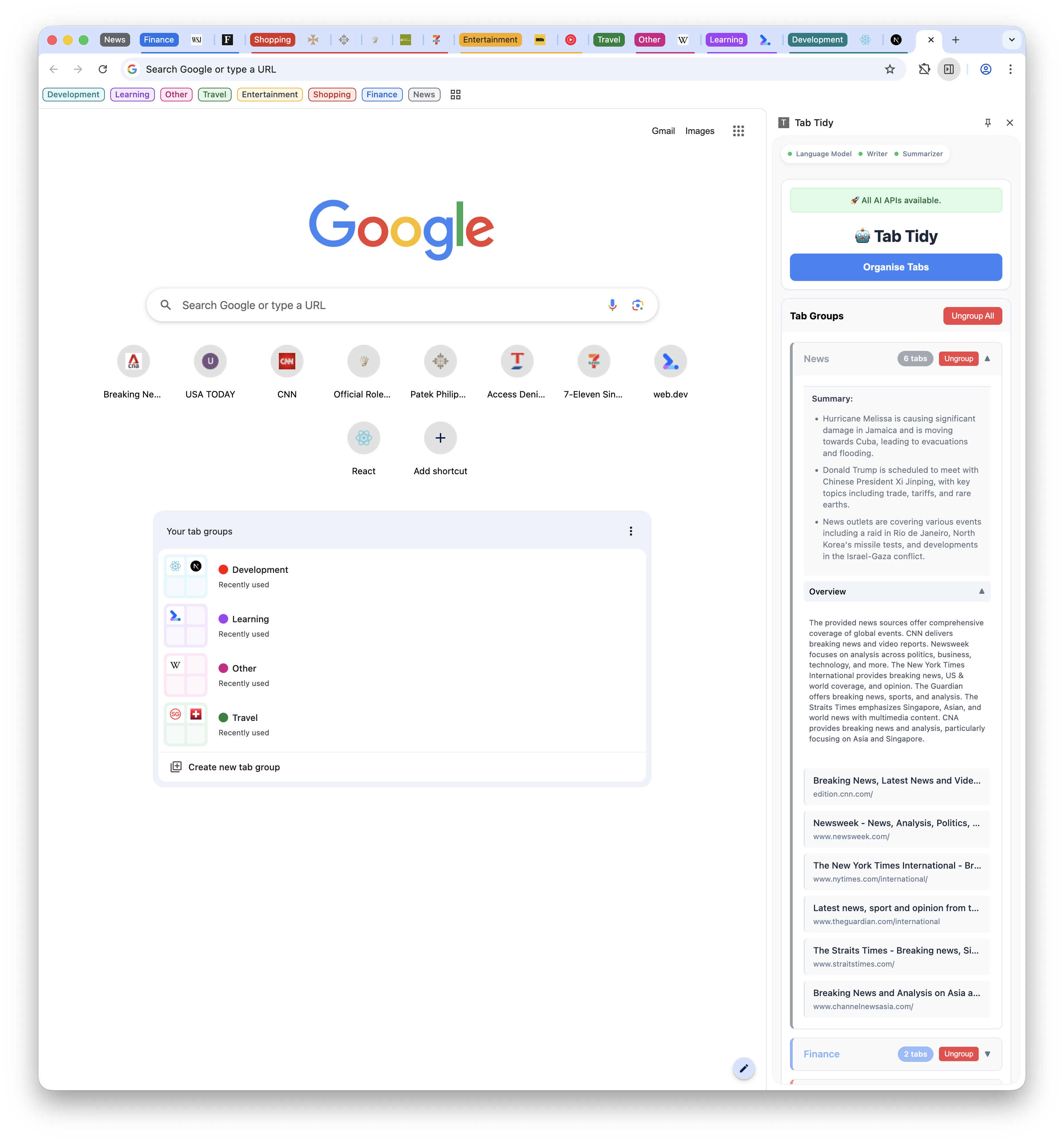
The inspiration for this Chrome extension came from a very relatable problem: the chaos of modern browsing habits. Like many others, I often find myself with dozens of tabs open in a completely unorganized fashion - research articles mixed with social media, work documents scattered between personal browsing, and important information buried among forgotten tabs. This digital clutter creates cognitive overhead and makes it difficult to maintain focus or find previously viewed content. The project was born from the intersection of this everyday frustration and several key technological opportunities:
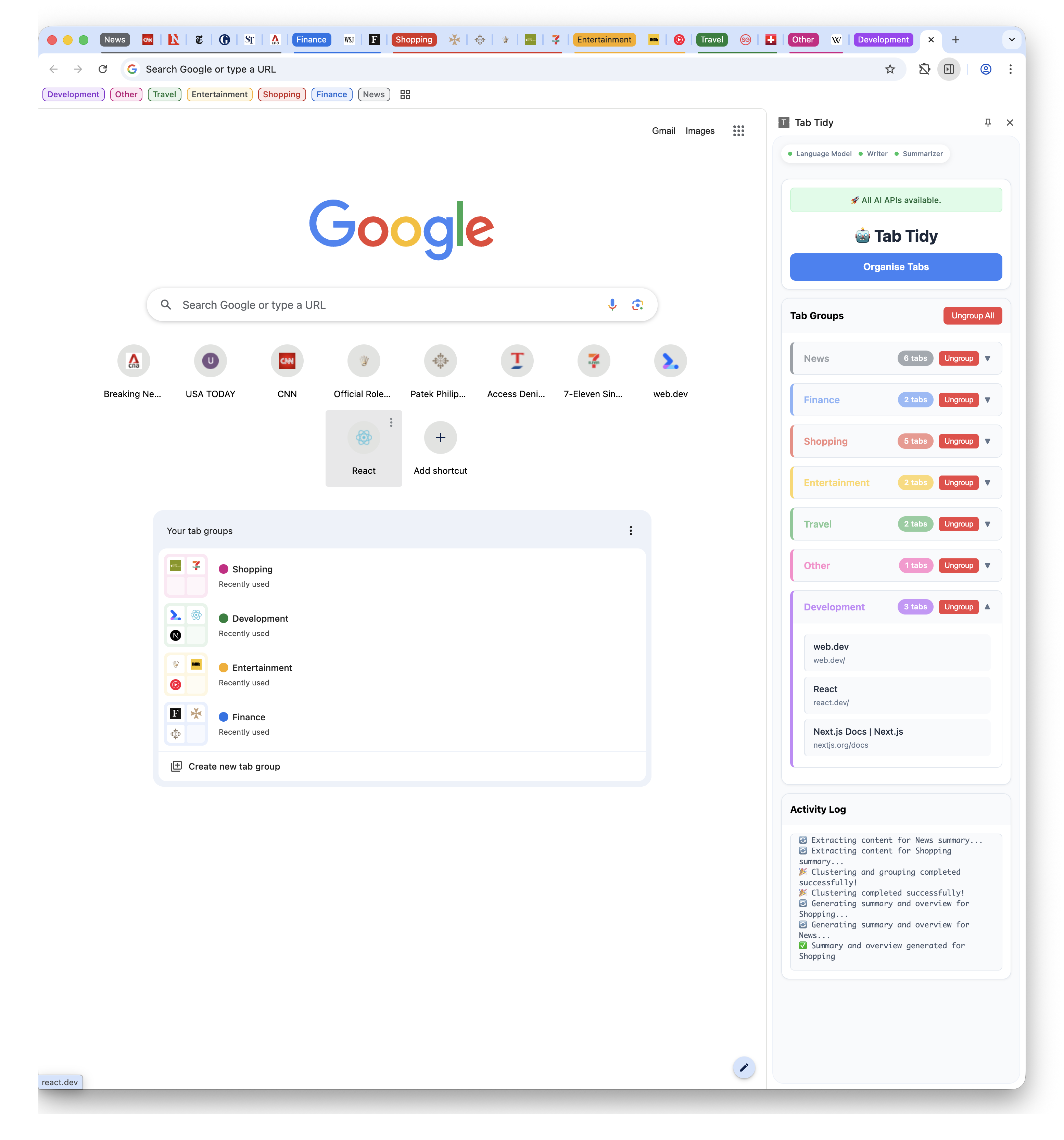
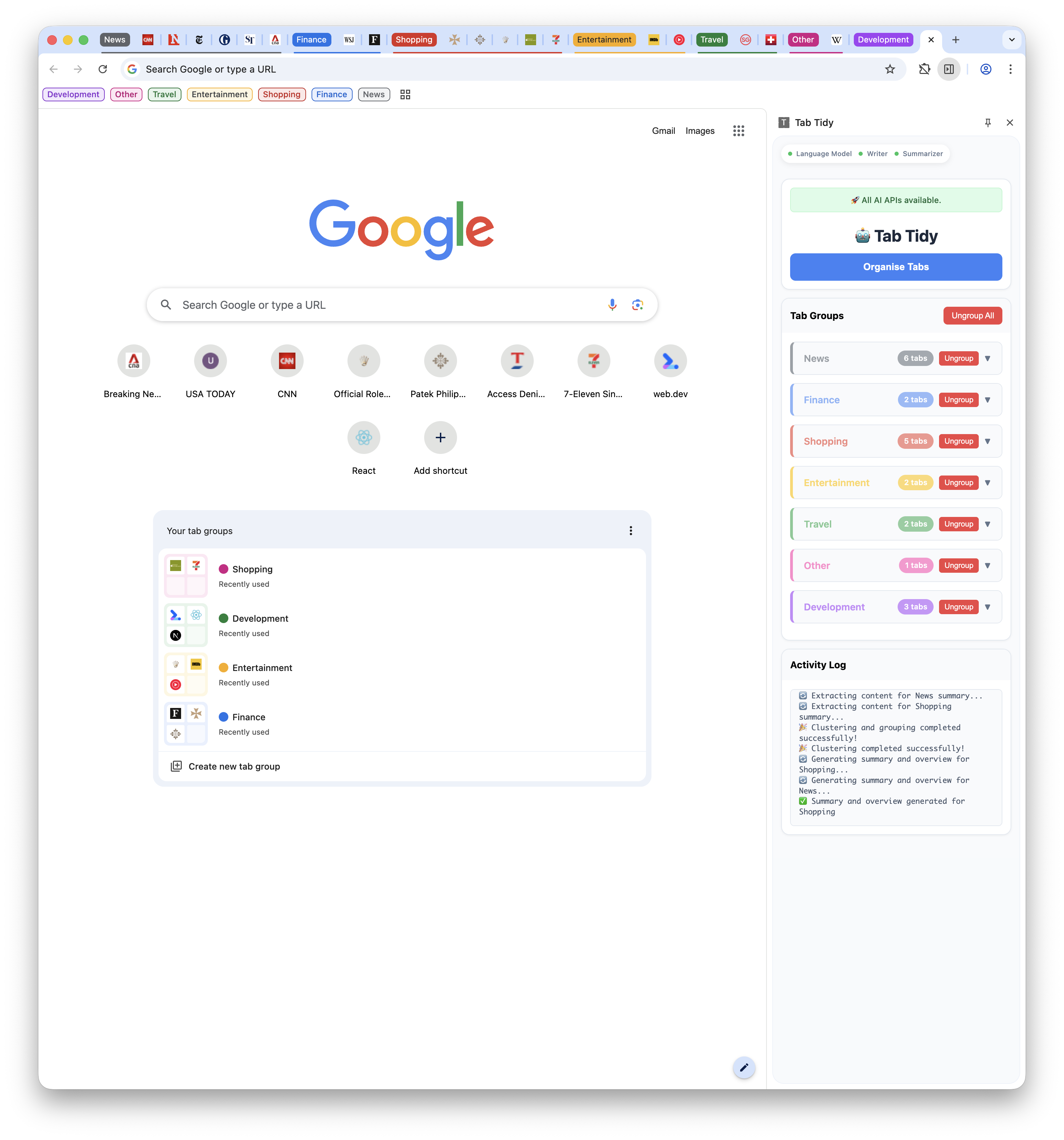
- Tab Organization Crisis: The universal struggle of managing multiple browser tabs efficiently, where important information gets lost in the noise of disorganized browsing sessions. This extension aims to bring AI-powered organization directly to the chaotic tab experience.
- Privacy-First AI: With growing concerns about data privacy, the ability to run AI models entirely on-device without sending user data to external servers represents a significant step forward in privacy-preserving technology - particularly important when dealing with personal browsing habits and potentially sensitive tab content.
- Chrome's Built-in AI Capabilities: Google's integration of Gemini Nano directly into Chrome opened up fascinating possibilities for developers to create AI-powered extensions that could analyze and organize tab content without requiring external API calls or model hosting.
- Real-Time User Feedback: The challenge of providing meaningful feedback during model loading processes inspired the implementation of a progress monitoring system that keeps users informed about the AI model's download status, making the organization process transparent and engaging.
- Seamless User Experience: The desire to create an AI interface that feels native to the browser, accessible through Chrome's side panel, without the friction of switching between applications or disrupting the natural browsing workflow.
Technical Architecture
The extension follows the Chrome Extension best practices and has an installer, a script and an HTML file. In terms of the AI integration it works with the Prompt, Writer and Summarizer APIs.
Core Components
The extension follows Chrome's Manifest V3 architecture with three primary components:
- Manifest Configuration (
manifest.json) - Background Service Worker (
background.js) - Side Panel Interface (
sidepanel.htmlandsidepanel.js)
Key Features Implemented
Model Download Progress Monitoring: One of the most challenging aspects was implementing real-time feedback for the Gemini Nano model download process. The solution involved:
const session = await LanguageModel.create({
  monitor(m) {
    m.addEventListener("downloadprogress", (e) => {
      console.log(`Downloaded ${e.loaded * 100}%`);
    });
  },
  expectedInputs: [{type: 'text', languages: ['en']}],
  expectedOutputs: [{type: 'text', languages: ['en']}],
});
The reason why this was challenging is because at the time of creating the extension the documentation omitted a few details on how to create sessions, but after a back and forth online conversation with Thomas Steiner and finding some online resources (https://github.com/webmachinelearning/writing-assistance-apis - which is a resource I found after browsing through the Chromium source code -- https://source.chromium.org/chromium/chromium/src/+/main:third_party/blink/renderer/modules/ai/create_monitor.idl?q=https:%2F%2Fgithub.com%2Fwebmachinelearning%2Fwriting-assistance-apis&ss=chromium) I was able to avoid warnings when creating a session in my console.
Side Panel Integration: Rather than using traditional popup interfaces, the extension leverages Chrome's side panel API for a more integrated user experience.
What I Learned
Chrome Extension Development
Manifest V3 Migration: Working with Chrome's latest extension architecture taught valuable lessons about service workers, permission models, and the evolution of browser extension security.
Side Panel API: Understanding how to effectively utilise Chrome's side panel API for creating persistent, accessible interfaces that don't interfere with user browsing.
Event-Driven Architecture: Managing asynchronous operations and event listeners in the context of Chrome extensions, particularly for monitoring long-running processes like model downloads.
On-Device AI Integration
Gemini Nano Capabilities:
Exploring the practical limitations and capabilities of running AI models directly in the browser, including:
- Model size constraints
- Performance considerations
- Language support
- Context length limitations
Progress Monitoring Patterns: Developing effective UI patterns for communicating long-running AI operations to users, balancing informativeness with simplicity.
API Design Philosophy: Understanding Google's approach to making AI accessible through web APIs while maintaining security and performance standards.
Initial Planning
The project began with research into Chrome's experimental AI APIs and understanding the requirements for accessing Gemini Nano. This involved:
- Setting up Chrome Dev/Canary with appropriate flags
- Understanding the Extension creation process
- Exploring the API documentation and examples
Implementation Phases
Phase 1: Basic Setup
- Created the fundamental Chrome extension structure
- Implemented basic Prompt API integration
- Established side panel communication
Phase 2: Progress Monitoring
- Added real-time download progress tracking
- Implemented user-friendly progress indicators
- Created UI elements for status updates
Phase 3: Enhanced Features
- Integrated context menu functionality
- Added Prompt API handling for tagging and clustering
- Added Summarizer API for summary per cluster
- Added Writer API for extended summary of tab clusters.
Kindly note that the Summarizer and Writer API is only invoked when the clustered tab group contains more than 5 tabs. Also note that there 100 tabs can be organised - this is just a theoretical limit.
Phase 4: Polish and Optimisation
- Refined error handling
- Improved user experience patterns
Conclusion
Developing this Chrome extension provided invaluable insights into the future of web-based AI applications. The combination of browser-native AI capabilities, thoughtful user experience design, and robust technical architecture creates compelling possibilities for privacy-preserving, high-performance AI tools.
The project demonstrated that on-device AI is not just technically feasible but can provide superior user experiences in many scenarios. The lessons learned about progress monitoring, asynchronous architecture, and Chrome extension development will prove valuable for future projects in this rapidly evolving space.
As browser-based AI capabilities continue to expand, this foundation provides a solid starting point for more sophisticated applications that can leverage the unique advantages of on-device computation while maintaining the accessibility and ubiquity of web-based tools.
The journey from concept to implementation revealed both the tremendous potential and current limitations of browser-based AI, providing a practical foundation for understanding what's possible today and what might be possible tomorrow in the world of privacy-preserving, on-device artificial intelligence.
Built With
- chrome
- css
- extension
- html
- javascript
- prompt
- summarizer
- writer


Log in or sign up for Devpost to join the conversation.