-
-
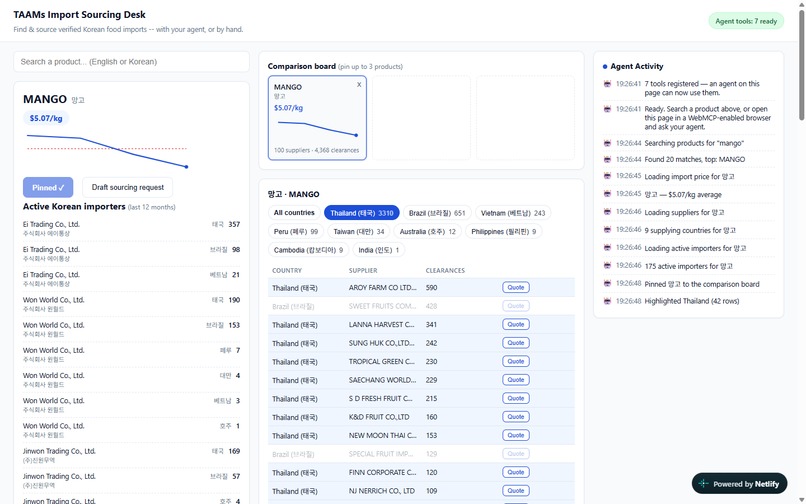
main image(pinned-and-highlighted)
-
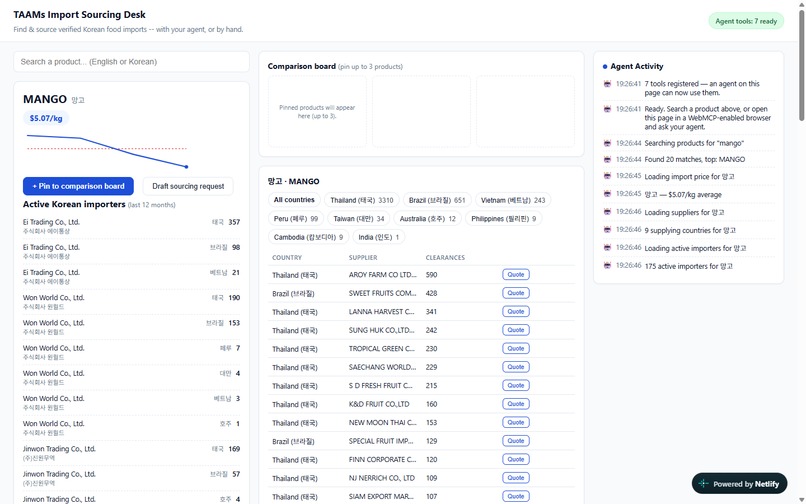
product load
-
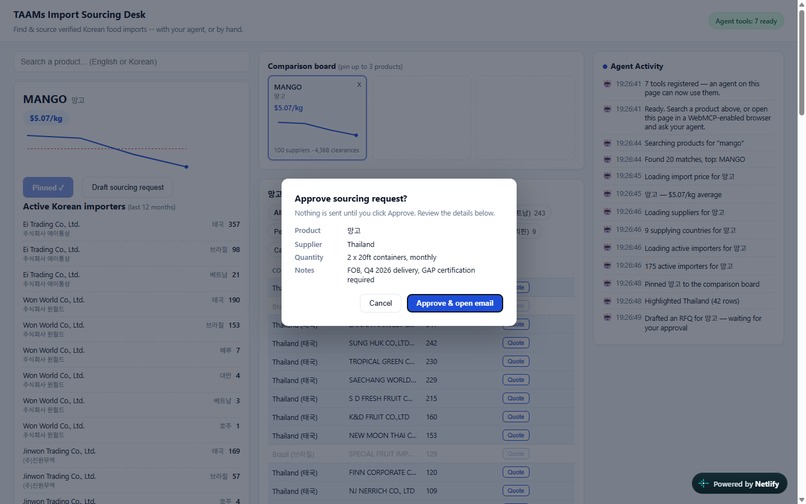
approval
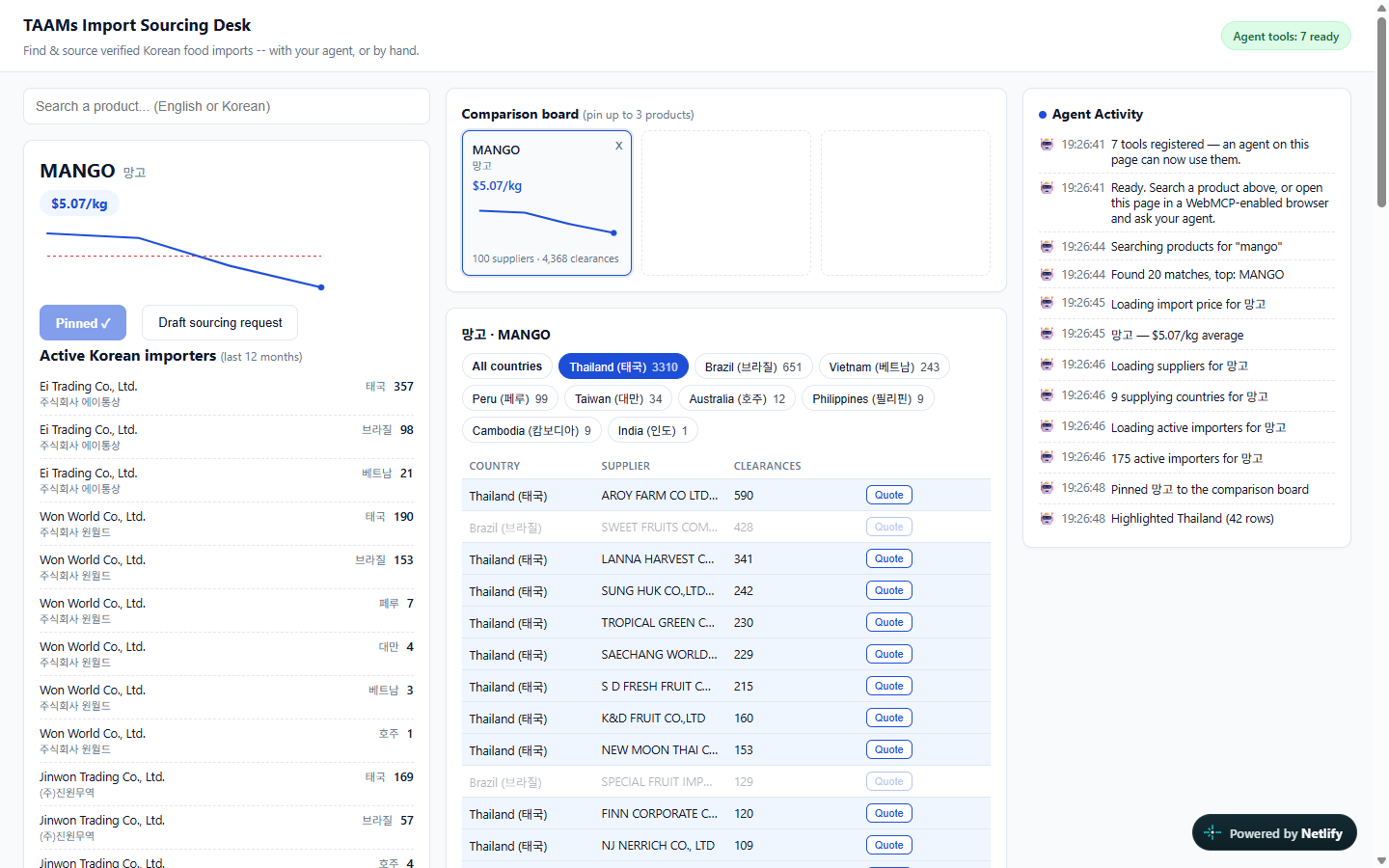
Inspiration
Importing food into a country starts with two questions that have nothing to do with software: is this a real supplier, and is this a real price?
Buyers answer them by hand today — reading government customs portals, cold-calling trading companies, guessing whether a quoted price is normal. All of that happens before a single quote is ever sent.
We had already built a remote MCP server for this data, and we watched what people actually did with it. The agent gives you a good summary. Then you open the real tool and redo the comparison yourself, because sourcing decisions are made by looking at things side by side. The summary is not the work.
That is the gap WebMCP closes. The comparison the agent builds is the comparison you are looking at. We wanted to find out whether that changes the workflow or just moves the JSON, so we built the same sourcing problem as a page an agent can operate.
What it does
A sourcing desk for food imported into Korea, backed by TAAMs — a B2B marketplace where verified, officially imported products are traded directly with the importers who cleared them through customs.
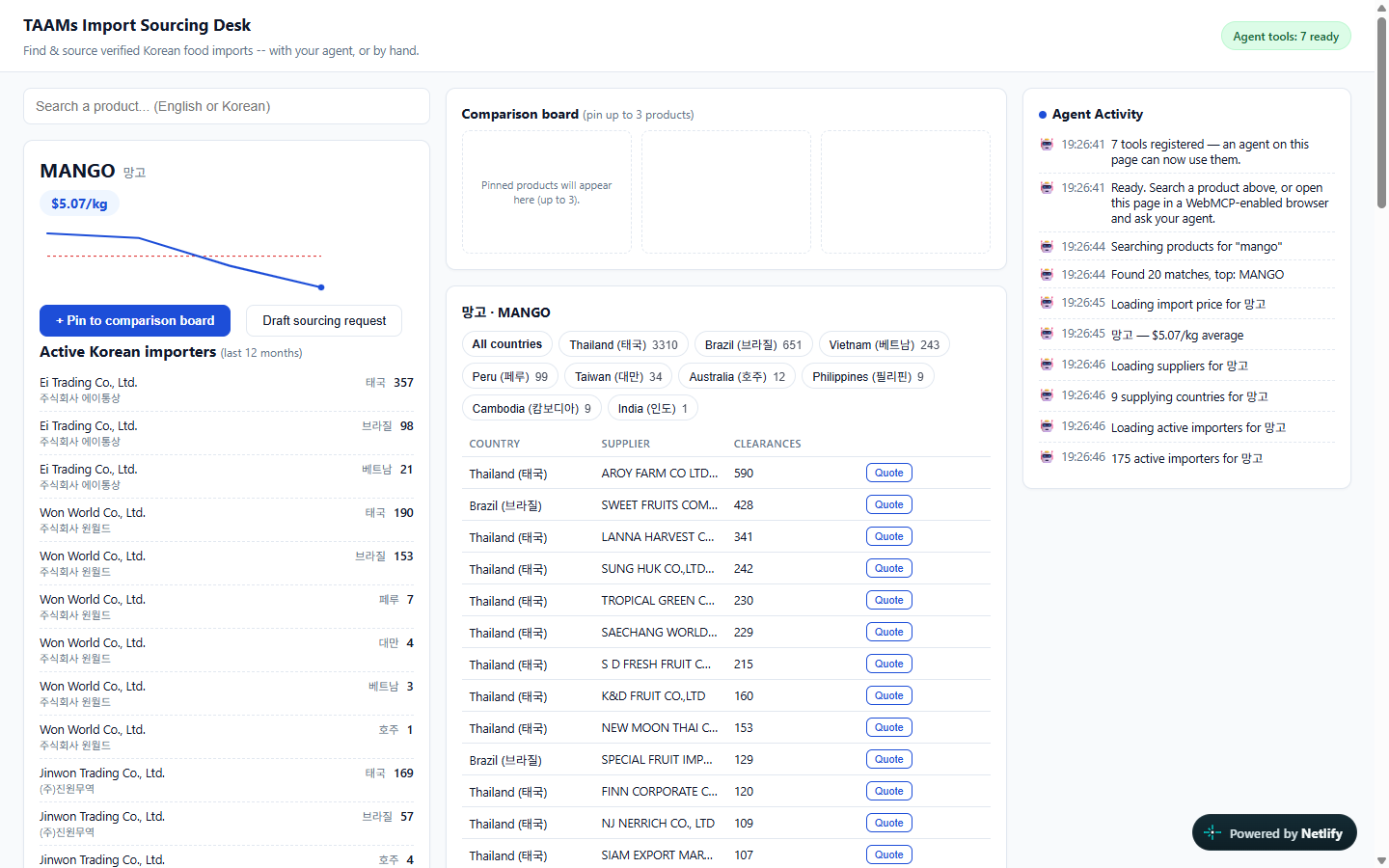
You search a product and get real customs clearance records: the monthly import unit price in USD/kg broken down by exporting country, the overseas suppliers actually shipping it, and the Korean companies already buying it. You pin origins side by side, filter to one supplying country, and draft a sourcing enquiry to a named supplier.
Every one of those actions is a button a person can click. Seven of them are also registered as WebMCP tools, so an agent can reach for the same buttons.
The seven tools, in three tiers
Tier A — lookup (4 tools). search_import_products resolves free text in English or Korean to the exact name used in clearance records; get_import_price_trend, get_top_exporters and get_active_importers fetch and render. The agent does the tedious part — name resolution, twelve months of history, nine countries — and the human keeps the judgement.
Tier B — screen control (2 tools), zero network requests. pin_to_comparison_board and highlight_supplier_country fetch nothing at all. They rearrange what is already in front of the human. Open the network tab while they run and nothing fires; that is asserted in the test suite, not just claimed.
This is the tier that only exists inside the page. A remote MCP server can return better JSON. It cannot know that a table is on your screen, let alone which row deserves attention.
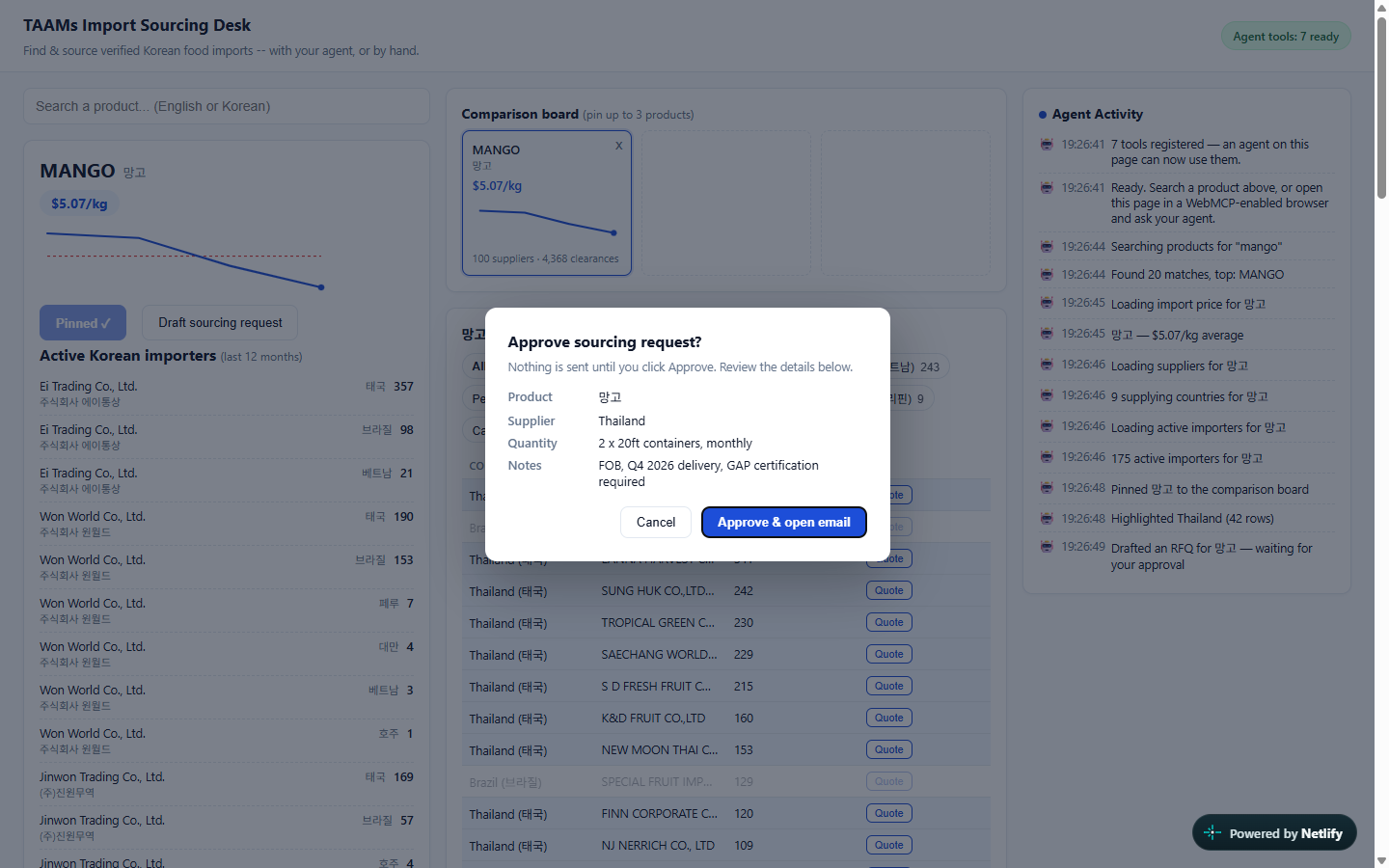
Tier C — action, gated by a human (1 tool). draft_sourcing_request fills in a real enquiry to a real supplier and then stops. An approval dialog shows exactly what is about to leave — product, supplier, quantity, notes. Only on approval does a pre-filled email open from the user's own mail client, and the person still presses send. Cancel, and the draft stays on screen to edit by hand.
Its most important behaviour is what it refuses to do. The agent has authority to prepare and no authority to send.
What it looks like with real data
Ask "Thai mango or Brazilian? Put both on the board and tell me who I should buy from." and the agent pins two cards from the same product:
| Thailand | Brazil | |
|---|---|---|
| Import price | $6.47/kg | $5.16/kg |
| Clearances (2025) | 3,310 | 651 |
| Named suppliers | 42 | 5 |
Thailand is 25% more expensive with five times the shipment history and eight times the supplier base. That is a sourcing decision, on screen, from 4,368 customs records for one fruit.
It works with no agent at all
Search, pin, highlight and RFQ are all clickable. Someone who has never heard of WebMCP gets a complete tool; an agent makes it faster. Each tool handler is a one-liner delegating to the same function the page's own button calls, so there is no agent-only code path and no human-only one — checkable from the source.
How we built it
Deliberately minimal: zero dependencies, no build step, one static page, no backend of its own. Tools register with document.modelContext.registerTool() at load, and the page calls the public TAAMs read API directly from the browser.
Three findings about the gap between the published spec and the shipping browser, because that gap was part of the work:
1. The API is on document.modelContext, not navigator.modelContext. Much published material still shows navigator. We feature-detect both so the page survives the object moving again.
2. requestUserInteraction() does not exist in Chrome 151. The approval gate was designed around it. The object only carries ontoolchange, executeTool, getTools and registerTool, so we built the gate ourselves as an in-page modal. That turned out better: the human sees the actual draft rather than a generic system prompt.
3. executeTool takes a tool object and a JSON string. Not a name, not an arguments object — both are rejected. This is documented nowhere we could find; we established it by enumerating the object in a live browser and trying each candidate convention until one returned a result.
That third finding is what made the whole thing testable. getTools() and executeTool() are exposed to the page, so a test can drive the tools exactly as an agent drives them — no ChatGPT needed in the loop. Every claim in the README is checked that way, in a real Chrome, against the live API.
Challenges we ran into
The schema could not express the demo's own question. pin_to_comparison_board originally took a product name and nothing else. But the question a buyer actually asks is "this origin or that one?" — same product, two countries — and a board keyed on product alone cannot hold that. You would be pinning the same product twice. No wording fixed it; the argument list had to change.
We found this by rehearsing tool selection rather than tool execution: handing a model only the registered tool definitions and the demo's question, and asking what it would call. It never reached for the screen-control tier at all.
Both screen-control tools were written as if the user would name them. "Call this when the user says 'compare'." A question that never uses the word never reaches the tool. Nothing told the agent it could reach for them on its own judgement. Adding that one clause is what makes the agent, in the demo video, say "I'll pin both options first, then highlight the stronger sourcing lane" — unprompted.
A filtered fetch got stored as the whole truth. Narrowing the supplier list to one country overwrote the session's list, so a card for any other country counted zero suppliers in it. Brazil showed "0 suppliers" when it has five. The API had been right the whole time; the number on screen was wrong.
The tests were passing through all of it. 22 of 22 green while the supplier column read "Unknown supplier" on every row, while a month-less price call returned a 500, while Brazil showed zero. Each assertion was true and each missed the point. What caught them: looking at the screen, and running the thing in a real agent browser.
Accomplishments that we're proud of
Tier B genuinely makes zero network requests, and you can check it. Not a design intention — an assertion in the test suite that counts requests during those calls and fails if any fire. It failed once, honestly, when a name-resolution call snuck in. That is fixed and guarded.
The action tool refuses, visibly, every time. The agent in our demo says it itself: "Review it in the approval dialog and click Approve to open the pre-filled email — nothing has been sent yet." We put that instruction in the tool's return value and the model honoured it. An agent that does not overclaim is worth more here than one more feature.
It runs in ChatGPT's actual in-app browser. Not only behind a Chrome flag. ChatGPT opened the page, found all seven tools, pinned two origins, highlighted Thailand, drafted an RFQ to a named Thai exporter, and stopped for approval. That run is the demo video.
The data is real, public, and government-sourced. 1,318,602 customs clearance transactions since 2023, 169,089 registered overseas manufacturers across 202 countries, built on records published by Korea's Ministry of Food and Drug Safety and Korea Customs Service. Not scraped listings, not self-reported catalogues.
What we learned
Tool descriptions are the product surface, not documentation. Every behaviour we wanted came from a sentence in a description, and every behaviour we did not get was a sentence we had not written. The gap between "the agent could do this" and "the agent does this" was one clause about when to act on its own judgement.
Testing execution is not testing selection. executeTool bypasses the model's decision entirely, so a suite can be fully green while the agent never picks the tools at all. Rehearsing selection — giving a model only the definitions and a question — is a different test, and it is the one that found the schema problem.
A schema encodes what questions can be asked. The pin tool's argument list quietly decided that comparison meant comparing products. The user's actual question compared origins. No amount of description could bridge that; the shape had to change.
"Fetches nothing" is a claim worth asserting. It is the whole basis for saying a remote server could not do this, and it is exactly the kind of claim that silently stops being true.
What's next for TAAMs Import Sourcing Desk
Onto the main product. This is a standalone page today. The same tools belong on taamsglobal.com itself, so any importer already using TAAMs gets an agent-operable version of the screen they use daily, with nothing to install.
More of the data, same three tiers. Our remote MCP server exposes twenty-two read-only tools — daily agricultural auction prices from Korea's public wholesale markets, HS-code tariff rates, importer financials, origin-region weather. Each is a candidate, but only where it earns a place on screen rather than in a transcript.
Write operations, same gate. Quote requests, watchlists and supplier shortlists are real actions in the marketplace. The approval pattern here is the precondition for opening any of them to an agent: prepare freely, send never, and show the human exactly what is about to happen.
Feeding back into the standard. The three implementation findings above cost us time we would rather other builders did not spend. They are written up in the repository, and the executeTool calling convention in particular seems worth getting into the docs.
Built With
- css
- ffmpeg
- html
- javascript
- model-context-protocol
- netlify
- playwright
- webmcp

Log in or sign up for Devpost to join the conversation.