-
-
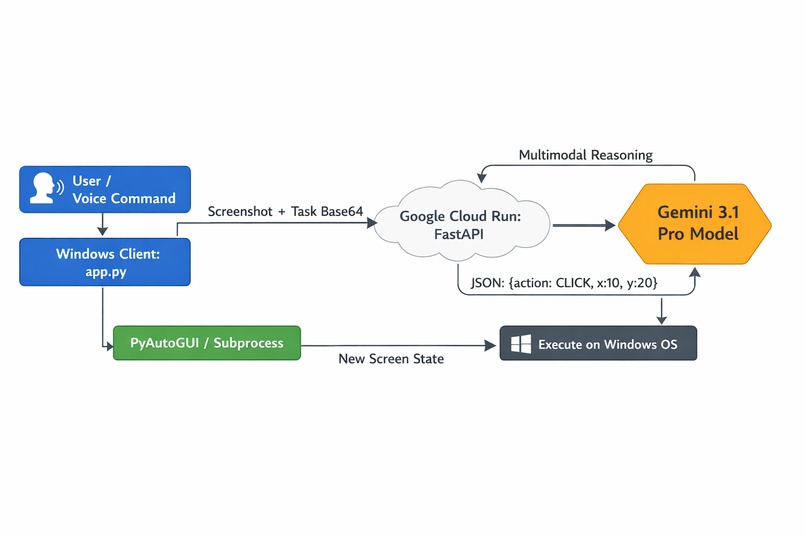
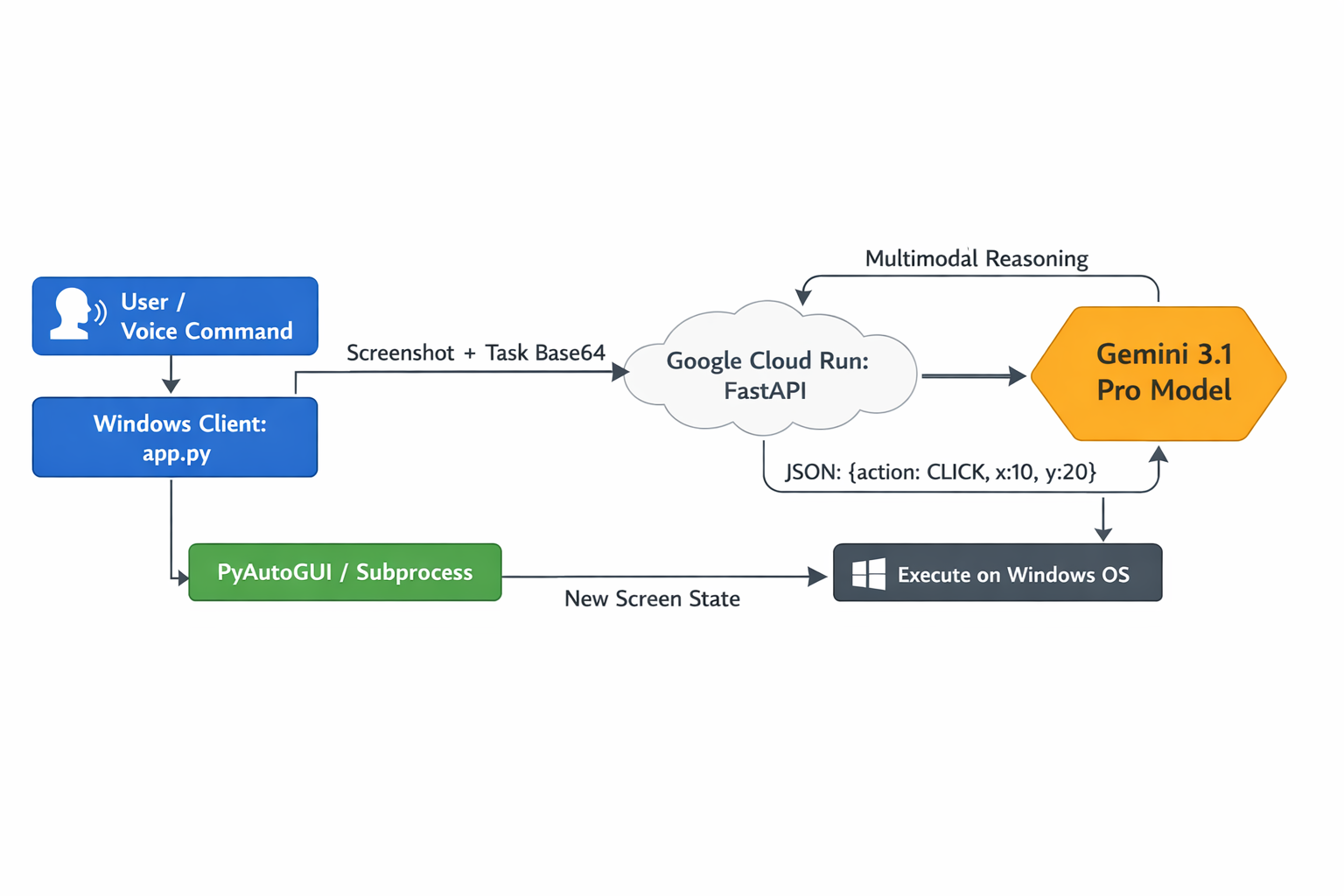
Architecture Diagram
Inspiration
Current AI models are powerful, but they often live isolated in web browsers. I wanted to build an AI that doesn't just talk to you, but acts as your hands, a true autonomous agent that can navigate an operating system, read your screen, and natively execute tasks across desktop applications and local files just like a human would.
What it does
System Captain is an advanced, voice-activated Windows desktop assistant powered by Gemini 3.1 Pro multimodal vision. It takes live screenshots of your desktop and uses a custom FastApi backend deployed to Google Cloud Run to analyze the current state of your PC. It then issues exact OS-level commands (via PyAutoGUI) to natively launch apps, open browsers, type files, and seamlessly traverse the entire operating system on your behalf based on your natural language requests.
How we built it
I architected a distributed Client-Server model. The backend is a FastAPI server securely deployed to Google Cloud Run. It utilizes the google-genai SDK and a highly customized system prompt to force Gemini 3.1 Pro to return atomic, deterministic JSON execution actions (CLICK, TYPE, HOTKEY, OPEN_APP, BROWSER). The client is a standalone Python Windows executable (customtkinter) that acts as the "eyes and hands." It continuously listens for the wake word "Hey Captain", grabs screenshots via Pillow, sends them to the Cloud Run server, and physically executes the returned JSON commands using pyautogui and native subprocess OS calls.
Challenges we ran into
When building the OS navigation logic, we initially tried an entirely visual approach where Gemini had to visually search and click the Windows Start button to find applications. This was brittle if UI elements overlapped. We overcame this by expanding our client to use direct native OS hooks (OPEN_APP, BROWSER) for application launching, reserving pure visual reasoning for in-app navigation, which drastically improved speed and reliability.
Accomplishments that we're proud of
We successfully built a full end-to-end loop that takes raw audio, transcribes it, uses a state-of-the-art multimodal vision model to read the screen, and converts that cognitive reasoning directly into human-like mouse tweens and keystrokes on a local desktop, all orchestrated securely through a Google Cloud deployment.
What we learned
We gained deep insights into how to structure system prompts for complex agentic workflows. We learned how essential strict JSON schema enforcement is when asking LLMs to perform physical actions, and how to effectively build error-correction loops (where the agent recognizes its own previous click failed and tries a new location) directly into the agent's memory stream.
What's next for System Captain
We plan to expand the agent's action arsenal beyond a single screen enabling it to manage multi-monitor setups, read direct file system meta-data to supplement its visual understanding, and integrating system-level APIs to perform tasks in the background without stealing mouse focus.

Log in or sign up for Devpost to join the conversation.