Inspiration
We enjoy listening to and making music! Synthesizers are especially great because they can create many different types of sounds with various effects, making this project really interesting. We wanted to make an instrument that could play smooth electronic music with other instruments in a band.
Monophonic synthesizers are typically very expensive, with most starting around $500. As computer engineers, we might as well make one ourselves! This synthesizer would surely be featured in the next 2024 CMPE hang out.
What it does
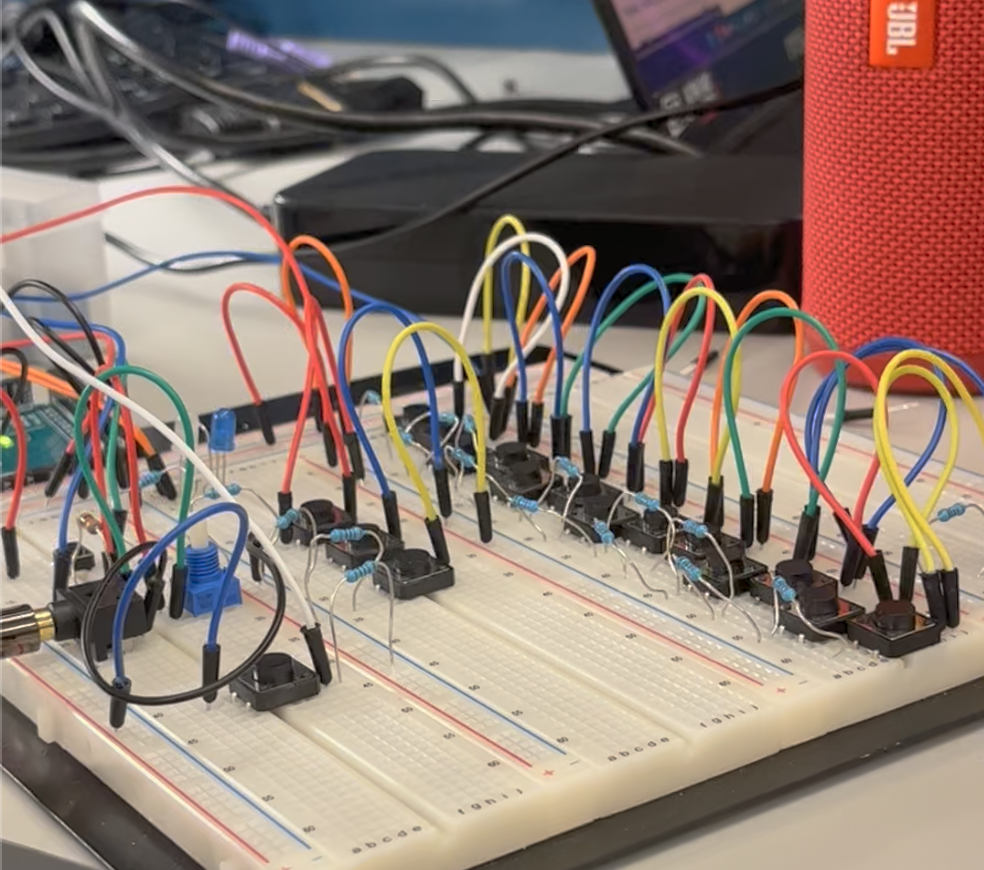
Our synthesizer all the capabilities needed to create electronic music. Monophonic means that only one note can be played at a time, so this is what we presented in our demo. The buttons were arranged in the order and style of a piano, with the left most note starting at C and chromatic notes raised higher on the breadboard to indicate half steps. This made it easy to figure out which button corresponded to which note for those with piano skills. We showed that the instrument can play all 13 notes in the mid range chromatic scale, from C4 (middle C) to C5.
Octaves: The instrument has the capability to play this scale in multiple octaves, using a button to select which one. This includes a lower octave (C2 to C3) and a higher octave (C6 to C7) as well as the mid octave (C4 to C5).
Volume: The volume can be changed up or down with a knob, ranging from all the way off to extremely loud.
Pitch: One button increases the pitch of a note, bending it up the more times it is pressed. Another button decreases the pitch of a note, bending it down the more times it is pressed.
Timbre: We had a button to change the timbre of a note. Although the note is played at the same frequency, while the timbre button is pressed it adds a “vibrato” sound to the note, allowing for an interesting musical effect.
Recording Playback: We included a recording system, where the user will be able to start recording using a button and then play a sequence of notes. A blue LED light turns on to indicate that notes are being recorded. After one stops pressing the recording button, the speaker will playback the notes they just inputted while recording. A white LED is turned on to indicate that notes are being played back. When the LED lights are off, this indicates recording mode is not active and the user is free to play solo.
Overall, we were able to demo all of these features and play a song that everyone can recognize (featured in our video).
How we built it
To generate the sine wave, we used fast-PWM, where OCR1B changed value every period by traversing through a sine-lookup-table. This is why we used the Arduino Mega instead of the Uno -- it has more memory to store the sine tables. Furthermore, we used a low pass filter to get rid of the high overlaying frequency that occurred at the frequency at which OCR1B was changing. The frequency of a note was altered by changing the value of OCR1A, as this changed the time it took to reach the "top" value for the fast PWM mode.
Our octave generation was created by varying the resolution of the sine tables. A larger sine table with 1024 values gave the lowest octave, a sine table of 256 values gave the middle octave, and a sine table of 64 values gave the highest octave. This makes sense because a longer sine table means it takes longer for OCR1B to get through the entire table, resulting in a lower frequency.
For the keys, we used a voltage divider and ADC and read in which key was being played through channel A0. We decided to do it this way because we wanted to create a monophonic synthesizer that only plays one note at a time, so this method frees up pins and has fewer wires connected to the MEGA at a time. You can view the setup here: https://www.circuitlab.com/circuit/xfvgk5tzvpn6/ese350-finalproj/
For recoding mode, we used input capture to start recording with a push, and start playback on release. We used Timer4. Another plus side of the MEGA is that it has plenty of timers.
For vibrato mode, we used polling in the function where we set the frequency, because in an interrupt for vibrato mode prevents the PWM from running.
For the pitch bending mode, we used a pin change interrupt.
Challenges we ran into
Generating a clean sine wave was a major challenge, as we had to learn the concepts needed to create one as well as make the low pass filter. After we sorted that out, most of the features we were able to implement with some tinkering, except for the record mode. We ran into unexpected issues when recording mode initially played random notes, but we eventually figured it out! We also ran into memory issues when storing the sine tables, but were able to fix it by moving the tables into flash memory.
Accomplishments that we're proud of
Overall, we are proud of the accomplishments we achieved during this project. Creating a smooth sounding sine wave was the most rewarding, as this music is something we were able to share with the people around us. Anyone can play or enjoy the synthesizer sounds without understanding PWM, allowing for a user friendly experience. We're proud that you can actually use our instrument to play a song!
What we learned
We learned a lot about digital sound generation, and the difference between using RAM and program memory, and how that effects the way your project runs.
In addition to learning a variety of technical skills, we gained experience working on a team and coordinating building a complex embedded systems project. Any of these skills are applicable to embedded projects in the future, including projects as part of a professional career.
What's next for Synth You've Been Gone
We'd like to create a more user-friendly casing to hide the electrical components and give the device a clean, uncluttered feel.
A further step we could have added to this project would be to add more sound effects and timbres. We included the vibrato sound effect for a more electronic sound, but in the future we would add more, such as a funky sound effect. Although the current sound is similar to a piano, we could add sound effects that are meant to mimic other keyed instruments, for example organ or clavichord. Modern keyboards are able to mimic every instrument in the band, so the possibilities here are essentially endless.


Log in or sign up for Devpost to join the conversation.