Inspiration
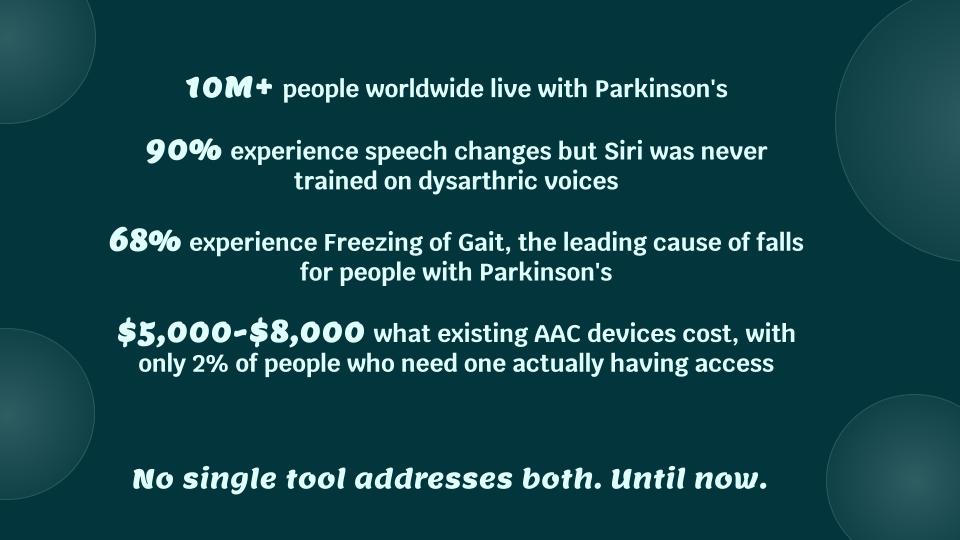
Synova came from a problem that felt personal to our team. Prishaa’s uncle has Parkinson’s and Eesha’s grandmother has Parkinson’s, so this was not just a random accessibility idea for us. We were thinking about real moments where someone knows exactly what they want to say or do, but the technology around them still fails when it is supposed to help.
Speech tools especially felt frustrating. A system can return text, but that does not mean it actually helped. Someone can be trying to say something simple and urgent and still get back repeated sounds, broken words, or something unusable. At the same time, Parkinson’s is not just about speech. Movement and gait are a huge part of daily life too. That is why we ended up building both a communication feature and a walking feature into the same project.
What it does
Synova has two main parts: Speak and Walk.
Speak records speech, sends it through a transcription pipeline, and then turns rough output into a clearer phrase that is actually usable. It also includes a voice bank so common phrases can be saved and replayed quickly.
Walk is a real time movement support feature. It uses motion data from the phone, processes it, detects gait events, watches for freezing, and generates audio cues that help guide the user’s pace and movement.
How we built it
For Speak, we built the backend in Python using FastAPI and Whisper. Browser microphone audio came in as webm, so we had to handle conversion before sending it through the transcription pipeline. We built backend routes for transcribe, compare, get phrases, and save phrase so the frontend could record speech, compare standard output against our corrected output, and store useful phrases in a voice bank.
On the frontend, we used React and connected that backend to a simple interface where the user can hold to record, get back a clearer phrase, save important phrases, and replay them. We also built a compare flow so we could directly show the difference between standard transcription and our normalized phrase output.
For Walk, Eesha built the engineering pipeline as a closed loop real time system. She used a UDP socket server to stream high frequency IMU data from the smartphone with low latency. Instead of relying on raw accelerometer peaks, the signal processing pipeline used a moving variance filter on the z axis acceleration over a sliding window of twenty samples to separate gait events from tremor noise. A watchdog timer monitored the time between peaks and flagged likely freeze of gait events when the interval became too large. The auditory feedback loop then adapted the beat based on the user’s cadence and used spatial audio logic to place the sound in front of the user as a walking target. The backend logic was in Python and the Android data streaming layer was in Kotlin.
Challenges we ran into
Reliability was the hardest part. Dysarthric speech is difficult for standard ASR, and browser recorded audio added another layer of inconsistency because we had to deal with microphone permissions, file formats, conversion, backend processing, and frontend state all at once. Even when transcription technically worked, the raw output was often not useful enough to show directly.
Integration was another challenge. The project only worked if the backend, frontend, voice bank, speech flow, and walking logic all worked together smoothly. On the Walk side, latency mattered a lot because the feedback had to stay synchronized with the user’s motion. On the Speak side, the system had to stay understandable and stable even when the model output was rough.
Accomplishments that we're proud of
We are proud of the Walk side because it was not just visual polish or a placeholder. Eesha built a real time motion pipeline that takes in IMU data, filters noisy movement, detects gait events, checks for freezing, and then adjusts auditory feedback based on cadence. That made the project feel like a real assistive system instead of two disconnected ideas.
Another part we are proud of is that we were able to make the problem visible. The compare flow clearly shows that standard ASR can fail badly on dysarthric speech, while our system still moves toward something more usable. That made the technical point of the project very clear.
What we learned
One of the biggest things we learned is that accessibility problems are not just model problems. A system can technically work and still fail the user. For this project, usefulness mattered more than whether the raw output looked close enough.
We also learned how much of the real engineering work sits around the model. Audio conversion, browser recording, backend routes, frontend state, fallback behavior, and latency all mattered just as much as Whisper itself. On the Walk side, low latency and filtering mattered because the feedback only helps if it stays aligned with the user’s movement.
Another thing we learned is that building around constraints can actually make the product stronger. Instead of trying to solve every possible speech case at once, using a phrase layer and voice bank made the communication side more stable and more practical for a demo and for actual use.
What's next for Synova
Next, we want Synova to become more of a full end to end communication system. That means building a stronger flow from browser microphone audio to a usable phrase, with more reliable transcription, comparison, phrase storage, and replay. We also want the phrase recovery to become more personalized over time instead of relying on a smaller fixed set of phrases, and we want to keep improving the Walk feature with more real movement data and better feedback tuning.

Log in or sign up for Devpost to join the conversation.