Inspiration
We created SyncED because students should still be able to learn even when they do not have reliable internet access. Many learning platforms depend on a constant internet connection, which can make it difficult for students with limited or unstable Wi-Fi to access lessons and complete schoolwork.
We wanted to solve that problem by building a platform designed around unreliable connectivity instead of treating offline access as an extra feature.
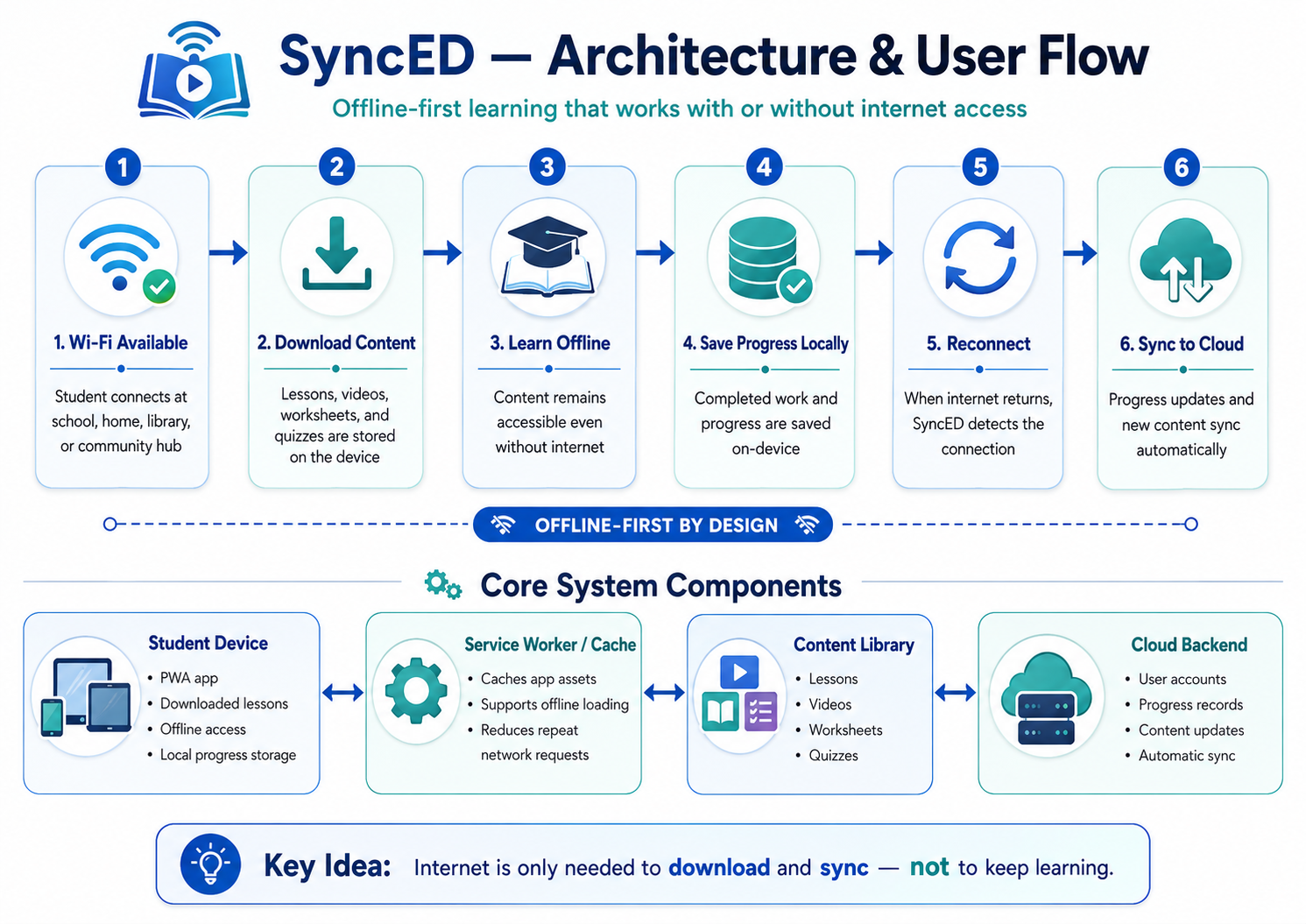
Our goal was to create a system where students could download learning materials while connected to Wi-Fi, continue learning offline, save their progress locally, and sync their work once they reconnect.
What it does
SyncED is an offline-first learning platform designed to keep educational content available with or without internet access.
Students can:
- Download lessons, worksheets, and learning resources while online
- Access previously downloaded content without Wi-Fi
- Save lesson progress locally on their device
- Sync progress after reconnecting
- View downloaded lessons, available storage, and last sync information
- Use accessibility features such as multilingual support and plain-language mode
- Track assignments, progress, learning streaks, and rewards
- Navigate through a responsive interface designed to work across different devices
The core idea behind SyncED is that losing an internet connection should not interrupt the learning experience.
How we built it
We built SyncED as a Progressive Web App (PWA) so it could combine the accessibility of a website with features normally associated with installed applications.
Our main offline-first flow is:
Connect → Download → Learn Offline → Save Locally → Reconnect → Sync
We designed the system around this flow from the beginning.
When a device is online, lesson content can be downloaded and stored locally. When the connection is lost, SyncED continues serving the downloaded resources instead of depending on a live server request. Student progress is also stored locally so that completing a lesson or activity offline does not immediately require an internet connection.
Once the device reconnects, that locally stored progress can be synchronized again.
We also worked on several supporting parts of the platform, including:
- Offline content management
- Local progress storage
- Caching strategies
- Connectivity detection
- Sync status indicators
- Downloaded lesson tracking
- Storage information
- Responsive layouts
- Accessibility-focused UI features
- Course and lesson navigation
- Assignment and progress tracking
- Error and interrupted-download considerations
We spent time iterating on the interface as well. We wanted students to immediately understand whether their lessons were available offline, when their device last synchronized, and what content was already downloaded.
How we used AI
We used AI as a development assistant, mainly to speed up debugging, research technical approaches, and improve our documentation while still making the core product and design decisions ourselves.
For example, we used AI to help us:
- Debug issues in parts of the offline workflow
- Compare different approaches for caching and local storage
- Think through possible failure cases, such as interrupted downloads or lost connections
- Review ideas for syncing locally stored progress after reconnection
- Improve and organize technical documentation
- Generate possible test cases that we could then review and run ourselves
- Refine explanations of the architecture for our presentation and submission
Instead of relying on one-shot AI-generated solutions, we often started with a basic question and then made our prompts more specific based on what we were actually building.
For example, instead of simply asking how to make an app work offline, we refined the problem around a PWA that needed to download lessons, store progress locally, handle interrupted connections, and sync changes after reconnecting.
The AI helped us explore possible approaches, but we still had to decide what made sense for SyncED, integrate those ideas into the project, test the behavior, and revise the design when something did not work as expected.
Challenges we faced
One of our biggest challenges was designing the app around unreliable internet connections.
A normal web application can assume that a server is available most of the time. SyncED could not make that assumption.
We had to think through situations such as:
- A download being interrupted halfway through
- Wi-Fi disconnecting while a student is using a lesson
- Saving progress while completely offline
- Avoiding progress loss between sessions
- Deciding when locally stored information should sync
- Showing users which resources are actually available offline
- Keeping the interface understandable even with multiple offline states
- Managing device storage without making the experience confusing
Another major challenge was balancing functionality with simplicity.
We had many ideas for features, but adding everything would have made the platform cluttered. We repeatedly adjusted the interface and user flow so that the most important actions — finding lessons, downloading content, learning offline, and checking sync status — remained easy to understand.
We also had to separate what was necessary for the working prototype from what would belong in a larger production system. This helped us think more seriously about future backend architecture, user accounts, course data, synchronization records, and scalability.
Testing
Testing was especially important because offline functionality has many edge cases that are easy to miss.
We created a set of 10 functionality checks covering important parts of the prototype and ran each one against the project.
The prototype successfully passed 10 out of 10 tests.
These checks helped us verify the main user flow and gave us a baseline for future testing. They also showed us that testing an offline-first application requires checking more than whether a page simply loads — we also needed to consider connectivity changes, saved state, downloaded resources, and how the application behaves when network access is unavailable.
What we learned
Building SyncED taught us that offline applications are much more complicated than simply downloading a few files.
A reliable offline-first system needs to think about storage, caching, state management, synchronization, connectivity changes, failure recovery, and user experience at the same time.
Through this project, we gained more experience with:
- Progressive Web Apps
- Service workers and caching concepts
- Offline data storage
- Local application state
- Synchronization workflows
- Network failure handling
- UI/UX design
- Accessibility
- Responsive web design
- Testing and debugging
- Backend architecture planning
- Using AI effectively as a development tool
We also learned the importance of designing around real constraints. Instead of building a normal educational website and adding an offline button afterward, we tried to make offline access part of the architecture and user experience from the beginning.
What's next
There is still a lot we want to build.
Our next steps include:
- Expanding the amount of educational content available on the platform
- Improving conflict handling and synchronization
- Building a more complete backend for users, courses, lessons, and progress
- Adding stronger download management and recovery
- Expanding multilingual and accessibility features
- Improving teacher and assignment tools
- Testing with more users and larger groups of students
- Measuring performance under slower and less reliable connections
- Improving how SyncED manages limited device storage
Ultimately, we want SyncED to become more than a prototype. We want it to show that educational technology can be designed for students who do not always have perfect connectivity.
Our long-term goal is simple:
Learning shouldn’t stop when Wi-Fi does.
Built With
- css
- html
- indexeddb
- javascript
- local-storage
- offline-first
- progressive-web-app
- pwa
- service-workers
- web-app

Log in or sign up for Devpost to join the conversation.