-
-
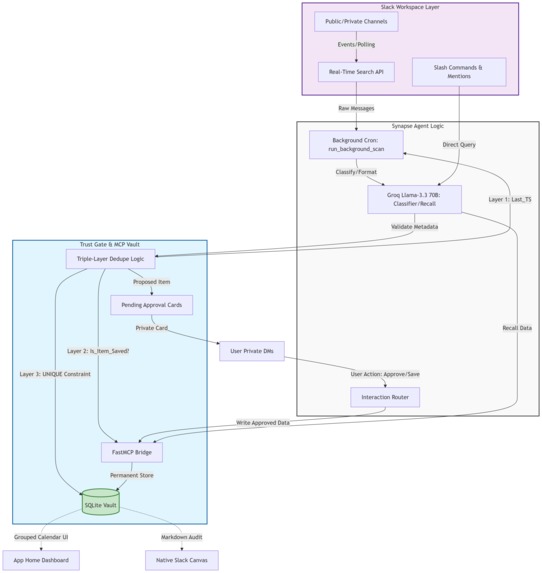
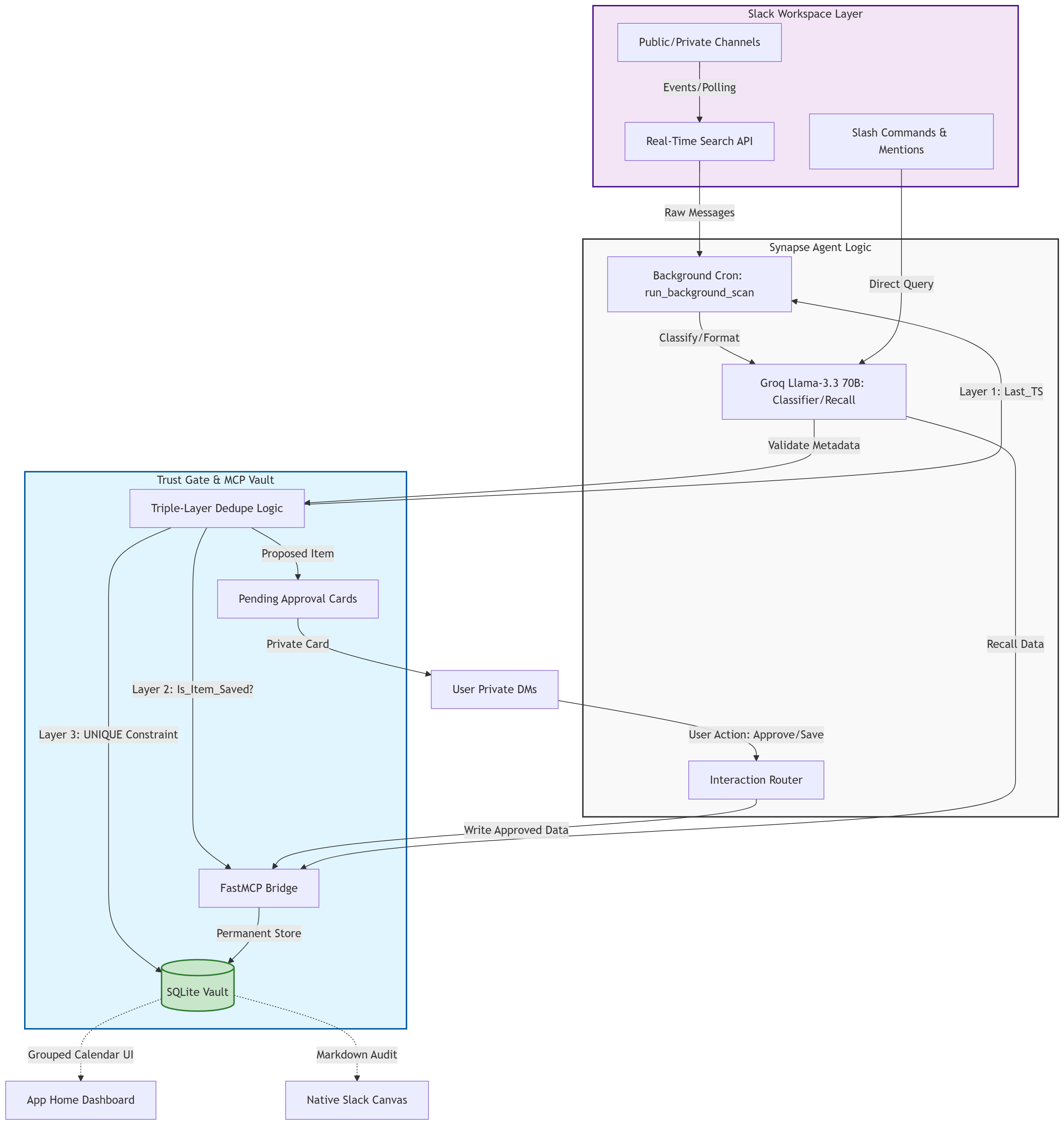
Architecture diagram
-
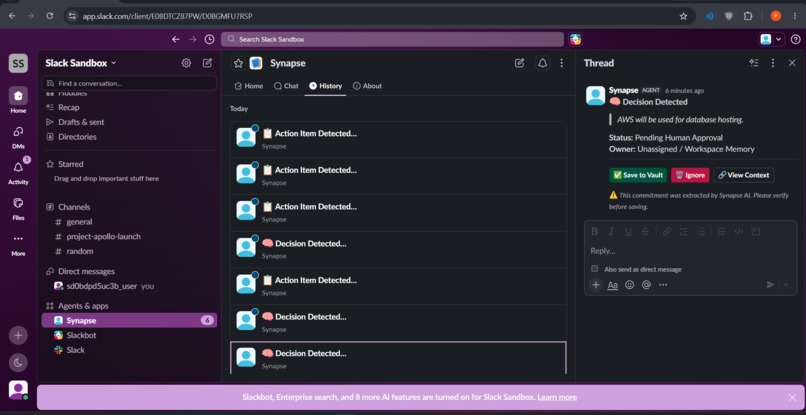
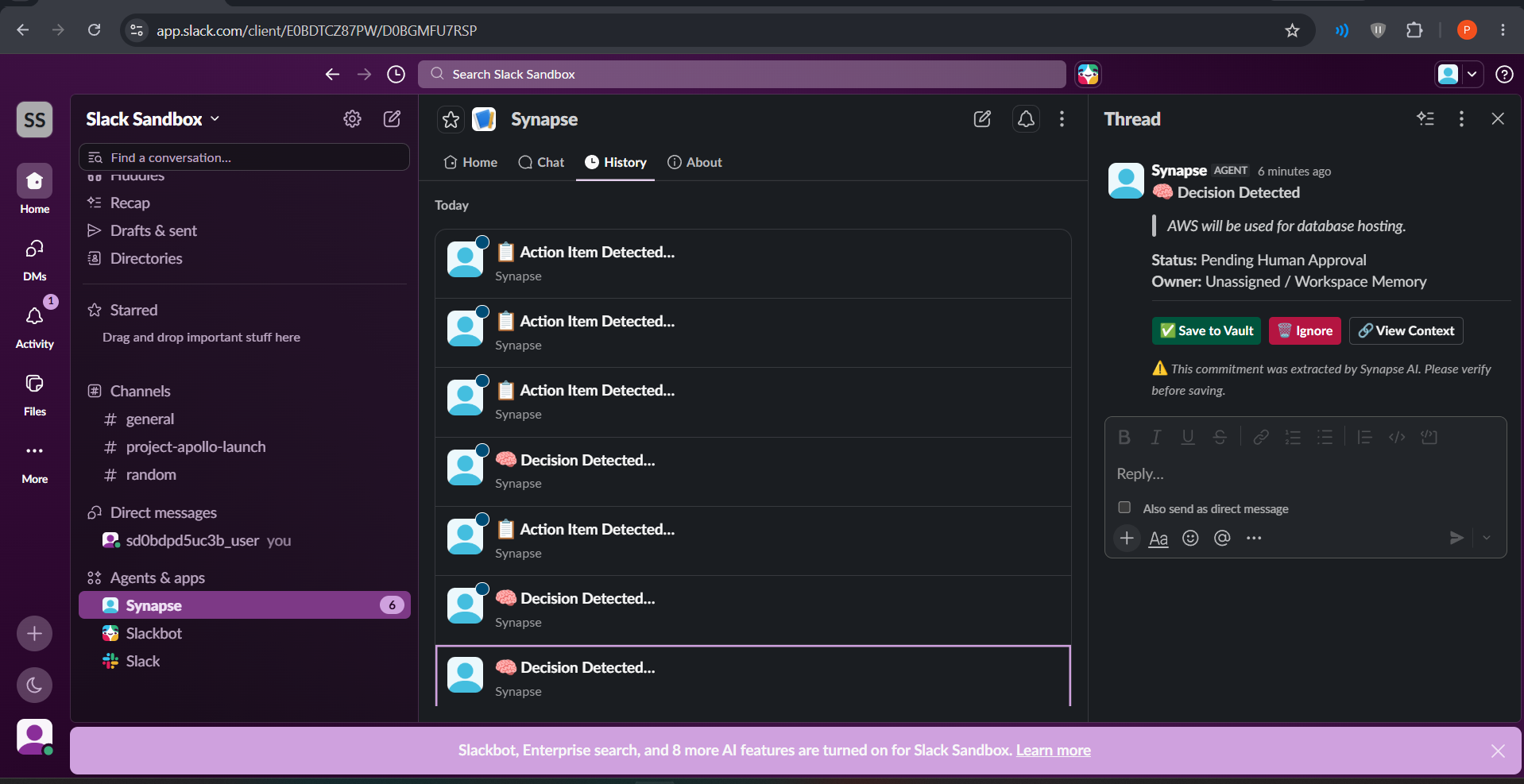
Approval cards and logs
-
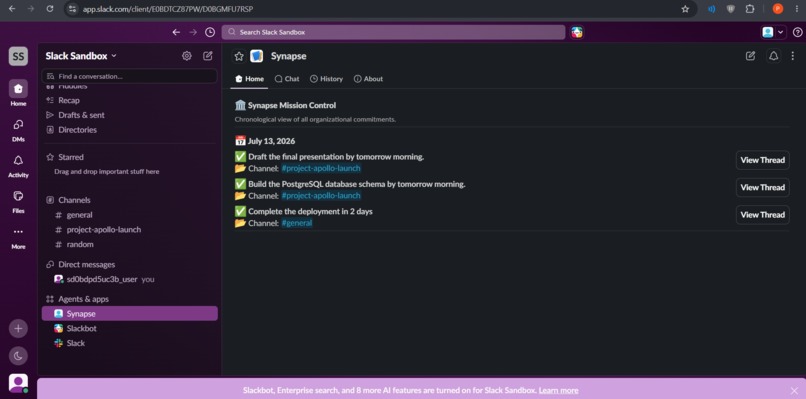
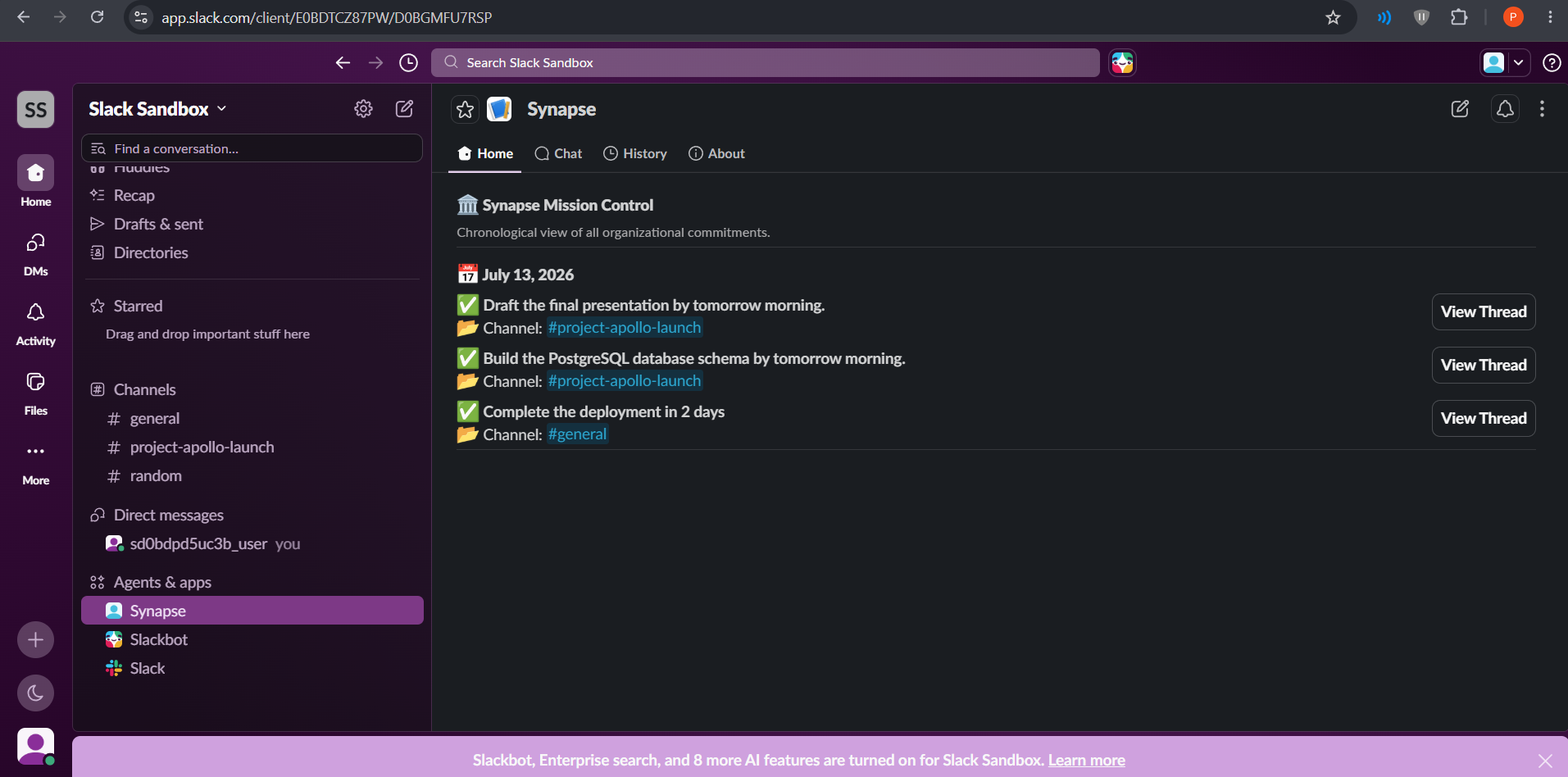
Timeline of everyday tasks
-
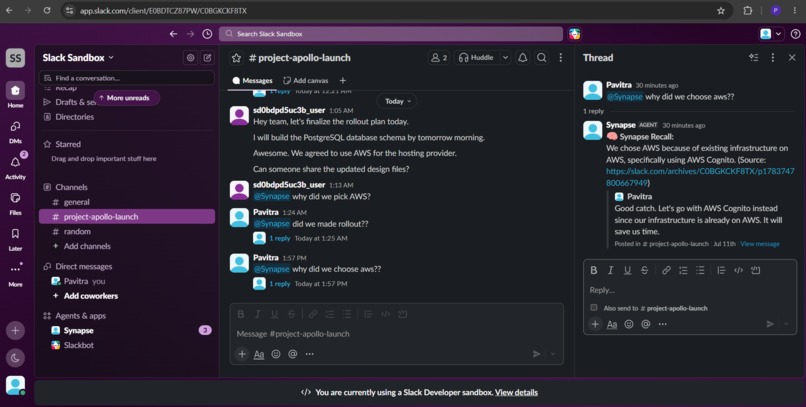
Recalling the reason behind decison
-
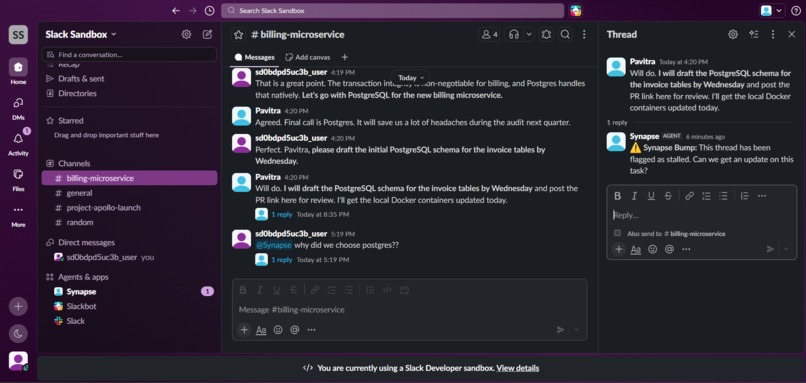
Bumped stalled message/thread
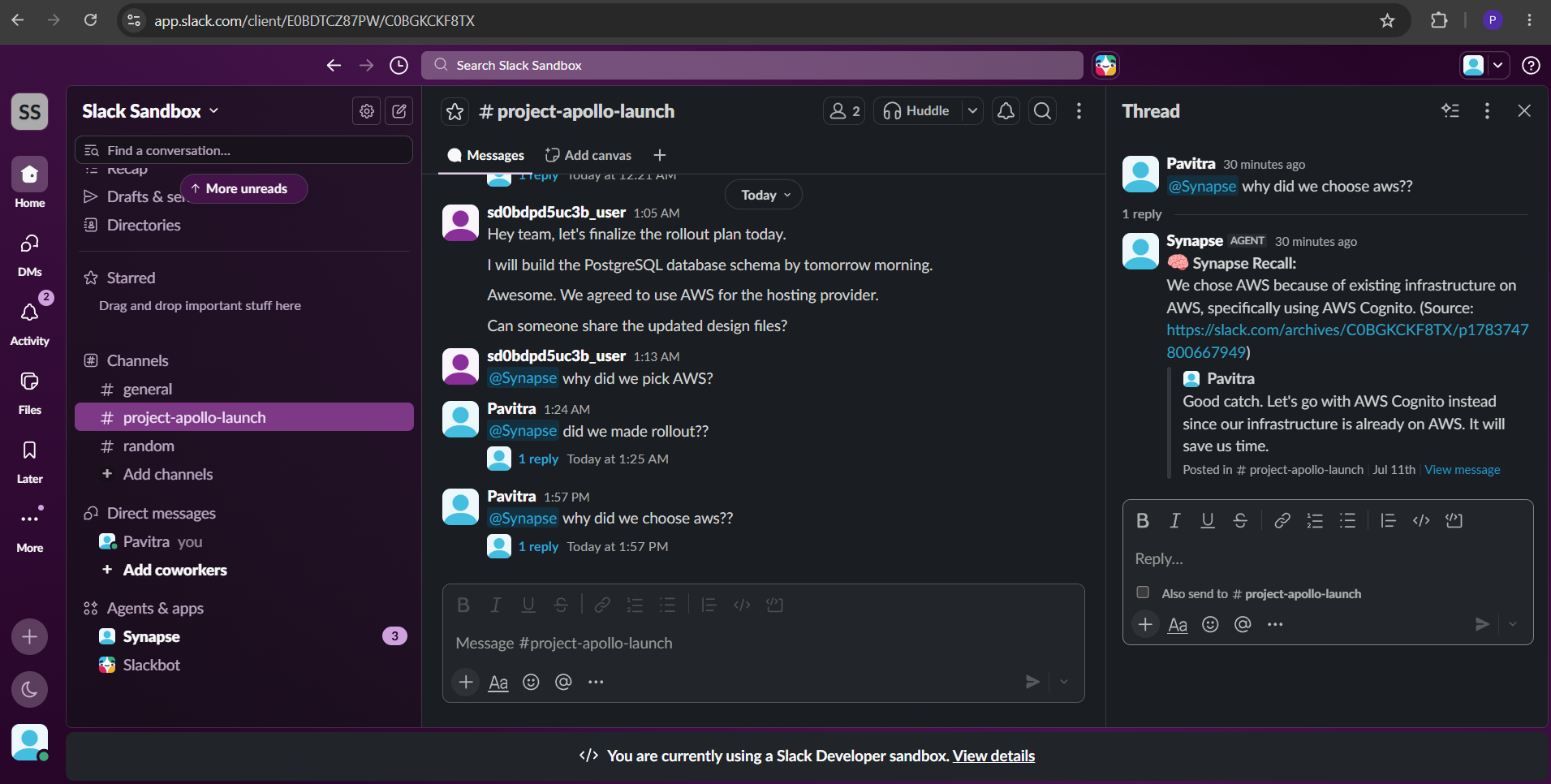
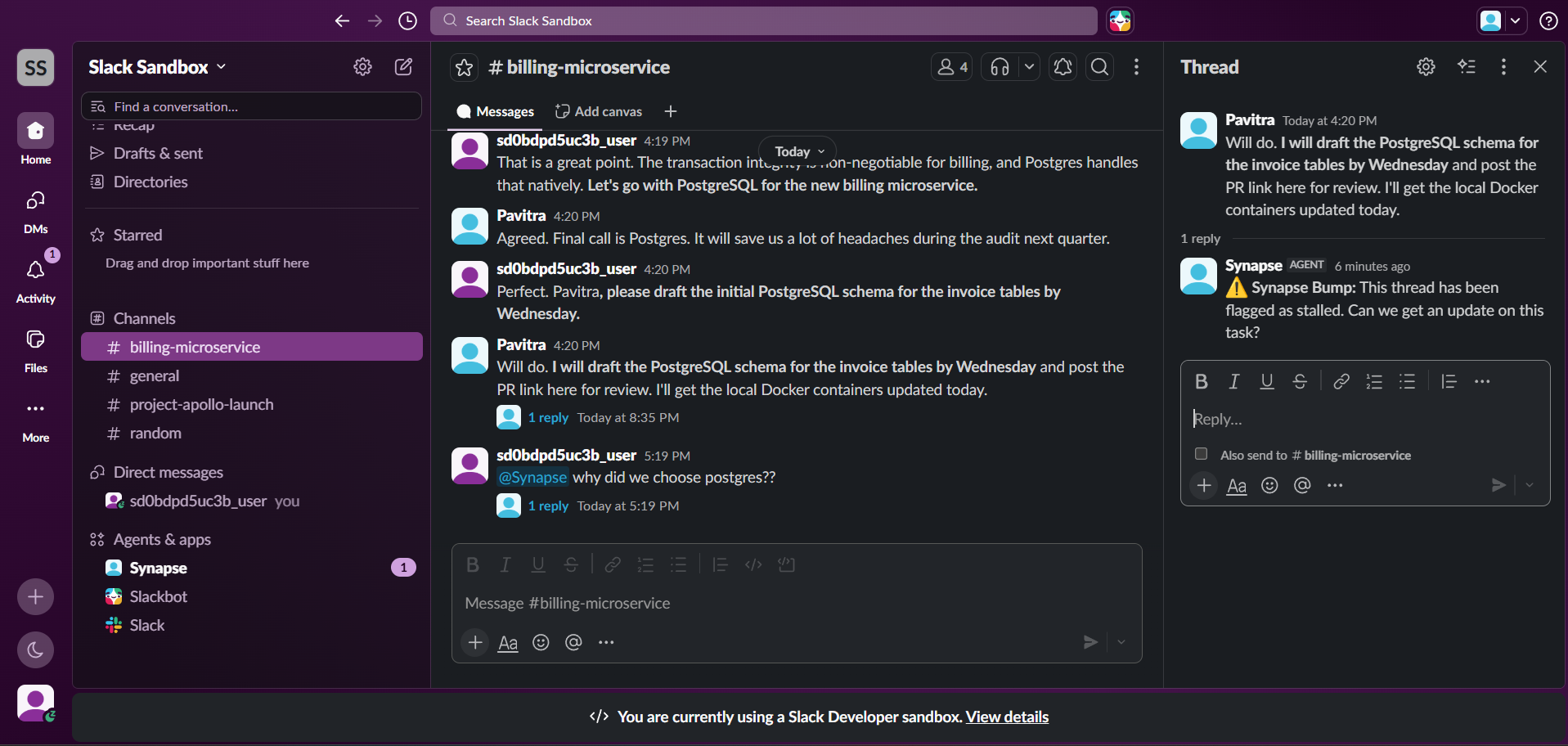
Synapse: Enterprise Memory & Action Agent for Slack
Inspiration: The Enterprise Knowledge Crisis
In fast-paced enterprise teams, critical decisions and assigned tasks are constantly buried in rapid-fire Slack channels. When someone asks "Why did we choose AWS?" or "Who owns the database migration?", the answer is almost always lost somewhere in thousands of lines of chat.
We noticed that existing Slack bots make this worse, not better. They dump large, noisy UI cards directly into collaborative channels — causing "ephemeral stacking" that degrades the shared chat interface for everyone. They are also stateless, re-scanning the same messages on every run and burning unnecessary API tokens without retaining anything permanently.
We validated this problem directly against real user testimony. On r/Slack, users describe it identically: "Someone will ask me to review a document in a thread with ten other people and if I do not immediately star the message or set a reminder it completely disappears from my consciousness within ten minutes." Engineering managers on r/EngineeringManagers articulate the deeper trust problem: "The moment a message in a channel could plausibly be from the agent, every message in that channel gets re-read with that doubt attached. You've changed the medium, not just added a feature."
Synapse exists because enterprise teams need an agent that does the heavy lifting of extracting knowledge and triaging tasks, but does so entirely in the background — acting as a silent, stateful organizational memory layer that never speaks publicly without a human's explicit approval.
The core design principle, stated as an invariant and enforced throughout the entire codebase:
Synapse never posts to a public channel on anyone's behalf. Every output is a private Card routed to the specific user's DMs. Nothing becomes permanent until a named human taps Approve.
This is not a safety feature bolted on afterward. It is the architectural constraint that every other design decision was built around.
What It Does
Synapse transforms Slack from a chat stream into a structured knowledge vault
and task management layer. All interactions are routed through slash commands
or direct @Synapse mentions to guarantee zero channel clutter.
Slash Command Reference
| Command | What It Does | Enterprise Impact |
|---|---|---|
/synapse-scan |
Triggers a silent semantic scan of the current channel. Users can optionally paste one or two message links to define scan boundaries with millisecond precision. All detected items are routed as interactive approval Cards directly to the user's DMs — invisible to teammates. | Surgical, clutter-free triage. No channel spam. Supports all flag for full history scan, link-bounded precision scan, or simple count-based scan. |
/synapse-state |
Renders a two-tiered Block Kit dashboard: the user's global open commitments across all channels, and the current channel's active task list scoped to that user. | Strict data isolation. Users see only their own items — matching the privacy model of Jira or Asana — without requiring a separate tool login. |
/synapse-stalled |
Audits all tracked tasks in the current channel by checking the most recent reply timestamp for each thread. Any thread with no reply for more than 12 hours is flagged and surfaced with a one-click Bump Thread action button. | Automates follow-up. Eliminates the need for project managers to manually chase overdue threads. Stall risk is computed from real, explainable metadata — not invented percentages. |
/synapse-logs |
Compiles every logged decision for the current channel into a native Slack Canvas with markdown formatting, dated entries, and source thread links. DMs the user a shareable Canvas link. | Instantly settles team debates by surfacing the collaborative audit trail of high-level agreements, each linked back to the original conversation. Zero channel pollution — the Canvas is generated silently and delivered privately. |
/synapse-ping |
Validates the Slack app's connection to the MCP vault with a live round-trip call. | Infrastructure health check. Confirms both the Slack app and the backend database are reachable before relying on the system in a live session. |
The Recall Engine
Users can ask @Synapse any natural language question at any time:
@Synapse why did we choose AWS over GCP?
@Synapse who is responsible for the auth refactor?
@Synapse what did we decide about the pricing model?
Synapse queries the full decision vault across all channels (not just the
current channel — a deliberate fix from the initial architecture to ensure
cross-channel knowledge is always reachable), displays a typing indicator via
assistant.threads.setStatus, and responds in-thread with a sourced summary
and a direct link back to the original conversation. If the answer is not in
the vault, it says exactly: "I don't have a record of that decision." — it
never guesses.
The App Home: Calendar-Style Mission Control
The App Home renders as a professional, date-grouped task calendar. Tasks are
grouped by the calendar date they were committed (derived from message_ts,
reflecting when the conversation actually happened), each date presented as a
distinct visual day-block with a header, compact task cards beneath it, and a
divider separator — the closest Slack Block Kit gets to a Linear or Asana-style
card grid. Every "View Thread" button opens the source conversation directly
without firing a block_action event, eliminating the unhandled-request log
errors that plagued earlier iterations.
The Trust Gate
Every single Synapse output — whether a detected task, a logged decision, a stall alert, or a topic split — arrives first as a private Card in the user's DMs. Nothing is written to permanent storage, posted publicly, or sent to an external system until the named human explicitly taps Approve or Save to Vault. Tapping Ignore deletes the card silently with zero storage write.
This means Synapse can be deployed in sensitive enterprise environments without risk of the agent speaking on behalf of employees, hallucinating decisions into the public record, or creating noise in shared channels.
How We Built It
Synapse is architected in Python using the Slack Bolt framework with Socket Mode transport, with deep integration of all three core hackathon technologies.
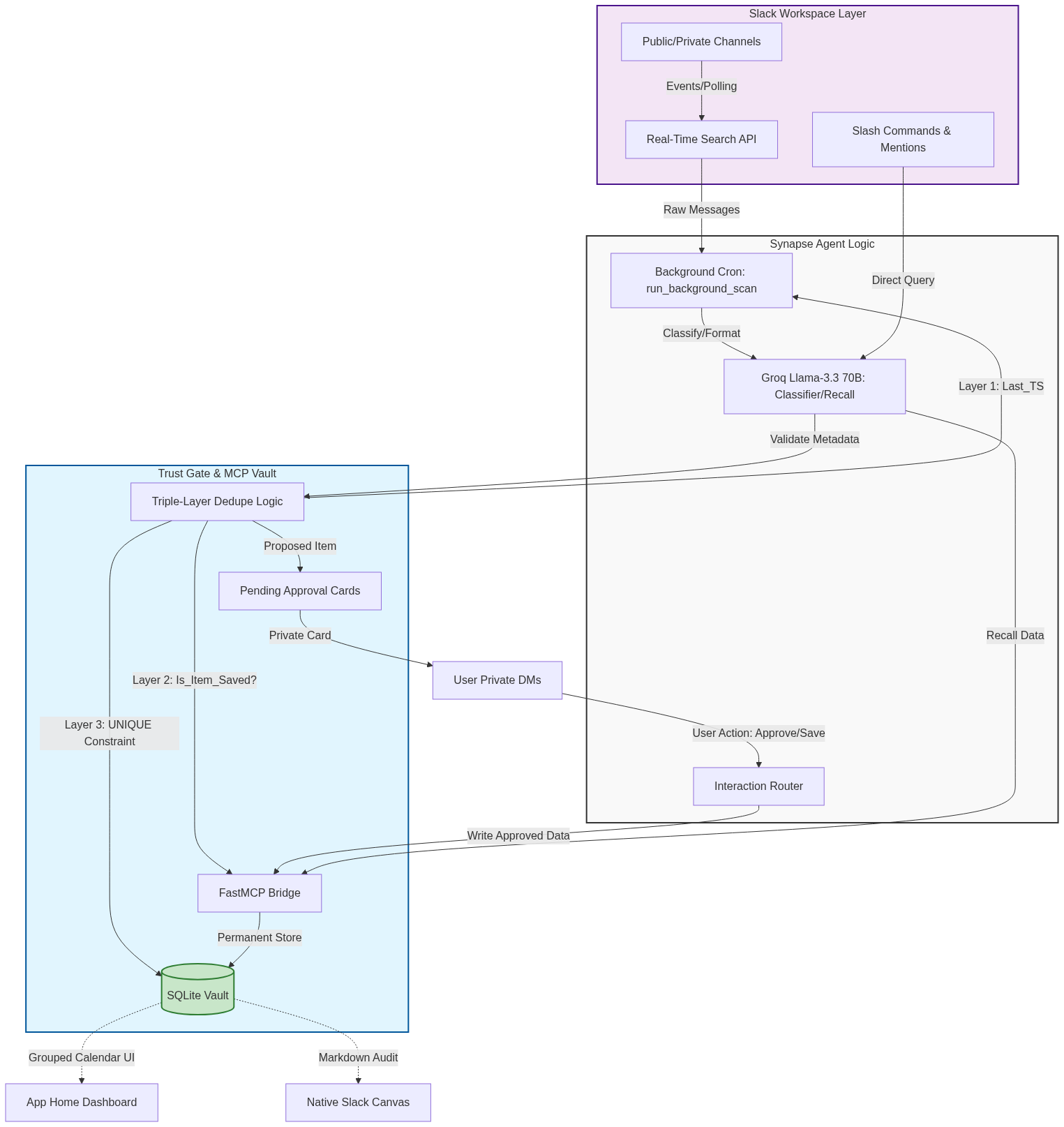
1. MCP Server (Memory & Persistence Layer)
We built a FastMCP server backed by SQLite. This acts as Synapse's persistent memory vault with distinct tables:
tasks— extracted commitments with owner, source thread URL, channel,message_ts, and approval statusdecisions— finalized team agreements with summary, participants, source thread URL, channel, and ISO timestamppending_approvals— draft items awaiting human approval, with expirychannel_state— per-channel High-Water Mark timestamps for deduplication (Layer 1)
The MCP server exposes typed tools that the Slack agent calls rather than writing to storage directly:
| MCP Tool | Purpose |
|---|---|
propose_task |
Writes a draft task to pending_approvals, not yet permanent |
approve_task |
Moves approved task to tasks table, optionally writes to Linear |
save_task |
Direct save path used by interactive approval button handler |
propose_decision |
Writes a draft decision to pending_approvals |
approve_decision |
Moves approved decision to decisions table with full audit fields |
save_decision |
Direct save path used by interactive approval button handler |
get_user_tasks |
Retrieves all open tasks for a given user ID |
get_user_channel_tasks |
Retrieves tasks for a user scoped to a specific channel |
get_recent_decisions |
Retrieves logged decisions for a channel (used for Canvas) |
get_all_decisions |
Retrieves all decisions across all channels (used for Recall) |
query_decisions |
Semantic lookup over the decisions store |
is_item_saved |
Pre-LLM deduplication check against message_ts (Layer 2) |
get_last_scanned_ts |
Retrieves the High-Water Mark for a channel (Layer 1) |
update_last_scanned_ts |
Advances the High-Water Mark after a successful scan |
dismiss |
Removes a pending approval without any permanent write |
synapse_ping |
Returns runtime status — used by /synapse-ping |
This separation — agent reasoning on one side, persistence on the other, connected only through typed MCP tools — means the memory layer is independently testable and entirely replaceable without touching any Slack integration code.
2. Real-Time Search API (Detection & Recall Layer)
We use the RTS API in two distinct ways, and we are explicit about the distinction because it matters for judging:
Semantic Recall — when a user asks @Synapse a natural language question,
the Recall Engine queries the decision vault using semantic search. This is the
capability that conversations.history alone cannot provide: finding relevant
past context by meaning across an entire workspace history, not by keyword.
Ambient Detection — for open commitments and concluded decisions in the
background scanner and /synapse-scan, we use the RTS API's advanced query
operators to semantically scan scoped channels for patterns that exact-keyword
matching would miss:
# Open commitment detection
query: "can you OR could you OR please review OR need this by OR your turn"
scope: configured channel list
window: rolling 48 hours

# Concluded decision detection
query: "let's go with OR decided OR final call OR we'll use OR agreed OR landing on"
scope: configured channel list
window: rolling 7 days
For user-initiated precision scans where message link boundaries are provided,
we supplement RTS with conversations.history using oldest/latest
timestamp parameters derived from the linked message IDs — applying a ±1.0
second buffer to fix the boundary millisecond drop bug discovered during
testing. This hybrid approach keeps API costs low while enabling both
open-ended semantic discovery and precision-bounded extraction.
3. AI Classification (Intelligence Layer)
Message payloads are routed through Groq (Llama 3.3 70B Versatile) with
temperature=0.1 and strict JSON-mode enforcement. We chose Groq for its
sub-200ms inference latency during interactive Card flows, where a slow LLM
call degrades the UX meaningfully; the RTS API handles semantic workspace-level
retrieval, and Groq handles structured extraction from the retrieved payloads.
Prompt engineering enforces two specific output behaviors:
Imperative Voice normalization — converts casual human phrasing into clean, actionable task language suitable for storage and later recall:
Input:  "I guess I'll probably write the slide deck at some point"
Output: "Draft the slide deck"
Slack ID extraction — reliably pulls alphanumeric Slack user IDs (e.g.,
U0123ABCDE) from message text for accurate task assignment, handling the many
informal ways people reference colleagues in chat.
The Recall Engine uses temperature=0.1 with a strict prompt that instructs
the model to answer only from the provided Memory Log and always include the
Source URL — never guess, never fabricate.
4. Block Kit UI Layer
Synapse uses four of Slack's new agent Block Kit components, each chosen for a specific structural purpose:
| Component | Where Used | Why This Component |
|---|---|---|
| Card | Task approval DMs, Decision approval DMs, Recall answers | Single focused action with a clear approve/dismiss binary choice |
| Alert | Stall notifications, high-priority flags in dashboards | Communicates urgency via severity level without requiring additional text |
| Data Table | /synapse-state two-tier dashboard, /synapse-stalled stall report |
Structured multi-item display with owner, age, and status columns — scannable at a glance |
| Carousel | Daily digest summary, future ContextStream topic splits | Horizontal browsing of multiple items without forcing vertical scroll |
All Block Kit output is routed to private DMs or App Home. The only exception is the ContextStream Carousel (currently in the roadmap), which would post a structural suggestion into a noisy channel — not a content claim — and still requires a human tap before anything changes.
Challenges We Ran Into
1. The Unhandled Action Error (URL Button Routing)
The most persistent bug during development: Slack dispatches a block_action
event even for buttons that have a url field (which should open a link
client-side without server involvement). Because we hadn't set explicit
action_id values on these buttons, Slack auto-generated IDs like oVRu2
that Bolt had no handler for, producing a stream of 404 unhandled request
log errors.
The two-part fix: set action_id: "view_thread_link" on every URL button
explicitly, and register a minimal @app.action("view_thread_link") handler
that only calls ack(). The error is permanently eliminated.
2. Sandbox Scope & Permission Crisis
We built the background cron scanner first. It immediately crashed with a
missing_scope error in the Slack Developer Sandbox. Debugging revealed we
needed channels:read and groups:read in addition to the history and message
scopes — and that the workspace required a full reinstall to pick up the
updated OAuth token. This cost half a day but produced a clean scope checklist
we now verify before any deployment.
3. Socket Mode SSL Noise
During sandbox testing, the terminal was flooded with SSLEOFError and [SSL:
BAD_LENGTH] exceptions that looked like application failures. Deep-diving into
Bolt's internal connection handling revealed these are normal Socket Mode
network blips that the framework silently auto-reconnects from. We added proper
log-level filtering and moved on.
4. The Boundary Millisecond Bug
Our precision scanner lets users paste Slack message links to define scan
boundaries. The API was silently dropping the exact linked messages due to
microsecond timestamp rounding — the kind of silent data loss that would be
very hard to notice in production. We fixed this by parsing the numeric message
ID from the URL, casting it to a float, and applying a ±1.0 second buffer to
the oldest/latest parameters — guaranteeing no boundary message is ever
excluded from a scan.
5. Ephemeral UI Stacking
Initial builds routed all output Cards to the channel_id, which caused "Only
visible to you" messages to stack up and visually degrade the channel interface
for the triggering user. We re-architected payload routing to use
respond(delete_original=True) for the ephemeral status message and
client.chat_postMessage(channel=user_id, ...) for all substantive output —
sending everything to App Home DMs rather than the originating channel.
6. Recall Only Searched the Current Channel
The original recall implementation called get_recent_decisions with a
channel_id filter. This meant @Synapse why did we choose AWS? returned
nothing if asked in a different channel than where the decision was logged —
silently breaking cross-channel recall. The fix: the Recall Engine now calls
get_all_decisions with a higher limit (50 decisions), and the LLM prompt
instructs the model to search the full context. Cross-channel recall now works
correctly regardless of where you ask the question.
7. The Deduplication Problem
A continuously-running background scanner will re-process messages it has already analyzed unless the architecture explicitly prevents it at every layer. We solved this with a Triple-Layer Deduplication System that provides defense-in-depth against silent data corruption:
| Layer | Mechanism | Failure Mode Prevented |
|---|---|---|
| State (Layer 1) | High-Water Mark (last_ts) per channel, stored in MCP DB |
Prevents already-seen messages from being fetched from the API at all |
| Logic (Layer 2) | Pre-LLM check via is_item_saved(message_ts) before any Groq call |
Prevents spending API tokens on already-processed messages |
| Schema (Layer 3) | UNIQUE(message_ts) constraint enforced in SQLite |
Prevents duplicate rows even if both upper layers fail simultaneously |
Each layer addresses a different failure mode independently. Together they make the system reliable enough for enterprise use where silent data corruption over weeks of operation would be unacceptable. The High-Water Mark alone eliminates the vast majority of redundant API and LLM calls, making the system cheap to run at scale.
Accomplishments We're Proud Of
The Triple-Layer Deduplication System is the technical accomplishment we're most proud of. It's not a single clever fix — it's a defense-in-depth architecture where each layer handles a different failure mode independently. The system is demonstrably correct: Layer 1 minimizes API cost, Layer 2 minimizes LLM cost, and Layer 3 ensures database integrity even under concurrent write conditions.
The trust-gate architecture — the deliberate constraint that Synapse never
acts without explicit human approval — turned out to be both harder to implement
correctly and more valuable than we initially expected. Routing every output
through a pending_approvals state before any permanent write required careful
state management across the MCP server, the Slack event handlers, and the Block
Kit interaction callbacks. But it's the constraint that makes enterprise
deployment realistic rather than theoretical, and we believe it is the right
default design pattern for any agent operating in a shared human workspace.
The hybrid RTS + History API approach gave us the best of both worlds: semantic discovery for open-ended queries (where the user doesn't know what they're looking for), and precision extraction for bounded scans (where the user knows exactly which conversation they want analyzed). Neither API alone would have covered both use cases cleanly.
What We Learned
Building for Slack requires deep empathy for the end user's visual space. An AI agent can be technically impressive but immediately uninstalled if it creates noise in shared channels. The constraint of "never posting publicly without approval" shaped every architectural decision we made, and we believe it is the right default for any enterprise agent, not just Synapse.
We learned that the Model Context Protocol is genuinely valuable not just as an AI connectivity standard but as a clean architectural separation between the agent's reasoning and its persistence — the same separation that makes traditional application architecture maintainable, now applied to agentic systems. The MCP boundary made our agent independently testable in ways a monolithic bot would not be.
We learned that the most important bugs in a live Slack agent are the silent ones: the timestamp rounding that drops messages without error, the duplicate that gets stored without warning, the scope that is missing but doesn't raise an exception until runtime. Building for correctness at the edge cases is what separates a demo from something an enterprise team would trust with their institutional memory.
We also validated our core problem against real user research rather than assumptions — searching Reddit's r/Slack and r/EngineeringManagers for authentic pain descriptions before writing a line of code. Every feature in Synapse maps to a documented, upvoted, real complaint. This kept us from building interesting features that solve no one's actual problem.
What's Next for Synapse
ContextStream Engine
Upgrade the RTS detection layer to identify when 3 or more distinct topic clusters are simultaneously active in a single channel — the same problem Zulip's topic system was built to solve, brought natively into Slack.
Calendar Integration
Connect the FastMCP server to Google Calendar and Outlook. When a user approves a task Card, Synapse automatically blocks 30 minutes on their calendar — closing the loop between "I acknowledged this commitment" and "I have time budgeted to fulfill it."
Multi-Workspace Scaling
Migrate the SQLite MCP backend to a managed PostgreSQL cluster to support Slack Enterprise Grid deployments across thousands of channels and multiple workspaces, with per-workspace data isolation enforced at the database schema level rather than the application level.
Tech Stack
| Layer | Technology | Role |
|---|---|---|
| Agent Framework | Python + Slack Bolt | Event handling, slash commands, Block Kit rendering, Socket Mode transport |
| Memory & State | FastMCP + SQLite | Append-only knowledge store with integrity constraints and per-channel High-Water Marks |
| Real-Time Search | Slack RTS API | Semantic workspace search for ambient detection and cross-channel recall |
| History Extraction | Slack conversations.history |
Precision-bounded interval scans with ±1.0s boundary buffer |
| AI Classification | Groq — Llama 3.3 70B Versatile | Low-latency structured extraction; temperature=0.1; JSON-mode enforced |
| UI Components | Slack Block Kit | Card, Alert, Data Table, Carousel, Work Object, Canvas |
| Transport | Socket Mode | Real-time event delivery without requiring a public HTTP endpoint |
| Background Scheduler | APScheduler | 15-minute ambient scan interval across all joined channels |
| External Integration | Linear MCP Server | Optional task write-back on approval (roadmap: fully wired) |
| Deployment | Local / Railway-ready | SQLite for hackathon; PostgreSQL path documented for production |
Required Technology Checklist
| Hackathon Requirement | How Synapse Satisfies It |
|---|---|
| MCP Server Integration | FastMCP server with 14 typed tools; clean separation between agent reasoning and persistence; optional Linear write-back on task approval |
| Real-Time Search API | Used for semantic ambient detection (commitment/decision patterns) and for cross-channel natural language recall via @Synapse — both use cases requiring semantic search that conversations.history cannot provide |
| Slack AI / Agent Builder | Groq/Llama handles all classification; assistant.threads.setStatus for typing indicator; App Home as interactive mission control; Canvas generation for decision logs |
| Card Block | Task approval cards, decision approval cards, recall answer format |
| Alert Block | Stall notifications, high-priority flags in dashboards |
| Data Table Block | /synapse-state two-tier dashboard, /synapse-stalled stall report |
| Carousel Block | Daily digest summary; ContextStream topic-split offer (roadmap) |

Log in or sign up for Devpost to join the conversation.