Inspiration
According to the Centers for Disease Control and Prevention, More than 80 per cent of people are unaware they have the virus. It also shows that infectors are most infectious when they have symptoms. Because of this, many organizations around the world have added urgency to the efforts to develop protocols for hospital and facility entrance triage. Triaging by Chatbot emerges as an effective tool to reduce the workload of the medical system.
SymCheck for triaging COVID-19 or any health issues at any building’s entrance with the six main purposes:
Keeping the workplace safe Speeding up the screening process Timely alerting and providing CDC-based guidance to users who are at risk for Covid-19 and other vires Immediately find nearby testing locations for at-risk users Notifying users of nearby possible Corona cases Provide further medical guidance through a qualified panel of doctors/occupational health staff to better guide an infected user.
What it does
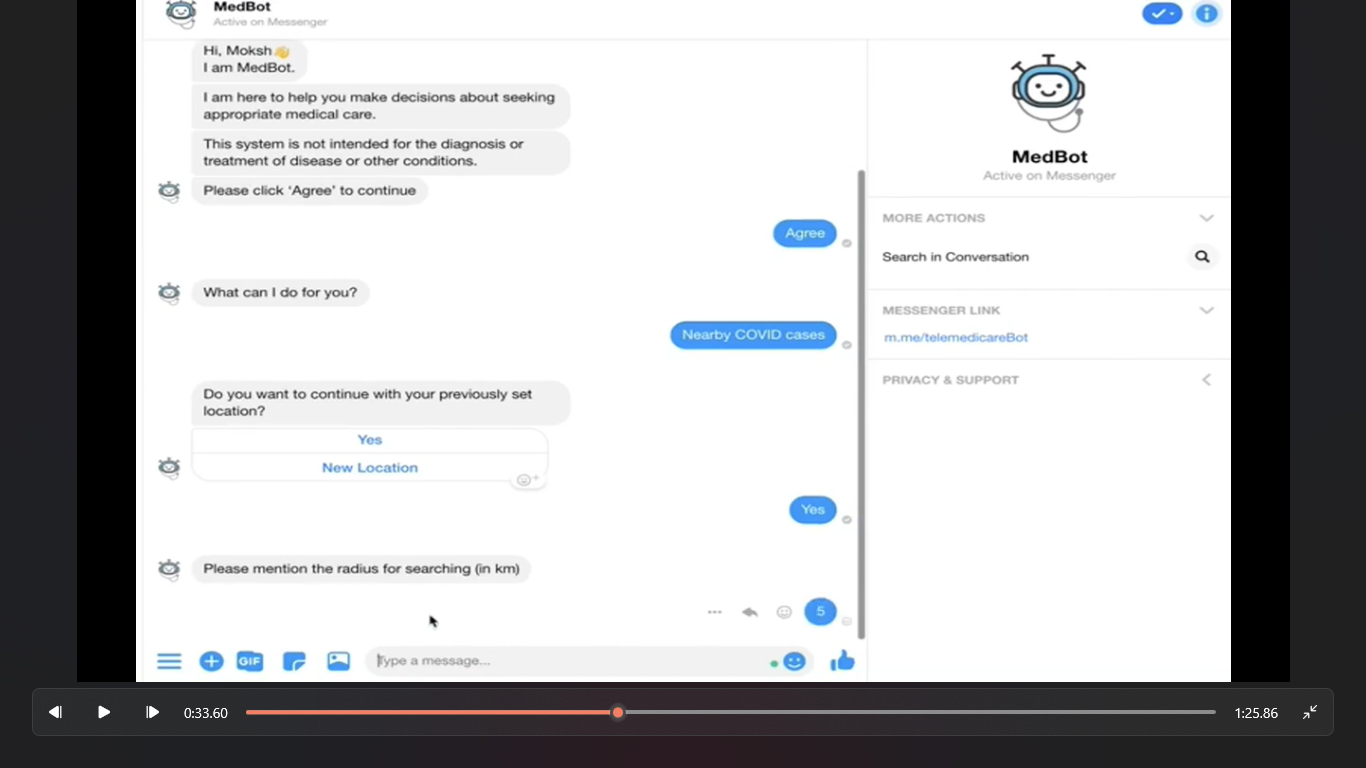
It comprehensive, secure, simple and fully automated symptom self-checker for security check-in at the workplace. Powered by developing tools from Courier API with Facebook Messenger, Medbot is developed to carry out exactly those needs. With this app, no security personnel or medical staff will be required to be on-site to screen and triage the workers at the gate. Instead, when a person enters a building, he/she will go through a fully-automated symptom screening for security purposes using Medbot.
The process is as follows:
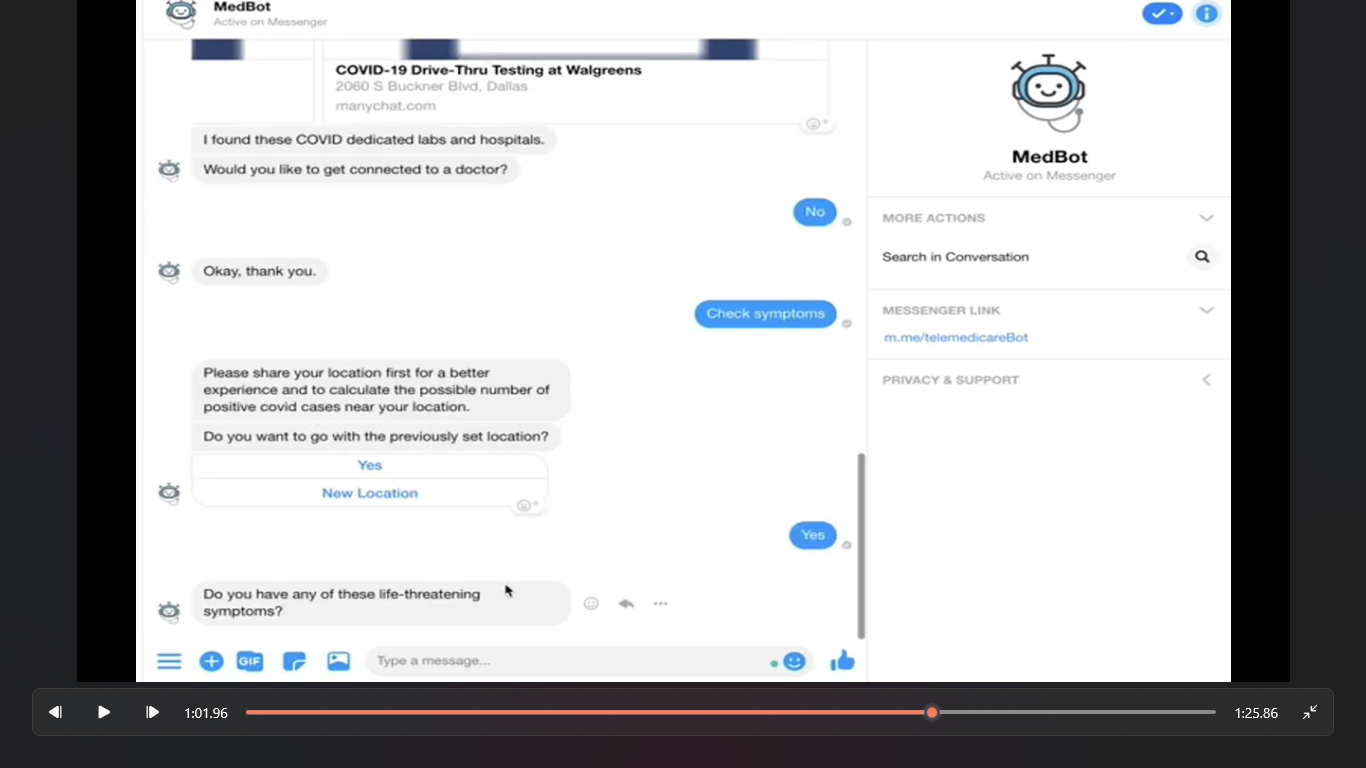
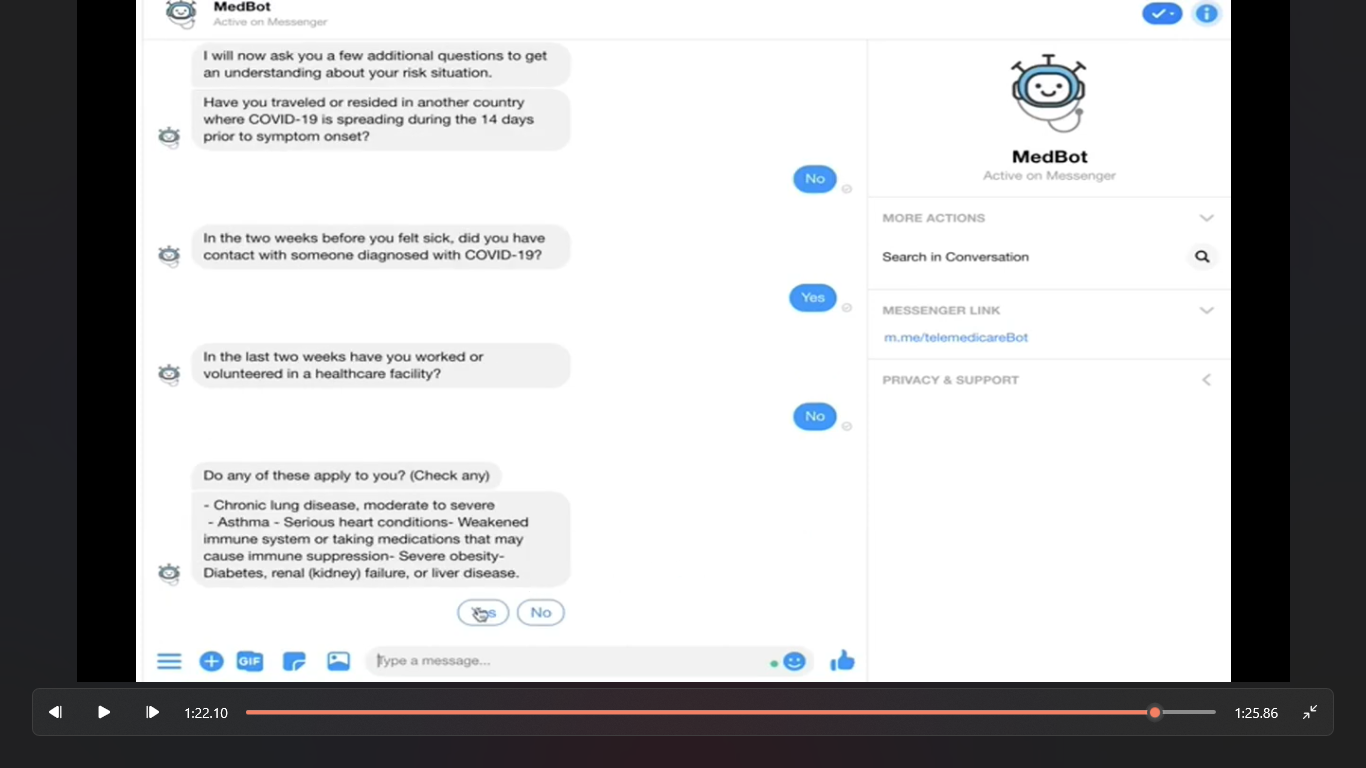
When Employee A enters the building, he or she will need to pass through a security check-in station. At this station, the person will log in to the SymCheck website to access the symptom screening chatbot. Employee A will answer all the screening questions. If Employee A shows no symptoms after the screening session, he or she will be texted a message of the screening result to show to the security guard who will allow the person to enter the building. If Employee A shows symptoms after the screening session, he or she will be directed to talk with occupational health staff available on MedBot. The occupational health staff will do a live chat session with the employee regarding self-quarantine and monitoring their symptoms. The chatbot will eventually suggest the nearby testing centres so the employee can make an appointment. The patients will also be instructed to self-quarantine and informed about testing sites for Covid-19.
With this fully-automated check-in process, the app will minimize physical human contact and significantly reduce the risk of COVID-19 transmission. We believe that besides security check-in at the workplace, this app can also have many other use cases such as Quick patient screening at a local clinic or hospital. After screening by the app, the medical assistants or nurses will separate from all the suspected COVID-19 patients and place these patients in a specifically designated area. The medical staff can now be more aware and cautiously follow CDC guidelines while caring for those separated patients. This can help minimize the spread of the virus to healthy individuals in a high-risk area like a clinic or hospital, and, more importantly, this can help protect the nurses and medical staff from contracting the virus from the patients
How we built it
Facebook Messenger components used:
When building the chatbot, many Facebook products were incorporated to optimize user experience. Specifically, the chatbot incorporated a Persistence Menu, Quick Replies, One-Time Notifications, and Handover protocol.
Persistence menu: By incorporating a persistence menu, we were able to give users an easier way to navigate different features of the chatbot, thus improving the overall user experience.
Quick replies are very helpful as they show what answer is required or what the user can do. It gives suggestions which the user can act upon. Without them a bot would be a lot less useful as you wouldn't know what to do or what is possible. Quick replies were incorporated in the chatbot to give users different options to efficiently navigate as needed. People often think a chatbot is a tool that 100% automates every single thing. That couldn't be further from the truth. A chatbot works hand in hand with actual humans. The bot takes over a repetitive task that a human often has to do and whenever the bot doesn't understand what the user needs, the option to get a human to intervene is often very helpful.
Handover protocol: We’ve incorporated Handover protocol by offering the user a chance to switch to a live chat with an actual doctor.
One-time notifications are especially useful when you want to check upon the user, ask for feedback or really any kind of post-conversation message or notification Via Couier API you want to send to the user. Within Messenger you can only use these once and the user has to explicitly accept that.We incorporated these notifications by checking up on the user after 24 hours of using the chatbot. If their condition is worse after 24 hours we suggest them to go through the flow again as their situation may have become critical.
Furthermore, the chatbot collected sensitive data from the user such as his or her address to find nearby testing centers and medical data, thus introducing the need for user privacy.
User Privacy: Users are made aware that their data is being used by MedBot solely for guidance and medical assistance. The Health Insurance Portability and Accountability and Act(HIPAA) outlines several rules and regulations to keep patient data confidential. HIPAA’s privacy regulation protects medical records of individuals, with limits and conditions of various uses that can’t be made without patient approval. In order to maintain and respect user privacy, we first provided users with information on how their data would be used. Then, we used quick replies to give users a choice to agree or refuse to proceed accordingly. Second, if users selected the option to talk to a doctor, they were made aware that the doctor will need access to personalised information to provide medical guidance. Then once again, quick replies were for the user to either proceed or skip talking to the doctor on MedBot. In terms of location sharing, we gave users the option to either click “share” to provide their location, or “skip” to prevent doing so.
Challenges we ran into
When developing the chatbot, we wanted to incorporate the feature where patients would get to choose if they wanted to connect with doctors. The challenge associated with this part was finding actual doctors who would serve as the live healthcare assistants. Eventually, I found 1 doctor from the United States who agreed to serve as the live healthcare staff. In the future, we will contact more doctors from different countries to better serve users. Furthermore, Integrating the Courier API was quite difficult to do since the documentation isn't that great. However, after many hours we managed to get it working! Another issue was generating the messenger rich elements from our back-end which required us to return JSON that contains buttons, text and URLs depending on which element is needed (e.g. a quick reply or a carousel). Due to time limit, we haven’t finished the UI for SymCheck website and integrated the chat bot in. However, the Medbot is completed and fully functional.
Accomplishments that we're proud of
Got to learn about courier API and it's easy to use and friendly user
What's next for SymCheck
Incorporating this chat bot in a security check-in system with employee ID badge scanner, mask detection on faces, and finger scan for vital signs. We expect to automate the whole security check-in process post COVID19-lockdown so that no security staff needs to be on site to minize the human contact to 0. Therefore, the spread and new cases of Coronavirus will decrease significantly. We will reach out to more doctors and public health specialists for (1) providing feedback on improving our chat bot and security system and (2) serving as live healthcare staff to better assist users of the MedBot. We will also need to do some UX research by testing on small groups of users to get their feedback to improve the application. Our end goal is making this a well-functioning product by the time countries start opening up. This application has the potential to become an essential part of security check-in as a new normal at corporate buildings, clinics and hospitals all over the world post-COVID-19.
Built With
- api
- awslambda
- courierapi
- facebook-messenger
- manychat
- python


Log in or sign up for Devpost to join the conversation.