Inspiration
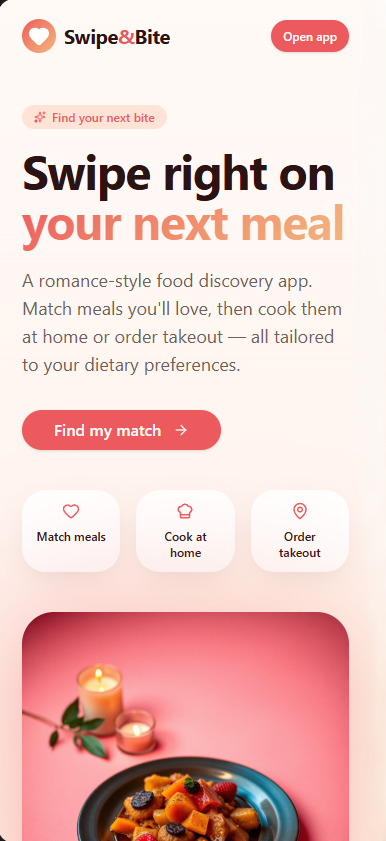
Every day, millions of people stare at their fridges or scroll through delivery apps with "decision fatigue." We wanted to turn that chore into a "spark." By borrowing the UI/UX of Tinder and Bumble, Swipe Bite removes the stress of choice and replaces it with a romance-themed discovery engine. It’s not just about eating; it’s about finding "The One". Whether that’s a home-cooked Mediterranean bowl or a local Thai takeout.
Our sketch idea was to use a filter (face recognition) or the traditional (clicks) way to make the swipe and the bite. By accessing the phone camera, it's easy to make the decision to choose your dish.
Slides: https://docs.google.com/presentation/d/1SLzWwOdwKSdCeTelPtizNyuNWa8DZVXNMuXMB4ETnz4/edit?usp=sharing
What it does
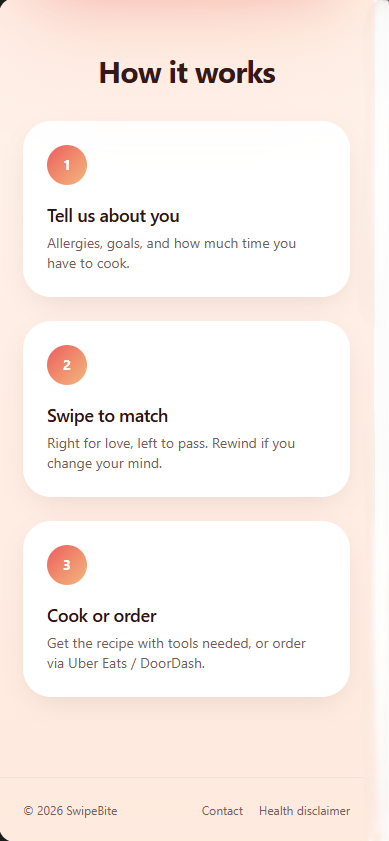
Swipe Bite is a hyper-personalized meal discovery platform. Users create a profile detailing their health goals (such as managing diabetes or following a pregnancy-safe diet) and lifestyle constraints.
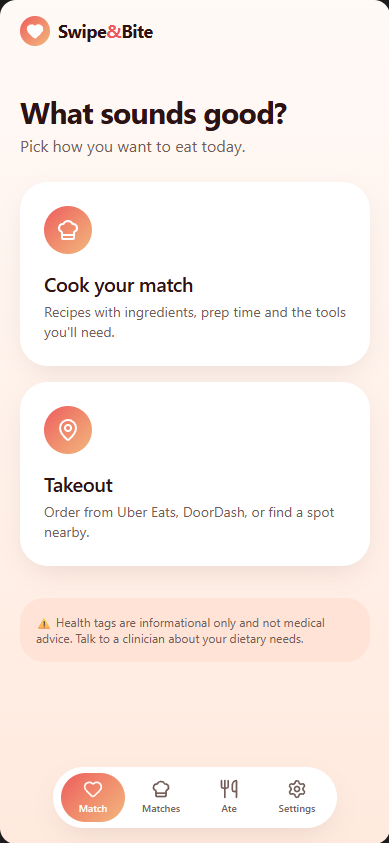
The Matchmaker. The app automatically detects the time of day to serve you Breakfast, Lunch, or Dinner options.
Two Paths. Choose Cook Your Match for curated recipes via TheMealDB, or Takeout to find local restaurants via Tavily.
The Swipe. Swipe right to "marry" a meal and save it to your grid; swipe left to move on.
The Interaction. Matches "talk" back to you with personalized nutritional "love notes" and health benefit tags (Iron-rich, proteins etc).
How we built it
We utilized a modern full-stack approach focused on high-speed data fetching and filtered delivery: Frontend: Built with a "Romance Aesthetic" using a custom color palette (#ee6464, #f19b7d). We implemented a swiping gesture engine and a Rewind state manager to allow users to undo accidental left-swipes.
Backend & Logic. A Python/Node.js environment handles the Filter Algorithm, which cross-references user health profiles (allergies, religious restrictions) against API data in real-time.
Intelligence. Integrated the Gemini API as an AI agent to refine search results and personalize the "Match" descriptions.
External Data. We leveraged TheMealDB and Edamam for recipe/nutrition logic and MealMe.ai for restaurant geolocation and deep-linking to delivery platforms.
Technologies
React 19 The main framework for building the user interface. It handles everything you see on screen, from the swipe cards to the settings page.
TanStack Router & TanStack Start Manages navigation between pages. When you click from the home screen to matches or settings, these tools make sure the URL updates and the page loads instantly.
Tailwind CSS 4 Handles all the styling and visual design. It lets us build a clean, responsive look without writing custom CSS files.
Radix UI Provides ready-made UI components like buttons, menus, and dialogs. These are accessible out of the box and work with our Tailwind styling.
Framer Motion Adds smooth animations to the app. When you swipe a card, it glides across the screen instead of just jumping.
React Hook Form & Zod Manages form inputs and validates them. When you fill out the onboarding quiz, these tools make sure your answers are correct before saving them.
TanStack Query Handles fetching and caching data from the server. It keeps your matches and meal data fresh without you needing to refresh the page.
Supabase (PostgreSQL + Auth + Row-Level Security) The backend database that stores all user data, matches, and meal information. It also handles user login/signup and keeps data secure with row-level access controls.
Google Gemini 2.5 Flash An AI model that estimates nutrition facts when they're not already in our database. It fills in calories, protein, carbs, and fat for any meal.
Tavily Search API Searches the web for nearby restaurants when you're in takeout mode. It finds places that serve the meals you've matched with.
TheMealDB Cook Food API Search the web diverse option food to cook, adaptable for anyone
Cloudflare Workers (via Wrangler) Deploys and hosts the app on the edge, so it loads fast anywhere in the world.
Bun & Vite Bun is the JavaScript runtime that runs our code, and Vite bundles everything together for the browser. Together they make development fast and builds quick.
TypeScript We wrote the entire app in TypeScript, from the frontend to the backend. This catches bugs early and makes the code easier to maintain.
Challenges we ran into
1. Support disabled people: blind (by creating a filter that smashes or passes the food).
2. Accuracy Data Aggregation: Normalizing nutritional data from different sources (recipes vs. restaurant menus) into a consistent "Match Card" format was technically demanding.
3. Decision Logic: Perfecting the "No Alcohol" filter to ensure the app remains safe and compliant for all age groups.
Accomplishments that we're proud of
1. Dynamic Time-Mapping: Successfully automated the transition between meal categories based on browser-side timestamps.
2. Inclusivity Focus: Built a robust tagging system for health conditions like GLP-1/Ozempic support and pregnancy-safe filters.
3. Accessibility: Included a high-contrast color-blind mode to ensure the "romance" is accessible to everyone.
What we learned
How to design an app that feels fun and easy to use, not just functional. I focused on user experience, like swipe interactions and clear navigation.
How to suggest content based on user preferences like diet, time, and goals. Based on user inputs into logic that helps decide what meals to show. Behind scene, API (TAVILY) gets accurate need, to cook or to order.
How to make the app usable for more people, like adding a color-blind mode. Showing the importance of inclusive design
What's next for Swipe&Bite
Order Automation AI
Implement an AI agent capable of automatically placing food orders directly by calling the restaurant or by fully integrating with third-party delivery services like Uber Eats.
Workflow Flexibility Allow users to switch between the Cook Your Match (recipes) and Take out (restaurants) options at any time, rather than only at the start of the session.
Hands-Free Swiping (Advanced UI) filter Introduce AI camera detection to control the swiping interface using head movement: Look right to Like Look left to Dislike Look up to Skip
Manual Meal-Time Override Give users the option to manually change the meal period (e.g., from lunch to dinner) instead of relying only on the automatic time detection.
Local Nutrient Context Display calorie and nutrient information specific to the user's local area. Health Reporting Integration: Develop a function to generate reports on the user's matched meal data for sharing with a doctor, nutritionist, or medical insurance provider.
Enhanced Accessibility Further expand accessibility features for visually impaired users.
Camera Filter Trending Add a camera filter trend feature
Built With
- api
- css
- glp1
- html5
- lovable.app
- next.js
- tavily-api
- typescript


Log in or sign up for Devpost to join the conversation.