SwarmBot Simulator
A Flutter-based application for simulating a swarm of robots navigating a grid to reach assigned targets while avoiding static and dynamic obstacles. The app features an interactive UI for configuring the grid, robots, targets, and obstacles, a simulation screen to visualize robot movements, and a dashboard to display results like successes, failures, collisions, and path lengths.
Screenshots
Input Screen
Configure the grid size, robot count, static/dynamic obstacles, targets, and robots.
 |
 |
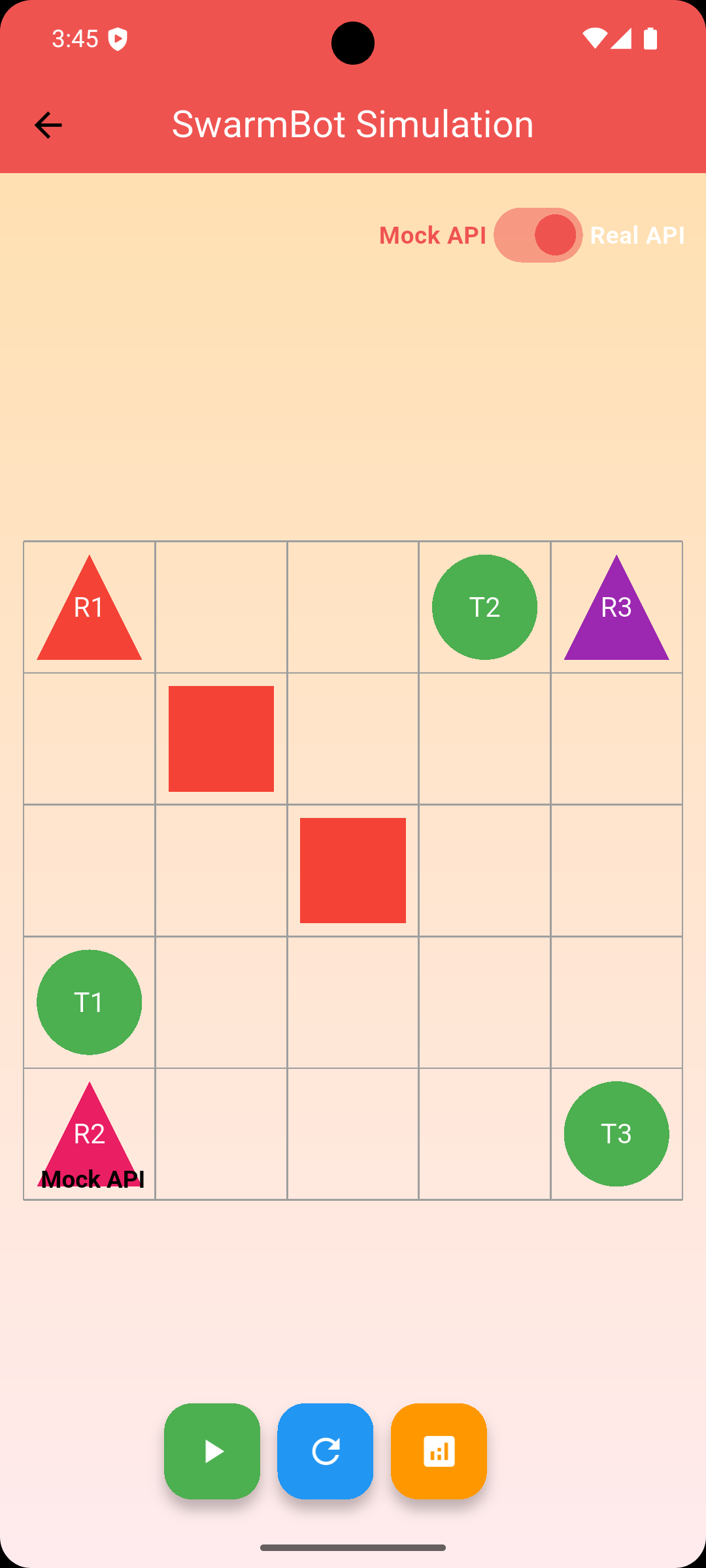
Simulation Screen
Visualize robot movements, static obstacles (red squares), dynamic obstacles (orange squares), and targets (green circles).
 |
 |
Dashboard Screen
View simulation metrics with charts for successes, failures, collisions, and path lengths.

Demo
Watch the simulation in action.

Features
- Grid Configuration: Define a grid size (1x1 to 10x10) and robot count.
- Static Obstacles: Place fixed obstacles (e.g.,
[2,2], [3,3]) on the grid. - Dynamic Obstacles: Add obstacles that appear at specific steps (e.g.,
[4,4,0], [2,3,3]). - Targets and Robots: Assign unique targets (e.g.,
[1,4,"T1"], [4,1,"T2"], [5,5,"T3"]) to robots (e.g.,[1,1,"R1","T3"]) with unique positions. - Simulation: Visualize robot paths with collision-free navigation using mock or real API responses.
- Dashboard: View metrics (successes, failures, collisions, path lengths) with charts.
- Validation: Prevents invalid inputs (e.g., overlapping positions, out-of-bounds coordinates).
Prerequisites
- Flutter: Version 3.0.0 or higher.
- Dart: Version 2.17.0 or higher.
- Dependencies:
provider: ^6.0.0for state management.fl_chart: ^0.68.0for dashboard charts.flutter_dotenv: ^5.0.0for environment variables.http: ^1.0.0for API calls (if using real API).
Setup Instructions
- Clone the Repository: ```bash git clone https://github.com/nssurya171/swarmbotr1 cd swarmbot-simulator
Install Dependencies:Run the following to install required packages: flutter pub get
Configure Environment:
Create a .env file in the project root. Add your OpenRouter API key (optional for real API mode):OPENROUTER_API_KEY=your-api-key-here
If using mock responses, no API key is needed.
Run the App: flutter run
Usage
Input Screen:
Set grid size (e.g., 5 for a 5x5 grid) and robot count (e.g., 3). Configure static obstacles (e.g., [2,2], [3,3]). Add dynamic obstacles (e.g., [4,4,0], [2,3,3]) with step numbers. Define targets (e.g., [1,4,"T1"], [4,1,"T2"], [5,5,"T3"]) and robots (e.g., [1,1,"R1","T3"], [1,5,"R2","T1"], [5,1,"R3","T2"]). Ensure no overlapping positions (e.g., no two entities at [2,2]) to avoid errors like "Overlapping positions detected." Click "Proceed to Simulation."
Simulation Screen:
Toggle between mock and real API modes (mock is default). Press the play button to run the simulation. View robots (triangles), static obstacles (red squares), dynamic obstacles (orange squares, appearing at specified steps), and targets (green circles). Reset or proceed to the dashboard.
Dashboard Screen:
View successes (robots reaching targets, e.g., 3 for the default setup), failures, collisions, and path lengths. Analyze charts for success/failure ratios, collision counts, and per-robot path lengths.
Notes
Dynamic Obstacles: Specified as [x,y,step], where step is when the obstacle appears (e.g., [4,4,0] appears immediately, [2,3,3] at step 3). Robot-Target Assignment: Robots use targetId (e.g., T3) to link to targets. Target coordinates are derived in SwarmViewModel, not provided as input arguments. Error Handling: Overlapping positions (e.g., static and dynamic obstacles at [2,2]) trigger an error. Ensure unique coordinates for all entities. Mock Mode: Default mode generates collision-free paths (e.g., Successes=3, Failures=0 for a 5x5 grid with obstacles [[2,2], [3,3]], dynamic obstacles [[4,4,0], [2,3,3]]).

Log in or sign up for Devpost to join the conversation.