-
-
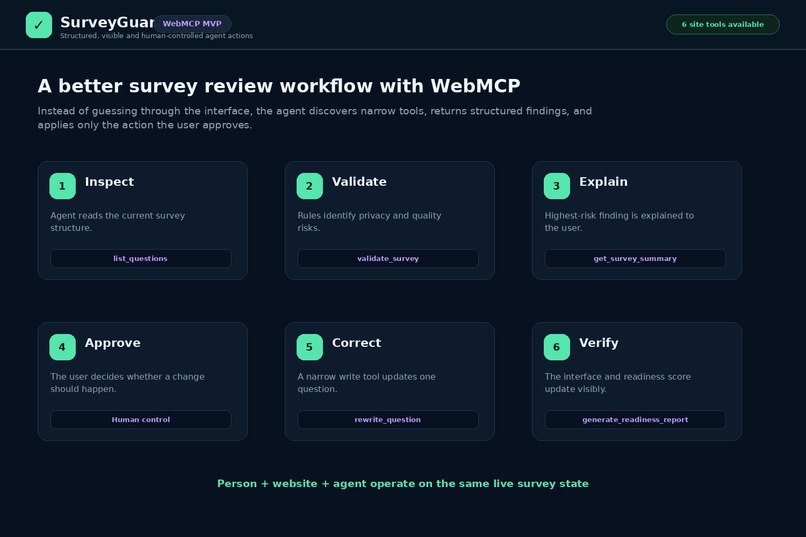
WebMCP enables agents to inspect, validate, explain, correct, and verify surveys while keeping people in control.
-
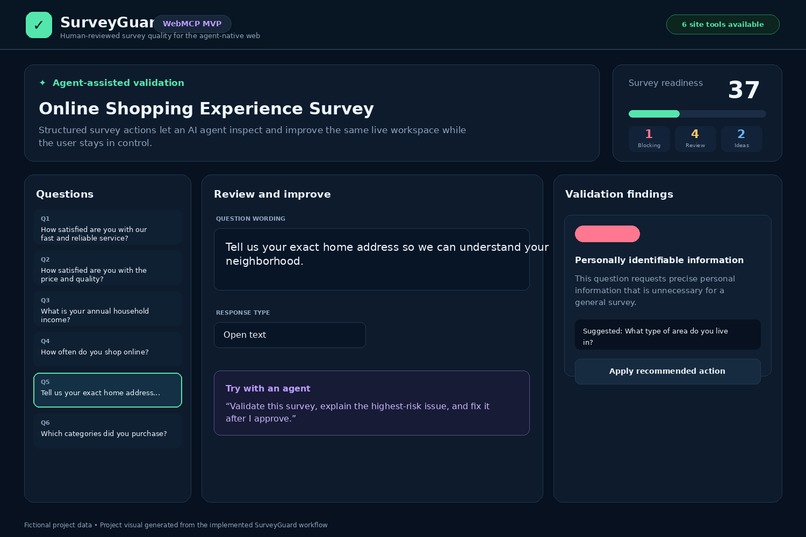
SurveyGuard detects an unnecessary request for personal information, marks it as blocking, and recommends a safer question.
-
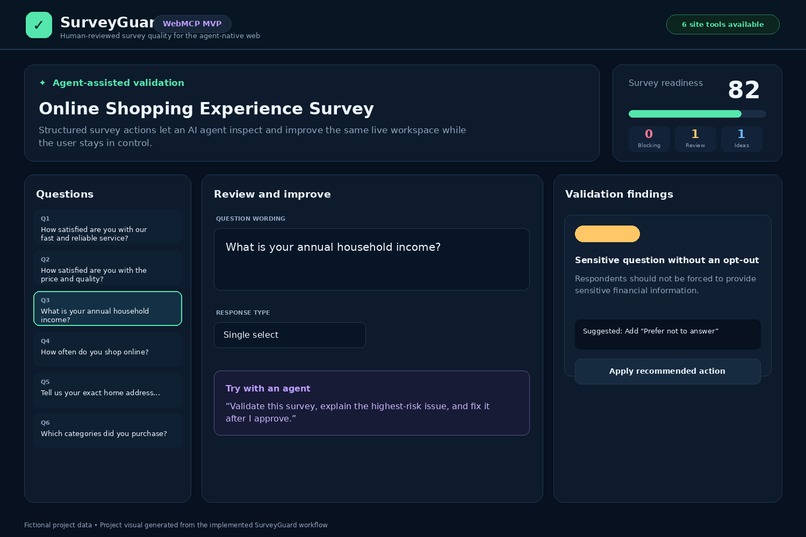
After corrections, SurveyGuard updates the findings and readiness score so users can verify the survey is safer and stronger.
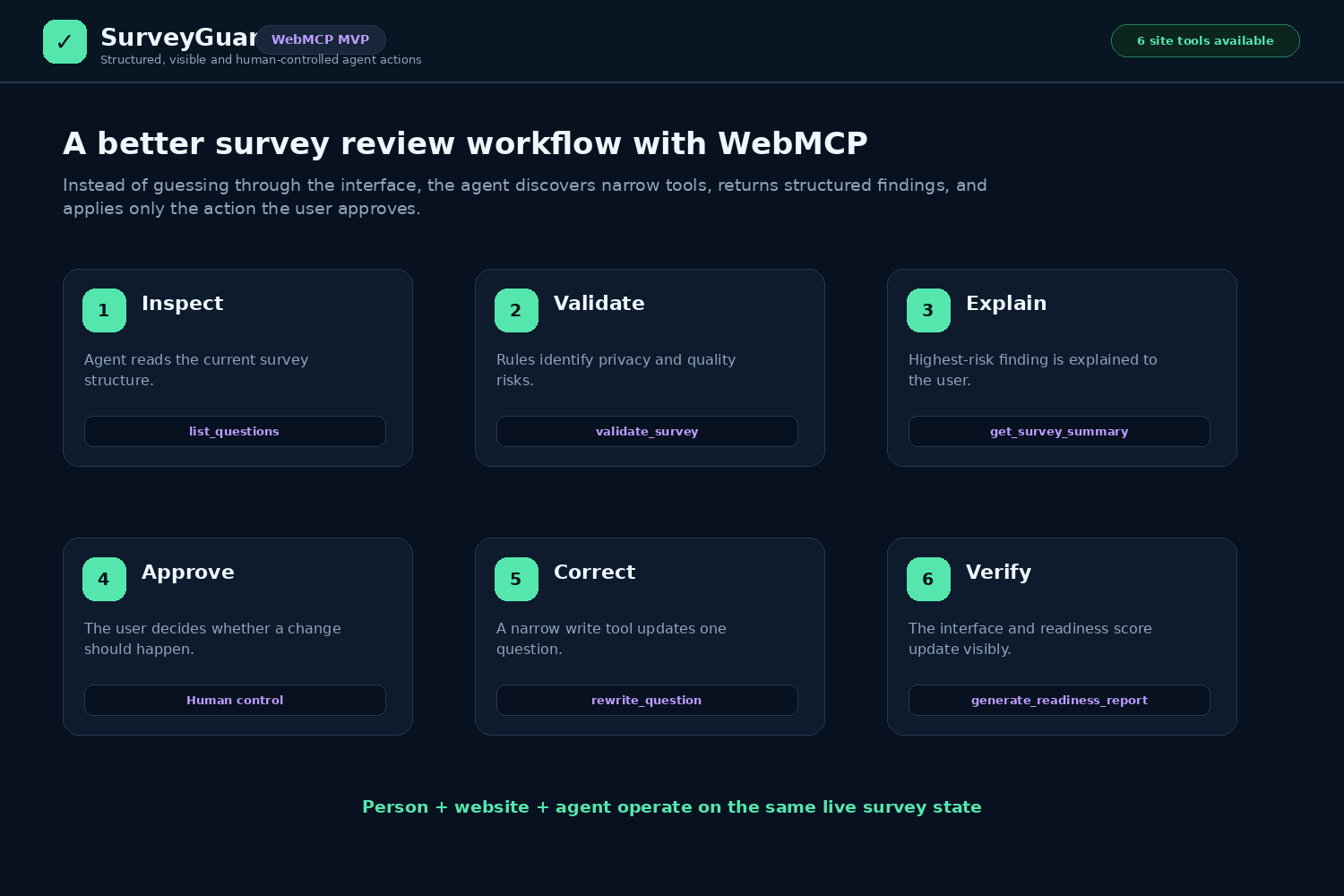
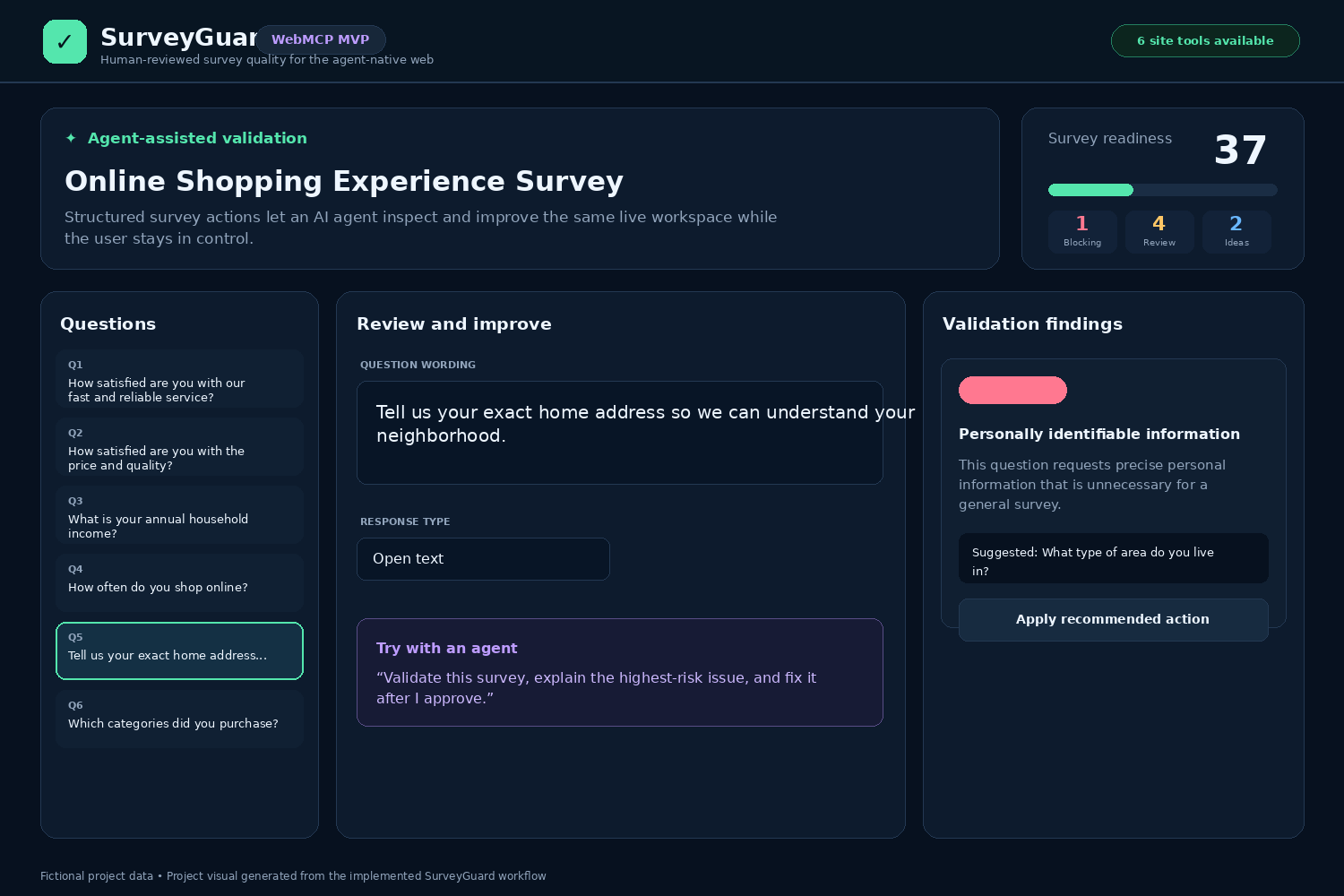
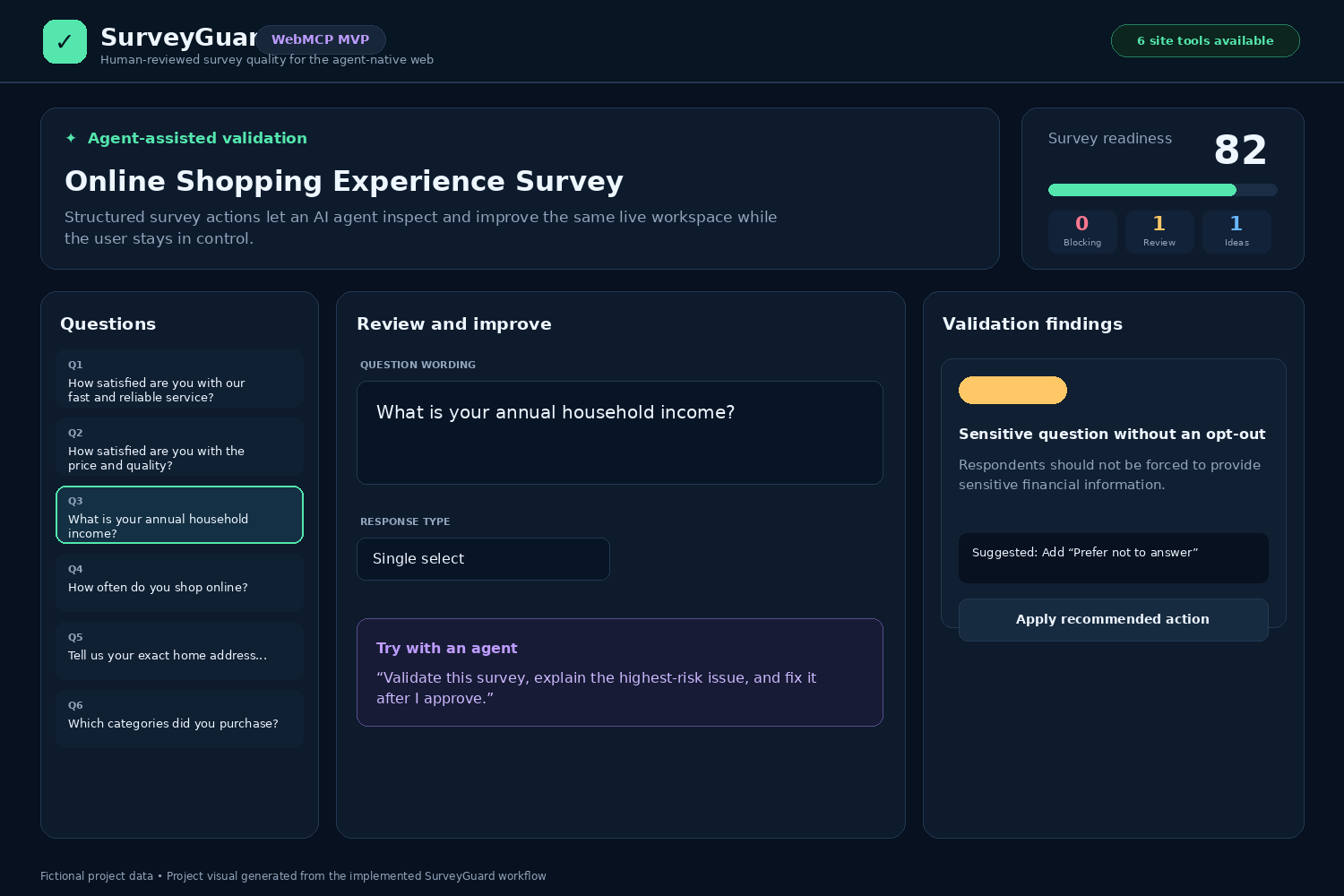
Creating a good survey is harder than it appears. A survey can look complete while still containing leading language, double-barrelled questions, unclear timeframes, sensitive questions without an opt-out, conflicting response options, or unnecessary requests for personal information.
These issues are often identified through manual reviews, long checklists, and repeated back-and-forth between researchers, product teams, and stakeholders. The process takes time, depends heavily on reviewer experience, and can still produce inconsistent results.
SurveyGuard was inspired by a simple question:
What if a person and an AI agent could review and improve a survey together inside the same live workspace?
Instead of requiring an agent to interpret buttons, scrape page content, or guess how the survey application works, SurveyGuard exposes clearly defined survey actions through WebMCP. The agent can inspect the survey, identify risks, explain findings, and perform approved actions while the person remains in control.
What SurveyGuard does SurveyGuard is a WebMCP-enabled survey quality workspace that helps people and AI agents collaboratively review surveys before publication.
The current MVP allows users to:
Create, edit, and delete survey questions Configure question types and response options Validate survey questions against defined quality checks Identify personally identifiable information Detect leading or loaded wording Flag potentially double-barrelled questions Identify sensitive questions that may need a “Prefer not to answer” option Detect unclear reference periods Flag exclusive options such as “None of these” in multi-select questions Review findings by severity Apply recommended corrections Monitor a dynamic survey-readiness score Generate a concise survey-readiness report Findings are organized into three levels:
Blocking: A high-risk issue that should be addressed before publication Needs review: An issue requiring human judgment or revision Suggestion: A non-blocking quality improvement SurveyGuard uses fictional survey content in the demonstration and does not depend on private company data, confidential research, or customer information.
Why WebMCP is a strong fit Survey review is not just a question-and-answer experience. It requires an agent to inspect structured survey content, understand validation results, modify specific questions, add response options, and confirm how those actions changed the survey.
Without WebMCP, an AI agent may have to infer this structure from the visual interface and navigate the application indirectly. That approach can be slow, fragile, and difficult to verify.
With WebMCP, SurveyGuard exposes narrow and intentional tools that describe exactly what an agent can do. The agent works with the same survey and application state that the user sees.
The MVP includes the following site tools:
get_survey_summary list_questions validate_survey rewrite_question add_prefer_not_to_answer generate_readiness_report For example, a user can ask an agent to:
Validate this survey, explain the highest-risk issue, and help me fix it.
The agent can call the validation tool, return structured findings, explain the most important issue, and then use an appropriate write tool after the user approves the change.
This creates a more reliable experience than asking the agent to guess how to manipulate the interface.
Human-agent collaboration SurveyGuard is designed around human review rather than unattended automation.
The application separates inspection from modification:
The agent retrieves the current survey structure. The agent runs structured validation. The agent explains the identified issues. The user reviews the recommendation. An approved change is applied through a specific WebMCP tool. The interface updates so the user can verify the result. SurveyGuard recalculates the readiness score and remaining findings. The agent provides speed and consistency, while the user maintains responsibility for context, judgment, and final approval.
This is particularly important in survey design because whether a question is appropriate can depend on the research objective, intended audience, jurisdiction, and sensitivity of the subject.
How I built it SurveyGuard was built as a React-based web application with a responsive three-panel review experience:
A question list for navigating the survey An editor for reviewing wording, question type, and response options A validation panel for displaying findings and recommended actions The validation engine evaluates each question using transparent, deterministic rules. Each finding includes:
A unique issue code A severity level A short title An explanation A recommended correction or action when appropriate The interface calculates a survey-readiness score based on the number and severity of unresolved findings. The score updates as users edit questions or apply corrections.
WebMCP tools are registered through document.modelContext.registerTool(). Each tool defines:
A specific name A focused description A narrow input schema Required parameters Read-only annotations where applicable An execution handler connected to the survey’s existing application logic The tools return structured results so an agent can understand what happened and communicate the result to the user.
The application also preserves a normal visual workflow for people and can display a preview state when WebMCP is not available in the current browser environment.
Challenges I faced Designing useful tool boundaries One challenge was deciding how much authority each tool should have. A single broad tool that could change the entire survey would be flexible, but it would also be harder to control and verify.
I chose narrower tools such as rewrite_question and add_prefer_not_to_answer. This makes each action easier for the agent to select, easier for the user to understand, and easier to test.
Separating blocking issues from recommendations Not every survey-quality concern should prevent publication. Treating every finding as equally severe would create unnecessary friction and reduce trust in the validator.
To address this, SurveyGuard separates blocking issues, review items, and optional suggestions.
Keeping the human in control A technically successful agent action is not necessarily the right research decision. SurveyGuard therefore treats agent recommendations as reviewable actions and clearly communicates that human approval is recommended before publication.
Managing shared application state WebMCP tools and the visible interface need to operate on the same current survey. Tool outputs, question edits, validation results, and readiness scoring must remain consistent after every action.
The MVP connects tool execution to the same underlying state used by the visual interface so changes can be seen and verified immediately.
Working within a short build window The challenge required prioritizing a focused, demonstrable workflow. Instead of attempting to build a complete survey-authoring platform, I concentrated on the core WebMCP experience: inspect, validate, explain, improve, and verify.
What I learned Building SurveyGuard reinforced several important lessons:
Agent-native applications need explicit actions, not just an AI chat box. Narrow tools are easier to understand, secure, test, and verify. Read-only and write actions should be clearly separated. Tool descriptions and input schemas are part of the product experience. Agents should return enough information for users to verify outcomes. Human approval is especially important when context changes what “correct” means. Deterministic validation and agent reasoning can complement each other. The visible interface should remain useful even when WebMCP is unavailable. A readiness score is useful only when users can understand which findings affect it. Most importantly, I learned to think of WebMCP as a collaboration layer between the website, the user, and the agent rather than simply another integration API.
Accomplishments I am proud that the MVP demonstrates a complete human-agent workflow rather than adding WebMCP as a superficial feature.
SurveyGuard includes:
A functional survey editing experience Transparent validation rules Multiple issue severities Actionable recommendations A dynamic readiness score Structured read and write tools Human-review safeguards Fictional demonstration data A workflow that can be explained and demonstrated clearly in under three minutes What’s next The current MVP establishes the foundation for a broader survey-quality platform. Future improvements could include:
Importing surveys from JSON, CSV, or common survey formats Adding duplicate and overlapping response-option detection Checking answer scales for balance and consistency Mapping questions to research objectives Supporting configurable validation policies Adding multilingual survey review Showing an audit record of human and agent changes Adding approval workflows for high-risk modifications Comparing original and revised question wording Exporting a complete readiness report Creating reusable validation templates for different survey types Expanding browser-based WebMCP evaluations and automated tool testing The longer-term vision is to make high-quality survey design more accessible while preserving human accountability.
SurveyGuard demonstrates how websites can become meaningfully better when people and agents work together through clear, structured, and verifiable tools.


Log in or sign up for Devpost to join the conversation.