-
-
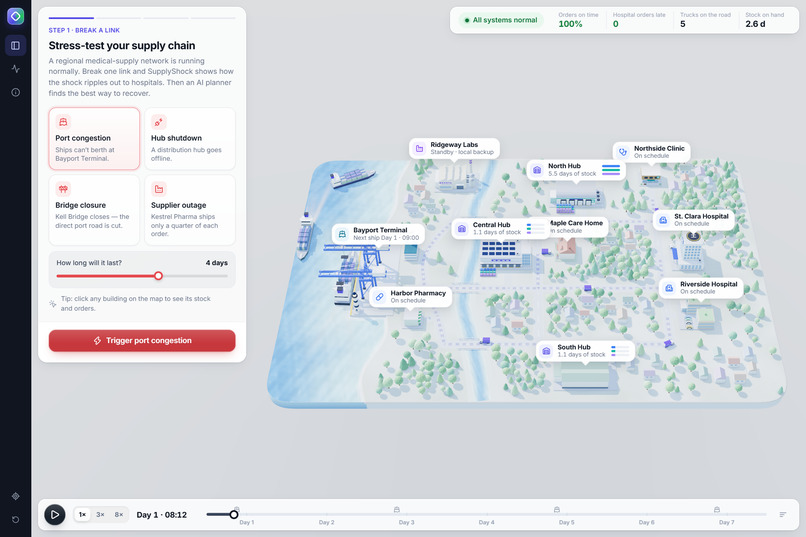
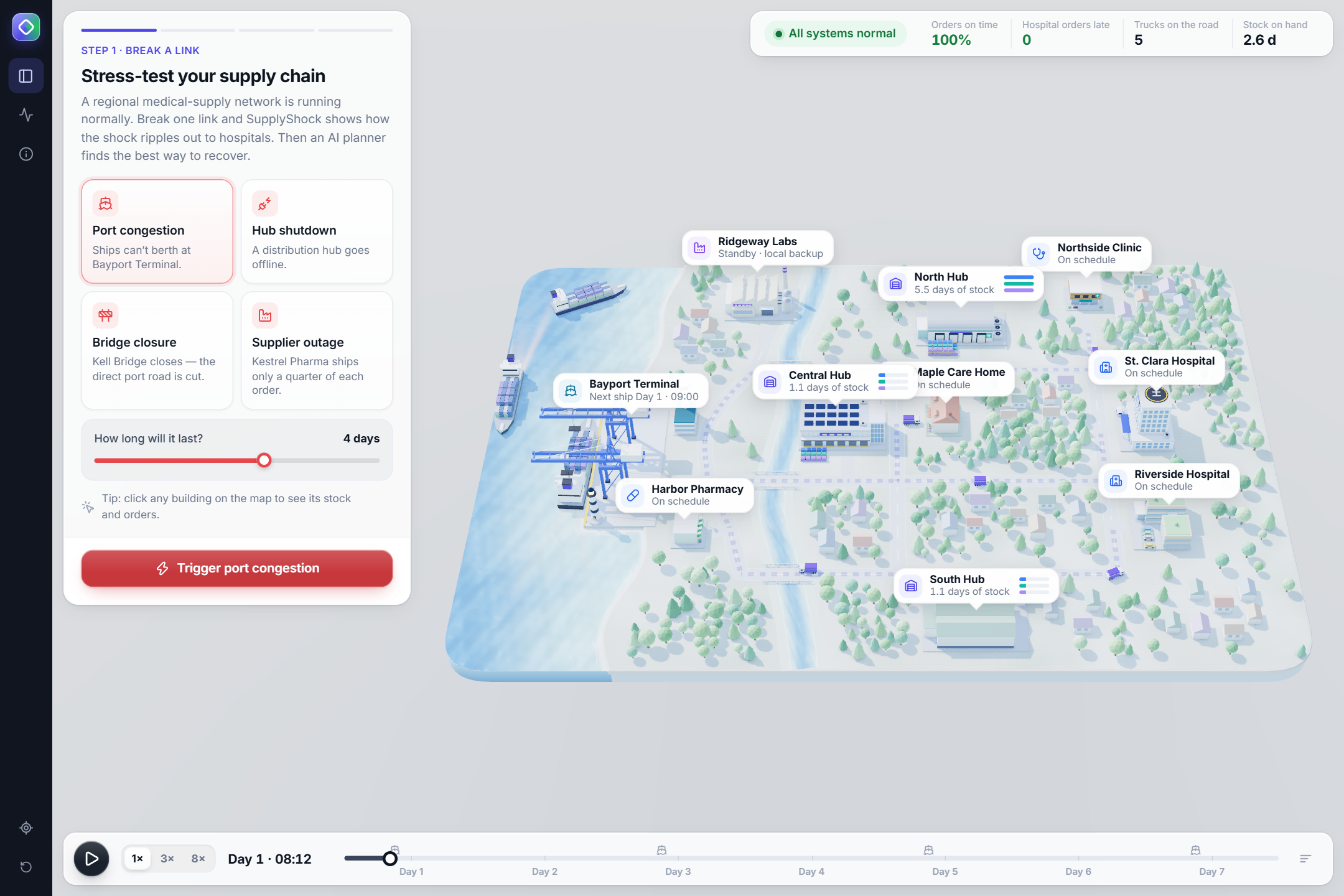
the network running normally, with the four disruption cards.
-
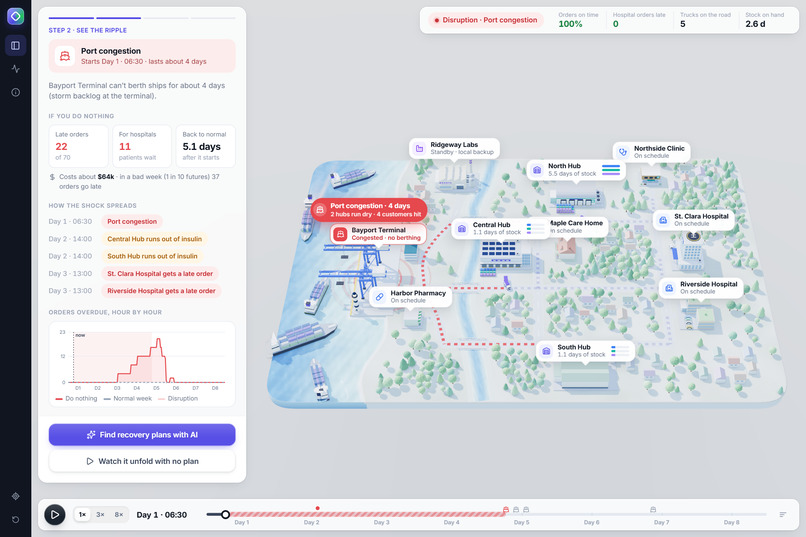
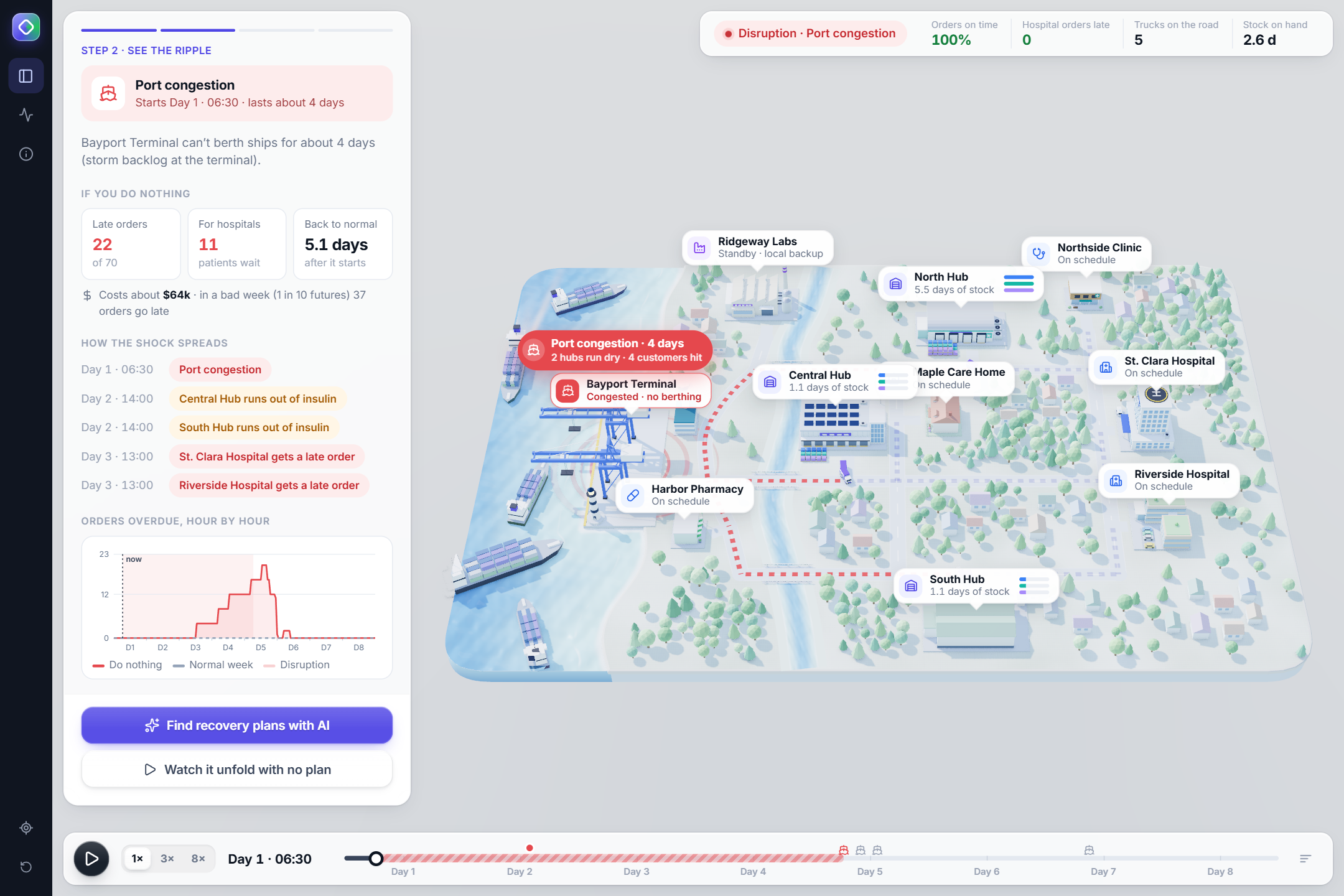
port congestion, the ripple across the map, and what happens if nobody acts (22 late orders, 11 of them for hospitals).
-
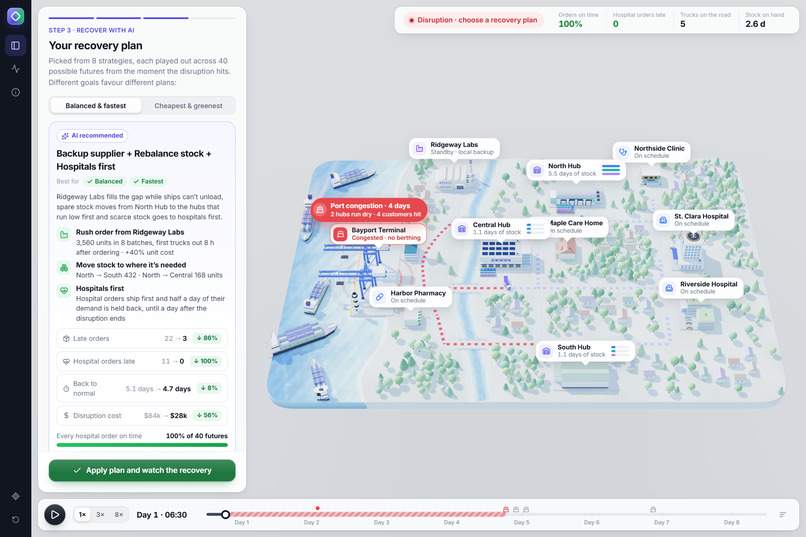
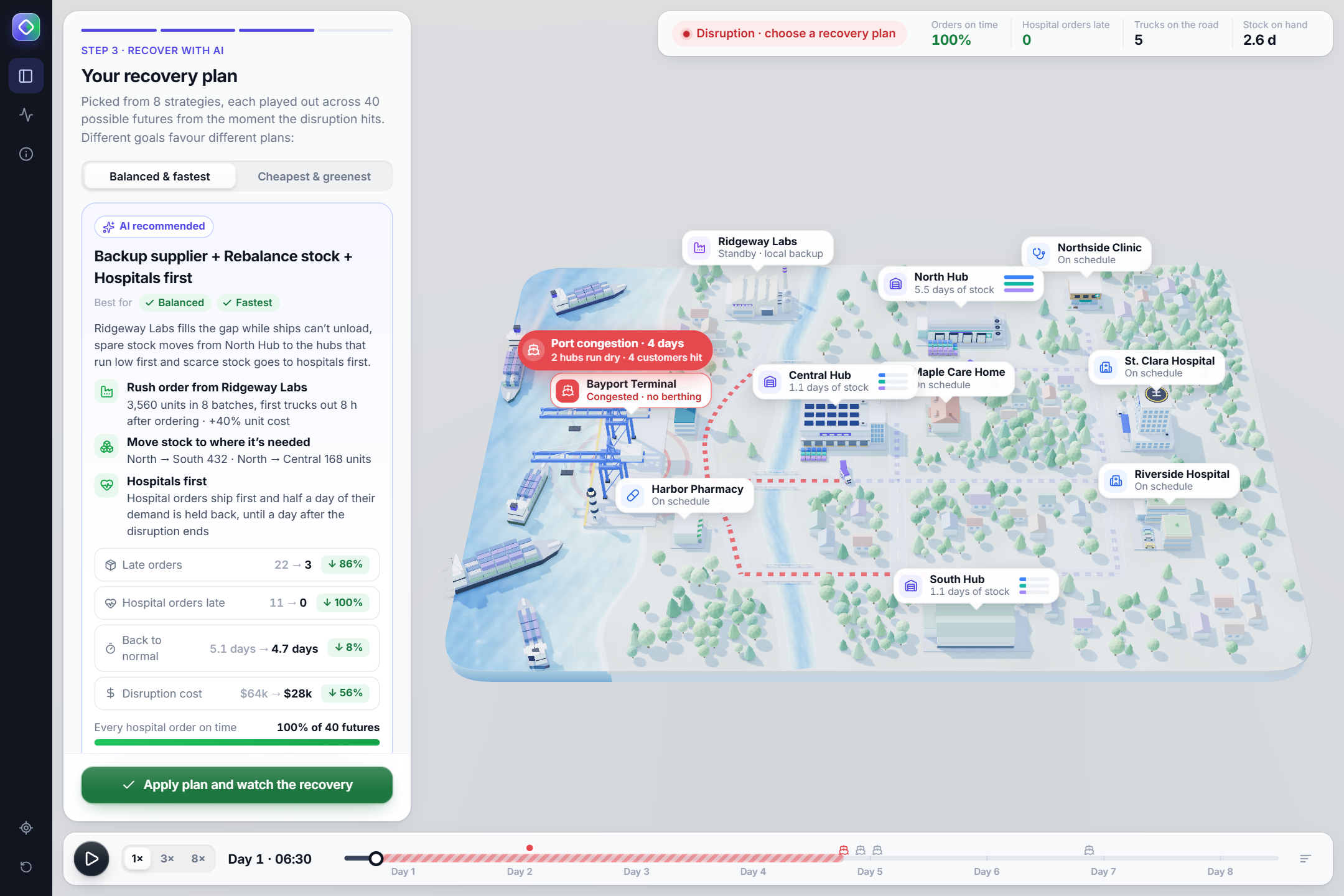
the AI’s recommended plan, with hospital orders late going from 11 to 0, on time in 40 of 40 futures.
-
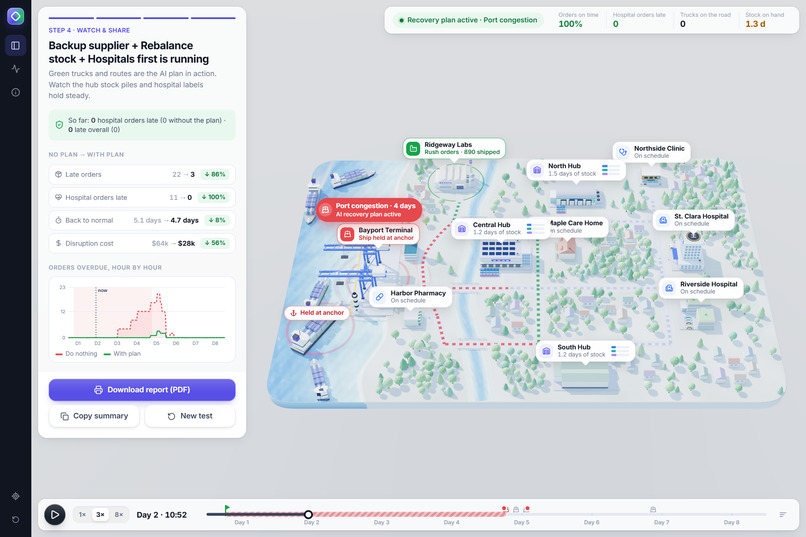
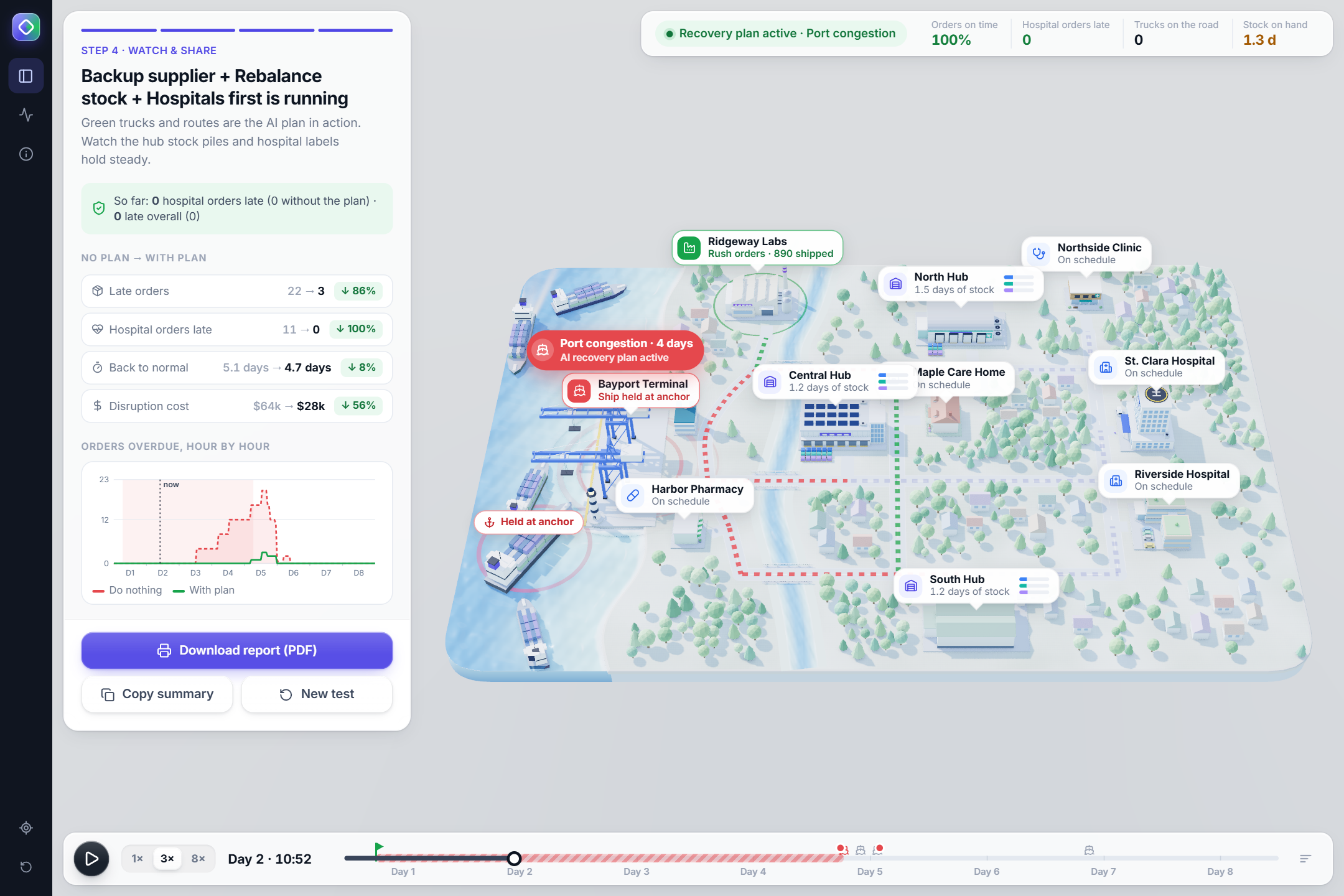
the plan running, with green routes and progress compared with doing nothing.
Inspiration
A ship stuck outside a port on Monday can leave a hospital without insulin by Wednesday. Big companies pay for planning suites that model knock-on effects like this. Small and mid-sized distributors usually find out when a customer calls about a missing delivery. We wanted a tool where a planner can break one link on purpose, see exactly who runs out first, and get a recovery plan they can trust. We also wanted people to understand it by watching it, not by reading a dashboard.
What it does
SupplyShock AI is a disruption simulator for a fictional regional medical-supply distributor: one port, three hubs, a backup supplier and five customers, two of them hospitals.
- Break a link. Congest the port, shut a hub, close a bridge or cut a supplier, and choose how long it lasts.
- See the ripple. A shockwave spreads from the disruption and supply routes turn red. The panel shows what happens if you do nothing: late orders, late hospital orders, cost, time to recover, and the chain of events hour by hour.
- Recover with AI. The planner tries every combination of four recovery levers: a rush order from a backup supplier, rebalancing stock between hubs, rerouting, and serving hospitals first. It simulates each combination in an expected week plus 40 randomised futures, shown live as a grid. It recommends a plan with concrete steps, before → after numbers and a confidence figure, and it explains what it turned down: "Why not Backup supplier + Rebalance stock? Fewer late orders in the expected week (0 vs 3), but a hospital order goes late in 19 of 40 futures."
- Watch it recover. Apply the plan and the week replays, with green trucks carrying out the AI's moves. Then download a printable report.
How we built it
- Discrete-event simulator in plain JavaScript. Customers order, hubs dispatch trucks over a road network with a river and three bridges (Dijkstra routing that avoids closed roads), and a container ship restocks the port every two days. Every truck trip, stock level and order is recorded.
- One simulator for both the picture and the AI. The 3D map just plays back the simulator's record, so what you watch is exactly what the planner evaluated.
- AI planner: a search over lever combinations plus Monte Carlo risk analysis. Order sizes vary ±15%, travel times ±8%, and the disruption's real length −20% to +35%. It runs about 330–650 simulations in under a second in a Web Worker, with no server and no API keys. Every objective (balanced, cheapest, fastest, greenest) is scored as
$$\text{score} = 10^6 \cdot \text{late hospital orders} + w_{\text{late}} \cdot \text{late orders} + w_{\text{cost}} \cdot \text{cost} + w_{\text{CO}2} \cdot \text{CO}_2 + w{\text{rec}} \cdot \text{hours to recover}$$
so no objective can "save money" by letting a hospital wait. The explanations are generated from the simulated numbers rather than by an LLM, so the text can't invent a figure.
- 3D map in Three.js: a diorama board with coast, river and bridges, ships that berth or wait at anchor, stock piles that rise and fall, and status-coloured routes. Lighting uses a baked sky environment, ambient occlusion and a little bloom, and quality steps down automatically on slower hardware.
- Blender, driven by code: a Python script builds all 21 low-poly models (three different hubs, two hospitals, a clinic, a pharmacy, a care home, a factory, the port tower, a lighthouse, the ship, cranes and trucks) and exports them as one GLB. At load time each model is baked into one mesh per surface finish to keep draw calls low.
- Workflow: built with Claude Code as an AI pair-programmer, following the Devpost Learn skill pack's scope → PRD → spec → checklist workflow. Vite build, deployed on Vercel, with 14 tests covering the simulator and planner.
Challenges we ran into
- The planner could game its own objective. The hospital penalty wasn't large enough at first, so a "cheapest" plan could trade away a hospital order. We raised it to a guardrail and added a test that no objective's pick is ever less safe for hospitals than the safest plan available.
- Expected vs. robust. The plan with the fewest late orders in the expected week sometimes failed hospitals in many futures. We rank on robustness, and the panel says so instead of hiding it.
- Levers that do nothing. Monte Carlo noise made some plans look slightly better for adding a lever that changed nothing. Near-ties (within 1.5%) now go to the simpler plan.
- Numbers that disagreed between screens. Showing Monte Carlo averages on one panel and expected-week figures on another looked contradictory. Now both show the expected week, plus "hospitals safe in X of 40 futures".
- A demo that depended on timing. A three-day port closure only mattered if it happened to catch an incoming ship, so the default became four days with leaner hubs.
- The interface kept covering the map, and the four objective buttons often showed the same plan. Objectives that agree now share one choice, and the camera fits the whole board into the space the panels leave free.
- Speed in the browser. Running hundreds of simulations next to a full 3D scene meant moving the planner into a Web Worker and using instanced scenery, baked meshes and adaptive quality.
Accomplishments that we're proud of
- It runs entirely in the browser with no backend and no keys, and every recommendation comes with reasons you can check.
- The planner turns down a plan with zero expected late orders because a hospital would wait in 19 of 40 futures, and it tells you why.
- Every 3D model is generated from code.
What we learned
- Sharing one deterministic simulator between the animation and the AI made the result trustworthy and much easier to debug.
- Averages hide risk. Showing "in how many futures does it hold?" was more honest and easier to read than a single expected number.
- Writing down the scope, PRD and spec, including who made each decision, made it easier to steer a coding agent and to review what it built.
What's next for SupplyShock AI
- Import a company's own network from a CSV of sites, routes and demand.
- Handle several disruptions at once, over longer time horizons.
- Add an LLM-written narrative on top of the planner's numbers, with the numbers still computed by the simulator.

Log in or sign up for Devpost to join the conversation.