-
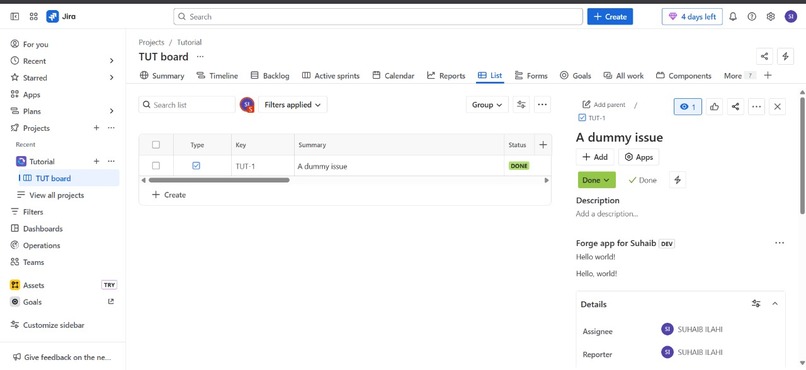
Successfully completed the novice level by deploying the forge app

Inspiration
As an upcoming engineer I love to explore new things tools and adept them if they are productive for me and do something amazing.I found this Quest as a great opportunity to explore the attlassian software.
What it does
This Forge app adds a custom project page within Jira Cloud. Once installed, users will see a new item labeled "Hello World" in the left sidebar of their Jira project. Clicking it opens a page rendered with a simple React frontend that currently displays a Hello World message — demonstrating the app’s successful deployment and integration.
How We Built It
- Used the Atlassian Forge CLI to scaffold the app.
- Defined a
jira:projectPagemodule in themanifest.ymlto inject the app into the Jira UI. - Created a React component using native Forge rendering to display content.
- Deployed the app with
forge deployand installed it to my Jira development site usingforge install.
Challenges We Ran Into
- UI Not Showing: Initially, I couldn’t find the app inside issues, until I learned that
jira:projectPageshows up in the sidebar, not issue view. - YAML Errors: A small formatting mistake in
manifest.yml(merging of two lines) taught me how sensitive YAML is to indentation and structure. - Deployment Confusion: Understanding the install/upgrade flow with Forge took some trial and error.
Accomplishments That We're Proud Of
- Successfully built and deployed my first Jira Cloud app using Atlassian Forge.
- Understood how cloud apps integrate into enterprise tools like Jira.
- Took a theoretical “Hello World” and turned it into a real, interactive tool within an enterprise-grade platform.
What We Learned
- How to work with Forge app modules and structure projects using
manifest.yml. - How to build and render secure, native UI components inside Jira.
- Basics of cloud-based app deployment with no infrastructure overhead.
- Importance of reading documentation carefully and debugging efficiently.
What's Next for Suhaib's Forge App
This is just the beginning! I plan to:
- Add form components to collect feedback or custom data inside Jira.
- Build integrations with tools like GitHub, Slack, and Notion.
- Create apps that solve real-world team collaboration problems — like tracking tasks, simplifying workflows, and automating project reporting.
App Details
- App ID:
ari:cloud:ecosystem::app/556a6df9-920e-4675-9195-267ff3426c71 - Screenshot:
(Attach your screenshot of the app running inside Jira here) - Project Files:
(Attach your zipped Forge app folder if required)

Log in or sign up for Devpost to join the conversation.