-
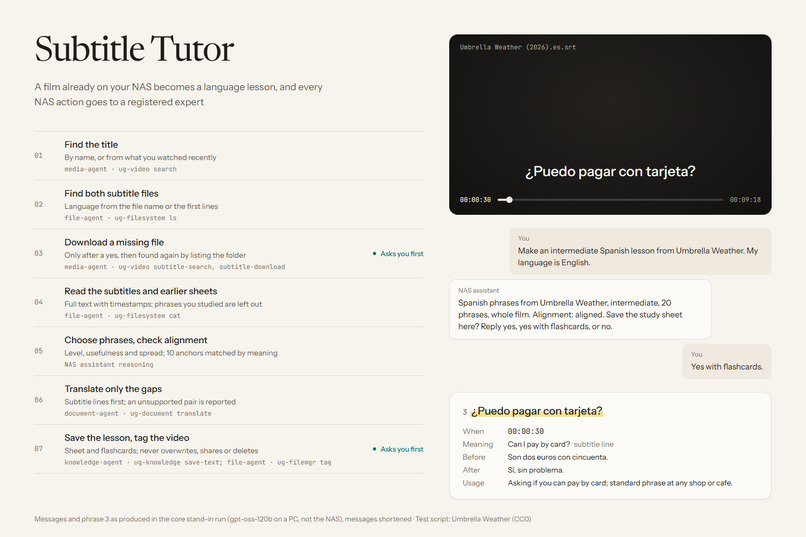
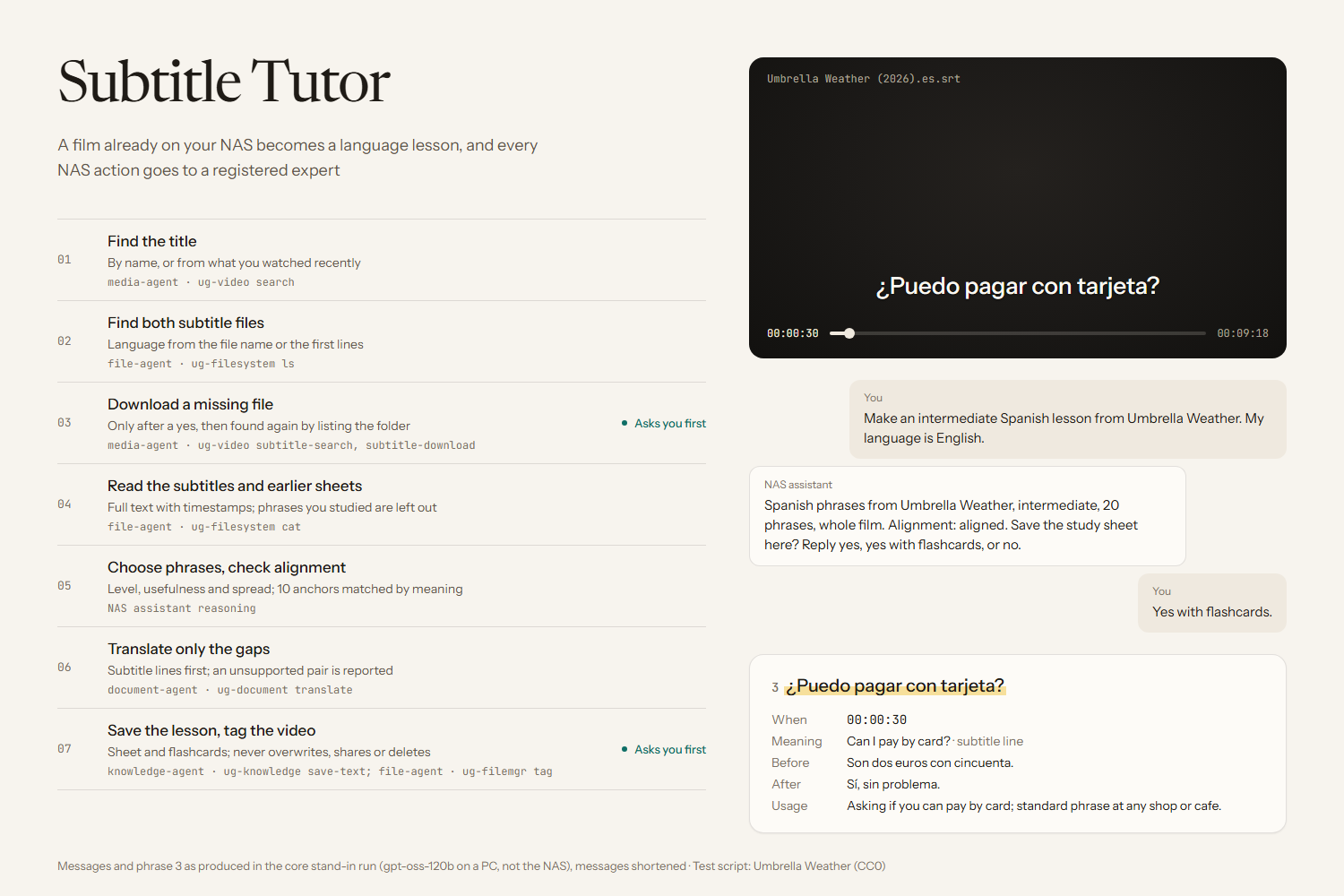
How it works: the expert behind each step, with messages and phrase 3 from the core stand-in run (PC, not the NAS)
-
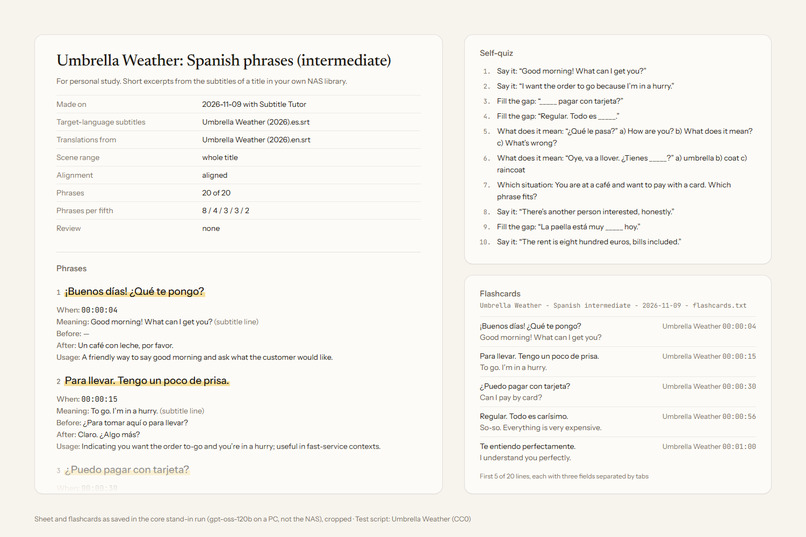
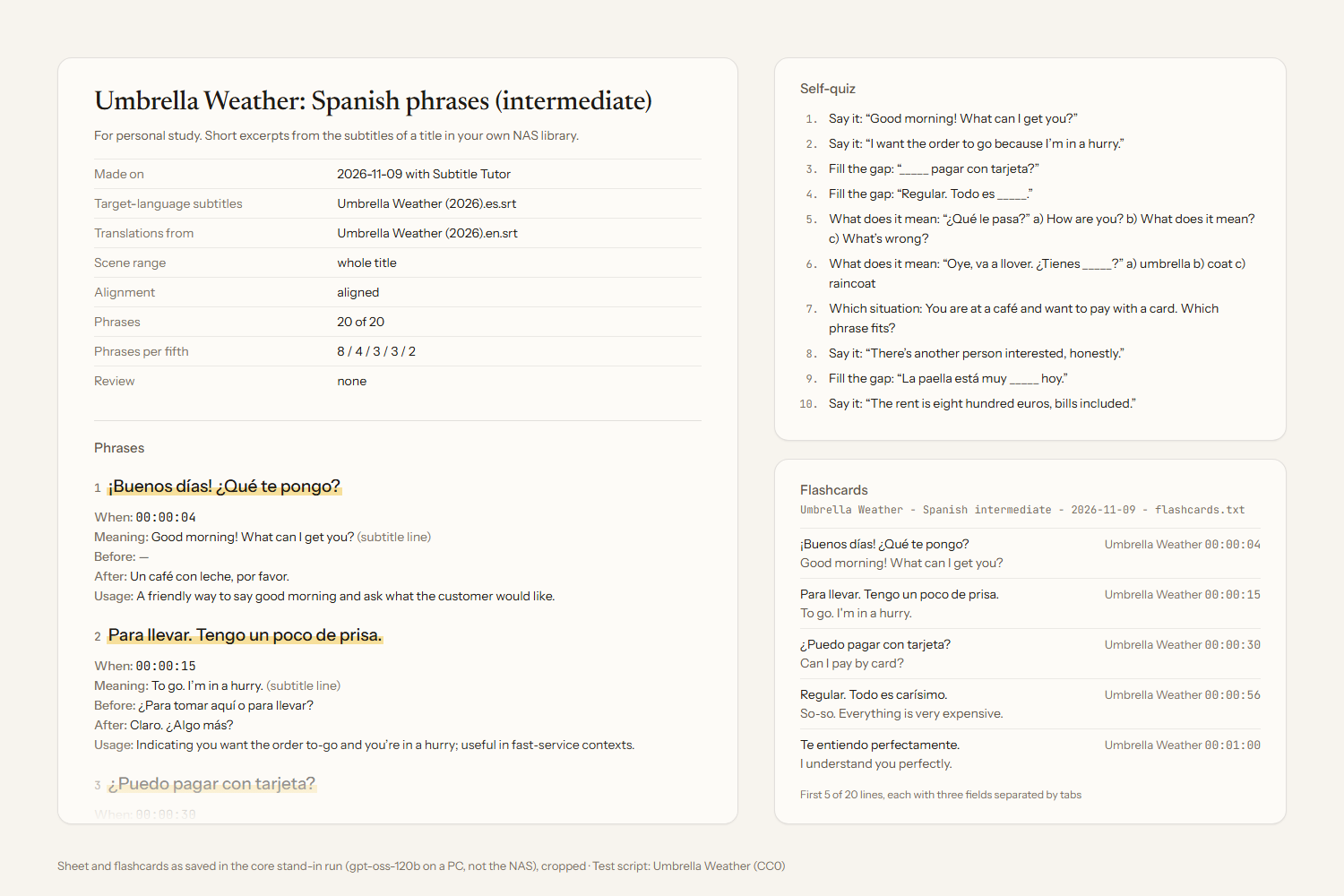
Study sheet and flashcards saved in the core stand-in run (PC, not the NAS), shown as they came out
-
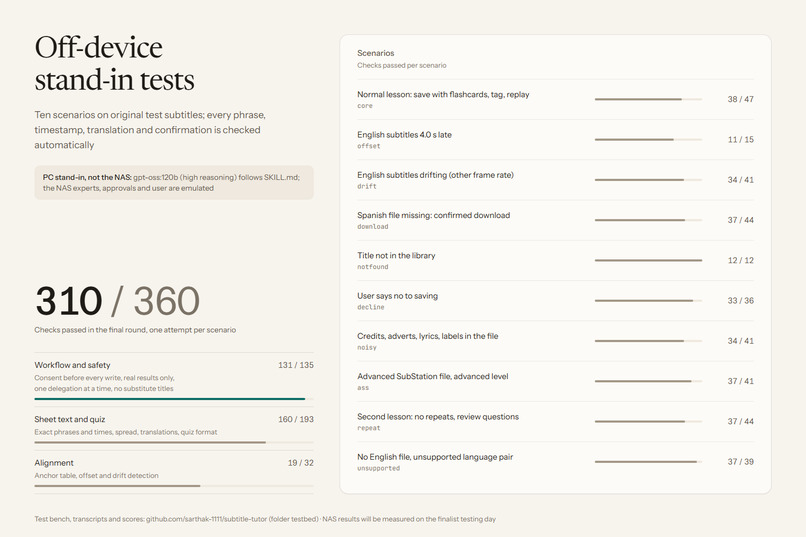
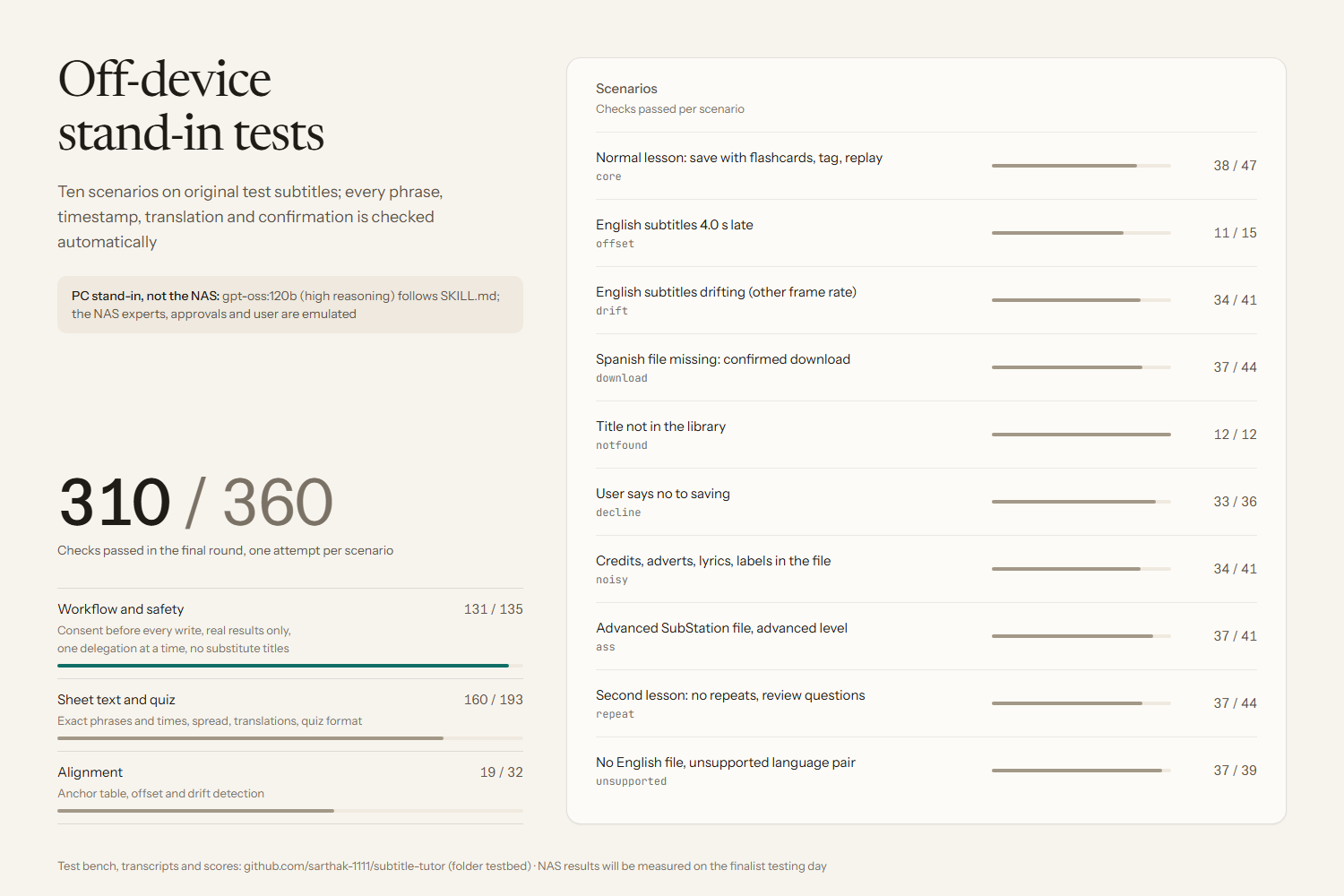
Final-round stand-in results (PC, not the NAS): 310 of 360 checks, by kind of check and by scenario
Inspiration
Subtitled films are one of the most enjoyable ways to learn a language, but the useful lines go by in a second, and turning them into study notes means pausing, copying and translating line by line. A NAS already holds the films and their subtitle files. Subtitle Tutor turns that library from storage into something you can study with.
What it does
You name a title, or say "the film I watched last night", and the language you are learning. Optionally you add your level, the number of phrases and a scene range. Subtitle Tutor then:
- Finds the title in the NAS video library, or lists what you watched recently.
- Finds both subtitle files next to the video. If one is missing, it offers to download it, and tells you first that this contacts a source outside the NAS.
- Checks earlier lessons in your lesson folder, so known phrases are not repeated.
- Reads the subtitles with their timestamps and picks phrases from across the whole film that suit your level. Names, fillers, sound labels, lyrics, signs, credits and adverts are left out.
- Measures alignment between the two subtitle files on 10 anchor lines, and pairs each phrase with the subtitle line spoken at the same moment. It corrects a constant offset and refuses to pair misaligned versions. Machine translation fills only the gaps.
- Saves a study sheet after you say yes: each phrase with its translation, timestamp, the lines before and after, a usage note, and a 10-question quiz with answers. Optional flashcards are saved as a tab-separated file. Nothing is overwritten without an explicit "replace".
- On request it gives the timestamp to replay a phrase, and after a yes it tags the video
studied: Spanish intermediate.
UGREEN's own SkillHub Skill "Smart subtitle matching" finds and downloads subtitle files. Subtitle Tutor starts where that ends and turns subtitles into lessons.
How it works: capability chain
| Step | Expert | Catalog capability |
|---|---|---|
| Find the title, or recently watched titles | media-agent |
ug-video search |
| Find subtitle files | file-agent |
ug-filesystem ls, ug-filemgr tag-get-file |
| Download a missing subtitle (after a yes) | media-agent |
ug-video subtitle-search, subtitle-download |
| Find earlier lessons, read the subtitles | file-agent |
file-workflow get-user-dir, ug-filesystem ls, cat |
| Translate unmatched phrases | document-agent |
ug-document translate |
| Save sheet and flashcards (after a yes) | file-agent, knowledge-agent |
ug-filesystem stat, mkdir, ug-knowledge save-text |
| Replay | media-agent |
ug-video search (play), plus the exact timestamp |
| Tag as studied (after a yes) | file-agent |
ug-filemgr tag-get-by-name, tag-add, tag-add-file |
How we built it
- Feasibility was checked CLI by CLI against the official capability catalog (
uliya-skill-kit0.7.3, catalog 2.0.0) before any file was written. - The Skill is Markdown only:
SKILL.mdand five linked references (phrase selection and alignment, sheet format, an example sheet, install and testing, disclosures). The official static checker reports static-pass with 0 errors and 0 warnings. - Because no NAS was available before the finalist day, we built an off-device test bench: an original bilingual screenplay turned into subtitle files with known faults (offset, drift, noise,
.asstags), emulated NAS experts and approval prompts, a scripted user, and automatic checks against the ground truth. An open-weight model (gpt-oss-120b on a PC) plays the NAS assistant and followsSKILL.mdword for word. - We ran all scenarios in rounds, rewrote the Skill after each round, and then froze the text for one final round. Every run is kept with its transcript and score.
- Claude Code (Anthropic) helped draft the Skill text, the test bench and these documents. All disclosures are in
references/disclosures.md. - The gallery images are HTML pages built from the saved run files and captured with headless Chrome.
Challenges
The stand-in runs found problems a static check cannot see, and each one changed the Skill text (details in testbed/DEVLOG.md):
- The model once saved a "sheet" that contained only the placeholder
{SHEET_TEXT}, after pasting the real sheet into the chat. The Skill now states that experts never see the conversation, so every value goes into the instruction in full. - Phrases bunched in the first minutes of the film, because the model's reasoning walked through the cues in order. Selection is now done part by part, and the sheet reports its "Phrases per fifth", which the checks compare with the real timestamps.
- The model picked its 10 alignment anchors from the opening minutes and, where it found no match, filled the row with the Spanish time. Anchors now come one from each tenth of the film, the anchor table quotes both lines, and the checks look up every quoted time in the files.
- The model's reasoning from the preview turn is not kept (as in most agent runtimes), so it wrote the sheet a second time when saving, and that copy drifted: times a minute off, a 20-question quiz. The preview now lists every phrase with its time and translation, the saved sheet must match that list, and the same checks run every time the sheet is written.
- Measuring alignment is still the weak point. In the final round only 19 of 32 alignment checks passed, and in the offset run the model copied the Spanish times into the English column. It never paired a phrase with a line from a misaligned file, so the failure stays on the safe side.
- The catalog has no video seek, no list of translation pairs and no documented save location for downloads. The Skill gives the replay timestamp, reports an unsupported pair instead of guessing, and finds a downloaded file by listing the folder before and after.
Accomplishments
- In the final stand-in round (PC, not the NAS; Skill text frozen; one attempt per scenario), 310 of 360 automatic checks passed. Workflow and safety passed 131 of 135: every write, download and tag came after the user's yes, although in one run the model replaced its own sheet after a plain yes instead of the explicit "replace" the Skill asks for.
- Phrases, timestamps and paired translations are verified against the ground truth of the test subtitles, not judged by eye. Every run is published with its transcript and score, including the failures.
- All five delegation states and every failure in the catalogue (missing title, missing subtitles, misaligned versions, unsupported pair, partial read, save conflict) have a defined response.
What we learned
A Skill is a program whose interpreter is a language model. The happy path is easy to write; what made the Skill robust was running it, reading the transcripts, and rewriting every sentence the model could misread. We also learned that one run per scenario is a small sample: a change that helped one scenario sometimes hurt another, so we report every run as it came out.
What's next
Nothing has run on a UGREEN NAS yet. On the finalist day we will first check where the stand-in was weakest (alignment measurement, exact copying), then the open runtime questions (the fields returned by the media search, the download location, the supported translation pairs, save and overwrite behaviour, tag approval), run the same scenarios on a public-domain film, and compare each NAS run with its stand-in transcript.
